

Primea ReviewsAll Reviews

Primea Reviews is reader-supported. When you buy through our Amazon links we may earn a commission, at no extra cost to you. Rankings are set by our editors and never sold. Learn more

Ranked & Reviewed by Primea Reviews

The 7 Best Printers for Occasional Use, Ranked & Reviewed

Joshua ParkesBy Joshua Parkes, Editor in ChiefUpdated November 11, 20269 min read7 products ranked
The 7 Best Printers for Occasional Use, Ranked & Reviewed

The short answer

The HP DeskJet 4355 is the best printer for occasional use because it is cheap, wireless and does print, copy and scan. Canon's PIXMA TS6520 is the one to buy if you want an on-unit status display, the TR4720 suits people who scan paperwork, and the MT610Pro is the only inkless option.

The Primea Scoreboard

Ranked & Reviewed

  1. The low-cost wireless all-in-one that suits a few prints a month.

    94Outstanding
    Check price
  2. A 1.42-inch OLED display makes ink and error checks painless between long gaps.

    92Outstanding
    Check price
  3. 03
    Canon PIXMA TR4720 All-in-One

    Best for Scanning Paperwork

    Canon PIXMA TR4720 All-in-One

    Phone-friendly printing plus a scanner for the odd small stack of documents.

    90Excellent
    Check price
  4. 04
    Canon PIXMA TS6420 All-in-One Wireless

    Best for Occasional Photos

    Canon PIXMA TS6420 All-in-One Wireless

    A step up in photo output for the person who prints a handful of pictures.

    88Excellent
    Check price
  5. No ink or toner at all, which removes the dried-nozzle problem entirely.

    86Excellent
    Check price
  6. A 1-year warranty and easy setup at the lowest price tier.

    84Very Good
    Check price
  7. Built around printing from a phone or tablet, but with no document feeder.

    81Very Good
    Check price

The expensive part of owning a printer you rarely use is not the printer. It is the ink that dries, the cleaning cycles that burn through cartridges, and the replacement unit you buy after a year in a drawer. Buy for the drawer months, not the print month: a cheap printer that clogs after eight weeks ends up costing more than a dearer one that wakes cleanly.

So we ranked seven models for low upfront cost, idle-time behavior and ease of use, not for pages per minute. Every unit here sits under about $200, and one skips ink entirely. Listing data is thin on speed and yield, so we stick to what is documented. That is the logic behind every placement here.

Before you buy

What Actually Matters

01

Ink drying

Inkjet nozzles clog when a printer sits for weeks, forcing cleaning cycles that waste ink. Cartridge-based models like the Canon TS6420 are prone to it. The MT610Pro avoids it with thermal printing, so check the technology before you assume cost per page. Each wake-up cleaning pushes ink through the head, so a monthly one-page print is cheaper than letting it dry out.

02

Instant Ink and subscriptions

Some HP printers include a trial of a monthly ink plan, as the DeskJet 4355 does for 3 months. These plans bill per page tier, and a low-volume user can end up paying for pages they do not print. Cancel before the trial ends unless you print often. Read the plan table before enabling it; a tier with more pages than you print is the usual trap.

03

Scanner and feeder

A flatbed scanner handles one page at a time. An automatic document feeder handles stacks, but the Canon MG3620 explicitly lacks one. Check the listing for a feeder if you scan multi-page taxes or contracts. A single-page flatbed scan is fine for a form or ID, but multi-page tax packets quickly become a chore.

04

Status display

A small screen on the printer tells you what is wrong without hunting through an app. The Canon TS6520's 1.42-inch OLED is the only one listed here. It is a small feature, but it saves time after months of idle. It shows ink levels and paper jams on the machine, so you do not need the phone app after a long gap.

05

Thermal vs inkjet

Thermal printers heat special paper to form an image, with no ink at all. They suit receipts, labels and quick pages, but output is single-color and can fade. Inkjets give color and standard paper at the price of maintenance. Thermal paper is a recurring cost too, and receipts fade in sunlight, so keep a color inkjet for anything you plan to file.

In-depth reviews

Our Ranked Picks, Reviewed

1

Best Overall

HP DeskJet 4355 Wireless All-in-One

Our verdict: The low-cost wireless all-in-one that suits a few prints a month.

HP's DeskJet 4355 is a wireless color inkjet all-in-one in the $50 to $100 range, with a compact body and a 3-month Instant Ink trial in the box. It handles print, copy and scan, which covers the occasional chores of forms, shipping labels and school sheets.

Our top spot comes down to economics. A printer used a handful of times a month should cost little to buy and little to leave idle, and the DeskJet is the lowest-priced of the full-featured models here. Canon's TS6520 adds a display, but you pay for hardware you rarely touch.

Buy it for a household that prints in bursts. Be careful with the Instant Ink trial: it is a subscription that bills after the trial unless you cancel, and a rarely used printer is usually better off with ordinary cartridges.

Type
Wireless color inkjet all-in-one
Functions
Print, copy, scan
Trial
3-month Instant Ink
Price tier
$50 to $100

What we like

  • +Low upfront cost
  • +Wireless printing built in
  • +Compact budget-friendly body
  • +Instant Ink trial included

Watch out for

  • −Subscription trial needs cancelling
  • −Basic controls, no status display

Buy it if: Households printing a handful of pages a month.

Skip it if: You want a screen showing ink and status.

2

Best Status Display

Canon PIXMA TS6520 Wireless Inkjet

Our verdict: A 1.42-inch OLED display makes ink and error checks painless between long gaps.

The PIXMA TS6520 is a wireless color inkjet with a built-in copier and scanner, an intuitive control panel and a 1.42-inch OLED display. It is the only model here with a screen on the unit.

The display is why it ranks second. When a printer sits idle for weeks, the first job on return is working out whether it is ready, low on ink or showing a fault, and an OLED beats a blinking light. Against the HP DeskJet it costs the same range but adds this feedback.

Buy it if you hate cryptic errors. The compromise is that a 1.42 inch display is small, and you will still run a cleaning cycle after a long gap since it is a standard inkjet.

Display
1.42-inch OLED
Functions
Print, copy, scan
Type
Wireless color inkjet
Price tier
$50 to $100

What we like

  • +OLED status display on unit
  • +Built-in copier and scanner
  • +Intuitive control panel
  • +Compact design

Watch out for

  • −Small display size
  • −Standard inkjet idle clogging

Buy it if: Occasional users who want to see printer status at a glance.

Skip it if: You never look at the printer between jobs.

3

Best for Scanning Paperwork

Canon PIXMA TR4720 All-in-One

Our verdict: Phone-friendly printing plus a scanner for the odd small stack of documents.

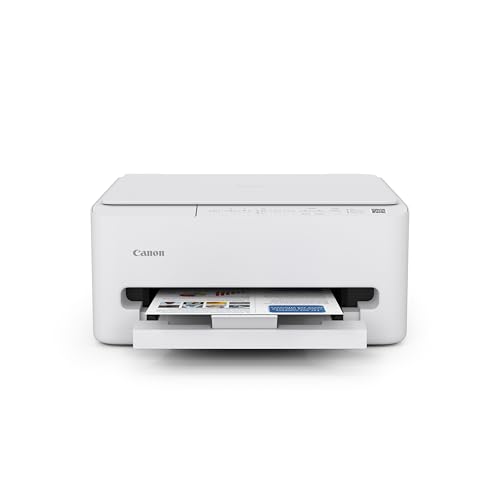
Canon's TR4720 is a compact wireless all-in-one with mobile printing support and a built-in fax, which is a legacy feature most people will skip. It is in the $50 to $100 bracket and ships in white.

It ranks third because document handling is the use case: forms, receipts and the odd contract that needs scanning. It sits under the TS6520 only because it lacks a display, and above the TS6420 because it costs less.

Buy it for a home office that scans more than it prints. The fax is a throwback you will almost certainly never use, and there is no automatic document feeder listed, so every page goes on the glass by hand.

Type
Wireless all-in-one
Mobile
Mobile printing support
Fax
Built-in legacy fax
Price tier
$50 to $100

What we like

  • +Mobile printing support
  • +Wireless connectivity
  • +Compact home design
  • +Scanner for small stacks

Watch out for

  • −Legacy fax adds little
  • −No feeder for multi-page scans

Buy it if: Occasional users who scan a few documents now and then.

Skip it if: You scan multi-page files regularly.

4

Best for Occasional Photos

Canon PIXMA TS6420 All-in-One Wireless

Our verdict: A step up in photo output for the person who prints a handful of pictures.

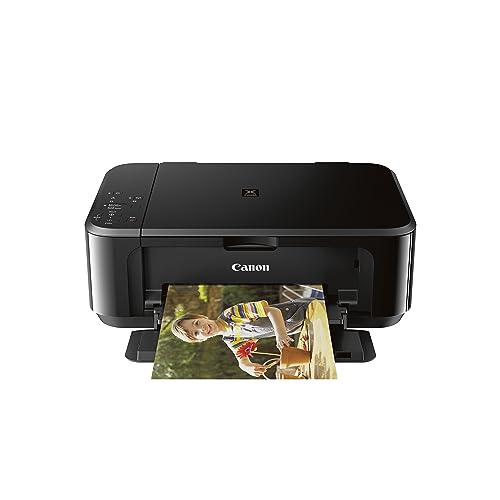
The Canon TS6420 is a wireless all-in-one with photo-capable output and a cartridge-based ink system, in a compact design in the $100 to $200 range.

It ranks fourth for photo quality on infrequent prints, where an occasional family photo or school project matters more than document speed. The extra spend over the TR4720 buys that photo ability, not scanning convenience.

It suits someone who prints photos a few times a year. Keep in mind that cartridge-based inkjets can dry out if left idle, so run a short print monthly, and expect to buy replacement cartridges at ordinary retail cost instead of a bulk-ink design.

Type
Wireless all-in-one
Ink system
Cartridge-based
Output
Photo-capable
Price tier
$100 to $200

What we like

  • +Photo-capable output
  • +Wireless printing
  • +Compact design
  • +Cartridge-based system

Watch out for

  • −Higher price than basics
  • −Cartridges can dry when idle

Buy it if: Households that print occasional photos.

Skip it if: Documents are all you print.

5

Best Zero-Maintenance

MT610Pro Inkless Portable Thermal Printer

Our verdict: No ink or toner at all, which removes the dried-nozzle problem entirely.

The MT610Pro is an inkless thermal printer that prints 8.5 x 11 inch US Letter or A4 pages at 300 DPI over Bluetooth, working with iOS, Android and laptops. It is portable and lists in the $50 to $100 bracket.

It lands fifth because it fixes the main complaint of occasional printing, which is ink that dries out between uses, by having none. The price is capability: thermal paper is monochrome, fades with heat and light, and does not feel like plain office paper.

Choose it for travel and for the person who prints something twice a year. Skip it for anything you need to keep for years or hand over as a formal document.

Technology
Inkless thermal
Paper
US Letter and A4
Resolution
300 DPI
Connection
Bluetooth

What we like

  • +No ink or toner needed
  • +Portable for travel use
  • +Bluetooth with iOS and Android
  • +300 DPI output

Watch out for

  • −Thermal paper limits
  • −Not for long-term records

Buy it if: Very infrequent printers who hate ink maintenance.

Skip it if: You need color or archival prints.

6

Best Budget Entry

Canon PIXMA TS4320 Wireless Inkjet

Our verdict: A 1-year warranty and easy setup at the lowest price tier.

The PIXMA TS4320 is a compact wireless color inkjet with a built-in copier and scanner, easy setup and a 1 year limited warranty, all in the $50 to $100 bucket.

It ranks sixth because it is the stripped model: no display, no photo-focused output. The 1-year warranty is the useful differentiator, since an inexpensive inkjet that sits idle can fail early and you get a window to claim.

Pick it for dorms or a spare room where price matters most. A basic printer like this has the same idle-time cleaning needs as the rest, so print a test page at least once a month.

Type
Wireless color inkjet
Functions
Print, copy, scan
Warranty
1 year limited
Price tier
$50 to $100

What we like

  • +1 year limited warranty
  • +Easy setup
  • +Built-in copier and scanner
  • +Compact design

Watch out for

  • −No status display
  • −Basic feature set

Buy it if: Dorms and spare rooms where price matters most.

Skip it if: You want a display or photo features.

7

Best for Phone Printing

Canon PIXMA MG3620 Wireless All-in-One

Our verdict: Built around printing from a phone or tablet, but with no document feeder.

The MG3620 is a wireless color all-in-one with an emphasis on mobile and tablet printing and a cartridge-based ink system. It has no automatic document feeder and sits in the $100 to $200 bracket.

It finishes last because it costs more than the DeskJet and TR4720 without a standout feature to justify it. Phone printing is now common across the whole group. It trails the TR4720 because its mobile focus does not offset the missing feeder.

It is worth it only if you find it at a good price and print mostly from a phone. Everyone else should buy the HP or the TR4720 for less.

Type
Wireless all-in-one
Focus
Mobile and tablet printing
Feeder
No automatic document feeder
Ink
Cartridge-based

What we like

  • +Phone and tablet printing focus
  • +Wireless connectivity
  • +Cartridge-based system
  • +Print, copy, scan

Watch out for

  • −No document feeder
  • −Higher price, no clear edge

Buy it if: People who print mostly from a phone or tablet.

Skip it if: You want the best value in the group.

Methodology

How We Ranked These

Upfront cost

Entry price tier, since an idle printer should be cheap to own.

Idle-time resilience

Whether the ink design suffers when the printer is left for weeks.

Scanning and copying

Built-in scanner, copier and document-handling features.

Feedback and setup

Display, controls and ease of wireless setup.

Warranty and risk

Stated warranty and subscription traps.

Every Primea Score uses the same weights: Performance 30% · Build & Materials 20% · Everyday Usability 20% · Value 20% · Owner Satisfaction 10%. Full scoring rules

Buyer's guide

How to Pick the Right One for You

By How Often You Print

Frequency decides whether ink or thermal makes sense.

By Budget

SpendOur pick
$50 to $100, best overallHP DeskJet 4355 Wireless All-in-One
$50 to $100, with displayCanon PIXMA TS6520 Wireless Inkjet
$50 to $100, with warrantyCanon PIXMA TS4320 Wireless Inkjet
$100 to $200, for photosCanon PIXMA TS6420 All-in-One Wireless

Inkjet vs Thermal

Inkjet

Color, normal paper and cartridges that dry out if left idle. Picks: HP DeskJet 4355, Canon TS6520, TR4720, TS6420.

Thermal

No ink, monochrome output on special paper. Pick: MT610Pro.

Choose inkjet for color and normal paper, thermal if you print twice a year.

By Main Task

TaskOur pick
Shipping labels and formsHP DeskJet 4355 Wireless All-in-One
Scanning paperworkCanon PIXMA TR4720 All-in-One
Checking printer statusCanon PIXMA TS6520 Wireless Inkjet
Printing from a phoneCanon PIXMA MG3620 Wireless All-in-One

For Students Specifically

Look for

Low upfront cost, wireless printing from a phone and a warranty, in a compact body that fits a dorm.

In this ranking

Canon TS4320 for the 1-year warranty, HP DeskJet 4355 for the lowest cost.

When to Spend More

Spend more if

You print photos or want clear status feedback. The Canon TS6420 or TS6520 earn the extra cost.

Save if

You print forms and labels only. The HP DeskJet or Canon TS4320 is enough.

Questions

Frequently Asked Questions

Will these work with my phone?+

Yes, all are wireless, and the Canon TR4720 and MG3620 specifically list mobile printing support. The MT610Pro connects by Bluetooth to iOS, Android and laptops. The MT610Pro needs the app and paper installed, but no ink.

What mistake should I avoid?+

Leaving the HP DeskJet's Instant Ink trial running. It converts to a paid plan, and a low-volume printer rarely uses enough pages to benefit. Cancel the plan in your HP account before the trial ends if monthly volume is low.

Is an inkless printer worth it over an inkjet?+

For a few pages a year, yes. The MT610Pro never clogs, but prints are monochrome on thermal paper, so keep an inkjet like the TS4320 for color work. A thermal print suits a label or a form, not a photo.

How do I set one up?+

Plug it in, install the cartridges, then connect through the maker's app. The Canon TS4320 lists easy setup, and the TS6520's display guides you through it. Run the first alignment page after installing cartridges.

How do I keep it from drying out?+

Print one color page a month and keep the printer powered down normally. Idle clogging mainly hits cartridge models like the Canon TS6420, MG3620 and TS4320. A monthly page keeps the nozzles wet, and a long gap tends to produce streaks.

Do I need the fax?+

Almost certainly not. The Canon TR4720 includes legacy fax, but you can send documents by email or a phone scanning app, and there is no feeder on that model anyway. A phone scanning app covers most scan jobs a fax would handle.

Final take

The HP DeskJet 4355 is the printer to buy for light household use. Spend a bit more on the Canon TS6520 if you want a status screen, pick the TR4720 for scanning, or choose the MT610Pro if you print so rarely that ink is a liability. Cancel any ink subscription trial, and print one page a month to keep nozzles clear.

About the author

Joshua Parkes, Editor in Chief at Primea Reviews

Joshua Parkes

Editor in Chief, Primea Reviews

Joshua owns the Primea Score framework and signs off on every ranking this site publishes. He and the editors work from spec sheets, manuals, warranty terms, certifications and long-term owner feedback, and a guide says so plainly when a listing leaves out the number that decides the purchase. Primea never claims to have physically tested a product it has not, and no brand can pay for placement.

More Ranked & Reviewed Guides