
Primea ReviewsAll Reviews

Primea Reviews is reader-supported. When you buy through our Amazon links we may earn a commission, at no extra cost to you. Rankings are set by our editors and never sold. Learn more

Ranked & Reviewed by Primea Reviews

The 7 Best Printers for Home Use of 2026, Ranked & Reviewed

By the Primea Editorial TeamUpdated November 1, 20269 min read7 products ranked
The 7 Best Printers for Home Use of 2026, Ranked & Reviewed

The short answer

The HP OfficeJet Pro 8125e is the best home printer for households that print every week, bundling a feeder, duplex and a setup that is easy to follow. Canon's TS6520 suits families who share a printer, and the TS4320 is a compact budget pick. The Brother laser is the long-term choice for heavy black text printing.

The Primea Scoreboard

Ranked & Reviewed

  1. For households that print every week, not just now and then.

    93Outstanding
    Check price
  2. A clear display makes a shared home printer less confusing.

    91Excellent
    Check price
  3. Compact, with duplex and a one-year warranty.

    89Excellent
    Check price
  4. Feeder and fax for households with occasional paperwork.

    87Excellent
    Check price
  5. Matches the 8125e on features but lists higher.

    85Excellent
    Check price
  6. The lowest upfront price, for very light printing.

    83Very Good
    Check price
  7. A black-and-white laser for heavy text printing.

    81Very Good
    Check price

A cheap printer is rarely cheap for long. The sticker price is a one-time number, while ink, toner and the occasional clogged nozzle show up month after month. Plenty of households buy the lowest-priced box on the shelf, print a few school forms, and then discover the cartridges cost nearly as much as the machine did.

We ranked seven printers from their listings, comparing document feeders, duplex printing, ink approach, connectivity and price bucket. We left a label maker out of the pool because it does not print documents. The goal was to match each model to a real household, from occasional use to steady weekly printing.

Before you buy

What Actually Matters

01

How often you print

Print frequency is how many pages you realistically print each month. It sets whether you need a feeder, duplex and a roomy ink plan, or just the cheapest machine. Rare printers like the HP DeskJet 4355 suit light use; weekly printing justifies the 8125e. Estimate your volume before you compare listings.

02

Ink drying

Ink drying happens when inkjet nozzles sit unused and clog, which can waste ink on cleaning cycles or ruin a print. A laser such as the Brother DCP-L2640DW avoids this because toner is a dry powder. It matters most if you print rarely. Check whether the title says inkjet or laser.

03

Duplex

Duplex means automatic printing on both sides of the page. It halves paper use and saves the time of flipping sheets by hand. The HP 8125e and Canon TS6520 have it, while the TR4720 does not list it. Look for the word duplex in the title or feature bullets.

04

Feeder

A document feeder pulls pages through the scanner one at a time, so you can copy or scan a stack without lifting the lid. It matters for taxes, school forms and contracts. The HP 8125e and Canon TR4720 include one. Look for ADF or automatic document feeder in the listing.

05

Trial ink plans

Trial ink plans, such as HP's Instant Ink or Brother's Refresh subscription, offer free cartridges or toner for a limited time. They lower the first few months of cost but eventually bill you. Read the listing to see when the trial ends and what the monthly charge becomes, so you can plan.

In-depth reviews

Our Ranked Picks, Reviewed

1

Best Overall

HP OfficeJet Pro 8125e Wireless All-in-One Color Inkjet Printer

Our verdict: For households that print every week, not just now and then.

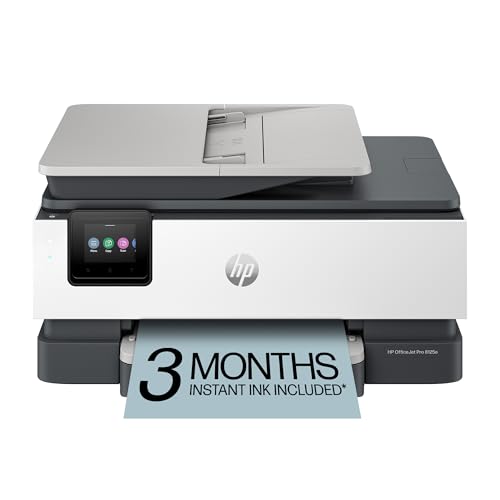
The HP OfficeJet Pro 8125e is a wireless color inkjet that prints, scans and copies, and adds a sheet feeder, duplex printing and AI-enabled setup, in the $50 to $100 bucket. It also ships with a three-month Instant Ink trial and carries a home-office rating.

It leads because it covers the tools a regular printer needs, and few competitors here combine a feeder and duplex at this price. The Canon TS6520 below offers a nicer display but no feeder, which matters once you start scanning multi-page paperwork.

Buy it if your household prints every week and wants scanning and copying without fuss. The caveat is that the trial ends after three months, so ink costs after that deserve a real budget. If you print only once in a while, a cheaper machine will serve you just as well.

Feeder
Automatic
Printing
Duplex
Trial
3-month Instant Ink
Setup
AI-enabled

What we like

  • +Feeder and duplex
  • +Low price bucket
  • +Easy AI setup
  • +Home-office rated

Watch out for

  • −Short ink trial
  • −Ongoing ink cost

Buy it if: Households printing every week.

Skip it if: You print once a month.

2

Best for Shared Households

Canon PIXMA TS6520 Wireless Color Inkjet Printer

Our verdict: A clear display makes a shared home printer less confusing.

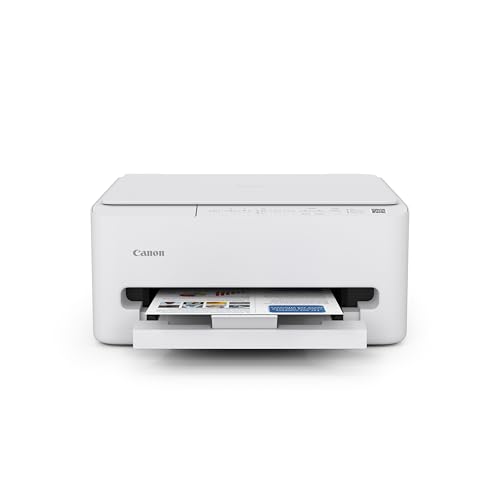
Canon's PIXMA TS6520 is a compact wireless color inkjet with a 1.42 inch OLED display, an intuitive control panel and duplex printing. It sits in the $50 to $100 bucket.

It takes second place because the screen makes life easier in a busy house. People can pick copy, scan or print options right on the device instead of guessing at buttons, which cuts down on arguments over whose job stalled. What holds it back from first is the lack of a document feeder, so every multi-page scan means lifting the lid again.

Buy it if a family of mixed ages shares one machine. Skip it if you regularly scan stacks of pages, because the HP above handles that far better.

Display
OLED
Printing
Duplex
Controls
Intuitive panel
Connectivity
Wireless

What we like

  • +Clear OLED display
  • +Duplex printing
  • +Easy control panel
  • +Compact

Watch out for

  • −No feeder
  • −Mid-range features

Buy it if: Families sharing one printer.

Skip it if: You scan stacks of pages.

3

Best Compact Budget

Canon PIXMA TS4320 Wireless Color Inkjet Printer

Our verdict: Compact, with duplex and a one-year warranty.

The PIXMA TS4320 is a small wireless inkjet that prints on both sides, copies and scans, and comes with a one-year limited warranty and simple setup. It costs in the $50 to $100 bucket.

It ranks third because it is built for lighter use and gives up the TS6520's OLED display, so settings are less obvious. The compact footprint is its strongest card, and the warranty gives a small safety net that some bargain models skip entirely.

Buy it if you have limited desk space and print a handful of pages each week. The honest drawback is that there is no feeder and no screen, so scanning a long document or navigating menus takes more patience than on the models above. For a family that shares, the TS6520 is a better fit.

Printing
Duplex
Functions
Copy and scan
Warranty
1-year limited
Design
Compact

What we like

  • +Compact design
  • +Duplex printing
  • +One-year warranty
  • +Easy setup

Watch out for

  • −No feeder
  • −No display

Buy it if: Small spaces with light printing.

Skip it if: You want a display.

4

Best for Paperwork

Canon PIXMA TR4720 All-in-One Wireless Printer

Our verdict: Feeder and fax for households with occasional paperwork.

Canon's PIXMA TR4720 is a wireless all-in-one with an automatic document feeder, built-in fax and mobile printing, using standard cartridges. It lands in the $50 to $100 bucket.

It ranks fourth because duplex is not listed. Printing on both sides has to be done by hand, which wastes time and paper compared with the HP and the TS models above. What it adds is the feeder and fax, a pairing that is rare in this price range and genuinely useful for occasional paperwork.

Buy it if you handle forms, faxes or multi-page scans once in a while and do not mind turning pages over yourself. Skip it if you want automatic two-sided printing, or if you have never needed a fax in your life, since that feature is mostly legacy at this point.

Feeder
Automatic
Fax
Built in
Mobile
Mobile printing
Ink
Cartridge inkjet

What we like

  • +Feeder included
  • +Fax built in
  • +Mobile printing
  • +Low price bucket

Watch out for

  • −No duplex listed
  • −Legacy fax

Buy it if: Occasional multi-page scans and faxes.

Skip it if: You want duplex.

5

Best Alternate 8125

HP OfficeJet Pro 8125 Wireless All-in-One Color Inkjet Printer

Our verdict: Matches the 8125e on features but lists higher.

The HP OfficeJet Pro 8125 is the sibling of the top pick, with a feeder, duplex printing, AI-capable setup and a three-month Instant Ink trial. Its listing falls in the $100 to $200 bucket.

It ranks fifth for a plain reason: the 8125e delivers the same feature list for less. The only difference listed is more control over ink subscription choices, which will not sway many buyers. The home-office rating is identical across both, so there is no performance argument to make.

Buy whichever of the two is cheaper on the day you shop, and do not pay extra for the name. The caveat is that if both cost the same, the newer 8125e is the safer bet. This is a fine printer that simply cannot beat its own cheaper sibling.

Feeder
Automatic
Printing
Duplex
Trial
3-month Instant Ink
Bucket
$100-200

What we like

  • +Feeder and duplex
  • +Instant Ink trial
  • +Home-office rated
  • +Wireless

Watch out for

  • −Higher price bucket
  • −Same as 8125e

Buy it if: Buyers who find it priced well.

Skip it if: The 8125e is cheaper.

6

Best Lowest Price

HP DeskJet 4355 Wireless All-in-One Color Inkjet Printer

Our verdict: The lowest upfront price, for very light printing.

The HP DeskJet 4355 is a wireless all-in-one that prints, scans and copies on standard cartridges, with a three-month Instant Ink trial and AI-capable setup. It has the lowest upfront price in the list, within the $50 to $100 bucket.

It ranks sixth because it omits both a feeder and duplex printing, so every two-sided job or multi-page scan is manual. The low price is real, but cartridge costs can add up quickly for anyone who prints often, which erases the savings.

Buy it if you print very little, perhaps a few pages a month for a form or a boarding pass. Skip it if your household prints weekly. In that case, the HP 8125e or Canon TS4320 will cost less over time despite higher initial prices.

Functions
Print, scan, copy
Ink
Standard cartridges
Trial
3-month Instant Ink
Setup
AI-capable

What we like

  • +Lowest upfront price
  • +Easy setup
  • +Instant Ink trial
  • +Wireless

Watch out for

  • −No feeder or duplex
  • −Cartridge costs

Buy it if: Very light, occasional printing.

Skip it if: You print weekly.

7

Best High-Volume

Brother DCP-L2640DW Wireless Compact Monochrome Laser Printer

Our verdict: A black-and-white laser for heavy text printing.

The Brother DCP-L2640DW is a compact monochrome laser printer with duplex printing, wireless and mobile connectivity and a Refresh Subscription toner trial. It lists in the $200 to $500 bucket, the highest here.

It sits last only because it prints in black and white and costs the most up front. For households that mostly print text, such as homework, contracts and recipes, it is arguably the most sensible machine on the page, since laser toner does not dry out between uses the way inkjet nozzles can.

Buy it if you print in volume or print rarely but need the page to be ready when you are. Skip it if you want color photos or posters, because it cannot do them. In that case, the HP 8125e is the better all-rounder.

Type
Monochrome laser
Printing
Duplex
Connectivity
Wireless and mobile
Toner
Subscription trial

What we like

  • +No ink drying
  • +Duplex printing
  • +Wireless and mobile
  • +Toner trial

Watch out for

  • −Black only
  • −Highest price bucket

Buy it if: High-volume text printing.

Skip it if: You need color.

Methodology

How We Ranked These

Print volume fit

We matched each printer to light, regular or heavy home use.

Core tools

Feeder, duplex and fax were weighed.

Ink approach

Cartridge, trial and toner designs were compared.

Ease of use

Displays and setup helpers counted.

Price bracket

Each printer was scored against its bucket.

Every Primea Score uses the same weights: Performance 30% · Build & Materials 20% · Everyday Usability 20% · Value 20% · Owner Satisfaction 10%. Full scoring rules

Buyer's guide

How to Pick the Right One for You

By Print Frequency

How often you print decides everything else.

FrequencyOur pick
RarelyHP DeskJet 4355
OccasionallyCanon PIXMA TS4320
WeeklyHP OfficeJet Pro 8125e
Daily, textBrother DCP-L2640DW

By Budget

SpendOur pick
$50-100, feederHP OfficeJet Pro 8125e
$50-100, displayCanon PIXMA TS6520
$100-200HP OfficeJet Pro 8125
$200-500Brother DCP-L2640DW

Inkjet vs Laser

Inkjet

Color and lower upfront cost. All picks except the Brother.

Laser

No idle drying and good for text. The Brother DCP-L2640DW.

Most homes should default to an inkjet unless they print black text in volume.

By Household Type

HouseholdOur pick
Shared familyCanon PIXMA TS6520
PaperworkCanon PIXMA TR4720
Small spaceCanon PIXMA TS4320

For Students Specifically

Look for

Duplex and low running cost.

In this ranking

The Canon TS4320 and TS6520 both list duplex.

When to Spend More

Spend more if

You print lots of text. The Brother laser saves on ink issues.

Save if

You print rarely. The DeskJet 4355 is the lowest.

Questions

Frequently Asked Questions

Do I need a laser or inkjet?+

Inkjets like the HP 8125e handle color and photos, while a laser such as the Brother DCP-L2640DW is best for black text and sits idle without drying out. Most homes should choose an inkjet unless they print text in volume.

What is the usual mistake?+

Buying the cheapest printer and then overspending on ink. A model like the HP DeskJet 4355 has a low sticker price, but frequent printing can make its cartridge costs add up beyond what a better machine would have cost.

Is a feeder worth it?+

Only if you scan or copy multi-page documents regularly. The HP 8125e and Canon TR4720 have feeders, which saves time with stacks of paper. For occasional single-page scans, the Canon TS4320 does the job without one.

How do I set one up?+

Download the maker's app, join your home wifi and follow the prompts. The HP 8125e uses AI-enabled setup to simplify this, while Canon models like the TS6520 guide you from the OLED display. Load paper and align the cartridges last.

How do I prevent clogs?+

Print something every week or two so ink keeps moving through the nozzles, especially on inkjets like the Canon TS4320. If you rarely print, the Brother laser avoids the issue completely since toner does not dry out.

Why was a label maker excluded?+

A label maker prints small strips for tags and folders, not documents, so it does not compete with these printers. Every pick here, from the HP 8125e to the Brother laser, is a general-purpose document machine for the home.

Final take

The HP OfficeJet Pro 8125e is the best printer for most homes that print weekly, thanks to its feeder, duplex and simple setup. The Canon TS6520 is a good pick for shared households, and the Brother laser is the answer for heavy black text. Be honest about how often you print, then choose the model whose running costs fit that habit.

More Ranked & Reviewed Guides