

Primea ReviewsAll Reviews

Primea Reviews is reader-supported. When you buy through our Amazon links we may earn a commission, at no extra cost to you. Rankings are set by our editors and never sold. Learn more

Ranked & Reviewed by Primea Reviews

The 7 Best Inkjet Printers for Home Use of 2026, Ranked & Reviewed

By the Primea Editorial TeamUpdated November 1, 202610 min read7 products ranked
The 7 Best Inkjet Printers for Home Use of 2026, Ranked & Reviewed

The short answer

The Epson EcoTank ET-2800 is the best inkjet for home use because refillable bottles keep the cost per page low for any household that prints regularly. The HP Smart Tank 5101 ships with two years of ink, and the ET-2400 is the cheaper Epson route. The Canon TS4320, TS6520 and TR4720 and the HP DeskJet 4355 are cartridge printers for lighter use, each with a different strength.

The Primea Scoreboard

Ranked & Reviewed

  1. Higher upfront cost, much lower cost per page.

    94Outstanding
    Check price
  2. The most ink included in the box, at tank prices.

    92Outstanding
    Check price
  3. A cheaper way into ink-tank printing.

    90Excellent
    Check price
  4. A compact cartridge printer with duplex.

    88Excellent
    Check price
  5. A clear OLED display for shared households.

    86Excellent
    Check price
  6. An auto document feeder and fax for paperwork.

    84Very Good
    Check price
  7. The cheapest way in, with an Instant Ink trial.

    82Very Good
    Check price

Printer pricing is a trick of accounting. A cartridge model that sits cheap on the shelf recovers its margin one replacement at a time, and anyone who prints more than a few pages a week will eventually pay more than they would have for a pricier ink-tank machine. Meanwhile an ink-tank model sat unused for months can clog its nozzles just as easily, so the cheapest choice depends on how you really print.

We reviewed seven inkjet printers on paper, comparing tank and cartridge designs, functions and extras like duplex, displays and feeders, and scored them on the Primea framework. Running cost for regular printers carried the most weight, and we rewarded included ink and sensible connectivity. Prices appear as buckets only.

Before you buy

What Actually Matters

01

Ink tank vs cartridge

Ink tank versus cartridge is the central decision. Tank printers refill from bottles and cost far less per page, while cartridge printers cost less upfront but more to run. If you print weekly, a tank usually wins within a year or so. Check the ink system in the title for words like EcoTank, Smart Tank or cartridge-free. Tank models also need an upfront refill step, so allow a little setup time.

02

Included ink

Included ink is the supply shipped with the printer, and it can offset early costs significantly. The HP Smart Tank lists two years of ink, which changes the first-year math, while cartridge printers often ship with starter cartridges that run out fast. Check the bullets for included ink, and for any subscription trial terms. A trial that ends in three months is not a reason to buy.

03

Duplex printing

Duplex printing means the printer flips the page and prints both sides automatically, which saves paper and shrinks long documents. Check that duplex is listed, because it is often absent on the cheapest models. The Canon TS4320 and TS6520 list it, and it matters most for school reports and statements. Also check that the driver exposes duplex from your phone, not only a computer.

04

Wi-Fi band

Wi-Fi band decides whether the printer can join your network. A 2.4GHz-only printer may fail to connect if your router is 5GHz only or hides the older band. Check the band in the listing, and log into your router to confirm the 2.4GHz band is enabled before buying the HP Smart Tank. Many modern routers combine both bands under one name, which hides the problem until setup.

05

Scanner and feeder

A scanner and document feeder determine how you handle paperwork. A feeder pulls pages through one at a time, which saves real time on multi-page forms. Check for feeder or ADF wording in the title, as the Canon TR4720 does, and note that flatbed-only models make long scans tedious. Without a feeder, a ten page contract means ten trips to the glass.

In-depth reviews

Our Ranked Picks, Reviewed

1

Best Overall

Epson EcoTank ET-2800 Wireless Cartridge-Free Supertank Printer (Black)

Our verdict: Higher upfront cost, much lower cost per page.

The ET-2800 is a cartridge-free Epson that prints, scans and copies wirelessly, and refills from bottles instead of swapping cartridges. It lands in the $100 to $200 bracket. Ink tanks hold far more ink than a cartridge and the bottles cost much less per milliliter, which is why the running cost drops so sharply.

It leads because that lower cost per page pays off for any household that prints more than occasionally. The ET-2400 costs a little less, but the saving is small, and the HP Smart Tank 5101 trades a clumsier network connection for its bundled ink.

Buy it for a family or home office with regular printing. The caveat is the higher upfront cost and a body larger than the small cartridge models, so skip it if you print a few pages a year.

Ink system
Cartridge-free tank
Functions
Print, scan, copy
Refill
Bottle system
Price tier
$100-200

What we like

  • +Low cost per page
  • +Refillable bottle system
  • +Wireless print, scan, copy
  • +No cartridges to buy

Watch out for

  • −Higher upfront price
  • −Larger body than minis

Buy it if: Households printing more than occasionally.

Skip it if: You print only a few pages a year.

2

Best Included Ink

HP Smart Tank 5101 Wireless All-in-One Refillable Printer

Our verdict: The most ink included in the box, at tank prices.

The HP Smart Tank 5101 is a cartridge-free all-in-one that prints, scans and copies, ships with two years of ink and connects over 2.4GHz Wi-Fi only. It is the lowest-priced tank model here, in the $100 to $200 bracket. Two years of included ink shifts the economics: you postpone the first refill bill and start with the lowest cost per page immediately.

It falls just behind the Epson because 2.4GHz-only wireless can be a nuisance on modern dual-band networks, and it is bulkier than a cartridge unit. The ET-2800 has no such restriction listed.

Buy it if you want ink included upfront and your router supports 2.4GHz. Skip it if your network runs 5GHz only, because the printer will not connect at all.

Ink system
Cartridge-free tank
Included ink
2 years
Wi-Fi
2.4GHz only
Price tier
$100-200

What we like

  • +Two years of ink included
  • +Lowest priced tank model
  • +Print, scan, copy
  • +No cartridges

Watch out for

  • −2.4GHz Wi-Fi only
  • −Bigger than a cartridge model

Buy it if: Buyers who want ink included upfront.

Skip it if: Your router is 5GHz only.

3

Best Entry Tank

Epson EcoTank ET-2400 Wireless Cartridge-Free Supertank Printer

Our verdict: A cheaper way into ink-tank printing.

The ET-2400 is a cartridge-free Epson with wireless print, scan and copy for everyday home use, using the same bottle refill system as the ET-2800. It sits in the $100 to $200 bracket at a slightly lower price. Bottle refills mean the savings are identical in daily use; the difference is in the listing detail.

It ranks third because the saving over the ET-2800 is small, so most buyers are better served by the model one step up. It also lists fewer extras than the ET-2800 and cannot match the HP's bundled two years of ink.

Buy it if the price difference matters to you. The honest caveat is that it saves little, and if the ET-2800 is close in price, spend the extra. Skip it if you want the most documented feature set.

Ink system
Cartridge-free tank
Functions
Print, scan, copy
Focus
Everyday home printing
Price tier
$100-200

What we like

  • +Bottle refill system
  • +Lower price than ET-2800
  • +Wireless all-in-one
  • +Everyday home focus

Watch out for

  • −Small saving over ET-2800
  • −Fewer listed extras

Buy it if: Everyday home printers trimming cost.

Skip it if: The ET-2800 is close in price.

4

Best Cartridge Pick

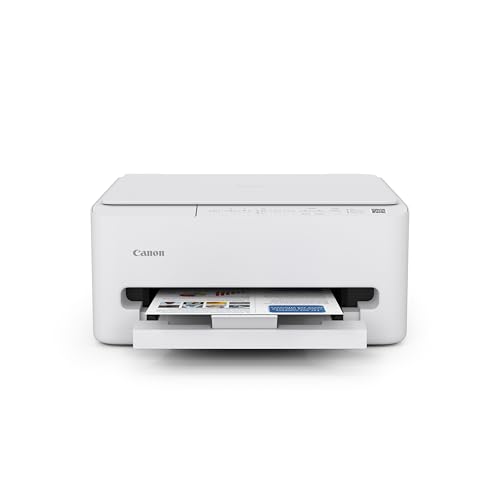
Canon PIXMA TS4320 Wireless Color Inkjet Printer

Our verdict: A compact cartridge printer with duplex.

The Canon PIXMA TS4320 is a compact, cartridge-fed machine that prints double-sided, copies and scans, with simple setup and a one-year limited warranty, priced at $50 to $100. Duplex printing saves paper automatically, and a small footprint suits a desk shelf or a dorm.

It ranks fourth because the cartridge design means a higher cost per page than the EcoTank models, though the entry price is far lower. It beats the TS6520 on size and simplicity but lacks that model's display, and it cannot compete with any tank printer on running cost.

Buy it for light, occasional printing in a small space. The caveat is running cost: if you print weekly, cartridges will eventually cost more than a tank model, so skip it for heavy use.

Ink system
Standard cartridge
Duplex
Yes
Warranty
1-year limited
Price tier
$50-100

What we like

  • +Compact footprint
  • +Duplex printing
  • +1-year warranty
  • +Easy setup

Watch out for

  • −Cartridge cost per page
  • −Not for heavy use

Buy it if: Small spaces and occasional printing.

Skip it if: You print weekly.

5

Best Display

Canon PIXMA TS6520 Wireless Color Inkjet Printer

Our verdict: A clear OLED display for shared households.

The Canon PIXMA TS6520 uses standard cartridges and adds duplex printing, a 1.42 inch OLED display, a compact design and wireless connectivity, in the $50 to $100 bracket. The display matters more than it sounds: menus, ink levels and error messages are readable at a glance, which cuts down on guessing when something jams.

It sits above the TR4720 for households where several people print, because the display makes everyday use clearer. Against the TS4320, it costs a little more for that screen.

Choose it if more than one person uses the printer. The caveat is that cartridges still cost more per page than an EcoTank, and the screen is small. Skip it if you print large volumes, since a tank model will save money.

Ink system
Standard cartridge
Display
1.42-inch OLED
Duplex
Yes
Price tier
$50-100

What we like

  • +Clear OLED display
  • +Duplex printing
  • +Compact design
  • +Wireless

Watch out for

  • −Cartridge running cost
  • −Small screen

Buy it if: Shared family printers.

Skip it if: You print large volumes.

6

Best for Scan and Fax

Canon PIXMA TR4720 All-in-One Wireless Printer

Our verdict: An auto document feeder and fax for paperwork.

The Canon PIXMA TR4720 uses standard cartridges and stands out for an automatic document feeder, a built-in fax and mobile printing, all wireless, at $50 to $100. Instead of lifting the lid for every sheet, you drop a pile of forms in the tray and walk away, which changes how paperwork feels.

It ranks sixth because paperwork features are a niche, and it carries the same cartridge cost per page as the other Canon models. Fax is rarely used today, so the feeder is the real draw. It is more useful than the DeskJet for anyone who scans.

Buy it for a home that handles multi-page forms, taxes or school paperwork. The caveat is that fax is rarely needed, so skip it if you never scan stacks and want lower running costs.

Ink system
Standard cartridge
Feeder
Auto document feeder
Extra
Built-in fax
Price tier
$50-100

What we like

  • +Auto document feeder
  • +Built-in fax
  • +Mobile printing
  • +Wireless all-in-one

Watch out for

  • −Cartridge cost per page
  • −Fax rarely needed

Buy it if: Homes that scan multi-page paperwork.

Skip it if: You never scan or fax.

7

Lowest Entry Price

HP DeskJet 4355 Wireless All-in-One Color Inkjet Printer

Our verdict: The cheapest way in, with an Instant Ink trial.

The HP DeskJet 4355 is a standard cartridge inkjet that prints, scans and copies wirelessly, with a 3-month Instant Ink trial and AI-capable setup features. It has the lowest price in this list at $50 to $100. A subscription trial offsets cartridge cost early, but only while it lasts.

It finishes last because cartridges make it the costliest to run if you print often, even though it is the cheapest to buy. Every Canon and every tank model above it either prints for less or does more.

Buy it for very light printing, such as the occasional boarding pass. The caveat is running cost, so skip it if you print more than a few pages a week, because the savings at the register disappear into replacement ink.

Ink system
Standard cartridge
Functions
Print, scan, copy
Ink plan
3-month Instant Ink trial
Price tier
$50-100

What we like

  • +Lowest entry price
  • +Wireless print, scan, copy
  • +Instant Ink trial
  • +AI-capable setup

Watch out for

  • −Highest running cost
  • −Cartridge dependent

Buy it if: Very light, occasional printing.

Skip it if: You print more than a few pages weekly.

Methodology

How We Ranked These

Ink system

We compared cartridge and ink-tank designs for running cost.

Functions

We counted print, scan, copy, fax, duplex, and feeders.

Setup and display

We considered displays and setup features for shared homes.

Entry price

We compared upfront price brackets.

Warranty and extras

We credited included ink and warranty.

Every Primea Score uses the same weights: Performance 30% · Build & Materials 20% · Everyday Usability 20% · Value 20% · Owner Satisfaction 10%. Full scoring rules

Buyer's guide

How to Pick the Right One for You

By Print Volume

How much you print decides tank versus cartridge.

VolumeOur pick
Weekly or moreEpson EcoTank ET-2800 Wireless Cartridge-Free Supertank Printer (Black)
Weekly, ink includedHP Smart Tank 5101 Wireless All-in-One Refillable Printer
A few times a monthEpson EcoTank ET-2400 Wireless Cartridge-Free Supertank Printer
A few pages a yearHP DeskJet 4355 Wireless All-in-One Color Inkjet Printer

By Budget

SpendOur pick
$50 to $100, cheapestHP DeskJet 4355 Wireless All-in-One Color Inkjet Printer
$50 to $100, duplexCanon PIXMA TS4320 Wireless Color Inkjet Printer
$100 to $200, ink includedHP Smart Tank 5101 Wireless All-in-One Refillable Printer
$100 to $200, best overallEpson EcoTank ET-2800 Wireless Cartridge-Free Supertank Printer (Black)

Ink Tank vs Cartridge

Ink tank

Tanks refill from bottles and cost less per page. Epson ET-2800, ET-2400, and HP Smart Tank 5101 are tanks.

Cartridge

Cartridges cost less upfront but more per page. Canon TS4320, TS6520, TR4720, and HP DeskJet 4355 use them.

Most homes that print weekly should default to ink tank.

By Household Need

NeedOur pick
Shared family printerCanon PIXMA TS6520 Wireless Color Inkjet Printer
Scanning paperworkCanon PIXMA TR4720 All-in-One Wireless Printer
Small spaceCanon PIXMA TS4320 Wireless Color Inkjet Printer

For First-Time Printer Buyers Specifically

Look for

Easy wireless setup, included ink, and a clear display.

In this ranking

The HP Smart Tank 5101 includes two years of ink, and the Canon TS6520 adds an OLED display.

When to Spend More

Spend more if

You print weekly, where the Epson ET-2800 tank design saves on ink over time.

Save if

You print rarely, where the DeskJet 4355 or TS4320 is enough.

Questions

Frequently Asked Questions

Are ink-tank printers worth it?+

For regular printing, yes: the EcoTank ET-2800 and HP Smart Tank 5101 cost much less per page over a year of use. For rare use, a cartridge model such as the Canon TS4320 costs less upfront and is the better fit.

What mistake do buyers make?+

Choosing the cheapest printer without considering ink cost. The HP DeskJet 4355 is the lowest priced here and the most expensive to run for regular printing. Compare running cost, not just the sticker bucket.

Is the ET-2800 worth it over the ET-2400?+

The saving is small, so most buyers should take the ET-2800. Both share the same bottle refill system in the $100 to $200 bracket, and the ET-2800 lists more features.

How do I set up an ink-tank printer?+

Fill each tank from its matching bottle, run the initial setup, then connect to Wi-Fi. On the Epson models use the bottle fills provided, and on the HP Smart Tank confirm your router offers 2.4GHz first.

How do I keep inkjet nozzles clear?+

Print something every week or two so ink does not dry in the nozzles. This applies to the Canon and HP cartridge models as well as the tank printers, and skipping it is the usual cause of streaks.

Does the HP Smart Tank work on 5GHz Wi-Fi?+

No, it supports 2.4GHz only. If your router is dual-band, it can still connect, but a 5GHz-only network will not work. The Epson ET-2800 and ET-2400 do not list this limitation.

Final take

If you print every week, buy a tank printer, and choose the EcoTank ET-2800 unless the HP Smart Tank 5101's two years of included ink or the ET-2400's lower price fits better. Cartridge models make sense only for light, occasional printing, with the TS4320 for small spaces and the TR4720 for paperwork. The DeskJet 4355 is the cheapest to buy and the most expensive to run.

More Ranked & Reviewed Guides