
Primea ReviewsAll Reviews

Primea Reviews is reader-supported. When you buy through our Amazon links we may earn a commission, at no extra cost to you. Rankings are set by our editors and never sold. Learn more

Ranked & Reviewed by Primea Reviews

The 8 Best All-in-One Printers for Home Use of 2026, Ranked & Reviewed

By the Primea Editorial TeamUpdated November 1, 202610 min read8 products ranked
The 8 Best All-in-One Printers for Home Use of 2026, Ranked & Reviewed

The short answer

The Canon PIXMA TR8620a is the best all-in-one for homes that use most features, from fax to an automatic feeder. The HP OfficeJet Pro 8125e is the better pick for steady document work, with a feeder and duplex printing at a lower price. Basic households can stay with the Canon TS4320 or HP DeskJet 4355.

The Primea Scoreboard

Ranked & Reviewed

  1. Nearly every all-in-one feature, in one home-friendly body.

    94Outstanding
    Check price
  2. ADF and duplex for home-office work without the fax extras.

    92Outstanding
    Check price
  3. The same feeder-and-duplex idea, listed at a higher price bucket.

    90Excellent
    Check price
  4. Duplex printing in a compact single-tray body.

    88Excellent
    Check price
  5. A small OLED screen makes daily use less fiddly.

    86Excellent
    Check price
  6. A feeder and fax for households that scan multi-page papers.

    84Very Good
    Check price
  7. Print, scan and copy with simple setup, nothing more.

    82Very Good
    Check price
  8. Ink-tank economics and a manual feed slot for specialty paper.

    80Very Good
    Check price

A home all-in-one is a bundle of features, and most households use only half of them. Fax is the classic example: it comes standard on several models, yet a printer that never faxes is paying for hardware it will not touch. What people actually miss is a feeder for scanning forms or a duplex unit that halves the paper pile.

We ranked eight all-in-ones from their listings, looking at functions, feeder, duplex, display and ink approach. Start with the tasks you do every week, then choose the cheapest model that covers them. Prices appear as buckets, and ink programs are noted only as trials.

Before you buy

What Actually Matters

01

Automatic document feeder

An automatic document feeder, or ADF, pulls pages through the scanner without lifting the lid each time. It matters for multi-page forms, contracts and school packets. Look for ADF in the title or spec table. The Canon TR8620a, TR4720 and both HP OfficeJet Pro models list one.

02

Duplex printing

Duplex printing prints both sides of the page automatically, saving paper and time on longer documents. Without it you flip pages by hand. Check the listing for the word duplex. The HP 8125e and the Canon TS4320 and TS6520 list it, while the Canon TR4720 does not.

03

Ink program

Ink programs such as Instant Ink send cartridges for a monthly fee. On the HP models here, the offer is a three-month trial, not a lasting discount. Plan ongoing ink costs beyond that. Read the terms in the listing, and compare what you would pay once the trial is over.

04

Display and controls

A built-in display lets you copy and scan without an app. The Canon TS6520 has a 1.42 inch OLED screen, and the Brother has a 1.8 inch color display. It matters for quick jobs and for family members who dislike apps. Look for display size in the specs.

05

Specialty paper

A manual feed slot accepts envelopes and cardstock outside the main paper tray. It matters only if you print them regularly. The Brother MFC-J4355DW lists one. Look for manual feed in the specifications, and check which paper weights and envelope sizes the manual says it supports.

In-depth reviews

Our Ranked Picks, Reviewed

1

Best Overall

Canon PIXMA TR8620a All-in-One Printer

Our verdict: Nearly every all-in-one feature, in one home-friendly body.

The Canon PIXMA TR8620a prints, copies, scans and faxes, and adds an automatic feeder, wireless setup, AirPrint and Android support, Alexa compatibility and photo printing. It sits in the $100 to $200 range.

It leads because no other pick lists as many features in a single home-sized body. A household that actually scans stacks, sends the occasional fax and prints photos gets real value from it. The HP OfficeJet Pro 8125e gives you a feeder and duplex for less, but it leaves out fax and some of the mobile options.

Buy it if you want one machine to cover nearly every job. Skip it if your printing is occasional and simple, because you would be paying for hardware you will rarely use.

Functions
Print, copy, scan, fax
Feeder
ADF
Mobile
AirPrint and Android
Smart
Alexa compatible

What we like

  • +Widest feature set
  • +Feeder included
  • +AirPrint and Android
  • +Alexa compatible

Watch out for

  • −Costs more
  • −Fax rarely needed

Buy it if: Households that use most all-in-one features.

Skip it if: You only print occasionally.

2

Best Feeder and Duplex

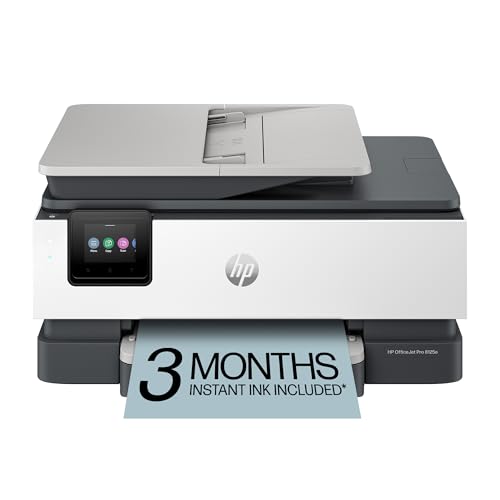
HP OfficeJet Pro 8125e Wireless All-in-One Color Inkjet Printer

Our verdict: ADF and duplex for home-office work without the fax extras.

The HP OfficeJet Pro 8125e prints, scans and copies with an automatic feeder and duplex printing. It includes a three-month Instant Ink trial and AI-capable features, and it is aimed at home-office work. Expect to pay $50 to $100.

It ranks second only because it skips fax and the extra mobile conveniences the Canon offers. For anyone whose work is documents, that omission hardly matters, and the feeder-plus-duplex pairing makes it the strongest value for steady paperwork. It costs less than the Canon too.

Buy it if you handle forms, reports or school work every week. Keep in mind the ink trial lasts only three months, so factor ongoing ink into your budget before you commit.

Functions
Print, scan, copy
Feeder
ADF
Printing
Duplex
Trial
3-month Instant Ink

What we like

  • +Feeder and duplex
  • +Home-office design
  • +Low price bucket
  • +Instant Ink trial

Watch out for

  • −No fax
  • −Ink trial is short

Buy it if: Home-office document workers.

Skip it if: You need fax.

3

Best Alternate 8125

HP OfficeJet Pro 8125 Wireless All-in-One Color Inkjet Printer

Our verdict: The same feeder-and-duplex idea, listed at a higher price bucket.

The HP OfficeJet Pro 8125 lists the same feeder, duplex printing, AI-capable features and three-month Instant Ink trial as the 8125e. It is a wireless home-office all-in-one, but it sits in the $100 to $200 bucket.

Third place is entirely about price. Because the headline features match the 8125e, a higher price brings no clear benefit. If both are sold at the same price on the day you shop, either will do, and the choice becomes one of stock and shipping.

Buy whichever 8125 costs less. Skip this one when the 8125e is cheaper, since the listing does not show any extra advantage. Do not assume that the higher price means a better printer.

Functions
Print, scan, copy
Feeder
ADF
Printing
Duplex
Trial
3-month Instant Ink

What we like

  • +Feeder and duplex
  • +Home-office design
  • +Wireless
  • +Instant Ink trial

Watch out for

  • −Higher price bucket
  • −Same specs as 8125e

Buy it if: Buyers who find this variant at a good price.

Skip it if: The 8125e is cheaper.

4

Best Budget Duplex

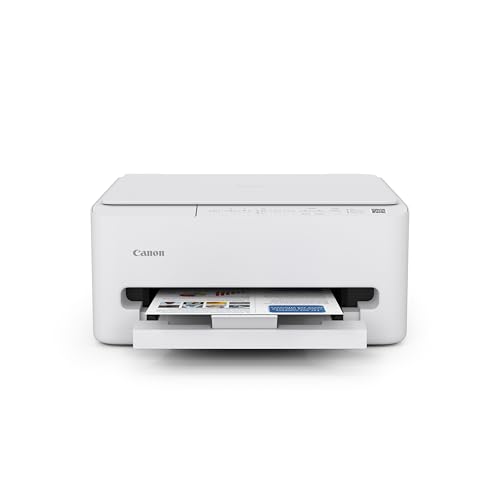
Canon PIXMA TS4320 Wireless Color Inkjet Printer

Our verdict: Duplex printing in a compact single-tray body.

The Canon PIXMA TS4320 prints, scans and copies, with duplex printing in a compact single-tray body. A one-year limited warranty covers it, and setup is described as easy. Prices run $50 to $100.

It ranks fourth because it has no automatic document feeder, which the HP units above include. In exchange you get a smaller footprint and a lower bill, plus two-sided printing that saves paper. For a household that mostly prints single pages, the missing feeder is a minor cost.

Buy it for light home use where duplex matters. Skip it if you scan multi-page documents, because every sheet has to go on the glass by hand.

Functions
Print, scan, copy
Printing
Duplex
Feeder
None
Warranty
1-year limited

What we like

  • +Duplex printing
  • +Compact single tray
  • +Easy setup
  • +One-year warranty

Watch out for

  • −No feeder
  • −Basic features

Buy it if: Light home use with two-sided printing.

Skip it if: You scan multi-page documents.

5

Best Controls

Canon PIXMA TS6520 Wireless Color Inkjet Printer

Our verdict: A small OLED screen makes daily use less fiddly.

The Canon PIXMA TS6520 prints, scans and copies with duplex printing, and adds a 1.42 inch OLED display and an intuitive control panel. It has no feeder, and it costs $50 to $100.

It lands fifth because the screen is a comfort feature rather than a capability. The TS4320 delivers the same core functions with less to learn. What the TS6520 offers is control on the device itself, which saves you opening an app for a quick copy.

Buy it if app-only control annoys you and you like pressing a button to copy. Skip it if you want a feeder, since neither Canon in this pair has one. The extra screen is nice, but not essential.

Functions
Print, scan, copy
Printing
Duplex
Display
OLED screen
Feeder
None

What we like

  • +Clear OLED screen
  • +Easy control panel
  • +Duplex printing
  • +Compact

Watch out for

  • −No feeder
  • −Similar core to TS4320

Buy it if: People who want on-device controls.

Skip it if: You want a feeder.

6

Best Budget Feeder

Canon PIXMA TR4720 All-in-One Wireless Printer with ADF

Our verdict: A feeder and fax for households that scan multi-page papers.

The Canon PIXMA TR4720 prints, scans, copies and faxes, and includes an automatic document feeder and mobile printing support. The compact home design is wireless, and it costs $50 to $100.

It ranks sixth because duplex is not listed, whereas the HP units pair a feeder with two-sided printing. It does win on size and gives you fax, which the HP printers lack. The fax feature is legacy, but some households still need it.

Buy it if you scan multi-page forms and want an inexpensive way to do it. Skip it if you need duplex, because two-sided jobs mean flipping pages manually.

Functions
Print, scan, copy, fax
Feeder
ADF
Mobile
Mobile printing
Design
Compact

What we like

  • +Feeder included
  • +Fax built in
  • +Mobile printing
  • +Compact

Watch out for

  • −No duplex listed
  • −Legacy fax

Buy it if: Households scanning multi-page documents.

Skip it if: You want two-sided printing.

7

Best Basic

HP DeskJet 4355 Wireless All-in-One Color Inkjet Printer

Our verdict: Print, scan and copy with simple setup, nothing more.

The HP DeskJet 4355 prints, scans and copies, with simple wireless setup, a compact budget design and a three-month Instant Ink trial. There is no feeder, and no duplex is listed. Prices run $50 to $100.

It ranks seventh since it offers fewer features than the Canon models above. What it does, it does plainly: set it up quickly, print what you need, and scan single sheets. The ink trial can lower the first few months of costs.

Buy it for occasional home printing such as recipes, labels or the odd form. Skip it if you need a feeder or duplex printing, because the HP 8125e or the Canon TS4320 deliver those for similar money.

Functions
Print, scan, copy
Feeder
None
Setup
Simple wireless
Trial
3-month Instant Ink

What we like

  • +Simple setup
  • +Budget price
  • +Compact
  • +Instant Ink trial

Watch out for

  • −No feeder
  • −No duplex listed

Buy it if: Occasional home printing.

Skip it if: You need a feeder or duplex.

8

Best for Envelopes

Brother INKvestment 4355 Wireless Color Inkjet All-in-One Printer (MFC-J4355DW)

Our verdict: Ink-tank economics and a manual feed slot for specialty paper.

The Brother MFC-J4355DW prints, scans and copies using an ink-tank system. It has a 1.8 inch color display, a manual feed slot for envelopes and cardstock, and a Refresh Subscription trial. It is the most expensive pick, at $200 to $500.

It ranks last because it costs far more than the rest and lists no feeder. Its niche is specialty paper: the manual slot handles envelopes and cardstock that cartridge inkjets often struggle with. For ordinary documents, cheaper machines do the same job.

Buy it if you regularly print envelopes, cards or thick stock. Skip it if you mostly print documents, since the price premium will not pay back and the Canon TR8620a offers more features for less.

Functions
Print, scan, copy
Ink
Ink-tank system
Display
1.8 inch color
Feed
Manual slot

What we like

  • +Ink-tank system
  • +Manual feed slot
  • +Color display
  • +Subscription trial

Watch out for

  • −Highest price bucket
  • −No feeder listed

Buy it if: Envelope and cardstock printers.

Skip it if: You print ordinary documents.

Methodology

How We Ranked These

Functions

We compared print, scan, copy and fax, plus feeder and duplex.

Home suitability

Compact, easy-setup models scored above office-heavy ones.

Ink approach

Instant Ink trials, ink-tank systems and subscriptions were noted.

Controls

Displays and control panels were weighed for daily ease.

Price bracket

Each printer was judged against its bucket.

Every Primea Score uses the same weights: Performance 30% · Build & Materials 20% · Everyday Usability 20% · Value 20% · Owner Satisfaction 10%. Full scoring rules

Buyer's guide

How to Pick the Right One for You

By Main Task

Pick by the job you do most.

TaskOur pick
Everything, including faxCanon PIXMA TR8620a
Document work with duplexHP OfficeJet Pro 8125e
Light printing, duplexCanon PIXMA TS4320
Envelopes and cardstockBrother MFC-J4355DW

By Budget

SpendOur pick
$50-100, basicHP DeskJet 4355
$50-100, duplexCanon PIXMA TS4320
$100-200Canon PIXMA TR8620a
$200-500Brother MFC-J4355DW

Cartridge vs Ink Tank

Cartridge inkjets

Lower cost upfront. The Canon and HP models.

Ink tank

Built for lower running costs. The Brother MFC-J4355DW.

Most households should default to a cartridge inkjet unless they print weekly.

By Scanning Needs

NeedOur pick
Multi-page, with duplexHP OfficeJet Pro 8125e
Multi-page, with faxCanon PIXMA TR4720
Single pages onlyCanon PIXMA TS6520

For Families Specifically

Look for

Simple setup, mobile printing and photo ability.

In this ranking

The Canon TR8620a handles photos, AirPrint and Alexa.

When to Spend More

Spend more if

You use fax, a feeder and photos. The Canon TR8620a pulls them together.

Save if

You print rarely. The HP DeskJet 4355 covers basics.

Questions

Frequently Asked Questions

Do I need a feeder?+

Only if you scan multi-page documents. The Canon TR8620a and TR4720 and both HP OfficeJet Pro models have one. For single pages, a model without a feeder like the Canon TS4320 costs less.

What is the usual mistake?+

Paying for fax and a feeder that never get used. The Canon TR8620a is wonderful for busy households, but a family that prints occasionally is better served by the TS4320 or DeskJet 4355.

Is Instant Ink worth it?+

The three-month trials on the HP 8125e and DeskJet 4355 only cover the start. Check what the subscription costs afterwards, and compare it with buying standard cartridges before you decide.

How do I set one up?+

Use the maker's app to join your wifi, then install the driver on each computer. HP and Canon models like the DeskJet 4355 and TS6520 both describe simple wireless setup in the listing.

How do I keep inkjet nozzles healthy?+

Print something every week or two so the ink does not dry in the nozzles. Inkjets such as the Canon TS4320 clog if left idle for long periods.

Can I print from my phone?+

The Canon TR8620a lists AirPrint and Android compatibility, and the TR4720 lists mobile printing support. Both let you print without a computer, once the printer is on your wifi.

Final take

The Canon TR8620a suits households that scan, fax and print photos. Document-heavy homes should choose the HP 8125e, and light users can buy the Canon TS4320 for duplex or the DeskJet 4355 for basic needs. Pay for the Brother only if envelopes and cardstock are a regular job.

More Ranked & Reviewed Guides