
Primea ReviewsAll Reviews

Primea Reviews is reader-supported. When you buy through our Amazon links we may earn a commission, at no extra cost to you. Rankings are set by our editors and never sold. Learn more

Ranked & Reviewed by Primea Reviews

The 6 Best Easy-to-Use Printers of 2026, Ranked & Reviewed

By the Primea Editorial TeamUpdated November 1, 20269 min read6 products ranked
The 6 Best Easy-to-Use Printers of 2026, Ranked & Reviewed

The short answer

The HP DeskJet 4355 is the easiest printer for first-time buyers, with a simple wireless setup, a labeled cartridge door and a 3-month Instant Ink trial. The Canon TS6520 adds an OLED display for error messages. The TR4720 brings a document feeder, the TS6420 has labeled buttons, and the TS4320 and TS3720 suit routine and light use.

The Primea Scoreboard

Ranked & Reviewed

  1. The simplest start for a first-time printer buyer.

    93Outstanding
    Check price
  2. A small OLED screen spells out what is wrong.

    90Excellent
    Check price
  3. A document feeder takes the pain out of scanning.

    87Excellent
    Check price
  4. Clear button labels and a simple wireless setup flow.

    84Very Good
    Check price
  5. A compact single-tray printer with app support.

    81Very Good
    Check price
  6. Stripped down to the basics, with no feeder or fax.

    78Very Good
    Check price

Printers earn their reputation for being difficult in two moments: the first connection and the first jam. A model that joins your Wi-Fi in a few taps but answers a stuck sheet with a blinking amber light has only solved half the problem. Ease of use, then, is two separate qualities, a good setup flow and good help when something fails, and the best printers cover both.

We judged six home printers on those terms, along with how simply they handle everyday jobs such as copying a form or scanning a receipt. Eight were considered and six ranked from spec sheets, and we did not time any setup ourselves. The Canon line dominates the list for a reason: it offers the widest range of display, button and feeder choices at the price of a modest inkjet.

Before you buy

What Actually Matters

01

Setup flow

Setup is connecting the printer to your Wi-Fi and phone, and a guided flow saves the worst frustration. Look for a described simple wireless setup, as on the HP DeskJet 4355, and have your Wi-Fi password ready. Make sure your phone is on the same network, or the printer will not appear, and expect to enter the password once.

02

On-screen help

A display explains errors in words instead of blinking lights, which matters most during a paper jam. A 1.42-inch OLED, as on the Canon TS6520, is small but clear. Check whether the listing names a display at all, because many cheaper models rely on indicator lights and a manual, and a light alone rarely says which door is open.

03

Button layout

Labeled physical buttons are faster for simple copy jobs than menus, and fewer buttons means less to learn. Look at the product photos for the control panel, and decide whether you prefer keys or a screen. A cluttered panel with legacy fax keys can make a simple printer look hard, even if the daily tasks are easy.

04

Document feeder

An auto document feeder pulls pages in one at a time for scanning and copying. Without one, you place each page on the glass. If you scan stacks of paper, the feeder is the real ease-of-use feature, and the TR4720 is the only model here that lists one, so it stands apart for paperwork.

05

Ink access

A clearly labeled cartridge door makes ink changes less intimidating, and it reduces mistakes like forcing the wrong slot. It is a small detail that matters for first-time buyers. Look for it in the feature bullets, as with the HP DeskJet 4355, and check how ink is replaced, including whether cartridges are cheap and easy to find.

In-depth reviews

Our Ranked Picks, Reviewed

1

Best Overall

HP DeskJet 4355 Wireless All-in-One Color Inkjet Printer

Our verdict: The simplest start for a first-time printer buyer.

HP's DeskJet 4355 earns first place by smoothing the two moments that usually frustrate beginners. A short wireless setup connects it to your network, and a plainly labeled cartridge door takes the guesswork out of changing ink. It prints, scans and copies in color, comes with a 3-month Instant Ink trial and sits in the $50 to $100 band.

It ranks above the Canon TS6520 because the setup is described more simply, though it lacks the OLED display that makes error messages readable. A compact body keeps it unintimidating on a shelf.

Buy it for first-time buyers and non-technical households. The caveat is what the small size leaves out: there is no document feeder, so every scan means lifting the lid, and no color display, so you rely on lights when something fails. Heavy scanners should look at the TR4720.

Type
Color inkjet AIO
Functions
Print, scan, copy
Setup
Simple wireless flow
Ink program
3-month Instant Ink trial

What we like

  • +Simple wireless setup
  • +Labeled cartridge door
  • +Compact body
  • +Instant Ink trial

Watch out for

  • −No document feeder
  • −No color display

Buy it if: First-time printer buyers.

Skip it if: You scan stacks of paper.

2

Best On-Screen Guidance

Canon PIXMA TS6520 Wireless Color Inkjet Printer

Our verdict: A small OLED screen spells out what is wrong.

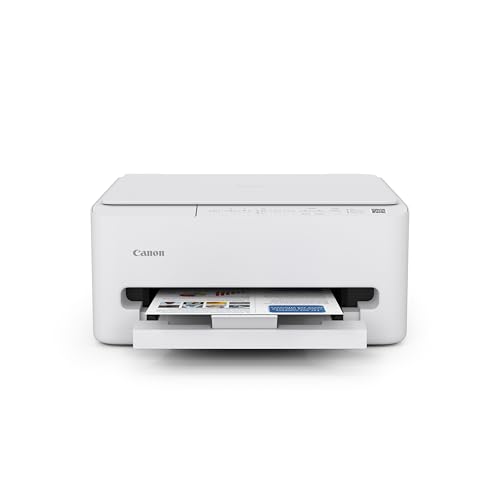
The Canon TS6520 puts words on the screen. A 1.42-inch OLED display shows status messages in plain language, so a paper jam or low ink reads as a sentence rather than a code. It also prints duplex, includes a built-in copier and scanner, and has an intuitive control panel, in the $50 to $100 band.

It ranks second because the display makes troubleshooting less of a guess, but its setup flow is not described as simply as HP's. Where the DeskJet wins on day one, the Canon wins on day thirty, when something breaks.

Buy it if you dread error lights. The caveat is size: the screen is small, so long messages need scrolling, and there is no document feeder, which limits multipage scans. Skip it if you would never look at a display anyway and want the simplest hardware.

Display
1.42" OLED
Duplex
Yes
Functions
Print, scan, copy
Price band
$50-100

What we like

  • +Clear OLED messages
  • +Duplex printing
  • +Intuitive control panel
  • +Compact design

Watch out for

  • −No document feeder
  • −Small screen size

Buy it if: Buyers who want help when something fails.

Skip it if: You never look at the display.

3

Best For Scanning

Canon PIXMA TR4720 All-in-One Wireless Printer

Our verdict: A document feeder takes the pain out of scanning.

The TR4720 is the one that makes scanning painless. It has an automatic document feeder that pulls pages in one at a time, which scanning-heavy homes feel immediately, plus mobile printing, wireless connectivity and a legacy fax, in the $50 to $100 band. Feeding a ten-page form is a single step instead of ten lid lifts.

It ranks third because the feeder simplifies multipage work that none of the higher picks offer, while its day-to-day controls are less guided, with no OLED display. You choose capability over hand-holding.

Buy it for households that scan bills, forms and school paperwork often. The caveat is the fax: it is a legacy feature most people will ignore, and it adds buttons and menus that make the printer look more complicated than it is. If you only print, the TS3720 is simpler.

Feeder
Auto document feeder
Type
Color inkjet AIO
Mobile
Mobile printing
Extra
Legacy fax

What we like

  • +Auto document feeder
  • +Mobile printing
  • +Wireless connectivity
  • +Compact design

Watch out for

  • −Fax is rarely useful
  • −No OLED display

Buy it if: Households that scan often.

Skip it if: You only print.

4

Best Labeled Controls

Canon TS6420 All-in-One Wireless Printer

Our verdict: Clear button labels and a simple wireless setup flow.

The TS6420 is the choice for people who trust buttons over menus. It prints, scans and copies in color, has a simple wireless setup, and a button layout where every key is clearly labeled. Real keys are quicker for a one-touch copy than scrolling a touch menu.

It ranks fourth because it costs a band more than the cheaper Canons, in the $100 to $200 range, without adding a feeder or a display. For the same money you could take a model with more help.

Buy it if you prefer physical controls to touch screens. The caveat is ink: it is cartridge-based, so running costs add up if you print a lot, and the higher price asks you to value the buttons enough to pay for them.

Type
Color inkjet AIO
Controls
Labeled buttons
Setup
Simple wireless flow
Ink
Cartridge-based

What we like

  • +Labeled buttons
  • +Simple wireless setup
  • +Compact design
  • +Print, scan, copy

Watch out for

  • −Higher price band
  • −Cartridge ink costs

Buy it if: Buyers who like real buttons.

Skip it if: You want a lower price.

5

Best Daily Routine

Canon PIXMA TS4320 Wireless Color Inkjet Printer

Our verdict: A compact single-tray printer with app support.

The TS4320 keeps things simple: a compact single-tray design with duplex printing and app printing from a phone. A built-in copier and scanner and a 1-year limited warranty come at $50 to $100. One paper tray means one place to load, and a phone app handles the printing for people who never touch a computer.

It ranks fifth because it has none of the guidance extras of the TS6520. It keeps the same duplex and app basics but gives you no display help when a jam occurs, and no feeder.

It suits people who print the same few things each week. The caveat is on-device support, so when something fails you rely on blinking lights and the manual. Choose the TS6520 instead if error messages are a worry, or the TR4720 if you scan.

Type
Color inkjet
Duplex
Yes
Tray
Single tray
Warranty
1 year limited

What we like

  • +Duplex printing
  • +App printing support
  • +Single-tray simplicity
  • +1-year warranty

Watch out for

  • −No display guidance
  • −No document feeder

Buy it if: Routine weekly printing.

Skip it if: You want on-device help.

6

Best Fewest Controls

Canon PIXMA TS3720 Wireless All-in-One Printer

Our verdict: Stripped down to the basics, with no feeder or fax.

Canon's TS3720 is the plain one: a small, inexpensive color printer that scans and copies over wireless, with no document feeder and no fax. It costs $50 to $100. With so few controls, there is little to misunderstand, which is the whole appeal for a nervous user.

It ranks last because it offers the fewest features, yet that is the point for people who want the fewest buttons. Next to the TR4720, it drops the feeder and the mobile printing mention, and next to the TS6520, it drops the display.

It suits light users, older relatives and a printer that sits mostly idle. The caveat is multipage scanning, which is slow without a feeder. Heavy scanning is better done on the TR4720, and anyone who prints a lot should consider a model with more guidance.

Type
Color inkjet AIO
Functions
Print, scan, copy
Feeder
None
Price band
$50-100

What we like

  • +Few buttons to learn
  • +Low cost
  • +Compact
  • +Wireless

Watch out for

  • −No document feeder
  • −No fax

Buy it if: Light, occasional users.

Skip it if: You scan multipage documents.

Methodology

How We Ranked These

Setup flow

We favored listings that describe a simple wireless setup and guided first run.

Guidance

On-screen messages and labeled controls were weighed for troubleshooting ease.

Everyday tasks

Print, scan, copy and feeder support were compared for common jobs.

Ink access

A labeled, reachable cartridge door scored higher.

Price band

Each model was weighed against its band and extras.

Every Primea Score uses the same weights: Performance 30% · Build & Materials 20% · Everyday Usability 20% · Value 20% · Owner Satisfaction 10%. Full scoring rules

Buyer's guide

How to Pick the Right One for You

By Experience Level

Pick for the person using it most.

UserOur pick
First-time buyerHP DeskJet 4355 Wireless All-in-One Color Inkjet Printer
Dreads error lightsCanon PIXMA TS6520 Wireless Color Inkjet Printer
Older relativeCanon PIXMA TS3720 Wireless All-in-One Printer
Scans bills oftenCanon PIXMA TR4720 All-in-One Wireless Printer

By Budget

SpendOur pick
$50 to $100, simplestHP DeskJet 4355 Wireless All-in-One Color Inkjet Printer
$50 to $100, with feederCanon PIXMA TR4720 All-in-One Wireless Printer
$50 to $100, bare basicsCanon PIXMA TS3720 Wireless All-in-One Printer
$100 to $200Canon TS6420 All-in-One Wireless Printer

Screen vs Buttons

Screen

Words explain problems in real time. Pick: Canon PIXMA TS6520 with its OLED display.

Buttons

Labeled keys give quick, predictable control. Picks: Canon TS6420 and Canon PIXMA TS3720.

Most nervous users should default to the screen, since a message beats a blinking light.

By Task

Main jobOur pick
Printing homeworkCanon PIXMA TS4320 Wireless Color Inkjet Printer
Scanning formsCanon PIXMA TR4720 All-in-One Wireless Printer
Two-sided printsCanon PIXMA TS6520 Wireless Color Inkjet Printer
Rare printingHP DeskJet 4355 Wireless All-in-One Color Inkjet Printer

For Non-Technical Households Specifically

Look for

A guided wireless setup, labeled ink door and as few settings as possible.

In this ranking

The HP DeskJet 4355 lists all three setup helpers; the Canon TS3720 minimizes controls.

When to Spend More

Spend more if

You want buttons you can read at a glance. The Canon TS6420 labels its layout.

Save if

You print occasionally. The HP DeskJet 4355 sits in the $50 to $100 band.

Questions

Frequently Asked Questions

Do these need a computer to set up?+

Most can be set up from a phone app over Wi-Fi, so no computer is required. The HP DeskJet 4355 describes a simple wireless setup flow, which is the easiest start among these for someone who has never set up a printer.

What is the common mistake?+

Pairing over the wrong Wi-Fi network. Make sure your phone is on the same network as the printer, and keep the router password nearby before you start the setup, so you do not stall halfway.

Is the TR4720 worth it over the TS3720?+

Yes, if you scan. The TR4720 adds an automatic document feeder, which turns a multipage scan into one step. If you only print and copy, the TS3720 costs the same and has fewer buttons to confuse a newcomer.

How do I change cartridges?+

Open the labeled access door and follow the prompts. The HP DeskJet 4355 labels the door clearly, and the Canon TS6520 can show a message on its OLED display if a cartridge is wrong or empty.

How do I keep ink from drying?+

Print a page every week or two. Idle inkjets can dry out, so a short routine job keeps the nozzles moving, and any of these printers benefits from regular use. Do not leave one switched off for months.

Can I print from a phone?+

The TR4720 and TS4320 list mobile printing support, and the HP DeskJet 4355 uses a phone for setup. Check the app is available for your phone before buying, and confirm your phone's software is recent enough.

Final take

Buy the HP DeskJet 4355 if you want the least friction on day one, or the Canon TS6520 if you want plain-language error messages. Choose the TR4720 when scanning stacks of paper is the real job. The TS6420, TS4320 and TS3720 are narrower fits, each for a specific habit or user.

More Ranked & Reviewed Guides