

Primea ReviewsAll Reviews

Primea Reviews is reader-supported. When you buy through our Amazon links we may earn a commission, at no extra cost to you. Rankings are set by our editors and never sold. Learn more

Ranked & Reviewed by Primea Reviews

The 7 Best Easy-to-Use Tablets of 2026, Ranked & Reviewed

By the Primea Editorial TeamUpdated November 3, 202610 min read7 products ranked
The 7 Best Easy-to-Use Tablets of 2026, Ranked & Reviewed

The short answer

The Apple iPad 11-inch with the A16 chip is the easiest tablet to live with long term, thanks to a consistent interface and a long run of updates. The Samsung Galaxy Tab A11+ is the best Android choice, the Amazon Fire HD 10 is the cheap family tablet, and the GrandPad is the one to buy when the user will never manage settings alone.

The Primea Scoreboard

Ranked & Reviewed

  1. The most predictable interface here, with 128GB of storage and keyboard support if skills grow.

    94Outstanding
    Check price
  2. A capable Android with 6GB RAM and 128GB storage, for people who want more than basics.

    92Outstanding
    Check price
  3. 03
    Amazon Fire HD 10 tablet

    Best Family Tablet

    Amazon Fire HD 10 tablet

    A big 10.1-inch screen with stylus support at a price that makes a shared tablet painless.

    90Excellent
    Check price
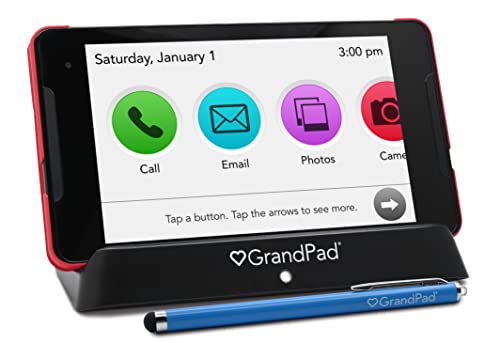
  4. A locked-down, cellular senior tablet built so the user cannot get lost in settings.

    88Excellent
    Check price
  5. 05
    Amazon Fire HD 8 tablet

    Best Compact Budget Pick

    Amazon Fire HD 8 tablet

    A small, light 8-inch tablet with 64GB, easy to hold in one hand for reading.

    86Excellent
    Check price
  6. An 11-inch 2.5K IPS screen and 256GB, but a college tablet, not a simple one.

    84Very Good
    Check price
  7. The cheapest 10-inch option with 128GB and a current Android version.

    82Very Good
    Check price

Most people shopping for an easy tablet fixate on the price and the screen size, then discover on day two that the hard part was never the hardware. It is the first-run setup, the pop-ups, the account sign-ins and the update prompts. A tablet that is simple for you to use is often miserable for a parent or grandparent who has never held one.

So this ranking leans on how little ongoing help each device needs. We reviewed seven tablets from the spec sheets and listing details, leaning hardest on interface consistency, screen size against weight in the hand, and storage headroom. Oversized slates were left out on purpose: past 11 inches, a tablet gets too heavy to hold comfortably in one hand.

Before you buy

What Actually Matters

01

Home screen clarity

The home screen is the interface a beginner sees a hundred times a day. Look for large icons, few pages and no clutter. On Android you can install a simple launcher, while iPads and Fire tablets already default to fewer decisions. Check screenshots on the listing for the default layout.

02

Screen size against weight

A bigger screen helps eyesight but weighs more in the hand. Eight inches suits one-handed reading, 10 to 11 inches suits video calls and photos on a stand. If the tablet will be held in bed, favor the smaller size or buy a lightweight case.

03

Storage you will actually use

A 32GB tablet has far less room than it sounds after system files, and apps and photos fill the rest. Plan on 64GB as a floor for anyone who takes pictures. Look for the storage line on the listing, and check whether a microSD slot exists.

04

Update window

A tablet that stops receiving security patches becomes risky for someone who clicks on messages and links. Established brands usually publish update policies; smaller brands often do not. Search the manufacturer's support page for a stated number of years before buying.

05

Who sets it up

The real cost of a tablet is the first hour. A family member can configure an Android or iPad with a simple launcher, shared photos and video calling contacts in advance. A closed device like the GrandPad moves that burden into a managed service instead.

In-depth reviews

Our Ranked Picks, Reviewed

1

Best Overall

Apple iPad 11-inch: A16 chip

Our verdict: The most predictable interface here, with 128GB of storage and keyboard support if skills grow.

The iPad 11-inch runs Apple's A16 chip and ships with 128GB of storage and keyboard compatibility. For a first-time user the real strength is not speed but consistency: one home button gesture, big app icons, and settings that look the same year after year.

It ranks first because it needs the least rescue calls. Compared with the Galaxy Tab A11+ below, it asks fewer questions after an update and its interface rarely moves things around. The tradeoff is price, since it costs more than any other tablet in the field, and an 11-inch screen weighs enough to tire the wrist during long reading sessions.

It is the right buy for a beginner who wants a device that will still feel familiar in several years. Skip it if the tablet is for a child who will drop it.

Screen
11 in
Storage
128GB
Chip
Apple A16
Extras
Keyboard compatible

What we like

  • +Consistent, familiar interface year after year
  • +128GB handles photos and apps
  • +Keyboard support when skills grow
  • +Fast A16 chip stays smooth

Watch out for

  • −Costliest tablet in this ranking
  • −11 inches gets tiring to hold

Buy it if: First-time users who want one tablet to last for years.

Skip it if: You want a cheap device for a child or a shared kitchen tablet.

2

Best Android Pick

Samsung Galaxy Tab A11+ 6GB RAM

Our verdict: A capable Android with 6GB RAM and 128GB storage, for people who want more than basics.

The Galaxy Tab A11+ brings 6GB of RAM and 128GB of storage, which is generous for the price bracket. Extra memory matters on Android because the system keeps several apps alive in the background; 6GB keeps switching between a browser, video calls and email from stuttering.

It trails the iPad because Android tablets ask more of the owner. Settings menus run deeper, and manufacturer skins add duplicate apps. You can quiet this with a simple launcher, but someone has to set that up once. Against the Fire HD 10 below, it is far more capable but costs noticeably more.

Buy it if you want a mainstream Android tablet that runs most apps without lag. Skip it if the person using it will not tolerate any menu clutter.

Memory
6GB RAM
Storage
128GB
System
Android
Bracket
$200 to $500

What we like

  • +6GB RAM keeps multitasking smooth
  • +128GB is roomy for photos
  • +Runs the full Google app catalog
  • +Samsung brand has wide support

Watch out for

  • −Menus run deeper than iPadOS
  • −Duplicate apps need tidying

Buy it if: Android fans who want power without paying iPad prices.

Skip it if: You want the simplest possible home screen with no setup.

3

Best Family Tablet

Amazon Fire HD 10 tablet

Our verdict: A big 10.1-inch screen with stylus support at a price that makes a shared tablet painless.

The Fire HD 10 has a 10.1-inch screen, 32GB of storage and stylus support, all inside a $100 to $200 price. Its home screen is built around large tiles for books, video and apps, and it is the easiest tablet here to turn into a streaming and reading screen.

It sits above the Fire HD 8 because the extra screen real estate makes a real difference for older eyes. It sits below the Tab A11+ because 32GB fills up quickly once you add apps and downloaded video. A microSD card or cloud storage soon becomes necessary, which adds one more thing to manage.

It is a smart pick for a shared household tablet where the main jobs are reading, video and video calls. Skip it if you need access to the full Google Play app catalog.

Screen
10.1 in
Storage
32GB
Input
Stylus support
Bracket
$100 to $200

What we like

  • +Large 10.1-inch screen for older eyes
  • +Stylus support for notes and sketching
  • +Simple tile-based home screen
  • +Low enough price for sharing

Watch out for

  • −32GB fills up quickly
  • −App choice is narrower than Android

Buy it if: Households that want a streaming and reading tablet.

Skip it if: You rely on apps found only in the Google Play store.

4

Best for Seniors Who Need Hand-Holding

GrandPad Easy to Use Tablet & Phone for Seniors [Locked - Not

Our verdict: A locked-down, cellular senior tablet built so the user cannot get lost in settings.

The GrandPad is designed for seniors and ships with cellular connectivity, so there is no Wi-Fi password to manage. The listing frames it as a closed device, which means no app store to browse and no settings maze to fall into.

That design is both its strength and the reason it is not number one. A locked tablet cannot do what an iPad does, and the listing title is cut off, so read the full description to see what service plan, if any, the unit requires before you buy. Compared with the Fire HD 8 below, you trade flexibility for a far lower chance of accidental mistakes.

It is the right choice when the user has memory issues or no interest in learning, and a family member can manage the account remotely. Skip it if the user wants to choose their own apps.

Connectivity
Cellular
Design
Locked senior interface
Use
Tablet and phone
Bracket
$200 to $500

What we like

  • +Cellular, so no Wi-Fi setup
  • +Simplified interface lowers confusion
  • +Works as tablet and phone
  • +Built for first-time seniors

Watch out for

  • −Locked, so no app choice
  • −Listing details need careful reading

Buy it if: Seniors who need a device that family can manage.

Skip it if: The user wants to browse apps or use a normal tablet.

5

Best Compact Budget Pick

Amazon Fire HD 8 tablet

Our verdict: A small, light 8-inch tablet with 64GB, easy to hold in one hand for reading.

The Fire HD 8 is the compact option, with a 64GB storage listing that doubles the Fire HD 10's base capacity. At 8 inches it is far lighter in the hand, and it sits comfortably in a bag or on a nightstand.

It ranks fifth because a smaller screen is a downside for anyone with weaker eyesight; icons and text shrink, and video calls feel cramped. Against the Fire HD 10 above, you gain storage and portability but lose reading comfort.

Buy it for a bedside reader, a travel video player or a kid's first tablet. Skip it if the user needs a big display for photos or video calls.

Screen
8 in
Storage
64GB
System
Fire tablet interface
Bracket
$100 to $200

What we like

  • +64GB at a low price
  • +Light enough for one hand
  • +Tile layout is easy to read
  • +Fits small bags and nightstands

Watch out for

  • −Small screen strains older eyes
  • −Limited to Amazon's app store

Buy it if: Bedside reading and travel video.

Skip it if: The user needs a large screen for video calls.

6

Best Storage for the Money

Lenovo Idea Tab - College Tablet - 11″ 2.5K IPS Touchscreen Display -

Our verdict: An 11-inch 2.5K IPS screen and 256GB, but a college tablet, not a simple one.

Lenovo's Idea Tab has an 11-inch 2.5K IPS touchscreen and 256GB of storage, which is the most space in this group by a wide margin. The sharp panel makes text look crisp, a quiet help for aging eyes.

The reason it ranks sixth is positioning. It is marketed for college work, so the setup is a standard Android flow without any senior-friendly layer. It beats the AOC below on screen quality and capacity but lacks the simplicity of the Fire tablets.

Buy it if you want a sharp display and plenty of storage and you can set it up for the user. Skip it if they will be configuring it alone.

Screen
11 in 2.5K IPS
Storage
256GB
Input
Touchscreen
Bracket
$100 to $200

What we like

  • +256GB is the most storage here
  • +Sharp 2.5K IPS panel
  • +Large 11-inch display
  • +Good value for the bracket

Watch out for

  • −Standard Android setup flow
  • −Not aimed at beginners

Buy it if: Setup-friendly families who want a crisp screen and big storage.

Skip it if: The user will set it up and fix it alone.

7

Lowest Cost Entry

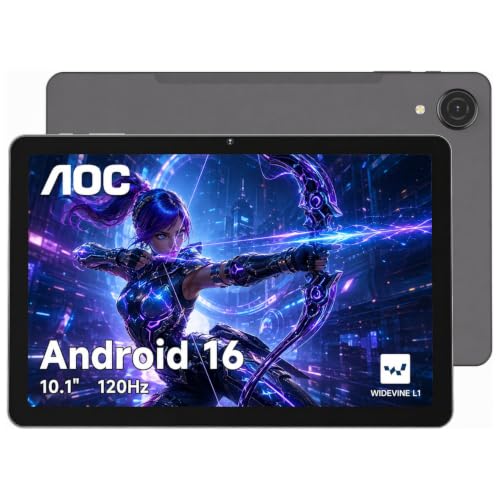
AOC 10 Inch Tablet Android 16

Our verdict: The cheapest 10-inch option with 128GB and a current Android version.

The AOC tablet gives you a 10-inch display, 128GB of storage and Android 16 at the lowest price in this comparison. For basic browsing, reading and video it covers the essentials without spending much.

It ranks last because the brand has a shorter track record on software support than Apple, Samsung or Amazon. Before buying, check how long it will receive security patches; a tablet that stops updating becomes a risk for a user who clicks on anything.

It is fine as a low-risk starter or a spare for a guest room. Skip it if you want a long update window.

Screen
10 in
Storage
128GB
System
Android 16
Bracket
$100 to $200

What we like

  • +Cheapest entry in the group
  • +128GB at a low price
  • +Current Android 16 software
  • +10-inch screen for easy reading

Watch out for

  • −Update support is uncertain
  • −Smaller brand support network

Buy it if: A low-cost starter or guest-room spare.

Skip it if: You need a tablet that stays supported for years.

Methodology

How We Ranked These

Interface simplicity

We scored how many steps a first-time user needs between unboxing and a working video call, and how often updates rearrange the home screen.

Screen size against weight

Eight to eleven inches is the useful range, so we weighed readability for aging eyes against hand fatigue.

Storage headroom

Storage from 32GB to 256GB was compared with how fast photos, apps and downloaded video fill it.

Support and update outlook

Brand track record on security updates and support channels was reviewed from listing details and owner reports.

Value for the bracket

Capability and build were scored against each tablet's price bucket, from $100 to $200 up to $200 to $500.

Every Primea Score uses the same weights: Performance 30% · Build & Materials 20% · Everyday Usability 20% · Value 20% · Owner Satisfaction 10%. Full scoring rules

Buyer's guide

How to Pick the Right One for You

By User Experience Level

Match the tablet to how much help the person will accept.

UserOur pick
Complete beginner, long-termApple iPad 11-inch: A16 chip
Comfortable with AndroidSamsung Galaxy Tab A11+ 6GB RAM
Needs managed, locked setupGrandPad Easy to Use Tablet & Phone for Seniors [Locked - Not
Reader or video watcherAmazon Fire HD 10 tablet

By Budget

SpendOur pick
$100 to $200 (large screen)Amazon Fire HD 10 tablet
$100 to $200 (compact)Amazon Fire HD 8 tablet
$100 to $200 (storage)Lenovo Idea Tab - College Tablet - 11″ 2.5K IPS Touchscreen Display -
$100 to $200 (lowest cost)AOC 10 Inch Tablet Android 16
$200 to $500Apple iPad 11-inch: A16 chip

iPad vs Android vs Fire Tablet

iPad

One interface, long update window, expensive. Pick: Apple iPad 11-inch: A16 chip.

Android and Fire

Android gives the broadest app choice (Samsung Galaxy Tab A11+, AOC, Lenovo). Fire tablets trade app choice for a simple tile layout and low prices (Fire HD 10, Fire HD 8).

Default to the iPad unless the budget or app needs point elsewhere.

By Screen Size

SizeOur pick
8 inches, one-handedAmazon Fire HD 8 tablet
10 inches, generalAmazon Fire HD 10 tablet
10 inches, lowest costAOC 10 Inch Tablet Android 16
11 inches, sharpestLenovo Idea Tab - College Tablet - 11″ 2.5K IPS Touchscreen Display -

For Seniors Specifically

Look for

Large icons, a screen of at least 10 inches, no required app store knowledge, and ideally a family member who can manage settings remotely.

In this ranking

The GrandPad for full lock-down with cellular, or the Apple iPad 11-inch for a normal tablet that stays predictable. The Fire HD 10 is the budget fallback.

When to Spend More

Spend more if

The user will keep the tablet for years, wants video calls and photo sharing, and you want fewer support calls. That points to the iPad 11-inch.

Save if

The tablet is for reading or shows, or you want a spare. The Fire HD 10 or Fire HD 8 will do the job.

Questions

Frequently Asked Questions

Do easy tablets work with my existing Wi-Fi?+

Yes, the iPad, Galaxy Tab, Fire and Lenovo models join standard home Wi-Fi networks. The GrandPad is the exception, since it relies on cellular connectivity. Check the listing for the service plan before you rely on it.

What is the biggest mistake when buying a tablet for a senior?+

Buying a powerful device and leaving without setting it up. Take time to remove unused apps, enlarge text, and add family contacts before you hand it over. A simple home screen does more good than a faster chip.

Is the iPad worth it over a Fire HD 10?+

If the person will use it for years and wants video calls, photos and email, yes. If they mainly read and watch shows, the Fire HD 10 does that for far less. The 32GB base storage is the Fire's main weakness.

How do I make an Android tablet simpler?+

Install a large-icon launcher, remove unused apps from the home screen, and raise the font size in display settings. Setting this once saves many questions. The Galaxy Tab A11+ and AOC both support this.

How much storage does a beginner need?+

At least 64GB if they take photos or download video. The Fire HD 10 at 32GB fills up fastest. The iPad and Galaxy Tab at 128GB, or the Lenovo at 256GB, give much more breathing room.

Should I worry about security updates on cheaper tablets?+

Yes, especially for someone who may tap suspicious links. Choose a brand with a published update policy, and check the AOC's support page before you buy. Apple, Samsung and Amazon have the clearest track records.

Final take

For most households the Apple iPad 11-inch is the safest answer: a consistent interface, 128GB of storage and years of use. Prefer Android and want more power? The Samsung Galaxy Tab A11+ is the one. For reading and streaming on a budget, the Amazon Fire HD 10 is hard to beat, and for a senior who will never manage settings, the GrandPad removes the hard parts. Set up the home screen yourself before gifting any of them.

More Ranked & Reviewed Guides