
Primea ReviewsAll Reviews

Primea Reviews is reader-supported. When you buy through our Amazon links we may earn a commission, at no extra cost to you. Rankings are set by our editors and never sold. Learn more

Ranked & Reviewed by Primea Reviews

The 7 Best Laptop Cooling Pads for Lap Use of 2026, Ranked & Reviewed

By the Primea Editorial TeamUpdated November 1, 202610 min read7 products ranked
The 7 Best Laptop Cooling Pads for Lap Use of 2026, Ranked & Reviewed

The short answer

The MAX SMART lap pad is the best choice here, with a silent USB fan, a heat shield and a detachable cushion. The TECKNET gives you two adjustable fans at the lowest price. The Targus mats are better for stability, and the passive LAPGEAR and AboveTEK suit buyers who want silence.

The Primea Scoreboard

Ranked & Reviewed

  1. Active cooling and a cushion in one lap pad.

    93Outstanding
    Check price
  2. Two adjustable fans and a flat base at the lowest bracket.

    90Excellent
    Check price
  3. A neoprene lap mat with two USB fans.

    87Excellent
    Check price
  4. A stable dual-fan mat that shields the lap from heat.

    85Excellent
    Check price
  5. A fold-flat lap table with a fan and five heights.

    83Very Good
    Check price
  6. Passive airflow with a wrist rest and mouse pad.

    81Very Good
    Check price
  7. A thin, passive lap desk with zero fan vibration.

    79Very Good
    Check price

A cooling pad meant for a desk can be miserable on the lap. Rigid metal risers have hard edges, no grip and a tippy balance, which is why the Gogoonike riser, a regular in the same searches, is absent from this list. A good lap pad cushions your legs, holds the laptop steady and moves heat away from both of you.

We kept seven products built or sold for lap use and ranked them on cooling method, cushioning, stability and laptop size fit, using listing details only. Fan noise, size limits and the price bracket got equal attention, so you can match a pad to the way you sit.

Before you buy

What Actually Matters

01

Active vs passive cooling

Active pads use fans to push air across the underside, while passive ones rely on shields and gaps. Fans cool more but add noise and need power. This matters for hot laptops. Check whether the listing names fans or a heat shield, and read how many fans there are.

02

Cushioning

A soft base protects your legs from hard edges and heat. Neoprene and air-mesh feel better than hard plastic. This matters for sessions longer than half an hour. Check the base material in the listing, such as the air-mesh cushion on the MAX SMART or the neoprene on the larger Targus.

03

Stability

A pad that slides is annoying and risky. Rubber strips, grips and stops hold the laptop in place on an uneven surface. Look for these words in the bullets. The Targus mats list rubber stops or grips, and the AboveTEK lists anti-slip surfaces and double rubber strips.

04

Laptop size

Every pad lists a maximum laptop size. A 15.6 inch laptop on a pad rated for 14 inches will overhang and tip. Check the number against your laptop. The TECKNET stops at 15.6 inches, while the MAX SMART handles up to 17.3 inches.

05

Power source

Cooling fans on these pads draw power over USB. Count free ports on your laptop and check the connector type. The TECKNET offers both USB-C and USB-A, which helps if ports are scarce. Look for the power source in the specs, and watch for a pass-through port.

In-depth reviews

Our Ranked Picks, Reviewed

1

Best Overall

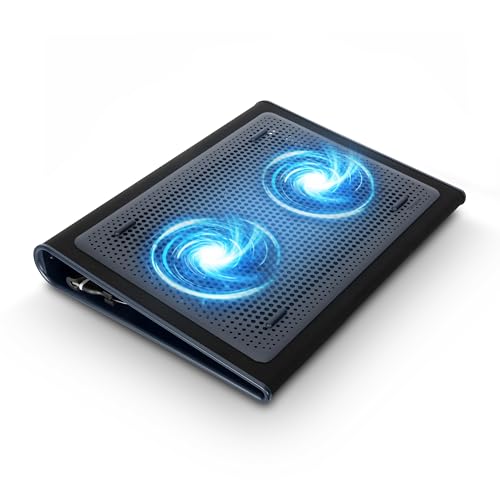
MAX SMART Laptop Lap Pad with Attached Mouse Pad, Cushion and USB Cooling Fan

Our verdict: Active cooling and a cushion in one lap pad.

The MAX SMART is a lap pad with an attached mouse pad, a detachable air-mesh cushion and a silent USB fan that doubles as a heat shield. It offers five tilt settings from 0 to 30 degrees and a reinforced no-wobble platform, fits laptops up to 17.3 inches, and sits in the $50 to $100 bracket.

It leads because it covers every lap-use need in one product: cushion, tilt, active cooling and a stable surface. The passive AboveTEK is quieter, but a fan gives the MAX SMART more cooling headroom for busy laptops.

Buy it for long sessions on a couch with a larger laptop. The caveat is noise and cost. The fan adds some sound, and it is the priciest pad on the list.

Cooling
USB fan plus heat shield
Tilt
5 settings, 0-30 degrees
Fit
Up to 17.3 inch
Cushion
Detachable air-mesh

What we like

  • +Fan plus cushion
  • +Five tilt settings
  • +No-wobble platform
  • +Fits 17.3 inch laptops

Watch out for

  • −Higher price bracket
  • −Fan adds some noise

Buy it if: Long couch sessions.

Skip it if: You want a silent pad.

2

Best Budget Fan Pad

TECKNET Laptop Cooling Pad, 12"-15.6" with Quiet Cooling Fan

Our verdict: Two adjustable fans and a flat base at the lowest bracket.

The TECKNET pad has two 110mm fans with adjustable speed, a flat base designed for lap comfort, USB-C and USB-A ports and a 3-year warranty. It fits 12 to 15.6 inch laptops and costs under $25.

It ranks second because it has no cushion, which the MAX SMART provides, and it stops at 15.6 inches. In return, you get the lowest price on the list, adjustable airflow and the longest warranty. Few budget accessories offer that mix of coverage.

Buy it if you have a 15.6 inch or smaller laptop and want active cooling on a small budget. Skip it if you carry a 17 inch machine, because it will overhang the pad. Add a thin blanket or towel if you need cushioning.

Fans
Two 110mm, adjustable
Ports
USB-C and USB-A
Fit
12-15.6 inch
Warranty
3 years

What we like

  • +Lowest price bracket
  • +Adjustable fan speed
  • +3-year warranty
  • +Flat lap-friendly base

Watch out for

  • −No cushion
  • −Max 15.6 inch laptops

Buy it if: Budget lap users.

Skip it if: You have a 17 inch laptop.

3

Best Soft Base

Targus 17 Inch Dual Fan Lap Chill Mat, Soft Neoprene

Our verdict: A neoprene lap mat with two USB fans.

The Targus 17 inch Dual Fan Lap Chill Mat has a soft neoprene base, two USB-powered fans, an ergonomic tilt and four rubber stops to keep the laptop from slipping. It handles laptops up to 17 inches, and costs $25 to $50.

It ranks third because the TECKNET offers similar fan cooling for less, and the MAX SMART adds a cushion and a larger feature set. What the Targus gains is a softer base, which feels better on the legs than a hard plastic frame.

Buy it if you want lap-first design with active airflow and a bigger screen size. Skip it if you prefer passive cooling, because the fans need USB power from the laptop, and that uses a port.

Base
Soft neoprene
Fans
Dual USB
Fit
Up to 17 inch
Grip
4 rubber stops

What we like

  • +Soft neoprene base
  • +Dual fans
  • +Rubber stops
  • +Tilt for typing

Watch out for

  • −Needs USB power
  • −No mouse pad

Buy it if: Lap-first cooling.

Skip it if: You want passive cooling.

4

Best Rigid Mat

Targus Chill Mat for up to 16-Inch Laptop

Our verdict: A stable dual-fan mat that shields the lap from heat.

Targus' Chill Mat for laptops up to 16 inches has dual fans, rubber grips and USB-A power drawn directly from the laptop. Its listing makes an explicit lap heat-protection claim. It costs $25 to $50.

It ranks below the neoprene Targus because it is more rigid and fits a smaller laptop. The grips keep the machine from sliding, which many lap pads struggle with, so stability is its strongest point. The trade is comfort: a firm base presses on your thighs.

Buy it if you want a steady mat with real fans. Skip it if you want a soft base, in which case the neoprene Targus is the better choice. Check that your laptop is no bigger than 16 inches.

Fans
Dual, active
Power
USB-A from laptop
Fit
Up to 16 inch
Grips
Rubber

What we like

  • +Dual fans
  • +Rubber grips
  • +Lap heat protection
  • +USB powered

Watch out for

  • −Rigid base
  • −Max 16 inch

Buy it if: Stable mat seekers.

Skip it if: You want a soft base.

5

Best Raised Table

Laptop Desk for Bed with Cooling Fan, SAIJI Lap Desk Tray Table

Our verdict: A fold-flat lap table with a fan and five heights.

The SAIJI is a fold-flat lap desk with metal legs rated to 80 lbs, a built-in USB cooling fan, five heights from 9.4 to 12.6 inches and four tilt angles. The wood desktop measures 20.3 by 11.8 inches, folds to 1.8 inches thick, and costs $25 to $50.

It ranks fifth because it is a table rather than a pad resting on the lap. That gives it stability and cooling distance, but it takes more room and the desktop is small.

Buy it for working in bed or on a couch, where a raised surface beats balancing a laptop on your knees. Skip it if you want a thin pad that slides into a bag, since the legs and frame make it bulkier.

Legs
Metal, 80 lbs
Heights
9.4-12.6 inch, 5 levels
Top
20.3 x 11.8 inch wood
Folded
1.8 inch thick

What we like

  • +Five heights
  • +Built-in fan
  • +Folds flat
  • +Stable legs

Watch out for

  • −Bulkier than a pad
  • −Small desktop

Buy it if: Bed and couch work.

Skip it if: You want a thin pad.

6

Best Wrist Support

LAPGEAR Home Office Pro Lap Desk, Fits 15.6" Laptops

Our verdict: Passive airflow with a wrist rest and mouse pad.

The LAPGEAR Home Office Pro is a lap desk with a dual bolster cushion for comfort and passive airflow. It adds a cushioned wrist rest, a 5 by 9 inch mouse pad, a 21.1 by 14.1 inch platform and a carry handle. It weighs 2.8 lbs and costs $25 to $50.

It ranks sixth because it has no fan, which is the main tradeoff against the MAX SMART. The wrist support and large platform make it comfortable for typing, but a hot laptop needs more than gaps in the bolsters.

Buy it if wrist comfort and a roomy surface matter and your laptop runs cool. Skip it if your machine heats up under load, because passive airflow only goes so far.

Platform
21.1 x 14.1 inch
Weight
2.8 lbs
Cooling
Passive bolsters
Extras
Wrist rest, mouse pad

What we like

  • +Wrist rest
  • +Mouse pad included
  • +Carry handle
  • +Cushioned bolsters

Watch out for

  • −No fan
  • −Heavier than thin pads

Buy it if: Wrist comfort.

Skip it if: Your laptop runs hot.

7

Best Silent

AboveTEK Portable Laptop Lap Desk with Retractable Mouse Pad Tray

Our verdict: A thin, passive lap desk with zero fan vibration.

The AboveTEK portable lap desk weighs 2.2 lbs and measures 0.6 inches thick, with an anti-slip surface, double rubber strips, a passive heat-shield design and a retractable mouse tray. It fits laptops up to 15.6 inches and costs $25 to $50.

It ranks last because it offers no active cooling. Its upside is balance and silence: there is no fan vibration, and the low profile sits comfortably on a lap. The heat shield protects your legs, though it will not lower the laptop's temperature much.

Buy it if you want a quiet, thin lap desk and your laptop runs cool. Skip it for gaming laptops or long video edits, which need a fan pad such as the MAX SMART.

Weight
2.2 lbs
Thickness
0.6 inch
Cooling
Passive heat shield
Fit
Up to 15.6 inch

What we like

  • +No fan vibration
  • +Low profile
  • +Anti-slip surface
  • +Retractable mouse tray

Watch out for

  • −No active cooling
  • −Max 15.6 inch

Buy it if: Silent, balanced lap use.

Skip it if: You need active cooling.

Methodology

How We Ranked These

Lap suitability

We kept only products built or marketed for lap use.

Cooling approach

Active fans and passive shields were compared.

Stability

Grip, rubber stops and platform design were weighed.

Comfort

Cushions, bolsters and wrist supports counted.

Laptop fit

Stated maximum sizes were compared.

Every Primea Score uses the same weights: Performance 30% · Build & Materials 20% · Everyday Usability 20% · Value 20% · Owner Satisfaction 10%. Full scoring rules

Buyer's guide

How to Pick the Right One for You

By Cooling Style

Decide on fans first.

PreferenceOur pick
Fan plus cushionMAX SMART Lap Pad
Adjustable fans, cheapTECKNET Cooling Pad
Dual fans, soft baseTargus 17 Inch Dual Fan Lap Chill Mat
No fan noiseAboveTEK Lap Desk
Passive with wrist restLAPGEAR Home Office Pro

By Budget

SpendOur pick
Under $25TECKNET Cooling Pad
$25-50Targus 17 Inch Dual Fan Lap Chill Mat
$50-100MAX SMART Lap Pad

Pad vs Lap Table

Pad

Rests directly on legs. MAX SMART, TECKNET, both Targus, AboveTEK and LAPGEAR.

Table

Raised surface over the lap. SAIJI Lap Desk.

Most buyers should default to a pad.

By Laptop Size

LaptopOur pick
12-15.6 inchTECKNET Cooling Pad
Up to 16 inchTargus Chill Mat
Up to 17 inchTargus 17 Inch Dual Fan Lap Chill Mat
Up to 17.3 inchMAX SMART Lap Pad

For Bed and Couch Use Specifically

Look for

A stable surface with adjustable height or tilt.

In this ranking

SAIJI Lap Desk, with five heights and 80 lb legs.

When to Spend More

Spend more if

You want fan plus cushion in one, as with the MAX SMART.

Save if

You just need airflow, where TECKNET works.

Questions

Frequently Asked Questions

Do cooling pads work on a lap?+

Fan pads move air across the underside, and flat bases like the TECKNET are designed for lap comfort. How much they help depends on your laptop, but a cushion and heat shield protect your legs either way.

Common mistake?+

Using a desk riser on the lap. Rigid metal stands have no cushion or grip, which is why we left the Gogoonike riser out. Choose a pad built for lap use, like the MAX SMART.

Is the MAX SMART worth it over TECKNET?+

If you want a cushion, a heat shield and a 17.3 inch fit, yes. The TECKNET is cheaper, has two adjustable fans and a long warranty, but it has no cushion.

How do I power the fan?+

Most pads use USB. The TECKNET offers both USB-C and USB-A, while the Targus mats draw power over USB-A. Check which ports your laptop has before ordering.

Maintenance?+

Wipe the surface with a damp cloth and clear dust from the fan openings regularly. On the MAX SMART, remove the cushion to clean it, and keep the fan area free of lint.

Why was the Gogoonike riser left out?+

Its listing says desk-only, with no cushioning for the lap. A metal riser can be uncomfortable and unstable on your legs, so it does not belong in a lap-use ranking.

Final take

The MAX SMART is the best all-rounder for long lap sessions, with active cooling and a cushion. The TECKNET is the budget answer for 15.6 inch laptops, and the Targus neoprene mat adds softness. Pick the LAPGEAR or AboveTEK if your laptop runs cool and quiet matters, and the SAIJI when you work from bed.

More Ranked & Reviewed Guides