

Primea ReviewsAll Reviews

Primea Reviews is reader-supported. When you buy through our Amazon links we may earn a commission, at no extra cost to you. Rankings are set by our editors and never sold. Learn more

Ranked & Reviewed by Primea Reviews

The 6 Best Cooling Pads for 15.6 Inch Laptops in 2026, Ranked & Reviewed

By the Primea Editorial TeamUpdated November 3, 20269 min read6 products ranked
The 6 Best Cooling Pads for 15.6 Inch Laptops in 2026, Ranked & Reviewed

The short answer

The TECKNET nine-fan pad is the cooling pad to buy for a 15.6 inch laptop that you want quiet, with a 12 to 15.6 inch fit, stepless speed and a stated noise level under 40dB. The llano V12 is the pick for a demanding gaming or workstation machine, and the ChillCore suits a laptop with vents on the top and bottom.

The Primea Scoreboard

Ranked & Reviewed

  1. Nine fans, stepless speed to 2600 RPM and a stated noise under 40dB, sized to top out at 15.6 inches.

    94Outstanding
    Check price
  2. 02
    llano V12 Gaming Laptop Cooling Pad

    Best for Demanding Loads

    llano V12 Gaming Laptop Cooling Pad

    A 5.5 inch turbo fan with a dust filter and a 36W supply for heavy gaming or workstation use.

    92Outstanding
    Check price
  3. Nine fans cover top and bottom vents, with eight heights and an LCD readout.

    89Excellent
    Check price
  4. Three ultra-quiet fans on a slim USB-powered pad sized for the 15.6 inch class.

    86Excellent
    Check price
  5. Five fans with selectable modes, six heights and a dual USB hub, under $25.

    83Very Good
    Check price
  6. Seven height settings, independent fan groups and a phone holder at a budget price.

    80Very Good
    Check price

The 15.6 inch laptop is the most common size sold, which is why it is the easiest to get wrong. Pads are sold in ranges that straddle it, such as 12 to 15.6 or 15.6 to 17, and a 15.6 inch laptop sits on the boundary of both. At the top of a range the machine fills the pad, and at the bottom it sits in the middle with a lot of overhang on each side.

So fit comes first in this ranking, then airflow and noise. We looked at six pads that explicitly list 15.6 inches in their range, and compared fan layout, speed control, height settings and the claims each maker makes. We reviewed listings and specification sheets only, and temperature or noise figures are manufacturer statements, not measurements.

Before you buy

What Actually Matters

01

Range boundary

A 15.6 inch laptop sits at the edge of many ranges. At the top of a 12 to 15.6 inch pad it fits snugly, and at the bottom of a 15.6 to 19 inch pad it sits in a large frame. Either works, but check how the fans line up with your vents.

02

Fan position vs vents

Cooling happens only if the fans sit under your intake vents. Look at the underside of your laptop and match it to the pad's fan layout. Wide arrays are more forgiving.

03

Noise versus airflow

A turbo blower is the loudest and strongest, and many small fans are gentler. A speed dial or modes let you pick. Treat noise figures as manufacturer claims.

04

Weight support

15.6 inch gaming laptops are heavy, and a flimsy pad can sag. Metal mesh tops and reinforced frames hold up better. Check the listing for materials.

05

Power and ports

USB-powered pads use a port, and larger models use an adapter. Pass-through USB ports give one back. Check what your laptop offers.

In-depth reviews

Our Ranked Picks, Reviewed

1

Best Quiet Airflow

TECKNET Laptop Cooling Pad with Phone Stand, 12 to 15.6 Inch

Our verdict: Nine fans, stepless speed to 2600 RPM and a stated noise under 40dB, sized to top out at 15.6 inches.

The TECKNET lists a 12 to 15.6 inch range, nine fans with stepless speed up to 2600 RPM, a stated noise figure under 40dB and five height settings. It costs $25 to $50.

Being sized to end at 15.6 inches means a laptop of exactly that size sits fully supported with the fan array under it. A stepless dial lets you tune noise precisely, and the stated figure is rare in this category. It leads because few other pads combine a snug fit with documented noise.

Buy it if your laptop is 15.6 inches or smaller and noise matters. Skip it if you might upgrade to a bigger machine.

Fit range
12 to 15.6 inch
Fans
9, stepless to 2600 RPM
Noise
Under 40dB stated
Height
5 settings

What we like

  • +Snug fit at 15.6 inches
  • +Stated noise under 40dB
  • +Stepless speed control
  • +Five height settings

Watch out for

  • −Will not fit larger laptops
  • −Mid-range price tier

Buy it if: 15.6 inch laptops used in quiet rooms.

Skip it if: You may upgrade to a 17 inch laptop.

2

Best for Demanding Loads

llano V12 Gaming Laptop Cooling Pad

Our verdict: A 5.5 inch turbo fan with a dust filter and a 36W supply for heavy gaming or workstation use.

The V12 lists a 15.6 to 19 inch range, a 5.5 inch turbo fan with noise up to 70dB, three tilt angles, a 36W power output and a dust filter. It costs $50 to $100.

A 15.6 inch laptop is the bottom of its range, so the sealed airflow path lines up well with the intake of a thick gaming machine. Documented thermal intent makes it the choice if your laptop throttles. Its noise rating is the price you pay.

Buy it if your 15.6 inch laptop is a hard-working gaming or workstation model. Skip it if you want quiet.

Fit range
15.6 to 19 inch
Fan
5.5 inch turbo, up to 70dB
Tilt
3 angles
Power
36W, dust filter

What we like

  • +Turbo fan targets sustained heat
  • +Removable dust filter
  • +Three tilt angles
  • +Strong build for heavy laptops

Watch out for

  • −Loud at full speed
  • −Needs an external power brick

Buy it if: Gaming and workstation laptops that throttle.

Skip it if: You need near-silent operation.

3

Best Vent Coverage

ChillCore Laptop Cooling Pad, 9 Fans for 15.6 to 19.3 Inch Laptops

Our verdict: Nine fans cover top and bottom vents, with eight heights and an LCD readout.

The ChillCore lists a 15.6 to 19.3 inch range, nine fans covering top and bottom vents, eight height settings, an LCD display and ten RGB modes. It costs $25 to $50.

If your 15.6 inch gaming laptop exhausts heat from multiple vents, a wide array reaches more of them than a single blower can. The LCD readout shows the speed you have set. It ranks third because nine smaller fans move air gently and the RGB modes add little.

Buy it if your laptop has vents across the base. Skip it if you want strong focused pressure.

Fit range
15.6 to 19.3 inch
Fans
9, top and bottom coverage
Height
8 settings
Display
LCD and 10 RGB modes

What we like

  • +Covers several vent zones
  • +Eight height settings
  • +LCD speed readout
  • +Fits up to 19.3 inches

Watch out for

  • −Smaller fans move less air
  • −RGB adds little value

Buy it if: 15.6 inch gaming laptops with spread-out vents.

Skip it if: You want a focused blower.

4

Best Slim Quiet Pad

havit HV-F2056 15.6 to 17 Inch Laptop Cooler, Slim Portable USB Powered

Our verdict: Three ultra-quiet fans on a slim USB-powered pad sized for the 15.6 inch class.

The havit HV-F2056 lists a 15.6 to 17 inch range, three ultra-quiet fans, two height settings and an extra USB port. It costs $25 to $50.

It is sized specifically for the 15.6 inch class, with a slim design that carries well. Three fans at a gentle speed keep noise modest. It ranks fourth because it offers fewer heights and less airflow than the nine-fan pads.

Buy it if you want a slim, proven pad. Skip it if you want the most airflow.

Fit range
15.6 to 17 inch
Fans
3 ultra-quiet
Height
2 settings
Ports
Extra USB port

What we like

  • +Slim and portable
  • +Quiet three-fan design
  • +Extra USB port
  • +Sized for 15.6 inches

Watch out for

  • −Only two heights
  • −Less airflow than nine-fan pads

Buy it if: Slim carry-around cooling for 15.6 inch laptops.

Skip it if: You want maximum airflow.

5

Best Selectable Modes

Kootek Laptop Cooling Pad Cooler Stand with 5 Quiet Fans, 12 to 17 Inch

Our verdict: Five fans with selectable modes, six heights and a dual USB hub, under $25.

The Kootek has five fans with selectable modes, six height settings and a dual USB hub, fitting 12 to 17 inch laptops. It costs under $25.

A 15.6 inch laptop sits in the middle of its range, so the fan array lines up with most intakes. Selectable modes let you drop fans for quiet and add them for load. It ranks fifth because it lacks a stated noise figure.

Buy it if you want flexibility at the lowest price. Skip it if you want documented noise.

Fit range
12 to 17 inch
Fans
5 with selectable modes
Height
6 settings
Ports
Dual USB hub

What we like

  • +Selectable fan modes
  • +Six heights
  • +Dual USB hub
  • +Under $25

Watch out for

  • −No noise figure
  • −Plastic frame feel

Buy it if: Flexible budget cooling for 15.6 inch laptops.

Skip it if: You want documented noise.

6

Most Height Options

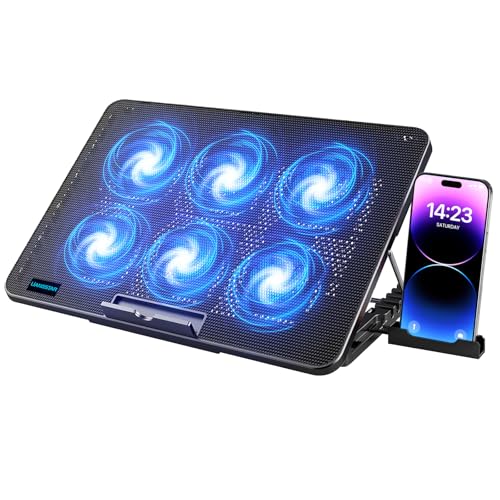
LIANGSTAR Laptop Cooling Pad with 6 Quiet Fans for 12 to 17 Inch

Our verdict: Seven height settings, independent fan groups and a phone holder at a budget price.

The LIANGSTAR lists six fans in independent groups, seven height settings, a phone holder and dual USB ports for 12 to 17 inch laptops. It costs under $25.

The seven heights are the widest choice in this ranking, which helps typing posture. The independent groups let you run only half the fans. It ranks last since it is a plainer pad than the others for cooling.

Buy it if height flexibility is your priority. Skip it if you need strong cooling.

Fit range
12 to 17 inch
Fans
6 in independent groups
Height
7 settings
Extras
Phone holder, dual USB

What we like

  • +Seven height settings
  • +Independent fan groups
  • +Phone holder
  • +Under $25

Watch out for

  • −Modest cooling power
  • −Plain build

Buy it if: Typing comfort and light cooling.

Skip it if: Your laptop runs very hot.

Methodology

How We Ranked These

15.6 inch fit

We rewarded pads whose stated range includes 15.6 inches and noted where it sits at the top or bottom of the range.

Airflow design

Blower, nine-fan and fewer-fan layouts were compared for the intakes of typical 15.6 inch laptops.

Noise and control

Stated noise, stepless dials, modes and independent fan groups were weighed.

Ergonomics

Height settings, tilt angles and USB hubs were scored for desk use.

Value

Each pad was judged within the under $25, $25 to $50 and $50 to $100 tiers.

Every Primea Score uses the same weights: Performance 30% · Build & Materials 20% · Everyday Usability 20% · Value 20% · Owner Satisfaction 10%. Full scoring rules

Buyer's guide

How to Pick the Right One for You

By Laptop Type

Laptop use decides how much cooling you need.

LaptopOur pick
Quiet office laptopTECKNET Laptop Cooling Pad with Phone Stand, 12 to 15.6 Inch
Demanding gaming laptopllano V12 Gaming Laptop Cooling Pad
Gaming laptop with spread ventsChillCore Laptop Cooling Pad, 9 Fans for 15.6 to 19.3 Inch Laptops
Everyday slim laptophavit HV-F2056 15.6 to 17 Inch Laptop Cooler, Slim Portable USB Powered

By Budget

SpendOur pick
Under $25 (modes)Kootek Laptop Cooling Pad Cooler Stand with 5 Quiet Fans, 12 to 17 Inch
Under $25 (height)LIANGSTAR Laptop Cooling Pad with 6 Quiet Fans for 12 to 17 Inch
$25 to $50TECKNET Laptop Cooling Pad with Phone Stand, 12 to 15.6 Inch
$50 to $100llano V12 Gaming Laptop Cooling Pad

Blower vs Fan Array

Blower

A single large fan builds pressure and targets the intake, at the cost of noise. Pick: llano V12.

Fan array

Many smaller fans cover more area quietly. Picks: TECKNET, ChillCore, Kootek, LIANGSTAR and havit.

Default to a fan array unless your laptop throttles under sustained load.

By Noise Priority

PriorityOur pick
Lowest stated noiseTECKNET Laptop Cooling Pad with Phone Stand, 12 to 15.6 Inch
Choose fan countKootek Laptop Cooling Pad Cooler Stand with 5 Quiet Fans, 12 to 17 Inch
Quiet and slimhavit HV-F2056 15.6 to 17 Inch Laptop Cooler, Slim Portable USB Powered
Maximum coolingllano V12 Gaming Laptop Cooling Pad

For a Gaming Laptop Specifically

Look for

A fan that sits under your intake, a sturdy frame, and a power supply that does not tax a laptop USB port.

In this ranking

The llano V12 has a turbo fan and its own power supply, and the ChillCore covers multiple vent zones.

When to Spend More

Spend more if

Your laptop throttles in long sessions. The llano V12 justifies its tier.

Save if

You do light work. The Kootek or LIANGSTAR costs under $25.

Questions

Frequently Asked Questions

Which pad size is right for a 15.6 inch laptop?+

Any pad whose range includes 15.6 inches. For a snug fit, choose one that tops out at 15.6, and for a larger frame, choose one that starts there.

What is the common mistake?+

Ignoring where the vents are. A pad whose fans do not sit under your intake does little.

Is the llano worth it over the TECKNET?+

If your laptop throttles, yes, for the turbo fan. If you want quiet, the TECKNET is better.

How hard is setup?+

Place the laptop on the pad, plug in USB or the adapter, and set the fan speed or height.

How do I clean the fans?+

Unplug and brush the grilles every few months. A removable dust filter, like on the llano, helps.

Do pads work with side-vent laptops?+

Less well. Pads help most with bottom intakes, so check where your vents are.

Final take

For a 15.6 inch laptop in a quiet room, the TECKNET nine-fan pad is the best choice here, with a snug fit and a stated noise level under 40dB. The llano V12 is the one for gaming and workstation loads, and the ChillCore suits wide vent layouts. Check where your vents are before you buy.

More Ranked & Reviewed Guides