
Primea ReviewsAll Reviews

Primea Reviews is reader-supported. When you buy through our Amazon links we may earn a commission, at no extra cost to you. Rankings are set by our editors and never sold. Learn more

Ranked & Reviewed by Primea Reviews

The 5 Best Budget Laptop Cooling Pads of 2026, Ranked & Reviewed

By the Primea Editorial TeamUpdated November 1, 20269 min read5 products ranked
The 5 Best Budget Laptop Cooling Pads of 2026, Ranked & Reviewed

The short answer

The KYOLLY is the best budget laptop cooling pad, pairing five height levels with a rolling speed wheel under $25. The LIENS is the lightest at 1.65 lbs, and the TECKNET carries the longest stated warranty at 3 years. The AIMIUZI and Kootek chase fan count, but each leaves out something a rival lists.

The Primea Scoreboard

Ranked & Reviewed

  1. Height and speed control at the lowest price tier.

    92Outstanding
    Check price
  2. The lightest pad here at 1.65 lbs.

    89Excellent
    Check price
  3. Five fans and a 12 month warranty.

    85Excellent
    Check price
  4. A 3 year stated warranty and a 30 day return.

    82Very Good
    Check price
  5. Run one, four or five fans as needed.

    79Very Good
    Check price

Cheap cooling pads tend to hide their weak point in the stand, not the fan. A flimsy tilt mechanism or a loose surface costs you more comfort than a slightly slower fan ever will, because the pad's real job is to lift the laptop so air can reach its intake vents. Fans only move that air.

We reviewed eight budget pads and ranked five on height range, weight, warranty, speed control and fan setup. All five sit under $25, so price barely separates them and the decision comes down to features. Everything comes from listings, so this is an on paper comparison. The useful question is which missing spec you can live without, whether that is a speed control, a stated warranty or a listed weight.

Before you buy

What Actually Matters

01

Height settings

Height settings tilt the laptop to move the keyboard to a comfortable wrist angle and to open the gap under the intake vents. More steps let you tune both. The Kootek lists six settings, the KYOLLY and AIMIUZI five, and the LIENS four. Check the count and the range in inches, since a pad with high steps still may not suit you.

02

Speed control

A dial or wheel lets you run the fans quietly while browsing and push them harder for rendering or games. Without one, the fans run at their set speed all the time. The KYOLLY has a rolling wheel, the TECKNET a dial, and the LIENS an 800 to 2000 RPM range. Look for the control type in the bullets.

03

Weight

A pad over 2 lbs feels heavy in a laptop bag, and weight stacks on top of the laptop itself. The LIENS lists 1.65 lbs, the only weight in this group. If a listing gives none, check the manufacturer page or a retailer Q and A before you plan to carry it every day.

04

Warranty

Budget pads fail most often at the fan or the USB hub, so a stated warranty gives you somewhere to turn. The TECKNET lists 3 years and the AIMIUZI 12 months, while the Kootek and LIENS list none. Look for the length and whether it is the seller's or the manufacturer's, and keep your order record.

05

Laptop size

Pads are sized to a laptop range. The KYOLLY and TECKNET fit up to 15.6 inches. A bigger laptop will overhang, leaving fans out of line with the intake vents. Match the range in the title to your screen size, and measure your laptop base if you are close to the edge.

In-depth reviews

Our Ranked Picks, Reviewed

1

Best Overall

KYOLLY Ultra Slim Laptop Cooling Pad with 2 Quiet Big Fans

Our verdict: Height and speed control at the lowest price tier.

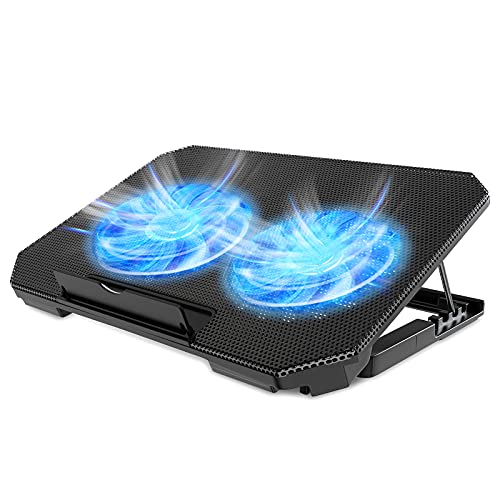
The KYOLLY has two fans under a metal mesh surface, five height levels, a rolling wheel for speed and two USB ports. It fits laptops from 10 to 15.6 inches and costs under $25. The height range is the headline: tilting a laptop changes both your wrist angle and how much air reaches the underside intake, so five steps let you tune each.

It ranks first because it keeps both adjustable height and a speed wheel at the entry price. The Kootek and AIMIUZI list more fans but no wheel, so they run at full noise. The LIENS has one fewer height setting, and the TECKNET offers a speed dial but only two fans.

Buy it for a student laptop in the 10 to 15.6 inch range. The caveat is size: it stops at 15.6 inches, and only two fans means less coverage on a large gaming machine.

Fans
2 with metal mesh
Height
5 levels
Control
Rolling wheel speed
Fits
10 to 15.6 inch laptops

What we like

  • +Rolling speed wheel
  • +Five height levels
  • +Metal mesh surface
  • +Under $25 tier

Watch out for

  • −Stops at 15.6 inches
  • −Only two fans

Buy it if: Students with small laptops.

Skip it if: You use a 17 inch laptop.

2

Lightest Pick

LIENS Laptop Cooling Pad with Adjustable Height, Two 5.1 Inch Fans

Our verdict: The lightest pad here at 1.65 lbs.

The LIENS has two 5.1 inch fans running 800 to 2000 RPM, four height settings from 2.3 to 5.1 inches and two USB ports. It weighs 1.65 lbs. That wide RPM range matters because you can run it near silent for browsing and near full for a heavy video export. Weight is the rarer spec on a budget pad.

It ranks second because it is the easiest to carry and still tunes fan speed, but it offers one fewer height setting than the KYOLLY and lists no warranty. Against the AIMIUZI, it gives up fan count but wins on speed control and weight, which are the two specs the AIMIUZI never states.

Buy it for a commuter bag or a coffee shop desk. The caveat is support: with no warranty listed, a failed fan means a replacement, not a repair claim.

Fans
Two 5.1 inch, 800-2000 RPM
Height
4 settings, 2.3-5.1 in
Ports
2 USB
Weight
1.65 lbs

What we like

  • +Light at 1.65 lbs
  • +Wide RPM range
  • +Four height settings
  • +Under $25 tier

Watch out for

  • −Fewer heights than top pick

Buy it if: Commuters carrying the pad daily.

Skip it if: You want a warranty stated.

3

Most Fan Hardware

AIMIUZI Laptop Cooling Pad, 5 Quiet Fans

Our verdict: Five fans and a 12 month warranty.

The AIMIUZI uses one small and four large fans under a honeycomb metal mesh, with five height settings, two USB ports and a stated 12 month warranty. Five fans spread airflow across more of the laptop's underside, which suits machines with intake vents in several spots.

It ranks third because it brings more fan hardware than the KYOLLY, yet lists no speed control or weight. Without a wheel or dial, you cannot throttle those five fans, so quiet use depends on the pad's default noise. It does beat the Kootek on warranty, since Kootek states none.

Buy it if you want airflow coverage across the whole base and a warranty. The caveat is noise control: there is no way to dial it down, so check owner feedback on sound if you work in a quiet room.

Fans
1 small plus 4 large
Surface
Honeycomb metal mesh
Height
5 settings
Warranty
12 months stated

What we like

  • +Five fans
  • +Honeycomb mesh surface
  • +Five height settings
  • +12 month warranty

Watch out for

  • −No speed control listed

Buy it if: Buyers wanting airflow coverage and a warranty.

Skip it if: You want to tune fan speed.

4

Best Warranty

TECKNET Laptop Cooling Pad with Quiet Cooling Fan

Our verdict: A 3 year stated warranty and a 30 day return.

The TECKNET has two 110mm fans, USB-C and USB-A ports, an adjustable speed dial, a 30 day return and a 3 year stated warranty. It fits 12 to 15.6 inch laptops. The warranty is the longest here, and that matters because budget pads usually fail at the fan bearing or the USB hub.

It ranks fourth because two fans give it less coverage than the AIMIUZI's five, and it lists no height range in our data. But it beats that pad on warranty length (3 years against 12 months) and adds a speed dial. Against the LIENS it trades weight information for the longer warranty.

Buy it if you want recourse if the pad fails. The caveat is the fan count and the 15.6 inch ceiling, which leaves larger laptops overhanging the edge.

Fans
Two 110mm
Ports
USB-C and USB-A
Warranty
3 years stated
Fits
12 to 15.6 inch laptops

What we like

  • +3 year warranty
  • +Speed dial
  • +USB-C port
  • +30 day return

Watch out for

  • −Only two fans
  • −Stops at 15.6 inches

Buy it if: Buyers who value warranty coverage.

Skip it if: You want maximum fan count.

5

Best Fan Staging

Kootek Laptop Cooling Pad Cooler Stand with 5 Quiet Fans

Our verdict: Run one, four or five fans as needed.

The Kootek has one large and four small fans with staged control of 1, 4 or 5, six height settings, a dual USB hub and blue LED indicators. Staged control is unusual: you run one fan for light work and bring in more as the laptop heats up, which keeps noise down at idle.

It ranks last only because the other four list a warranty, weight or speed dial, and it lists none of them. It does have the most height settings, six against five on the KYOLLY, and the staged fans give more control than the AIMIUZI's all-or-nothing five.

Buy it if you want to scale airflow as the workload changes. The caveat is the missing warranty. A pad with five fans has five parts that can fail, and you have no stated coverage if one does.

Fans
1 large plus 4 small
Control
Staged 1, 4 or 5 fans
Height
6 settings
Hub
Dual USB

What we like

  • +Staged fan control
  • +Six height settings
  • +Dual USB hub
  • +Under $25 tier

Watch out for

  • −No warranty listed

Buy it if: Buyers wanting scalable multi-fan airflow.

Skip it if: You want a stated warranty.

Methodology

How We Ranked These

Height range

Number and span of tilt settings, since posture depends on them.

Fan setup

Fan count, size and any speed control were compared on paper.

Portability

Listed weight counted for people who travel.

Warranty

Stated coverage and returns were treated as value.

Value tier

All five sit in the cheapest buckets, so features decided order.

Every Primea Score uses the same weights: Performance 30% · Build & Materials 20% · Everyday Usability 20% · Value 20% · Owner Satisfaction 10%. Full scoring rules

Buyer's guide

How to Pick the Right One for You

By Priority

Pick the thing you care about most.

PriorityOur pick
Best all-roundKYOLLY Ultra Slim Cooling Pad
PortabilityLIENS Cooling Pad
Airflow coverageAIMIUZI 5-Fan Cooling Pad
Longest warrantyTECKNET Cooling Pad

By Budget

SpendOur pick
Under $25, controlKYOLLY Ultra Slim Cooling Pad
Under $25, lightLIENS Cooling Pad
Under $25, warrantyTECKNET Cooling Pad
Under $25, stagingKootek 5-Fan Cooling Pad

Few Big Fans vs Many Small Fans

Few big fans

Quieter airflow. The KYOLLY and LIENS use two large fans.

Many small fans

Wider coverage. The AIMIUZI and Kootek use five.

Most buyers should default to two large fans for quiet use.

By How You Use It

UseOur pick
Carried dailyLIENS Cooling Pad
Desk useKootek 5-Fan Cooling Pad
Class and libraryKYOLLY Ultra Slim Cooling Pad

For Students Specifically

Look for

Light weight, quiet fans and enough height settings for a dorm desk.

In this ranking

The LIENS is lightest at 1.65 lbs and the KYOLLY adds a speed wheel.

When to Spend More

Spend more if

You want a USB-C hub or larger size support beyond these pads.

Save if

Your laptop only warms up on calls, where the KYOLLY is enough.

Questions

Frequently Asked Questions

Are cheap pads worth it?+

For a laptop that runs warm, yes. A pad like the KYOLLY lifts the machine and moves air under it, which can help sustained loads. It will not fix a failing fan or a blocked internal vent.

What is the common mistake?+

Buying by fan count. The AIMIUZI and Kootek have five fans each, but the KYOLLY with two fans and a speed wheel is better for noise control. Fan size and speed control matter as much.

Is the TECKNET worth it over the AIMIUZI?+

If you want the 3 year warranty, yes. The TECKNET lists it against the AIMIUZI's 12 months. The AIMIUZI has five fans to the TECKNET's two, so choose on whether coverage or airflow matters more.

How do I set one up?+

Plug the pad into a USB port, set the laptop on it and choose a tilt that keeps your wrists flat. Start at a low fan speed on the KYOLLY or LIENS and raise it only if the laptop gets hot.

How do I clean it?+

Unplug it first, then brush dust from the fan blades and the mesh with a soft brush. Do not spray liquid into the fans. Dust buildup is the usual cause of rising fan noise on pads like the AIMIUZI.

Does it fit a 17 inch laptop?+

None of the five lists support for 17 inch laptops. The KYOLLY and TECKNET stop at 15.6 inches, so check the range in each listing before you order for a large machine.

Final take

Buy the KYOLLY for the best mix of height and speed control. Commuters will prefer the lighter LIENS, and anyone who worries about early fan failure should pick the TECKNET for its 3 year stated warranty. Check the laptop size range first, since none of these lists support beyond 15.6 inches.

More Ranked & Reviewed Guides