


Primea ReviewsAll Reviews

Primea Reviews is reader-supported. When you buy through our Amazon links we may earn a commission, at no extra cost to you. Rankings are set by our editors and never sold. Learn more

Ranked & Reviewed by Primea Reviews

The 6 Best Plug-In Wi-Fi Extenders of 2026, Ranked & Reviewed

Joshua ParkesBy Joshua Parkes, Editor in ChiefUpdated November 11, 202610 min read6 products ranked
The 6 Best Plug-In Wi-Fi Extenders of 2026, Ranked & Reviewed

The short answer

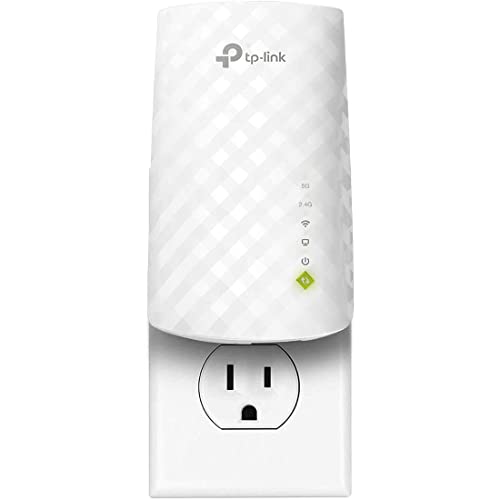
The TP-Link RE615X Wi-Fi 6 extender is the best pick for most homes, with AX1800 speed, listed coverage up to 2100 sq ft and an Ethernet port. The TP-Link RE550 is the cheaper Wi-Fi 5 choice for multi-floor homes, the NETGEAR EX5000 is the easiest to set up, and the PEDUMMY adds an access point mode.

The Primea Scoreboard

Ranked & Reviewed

  1. A Wi-Fi 6 AX1800 extender with 1.8 Gbps total bandwidth, listed coverage to 2100 sq ft and an Ethernet port.

    93Outstanding
    Check price
  2. An AC1900 dual-band extender with three adjustable antennas and listed coverage to 2100 sq ft.

    90Excellent
    Check price
  3. An AC1200 extender with Nighthawk app or WPS setup and listed coverage of 1500 sq ft.

    87Excellent
    Check price
  4. A 1200Mbps dual-band extender with an Ethernet LAN port and an access point mode.

    84Very Good
    Check price
  5. An AC1200 extender with 867 Mbps on 5 GHz, two adjustable antennas and listed coverage of 1500 sq ft.

    81Very Good
    Check price
  6. A dual-band extender with an Ethernet port and listed coverage of 1200 sq ft, under $25.

    78Very Good
    Check price

A Wi-Fi extender does not make your internet faster, and that is the most common surprise. It repeats your router's signal, and because it uses the same radio to talk to the router and to your devices, the repeated link loses speed. The trick is placement: set it at the midpoint of the gap, close enough to the router that it hears a strong signal to relay.

We ranked six plug-in extenders from the listings: Wi-Fi standard, total bandwidth, listed coverage, antenna design, Ethernet ports and setup method. Coverage figures are best case, measured without walls, so expect less. If you can run a cable to the dead zone, an access point or mesh system is better than any extender.

Before you buy

What Actually Matters

01

Wi-Fi standard

Wi-Fi 6 handles more devices than Wi-Fi 5, but only helps if your router supports it. Check the standard, and match it to your router. A newer standard gives better behavior with many phones, TVs and smart devices at once, but an older router cannot use the extra capability, so match the two before paying more.

02

Bandwidth

Total bandwidth, such as 1.8 Gbps, adds the bands together and is not what you get on one device. Check the 5 GHz speed on the listing. Total bandwidth adds the 2.4 GHz and 5 GHz figures together, so a single phone sees only a slice, usually the 5 GHz speed on the listing.

03

Coverage

Listed square footage is measured in open space. Walls cut it sharply. Treat the number as a ceiling. Walls, floors and appliances shrink the numbers sharply, so a 2100 sq ft listing may mean a single floor of an average house.

04

Ethernet port

A port lets a TV or console connect by cable and skip the wireless hop. Check for it on the listing. Wired devices such as a TV, console or desktop gain the most, because cable skips the shared wireless hop that slows extenders.

05

Placement

An extender works best at the midpoint between router and dead zone, where it still hears a clear signal. Check the app's signal light. Most apps show a signal light that turns green when the spot is good, so use it before settling on an outlet.

In-depth reviews

Our Ranked Picks, Reviewed

3

Best Easy Setup

NETGEAR EX5000 AC1200 WiFi Extender

Our verdict: An AC1200 extender with Nighthawk app or WPS setup and listed coverage of 1500 sq ft.

The NETGEAR EX5000 is a Wi-Fi 5 AC1200 extender with 1.2 Gbps total bandwidth, listed coverage up to 1500 sq ft and setup by the Nighthawk app or WPS.

It ranks third because app-guided setup suits people who dislike configuring networks. It loses to the TP-Link models on coverage and standard, and has no Ethernet port listed. It costs $25-50.

Buy it if you want app-guided setup. Skip it if you want more coverage. Keep it near an outlet in an open hallway for the clearest signal.

Standard
Wi-Fi 5 AC1200
Bandwidth
1.2 Gbps total
Coverage
1500 sq ft listed
Setup
Nighthawk app or WPS

What we like

  • +App-guided setup
  • +WPS option
  • +Dual band Wi-Fi 5
  • +1.2 Gbps total

Watch out for

  • −No Ethernet port listed
  • −Listed coverage 1500 sq ft

Buy it if: Someone who wants app-guided setup.

Skip it if: You need a wired port.

4

Best Access Point Mode

PEDUMMY 1200Mbps Dual Band WiFi Extender

Our verdict: A 1200Mbps dual-band extender with an Ethernet LAN port and an access point mode.

The PEDUMMY delivers 867 Mbps on 5 GHz and 300 Mbps on 2.4 GHz, has an Ethernet LAN port and an access point mode, and lists coverage of up to 5200 sq ft.

It ranks fourth because access point mode lets a cable carry the signal to the dead zone, which is better than repeating wirelessly. The 5200 sq ft figure is a listing claim that looks high, so treat it with caution. It costs $25-50.

Buy it if you have a spare cable run. Skip it if you rely on the coverage number. Run the cable first and test the signal before mounting it.

5 GHz
867 Mbps
2.4 GHz
300 Mbps
Wired
Ethernet LAN port
Mode
Access point

What we like

  • +Access point mode
  • +Ethernet LAN port
  • +Dual band speeds listed
  • +Costs $25-50

Watch out for

  • −Coverage claim looks high
  • −Less established brand

Buy it if: Homes with a spare cable run.

Skip it if: You need proven coverage.

Methodology

How We Ranked These

Wi-Fi standard

We compared Wi-Fi 6 and Wi-Fi 5 extenders.

Bandwidth and bands

Total bandwidth and 5 GHz speeds were compared.

Coverage

Listed square footage was treated as a best case.

Ports and modes

Ethernet ports and access point mode add flexibility.

Setup

App, WPS and manual setup were noted.

Every Primea Score uses the same weights: Performance 30% · Build & Materials 20% · Everyday Usability 20% · Value 20% · Owner Satisfaction 10%. Full scoring rules

Buyer's guide

How to Pick the Right One for You

By Router Type

Match the extender to your router.

Extender vs Access Point Mode

Extender

Repeats wirelessly and loses some speed. Picks: TP-Link models and NETGEAR.

Access point mode

Uses a cable for a clean signal. Pick: PEDUMMY.

Default to access point mode if you can run a cable.

By Coverage Need

Match the area to the extender.

For Streaming Specifically

Look for

An Ethernet port, a strong 5 GHz speed and Wi-Fi 6 if your router has it.

In this ranking

TP-Link RE615X for a wired TV, PEDUMMY for access point mode.

When to Spend More

Spend more if

You have a Wi-Fi 6 router and many devices. The RE615X is the pick.

Save if

You cover one room. The RE315 costs under $25.

Questions

Frequently Asked Questions

Will an extender slow my internet?+

It can, since the repeated link shares one radio. Site the TP-Link RE615X at the midpoint of the gap rather than in the weak spot itself. Ethernet from the extender to a TV removes the speed penalty.

What is the most common mistake?+

Placing it in the dead zone. An extender needs a strong signal to relay, so plug the RE550 or NETGEAR EX5000 halfway. Use the signal light on the unit or app to pick the spot.

Is the RE615X worth it over the RE550?+

With a Wi-Fi 6 router, yes. The RE615X has Wi-Fi 6 and an Ethernet port, while the RE550 has three antennas and costs less. Newer routers pair best with Wi-Fi 6 extenders.

How do I set one up?+

Plug it in near the router, press WPS or follow the Nighthawk app on the EX5000, then move it halfway. Keep the extender away from microwaves and cordless phones.

How do I look after one?+

Keep it clear of dust and update firmware when offered. Restart it if it drops. A firmware update fixes many drop-outs.

Can I use an extender with mesh?+

Better to use an access point or mesh. The PEDUMMY's access point mode over a cable is a good step. A mesh system is better if the whole house is weak.

Final take

The TP-Link RE615X AX1800 Wi-Fi 6 Extender is the best buy for homes with a Wi-Fi 6 router, with an Ethernet port and 1.8 Gbps total bandwidth. The TP-Link RE550 suits larger homes, the NETGEAR EX5000 is the easiest to set up, and the PEDUMMY adds access point mode. Place the extender halfway.

About the author

Joshua Parkes, Editor in Chief at Primea Reviews

Joshua Parkes

Editor in Chief, Primea Reviews

Joshua owns the Primea Score framework and signs off on every ranking this site publishes. He and the editors work from spec sheets, manuals, warranty terms, certifications and long-term owner feedback, and a guide says so plainly when a listing leaves out the number that decides the purchase. Primea never claims to have physically tested a product it has not, and no brand can pay for placement.

More Ranked & Reviewed Guides