
Primea ReviewsAll Reviews

Primea Reviews is reader-supported. When you buy through our Amazon links we may earn a commission, at no extra cost to you. Rankings are set by our editors and never sold. Learn more

Ranked & Reviewed by Primea Reviews

The 6 Best Dual-Band Wi-Fi Extenders of 2026, Ranked & Reviewed

By the Primea Editorial TeamUpdated November 4, 20268 min read6 products ranked
The 6 Best Dual-Band Wi-Fi Extenders of 2026, Ranked & Reviewed

The short answer

The TP-Link AX3000 is the dual-band extender with the most headroom, pairing Wi-Fi 6 with 2404 Mbps on 5 GHz. The RE550 is the better buy for most people on Wi-Fi 5, with three adjustable antennas. The NETGEAR EX5000 is the easiest to set up thanks to the Nighthawk app, and the RE315 is the cheapest respected option for one problem room.

The Primea Scoreboard

Ranked & Reviewed

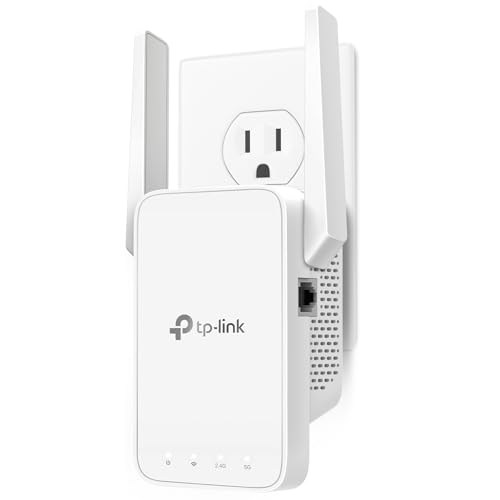
  1. Wi-Fi 6 with up to 2404 Mbps on 5 GHz, two directional antennas and beamforming.

    93Outstanding
    Check price
  2. A $25 to $50 AC1900 with three adjustable antennas and 2,100 sq ft of rated coverage.

    90Excellent
    Check price
  3. AC1200 Wi-Fi 5 with guided Nighthawk app or WPS setup and 1,500 sq ft of coverage.

    87Excellent
    Check price
  4. 867 Mbps on 5 GHz, two adjustable antennas and 1,500 sq ft rated, for under $25.

    85Excellent
    Check price
  5. 867 Mbps on 5 GHz plus 300 Mbps on 2.4 GHz and an Ethernet LAN port with AP mode.

    82Very Good
    Check price
  6. A basic 1200 Mbps dual-band repeater with a claimed 3,000 sq ft and WEP, WPA and WPA2 support.

    79Very Good
    Check price

Dual-band is the one extender feature worth insisting on, and for a reason people rarely hear. A single-band repeater has to receive and rebroadcast on the same radio, which cuts throughput roughly in half. Two bands let the extender listen on one frequency and speak on the other, so the link to the router does not eat the speed your devices see.

We ranked six dual-band models on the Primea framework, scoring the 5 GHz speed first, then antennas, setup experience and price. Some of these units lean on bigger coverage claims than the hardware can deliver, so the ranking rewards published speeds and recognized brands over inflated square footage.

Before you buy

What Actually Matters

01

Two real bands

Dual-band means the extender uses 2.4 and 5 GHz. 2.4 GHz travels farther but is slower, 5 GHz is faster but shorter range. The best units use one band to talk to the router and the other to serve you. Confirm both bands are listed, with speeds.

02

5 GHz speed

This is the lane for video and gaming. The AX3000 lists 2404 Mbps, the RE315 and PEDUMMY 867 Mbps. Anything under 800 Mbps is entry-level. Look at the 5 GHz figure rather than the combined number, which adds both bands and flatters the product.

03

Standard match

Your extender and router should speak the same standard. A Wi-Fi 6 AX3000 on a Wi-Fi 5 router performs like a Wi-Fi 5 unit. Check the router label for AX or AC, then choose an extender that matches so you pay only for what you can use.

04

Antennas

Adjustable external antennas, as on the RE550 and RE315, can be tilted to favor a floor or a hallway. Directional ones, as on the AX3000, focus signal. Plug-in units without visible antennas leave you no control. Count antennas on the listing and prefer adjustable ones.

05

Setup path

Setup should take minutes. NETGEAR offers an app and WPS, TP-Link uses its own app and WPS, and the budget units use a phone browser. Pick the setup you will actually finish, because a half-configured extender is worse than none.

In-depth reviews

Our Ranked Picks, Reviewed

3

Best App Setup

NETGEAR WiFi Extender EX5000

Our verdict: AC1200 Wi-Fi 5 with guided Nighthawk app or WPS setup and 1,500 sq ft of coverage.

An AC1200 dual-band extender with up to 1.2 Gbps across two bands, rated for 1,500 sq ft, with setup through the Nighthawk app or a WPS button.

It ranks third because setup is the pain point for most buyers and the app handles it. Against the RE315 it gives up an antenna adjustment option, and against the RE550 it covers a smaller area, so you pay $25 to $50 for ease rather than reach.

Choose it if you want guided installation. The caveat is that the numbers are the middle of the field, with no advanced antenna design.

Standard
Wi-Fi 5 (AC1200)
Bandwidth
Up to 1.2 Gbps
Coverage
Up to 1,500 sq ft
Setup
Nighthawk app or WPS

What we like

  • +App-guided setup
  • +WPS option
  • +Recognized brand
  • +Dual-band AC1200

Watch out for

  • −Smaller coverage than RE550
  • −No adjustable antennas listed
  • −Priced $25 to $50

Buy it if: Anyone who wants app-guided setup for a basic AC1200 extender.

Skip it if: You need coverage beyond 1,500 sq ft.

5

Best with a Wired Port

PEDUMMY WiFi Extender 1200Mbps Dual Band

Our verdict: 867 Mbps on 5 GHz plus 300 Mbps on 2.4 GHz and an Ethernet LAN port with AP mode.

Speeds are 867 Mbps on 5 GHz and 300 Mbps on 2.4 GHz, with an Ethernet LAN port and an access point mode. The listing claims coverage of up to 5,200 sq ft.

The wired port is what lifts it above the nohzio: a TV or console can plug in and ignore the wireless hop. The coverage claim is not credible for an AC1200-class radio, and the brand has no track record to lean on.

Buy it for a room with weak Wi-Fi where a cable can reach. The caveat is the unproven brand.

5 GHz speed
867 Mbps
2.4 GHz speed
300 Mbps
Coverage
Up to 5,200 sq ft listed
Wired
Ethernet LAN port, AP mode

What we like

  • +Ethernet port included
  • +Access point mode
  • +Both band speeds listed
  • +Priced $25 to $50

Watch out for

  • −Coverage claim is inflated
  • −Unproven brand
  • −AC1200-class speeds

Buy it if: Connecting a TV or console by cable in a room with weak Wi-Fi.

Skip it if: You want a major brand with security commitments.

6

Best First Extender

nohzio WiFi Extender 1200Mbps Dual Band

Our verdict: A basic 1200 Mbps dual-band repeater with a claimed 3,000 sq ft and WEP, WPA and WPA2 support.

Total bandwidth is 1200 Mbps across two bands, with 300 Mbps on 2.4 GHz. The listing claims coverage of 3,000 sq ft and supports WEP, WPA and WPA2.

It lands last because the 5 GHz speed is not itemized and there is no wired port or app. It is dual-band, however, so it avoids the throughput penalty of single-band repeaters.

Buy it as a low-commitment first extender for a small space. The caveat is that WEP is obsolete, so use WPA2.

Bandwidth
1200 Mbps total
2.4 GHz speed
300 Mbps
Coverage
Up to 3,000 sq ft listed
Security
WEP, WPA, WPA2

What we like

  • +Dual-band design
  • +Low entry price
  • +Works with common routers
  • +WPA2 support

Watch out for

  • −5 GHz speed not itemized
  • −No wired port
  • −Unproven brand

Buy it if: A low-commitment first extender for a small apartment or single room.

Skip it if: You want published 5 GHz speed or a wired port.

Methodology

How We Ranked These

5 GHz speed

The published speed on the band that carries streaming and calls, which sets real-world value.

Wi-Fi standard

Wi-Fi 6 versus Wi-Fi 5 class and how well each fits current routers.

Antennas and coverage

Antenna count and adjustability, with coverage ratings discounted when they look inflated.

Setup and wired options

App guidance, WPS and Ethernet ports.

Brand and price

Security commitments, support record and price bucket.

Every Primea Score uses the same weights: Performance 30% · Build & Materials 20% · Everyday Usability 20% · Value 20% · Owner Satisfaction 10%. Full scoring rules

Buyer's guide

How to Pick the Right One for You

By Router Standard

Pair the extender with your router's generation.

RouterOur pick
Wi-Fi 6 (AX)TP-Link AX3000 WiFi 6 Dual-Band Range Extender
Wi-Fi 5 (AC1900 class)TP-Link AC1900 WiFi Range Extender RE550
Wi-Fi 5 (AC1200 class)NETGEAR WiFi Extender EX5000
Older mixed gearnohzio WiFi Extender 1200Mbps Dual Band

By Budget

SpendOur pick
Under $25TP-Link AC1200 WiFi Extender RE315
$25 to $50 (best value)TP-Link AC1900 WiFi Range Extender RE550
$25 to $50 (app setup)NETGEAR WiFi Extender EX5000
$100 to $200TP-Link AX3000 WiFi 6 Dual-Band Range Extender

App Setup vs Browser Setup

App setup

A guided path with signal checks. NETGEAR's Nighthawk app handles it on the EX5000.

Browser setup

Works without an app but demands more fiddling. The PEDUMMY and nohzio rely on this.

If setup scares you, choose the EX5000 or a TP-Link.

By Rated Coverage

Rated areaOur pick
Up to 1,500 sq ftTP-Link AC1200 WiFi Extender RE315
Up to 2,100 sq ftTP-Link AC1900 WiFi Range Extender RE550
Up to 2,400 sq ftTP-Link AX3000 WiFi 6 Dual-Band Range Extender

For Gaming and Streaming Specifically

Look for

High 5 GHz speed, and ideally an Ethernet port so the console avoids the wireless hop.

In this ranking

The TP-Link AX3000 has the fastest 5 GHz lane, and the PEDUMMY WiFi Extender adds a cable port.

When to Spend More

Spend more if

You have a Wi-Fi 6 router and many devices. The TP-Link AX3000 is the only one that exploits it.

Save if

One room has weak signal; the TP-Link RE315 under $25 fixes it.

Questions

Frequently Asked Questions

Will these work with any router?+

Generally yes, because extenders connect wirelessly. The nohzio lists compatibility with any Wi-Fi router, and the TP-Link and NETGEAR units are widely used with major brands. Speed is capped by the slower of the router and extender.

What mistake do buyers make with dual-band extenders?+

Reading the combined speed. A 1200 Mbps rating adds a 300 Mbps and 867 Mbps band, but one device only uses one band at a time. Compare the 5 GHz figures: 2404 for the AX3000, 867 for the RE315.

Is the AX3000 worth it over the RE550?+

Only with a Wi-Fi 6 router and a crowded network. The AX3000 offers 2404 Mbps on 5 GHz and better efficiency, but costs $100 to $200 against the RE550's $25 to $50, which suits Wi-Fi 5 homes well.

How do I set up the EX5000?+

Plug it halfway between the router and the dead zone, then use the Nighthawk app or press WPS on the extender and router. The app shows signal quality so you can find a better outlet if needed.

Do extenders need maintenance?+

Keep firmware current and reboot occasionally. TP-Link and NETGEAR release updates through their apps. If speeds drop, move the extender closer to the router rather than assuming the unit has failed.

Does an extender slow my main network?+

A little, for devices that connect through it. Dual-band models like the RE550 limit that by using separate bands for each hop. Devices near the router should stay on the main network, not the extender.

Final take

The TP-Link AX3000 WiFi 6 Dual-Band Range Extender is the best extender if your router is Wi-Fi 6, and the TP-Link RE550 is the best for everyone else. The NETGEAR EX5000 wins on easy setup, the RE315 on price, and the PEDUMMY on its Ethernet port. Compare the 5 GHz line, not the combined Mbps on the box.

More Ranked & Reviewed Guides