
Primea ReviewsAll Reviews

Primea Reviews is reader-supported. When you buy through our Amazon links we may earn a commission, at no extra cost to you. Rankings are set by our editors and never sold. Learn more

Ranked & Reviewed by Primea Reviews

The 6 Best 5GHz Wi-Fi Extenders of 2026, Ranked & Reviewed

By the Primea Editorial TeamUpdated November 4, 20269 min read6 products ranked
The 6 Best 5GHz Wi-Fi Extenders of 2026, Ranked & Reviewed

The short answer

The TP-Link AX3000 is the strongest 5GHz extender here, with Wi-Fi 6, a 2404 Mbps headline rate and directional antennas. The TP-Link AX1800 RE615X is the sensible Wi-Fi 6 step with an Ethernet port. The AC1900 RE550 is the best Wi-Fi 5 value, and the AC1200 RE315 is the cheapest dependable entry. The two budget repeaters with 5000 square foot claims need a skeptical read.

The Primea Scoreboard

Ranked & Reviewed

  1. The only extender here with a 2404 Mbps headline rate and Wi-Fi 6.

    94Outstanding
    Check price
  2. 02
    TP-Link AX1800 RE615X

    Best Wi-Fi 6 Value

    TP-Link AX1800 RE615X

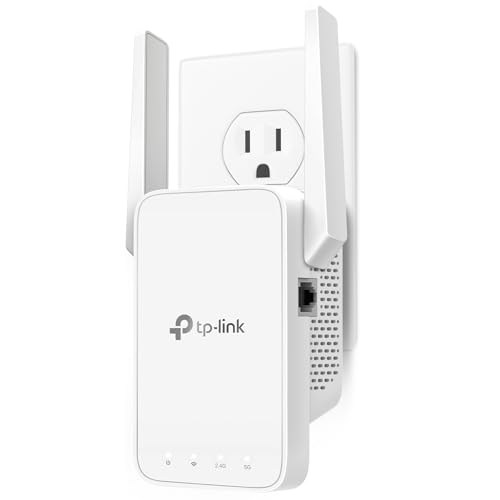
    Wi-Fi 6 plus an Ethernet port, at half the AX3000's bucket.

    91Excellent
    Check price
  3. 03
    TP-Link AC1900 RE550

    Best Wi-Fi 5 Value

    TP-Link AC1900 RE550

    Three adjustable antennas and 1.9 Gbps on Wi-Fi 5 for under $50.

    88Excellent
    Check price
  4. 04
    TP-Link AC1200 RE315

    Best Entry Level

    TP-Link AC1200 RE315

    867 Mbps on 5GHz for under $25, from a brand with firmware support.

    85Excellent
    Check price
  5. 05
    PEDUMMY 1200Mbps WiFi Extender

    Best Budget With Ethernet

    PEDUMMY 1200Mbps WiFi Extender

    867 Mbps on 5GHz, an Ethernet port and AP mode, with an optimistic range claim.

    82Very Good
    Check price
  6. 06
    VERMEYEN 1200Mbps 5G WiFi Extender

    Three selectable modes, but the lightest spec detail in the group.

    80Very Good
    Check price

The number on the box is the least useful figure on a Wi-Fi extender. An AC1200 label adds a 300 Mbps 2.4GHz band to an 867 Mbps 5GHz band, and no device can use both at once. What you can actually count on is the 5GHz rate, and the fact that a single-radio extender spends half of that talking to your router and half talking to your phone.

We reviewed six dual-band extenders from the spec sheets, ranking them on 5GHz rate, Wi-Fi generation, wired ports and how plausible each coverage claim is. The ordering leans toward Wi-Fi 6 and Ethernet, since an extender with a wired port can feed a console or TV without using the wireless link at all.

Before you buy

What Actually Matters

01

5GHz rate

Total bandwidth adds both bands together, but your phone connects to one band at a time. The 5GHz figure, such as 867 Mbps on the RE315, is the one that matters for streaming and calls. Look for it as a separate line in the listing, not just the AC or AX total in the title.

02

Wi-Fi 6 vs Wi-Fi 5

Wi-Fi 6 improves efficiency when many devices share the connection, even if peak speed looks similar on paper. The AX3000 and AX1800 offer it, the RE550 and RE315 do not. Check your router's standard first, because a Wi-Fi 5 router limits what a Wi-Fi 6 extender can deliver, and look for the standard on the box.

03

Ethernet and AP mode

A single-radio extender uses the same airtime to talk to the router and to your devices, which roughly halves throughput. A wired Ethernet port or AP mode avoids that. The RE615X, PEDUMMY and VERMEYEN offer wired or AP options; confirm the port on the listing photos.

04

Listed coverage

Square footage claims are lab-style ceilings under ideal conditions, with no walls or interference. The TP-Link figures of 1500 to 2400 sq ft are believable for a small unit, while 5000 and 5200 are not. Place any extender halfway between the router and the dead zone, where it still receives a strong signal, and discount the claim by half.

05

Antenna design

Adjustable external antennas, as on the RE550 and RE315, let you angle signal toward the weak area. Directional antennas, as on the AX3000, concentrate it in one direction. Match the design to your layout: directional for long hallways, adjustable for awkward outlet positions. Check the listing photos to see whether antennas are fixed or movable.

In-depth reviews

Our Ranked Picks, Reviewed

5

Best Budget With Ethernet

PEDUMMY 1200Mbps WiFi Extender

Our verdict: 867 Mbps on 5GHz, an Ethernet port and AP mode, with an optimistic range claim.

The PEDUMMY lists 867 Mbps on 5GHz and 300 Mbps on 2.4GHz, an Ethernet port, an access point mode and up to 5200 square feet of coverage. It is in the $25 to $50 bucket.

The wired port and AP mode are real advantages: you can run a cable from the router and create a proper second access point, which avoids the halving penalty of wireless repeating. But 5200 square feet is not a figure the antenna count supports, and no brand support page backs it up. It ranks above the VERMEYEN because the Ethernet port and AP mode are explicit, but below the TP-Link models for firmware track record.

Buy it if you can run Ethernet to it. Treat the coverage claim as a marketing number and plan for a fraction of it.

5GHz rate
867 Mbps
2.4GHz rate
300 Mbps
Listed coverage
Up to 5200 sq ft
Wired port
Ethernet plus AP mode

What we like

  • +Ethernet port included
  • +Access point mode for wired setups
  • +867 Mbps on 5GHz
  • +Low price bucket

Watch out for

  • −Exaggerated coverage claim
  • −Unknown firmware support
  • −Wi-Fi 5 class hardware

Buy it if: Wired access-point setups on a low budget.

Skip it if: You want a branded product with documented updates.

6

Best Mode Flexibility

VERMEYEN 1200Mbps 5G WiFi Extender

Our verdict: Three selectable modes, but the lightest spec detail in the group.

The VERMEYEN is a 1200 Mbps dual-band extender with 300 Mbps on 2.4GHz, a 5000 square foot listed coverage claim and three selectable modes, including repeater and AP. It sits in the $25 to $50 bucket.

Mode flexibility is the attraction, and it is why the unit is on the list at all. It ranks last because the listing does not break out the 5GHz rate, mention a wired port or provide a brand track record, which leaves less to verify than the PEDUMMY. Like that model, the 5000 square foot figure is a ceiling, not a typical result.

Buy it if you like switching between repeater and access-point use. Skip it if you want hard numbers to compare, as the 5GHz rate and any Ethernet connection are not clearly listed.

Total bandwidth
1200 Mbps dual-band
2.4GHz rate
300 Mbps
Listed coverage
Up to 5000 sq ft
Modes
3 selectable, incl. AP

What we like

  • +Repeater and AP modes
  • +Three selectable modes
  • +Dual-band 5GHz support
  • +Low price bucket

Watch out for

  • −5GHz rate not broken out
  • −Coverage claim unrealistic
  • −No wired port listed

Buy it if: Tinkerers who want to switch between modes.

Skip it if: You need documented speeds or a wired port.

Methodology

How We Ranked These

5GHz throughput

The rated 5GHz speed or the nearest stated figure, since this band carries most of the real traffic and backhaul.

Wi-Fi standard

Wi-Fi 6 versus Wi-Fi 5, because the newer standard handles many devices more efficiently.

Wired options

Ethernet ports and access point mode, which move traffic off the wireless link and avoid repeater slowdown.

Coverage realism

How plausible the listed square footage is for the antenna design and brand, discounting inflated claims.

Brand and support

Documented firmware, app support and warranty, which decide how long the extender stays useful.

Every Primea Score uses the same weights: Performance 30% · Build & Materials 20% · Everyday Usability 20% · Value 20% · Owner Satisfaction 10%. Full scoring rules

Buyer's guide

How to Pick the Right One for You

By Wi-Fi Standard

The standard decides how well the extender behaves with many devices, not only how fast it is.

Your routerOur pick
Wi-Fi 6, fast internetTP-Link AX3000 WiFi 6 Range Extender
Wi-Fi 6, mid-size homeTP-Link AX1800 RE615X
Wi-Fi 5, want more rangeTP-Link AC1900 RE550
Wi-Fi 5, small spaceTP-Link AC1200 RE315

By Budget

SpendOur pick
Under $25TP-Link AC1200 RE315
$25 to $50TP-Link AC1900 RE550
$50 to $100TP-Link AX1800 RE615X
$100 to $200TP-Link AX3000 WiFi 6 Range Extender

Repeater vs Access Point

Repeater

Rebroadcasts your router wirelessly. Simple, but it shares airtime and cuts throughput. The AC models and the AX1800 work this way by default.

Access point

Connects by Ethernet and creates a clean second network. The PEDUMMY and VERMEYEN list AP mode, and the AX1800 has an Ethernet port.

Use a cable and AP mode whenever you can; fall back to wireless repeating only when running a cable is not an option.

By Coverage Need

AreaOur pick
Up to about 1500 sq ftTP-Link AC1200 RE315
Up to about 2100 sq ftTP-Link AX1800 RE615X
Up to about 2400 sq ftTP-Link AX3000 WiFi 6 Range Extender
Large home with wired backhaulPEDUMMY 1200Mbps WiFi Extender

For Streaming and Gaming Specifically

Look for

Wi-Fi 6, a high 5GHz rate and an Ethernet port so the console or TV can be wired to the extender.

In this ranking

The AX1800 RE615X adds the port at a mid-range bucket, and the AX3000 delivers the highest rate if you have fast internet.

When to Spend More

Spend more if

Your router is Wi-Fi 6 and your plan is fast. The AX3000's 2404 Mbps headline rate only matters when the rest of the chain can feed it.

Save if

You have a small home and Wi-Fi 5 gear. The RE315 and RE550 cover that for under $50.

Questions

Frequently Asked Questions

Will a 5GHz extender work with any router?+

Yes, all six pair with standard routers. The AX3000 and AX1800 are Wi-Fi 6 but fall back to older standards on an older router, so you only get their top speed when the router supports Wi-Fi 6 as well.

What is the most common mistake when placing an extender?+

Putting it in the dead zone itself. The RE550 or AX1800 needs a strong signal from the router first, so plug it halfway between the router and the weak area, where it still sees good signal.

Is the AX3000 worth it over the AX1800 RE615X?+

Only with fast internet and a Wi-Fi 6 router. The AX3000 raises the headline rate to 2404 Mbps and coverage to 2400 sq ft, but the AX1800 gives Wi-Fi 6 and Ethernet at half the cost.

How do I set up an extender in AP mode?+

Connect the PEDUMMY or VERMEYEN to your router by Ethernet, switch to AP mode in its settings and name the network. Do this before relocating it, so you can confirm the wired link works.

How do I keep an extender running well over time?+

Keep firmware current, since TP-Link models like the RE315 receive updates and generic units may not. Restart it every few months, and check its placement if speeds drop after furniture or router changes.

Can I use two extenders in one home?+

Daisy-chaining wireless extenders cuts speed at every hop. If you need more coverage, use one extender with an Ethernet connection, like the RE615X, or step up to a mesh system rather than stacking repeaters.

Final take

The TP-Link AX3000 is the extender to buy if your router and internet plan are modern. Most homes will be better served by the AX1800 RE615X, which adds Wi-Fi 6 and an Ethernet port for half the bucket. Choose the AC1900 RE550 or AC1200 RE315 for Wi-Fi 5 setups, and treat the 5000 square foot claims on the generic units with caution.

More Ranked & Reviewed Guides