


Primea ReviewsAll Reviews

Primea Reviews is reader-supported. When you buy through our Amazon links we may earn a commission, at no extra cost to you. Rankings are set by our editors and never sold. Learn more

Ranked & Reviewed by Primea Reviews

The 6 Best 2.4GHz Wi-Fi Extenders for Dead Zones and Smart Devices, Ranked & Reviewed

Joshua ParkesBy Joshua Parkes, Editor in ChiefUpdated November 11, 202610 min read6 products ranked
The 6 Best 2.4GHz Wi-Fi Extenders for Dead Zones and Smart Devices, Ranked & Reviewed

The short answer

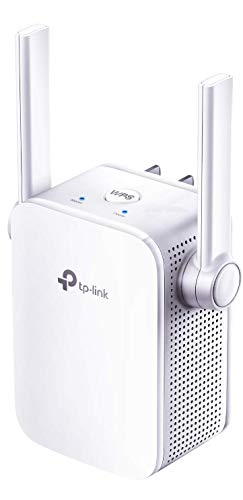
The TP-Link AC1900 RE550 is the extender to buy for a mixed home, because three adjustable antennas and dual-band Wi-Fi 5 serve phones, laptops and far-off smart gear. The AC1200 RE315 is the budget dual-band pick, the Rinkarlay is built for thick walls, and the N300 RE105 is the cheap 2.4GHz-only option with an Ethernet port.

The Primea Scoreboard

Ranked & Reviewed

  1. Dual-band Wi-Fi 5 with three adjustable antennas and a listed 2100 sq ft of coverage.

    94Outstanding
    Check price
  2. AC1200 dual-band with 867 Mbps on 5 GHz, two antennas and a listed 1500 sq ft.

    92Outstanding
    Check price
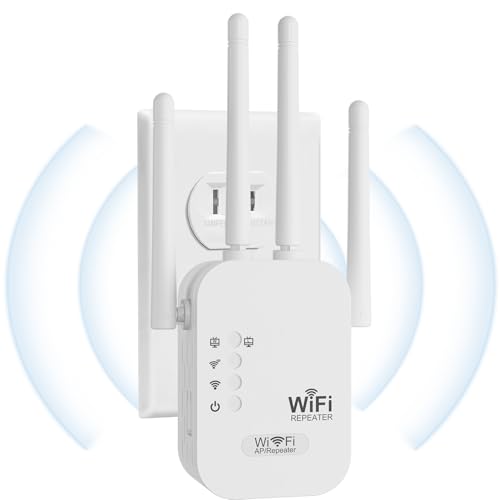
  3. Four omni-directional antennas tuned for 2.4 GHz wall penetration and 90 plus devices.

    90Excellent
    Check price
  4. 04
    TP-Link N300 RE105 Wi-Fi Extender

    Best 2.4GHz Only Budget

    TP-Link N300 RE105 Wi-Fi Extender

    N300 single band with two antennas, a Fast Ethernet port and access point mode.

    88Excellent
    Check price
  5. 05
    Aodcaopul Long Range WiFi Extender

    A 2.4 GHz repeater at 300 Mbps with plug-in setup and a very large listed coverage.

    85Excellent
    Check price
  6. Four antennas, 1200 Mbps and a headline 19,999 sq ft coverage and 115 plus device limit.

    82Very Good
    Check price

Square footage on an extender box is the least trustworthy number in networking. A listing that claims 19,999 square feet is describing a best case in open air, and it says nothing about the real constraint, which is that an extender can only repeat the signal it receives. Place it in a weak spot and it simply rebroadcasts a weak signal. A smart plug or camera does not need speed; it needs a stable link at the edge of the house, and that favors a well-placed extender over a large one.

So this ranking starts with what actually matters for 2.4GHz: antenna design, band support, wired ports and device limits. We reviewed six extenders from their listings and treat coverage figures as marketing claims, not measurements. Where a listing is vague, we say so.

Before you buy

What Actually Matters

01

Single band vs dual band

The 2.4 GHz band reaches farther and passes through walls better, while 5 GHz is faster over a shorter distance. A single-band N300 handles only the first. Check whether the listing says dual band, and prefer it if you also use laptops or streaming. Smart plugs and cameras mostly use 2.4 GHz anyway, so the N300 RE105 serves them well, while a TV stream wants the dual-band units.

02

Placement, not power

An extender can only rebroadcast what it hears. Place it about halfway between the router and the dead zone, where it still gets a strong signal. A larger model in a weak spot performs worse than a small one placed well. A second radio keeps the repeat link off the band your devices use, which is the usual fix for halved speeds.

03

Antennas

External antennas can be pointed toward the dead zone, and more of them help in homes with layered walls. Internal antennas are neater but fixed. Check whether the listing says adjustable, and count them. With four omni-directional antennas on the Rinkarlay or three adjustable ones on the RE550, aiming matters less than with two.

04

Ethernet port and modes

An Ethernet port lets you connect a TV or console with a cable, and access point mode creates a new Wi-Fi zone from a wired line. These features often matter more than a speed rating. Look for the port type, since Fast Ethernet is slower than gigabit. Fast Ethernet tops out at 100 Mbps, so the RE105's port suits a printer or camera better than a gaming PC.

05

Listed coverage

Square footage on the box is a best-case figure, not a promise. Claims of 9789 or 19,999 sq ft are not realistic for a single extender. Use them only to compare, and put more weight on antennas, bands and brand. The TP-Link RE550 and RE315 give 2100 and 1500 sq ft figures that are modest, which is a sign they were not inflated.

In-depth reviews

Our Ranked Picks, Reviewed

3

Best Through Walls

Rinkarlay 1200Mbps Dual Band Extender

Our verdict: Four omni-directional antennas tuned for 2.4 GHz wall penetration and 90 plus devices.

The Rinkarlay is a 1200 Mbps dual-band extender with four omni-directional high-gain antennas, a focus on 2.4 GHz wall penetration and a stated 90 plus device limit.

It ranks third because 2.4 GHz is the band that passes through walls best, and this unit builds its design around that. The four antennas help in brick or plaster homes where signal fades quickly. It sits behind the TP-Link models because it is a lesser-known brand, and the listing gives no coverage figure. The 90 plus device limit is a spec worth noting for a house full of bulbs, plugs and sensors.

Buy it for a home with thick walls and many small devices. The caveat is that it costs more than the RE315 and has less brand support.

Total bandwidth
1200 Mbps
Antennas
4 omni high-gain
Focus
2.4 GHz wall penetration
Device limit
90 plus devices

What we like

  • +Four high-gain antennas
  • +Tuned for 2.4 GHz walls
  • +Supports 90 plus devices
  • +Dual-band operation

Watch out for

  • −No coverage figure listed
  • −Higher cost than the RE315

Buy it if: Homes with thick walls and many small devices.

Skip it if: You want the support of a major network brand.

5

Best Low-Demand Reach

Aodcaopul Long Range WiFi Extender

Our verdict: A 2.4 GHz repeater at 300 Mbps with plug-in setup and a very large listed coverage.

The Aodcaopul is a single-band, long-range repeater with 300 Mbps on 2.4 GHz and a listed coverage of up to 9789 sq ft. Setup is plug in, join and follow a phone prompt.

It ranks fifth because it keeps things simple for low-demand gear. The coverage figure is the standout number, but it is a lab-style claim. In practice, a 2.4 GHz repeater at 300 Mbps struggles to deliver that distance with speed. Compared with the N300 RE105, it is a similar class of product, but it lacks the Ethernet port and access point mode.

Buy it for low-demand smart gear in a distant room. The caveat is that the huge coverage claim should be treated cautiously.

2.4 GHz speed
300 Mbps
Listed coverage
9789 sq ft
Setup
Plug in, join, phone prompt
Type
Long-range repeater

What we like

  • +Very simple plug-in setup
  • +300 Mbps on 2.4 GHz
  • +Large listed coverage
  • +Budget bucket pricing

Watch out for

  • −Single band only
  • −No Ethernet port listed

Buy it if: Low-demand smart gear in a distant room.

Skip it if: You need to stream or work on video calls.

6

Largest Listed Coverage

ZMISDRI 1200Mbps Dual Band WiFi Extender

Our verdict: Four antennas, 1200 Mbps and a headline 19,999 sq ft coverage and 115 plus device limit.

The ZMISDRI is a 1200 Mbps dual-band extender with four antennas, a listed coverage of up to 19,999 sq ft and a device limit of 115 plus.

It ranks last because the coverage claim is the largest of the group and the least believable: no extender fills 19,999 sq ft at useful speed. The four antennas and 115 plus device figure are more credible, and put it level with the Rinkarlay on hardware. It loses on trust, since there is no certification or support information.

Buy it for a large open home when you accept that the number is aspirational. The caveat is that large claims are often a warning sign for weak support.

Total bandwidth
1200 Mbps
Antennas
4
Listed coverage
19,999 sq ft
Device limit
115 plus devices

What we like

  • +Four antennas, dual band
  • +Highest device limit here
  • +1200 Mbps total bandwidth
  • +Wide listed coverage

Watch out for

  • −Coverage claim is unrealistic
  • −No brand support detail

Buy it if: Large open homes that want a lot of coverage on paper.

Skip it if: You want a brand with a track record.

Methodology

How We Ranked These

Band support

We favored dual-band units, since they serve both 2.4 GHz gadgets and faster 5 GHz devices.

Antenna design

Antenna count and adjustability decide how well the signal can be aimed through walls.

Coverage claims

Stated square footage was treated as a marketing claim and scored lightly against brand and design.

Ports and modes

An Ethernet port and access point mode make an extender far more flexible.

Device capacity

Stated device limits matter for homes full of smart plugs and bulbs.

Every Primea Score uses the same weights: Performance 30% · Build & Materials 20% · Everyday Usability 20% · Value 20% · Owner Satisfaction 10%. Full scoring rules

Buyer's guide

How to Pick the Right One for You

By Device Mix

The devices you need to reach decide how much extender you need.

DevicesOur pick
Phones, laptops and smart gearTP-Link AC1900 RE550 Range Extender
Phones plus a few gadgetsTP-Link AC1200 RE315 Dual Band Extender
Mostly smart plugs and sensorsTP-Link N300 RE105 Wi-Fi Extender
Dozens of small devicesRinkarlay 1200Mbps Dual Band Extender

Single Band vs Dual Band

Single band 2.4 GHz

Cheaper and simpler, with good reach for smart plugs and cameras but slow for streaming. Picks: TP-Link N300 RE105, Aodcaopul.

Dual band

Adds a fast 5 GHz link for phones and laptops, and costs a little more. Picks: TP-Link RE550, RE315, Rinkarlay, ZMISDRI.

Default to dual band unless every device on the extender is a low-demand smart gadget.

By Home Layout

For Smart Home Devices Specifically

Look for

2.4 GHz support, a high device limit and simple setup. Most smart plugs, bulbs and cameras only connect on 2.4 GHz.

In this ranking

Rinkarlay for the 90 plus device limit, TP-Link N300 RE105 for a cheap dedicated 2.4GHz repeater.

When to Spend More

Spend more if

You need to stream, work on video calls or the dead zone is large. Consider a mesh system instead, or the RE550 for adjustable antennas.

Save if

The extender will only serve a few smart plugs. The N300 RE105 is enough.

Questions

Frequently Asked Questions

Will a 2.4GHz extender work with my dual-band router?+

Yes. Extenders like the TP-Link RE315 connect to the 2.4 GHz band of a dual-band router. A single-band unit such as the N300 RE105 will only use 2.4 GHz, which is fine for smart plugs. The RE105 also works as an access point if you can wire it.

What is the most common mistake?+

Placing the extender in the dead zone itself. It then repeats a weak signal. Put the RE550 or any other unit about halfway between the router and the dead zone, where it still has a strong signal. Keep the unit off the floor and away from metal.

Is an extender worth it over a mesh system?+

For a single dead zone, yes. An extender like the RE315 costs less than a mesh kit. For large or multi-floor homes with video calls, a mesh system provides more consistent speed. A single extender will not hand your phone off between rooms like mesh.

How do I set one up?+

Plug it in near the router, connect using the app or WPS button, then move it to the midpoint. The Aodcaopul uses a plug in, join and phone prompt process, and the RE105 can also run as an access point. Aim the RE550 antennas toward the dead zone after setup.

How do I maintain an extender?+

Update the firmware occasionally and restart it if speeds drop. Keep vents clear and avoid placing it behind furniture. If you change your router password, reconnect the extender. Re-pairing takes a minute with WPS.

Why is my extended Wi-Fi slower?+

Extenders that use one radio for both receiving and repeating can halve throughput. Placing the unit closer to the router helps, and a wired connection avoids the loss entirely. A Fast Ethernet cable on the RE105 limits wired speed to 100 Mbps.

Final take

The TP-Link RE550 is the one to buy for most homes, because its three adjustable antennas and dual-band design cover both phones and smart devices. The RE315 is the better value for smaller homes, and the Rinkarlay suits thick walls. Treat coverage claims in the thousands of square feet with scepticism, and choose by antennas and bands instead.

About the author

Joshua Parkes, Editor in Chief at Primea Reviews

Joshua Parkes

Editor in Chief, Primea Reviews

Joshua owns the Primea Score framework and signs off on every ranking this site publishes. He and the editors work from spec sheets, manuals, warranty terms, certifications and long-term owner feedback, and a guide says so plainly when a listing leaves out the number that decides the purchase. Primea never claims to have physically tested a product it has not, and no brand can pay for placement.

More Ranked & Reviewed Guides