


Primea ReviewsAll Reviews

Primea Reviews is reader-supported. When you buy through our Amazon links we may earn a commission, at no extra cost to you. Rankings are set by our editors and never sold. Learn more

Ranked & Reviewed by Primea Reviews

The 6 Best Budget Wi-Fi Extenders for Dead Zones, Ranked & Reviewed

Joshua ParkesBy Joshua Parkes, Editor in ChiefUpdated November 11, 20269 min read6 products ranked
The 6 Best Budget Wi-Fi Extenders for Dead Zones, Ranked & Reviewed

The short answer

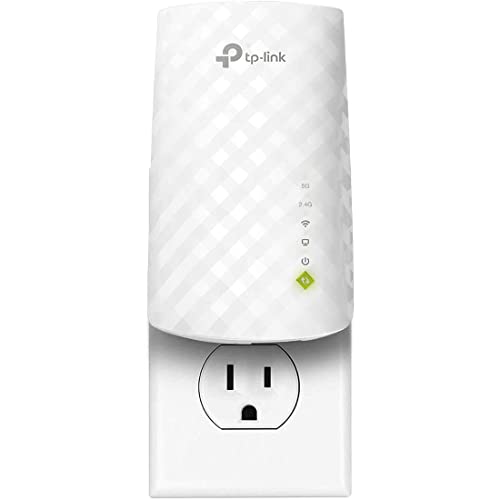
The TP-Link RE315 is the best budget Wi-Fi extender, with dual-band AC1200 speeds and two adjustable antennas for under $25. NETGEAR's EX6120 adds app-guided setup, and TP-Link's Ethernet model is the pick for wired devices. The unbranded high-claim extenders are the ones to approach carefully.

The Primea Scoreboard

Ranked & Reviewed

  1. Dual-band AC1200 with 867 Mbps on 5GHz and two adjustable antennas for under $25.

    94Outstanding
    Check price
  2. AC1200 Wi-Fi 5, 1500 square feet and setup by app or WPS.

    92Outstanding
    Check price
  3. A dual-band N300-lineage extender with a wired Ethernet port, up to 1200 square feet.

    88Excellent
    Check price
  4. Repeater and access point modes over Ethernet, with 802.11 N/B/G devices supported.

    82Very Good
    Check price
  5. A 300 Mbps maximum extender set up from a phone or laptop, with big coverage claims.

    80Very Good
    Check price
  6. 06
    FRWRJQ Wi-Fi Extender

    Best for Many Devices

    FRWRJQ Wi-Fi Extender

    Claims 10000 square feet and 80 devices, with two high-gain antennas and WPS pairing.

    78Very Good
    Check price

Budget extender listings promise the moon. Coverage claims of 5,000, 8,000 and even 10,000 square feet appear on units that cost less than a restaurant lunch, and no router-extender pair delivers that across real walls. The fair test of a cheap extender is whether it speaks two bands and what it plugs into, not how many rooms the box claims.

We ranked six extenders by wireless class, listed speed, Ethernet and setup, and we discount coverage claims that no spec supports. The honest tiers are dual-band AC1200 from TP-Link and NETGEAR, then older N300-class models, then the vague claims. Treat anything above 1500 square feet on a budget unit as advertising. Treat the vague claims as a reason to prefer brands that publish a wireless class.

Before you buy

What Actually Matters

01

Dual-band vs single-band

Dual-band means the extender has two radios, so it can listen to the router on one band and serve your devices on the other. Single-band repeaters do both on a single radio and lose roughly half their throughput. Look for the words dual-band and a 5GHz speed on the listing, as on the TP-Link RE315 and NETGEAR EX6120.

02

Wireless class

Wireless class names the Wi-Fi generation and its top speeds. AC1200 is Wi-Fi 5, up to 867 Mbps on 5GHz plus 300 on 2.4GHz. N300 is older and slower, and 802.11 N/B/G is older still, which caps real speed for streaming. Match the class to your router and plan, and read the 5GHz figure, not only the headline total.

03

Coverage claims

Coverage claims are the biggest source of fiction in this category. Square footage depends on walls, router strength and placement, so numbers like 5800, 8470 or 10000 square feet on a unit this cheap are marketing, not performance. Trust the 1200 to 1500 square feet figures on the TP-Link and NETGEAR, and treat the rest as a ceiling that rarely applies.

04

Ethernet port

An Ethernet port gives a wired path at the extender's location, so a TV, console or desktop skips Wi-Fi altogether. That is often faster and more stable than wireless. The TP-Link Dual Band lists a port, and Jancane offers access point mode over Ethernet. Check the listing for a port count, because many tiny plug-in units have none.

05

Placement

Placement decides whether an extender helps at all. It has to sit where the router signal is still strong, roughly halfway to the dead zone, because extending a weak signal rebroadcasts a weak signal. NETGEAR's Nighthawk app helps find that spot. Check the signal light or app reading in the new position before leaving it.

In-depth reviews

Our Ranked Picks, Reviewed

2

Best Setup Options

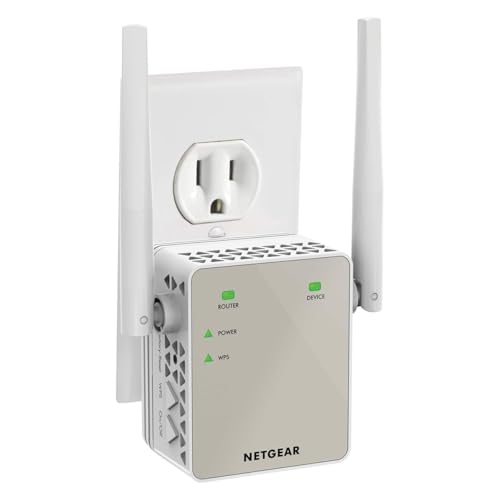
NETGEAR EX6120 AC1200 Wi-Fi Extender

Our verdict: AC1200 Wi-Fi 5, 1500 square feet and setup by app or WPS.

NETGEAR's EX6120 is an AC1200 Wi-Fi 5 extender with 1.2 Gbps total bandwidth, up to 1500 square feet of coverage and setup through the Nighthawk app or WPS. It costs $25 to $50.

It lands second because it matches the RE315's class and adds NETGEAR's app for finding the right spot. Total bandwidth is the sum of both bands, not what a single device gets, so do not expect 1.2 Gbps on a phone. Placement guidance matters because an extender in a dead zone extends nothing.

Buy it if you want guided setup. The RE315 gives you the same class for less.

Class
AC1200 Wi-Fi 5
Total bandwidth
1.2 Gbps
Coverage
Up to 1500 sq ft listed
Setup
Nighthawk app or WPS

What we like

  • +AC1200 Wi-Fi 5
  • +App or WPS setup
  • +1.2 Gbps total bandwidth
  • +Placement help in app

Watch out for

  • −Costs more than RE315
  • −Total speed is split across bands

Buy it if: Buyers who want guided setup and placement.

Skip it if: You are shopping on price alone.

4

Best Modes

Jancane WiFi Extender Signal Booster

Our verdict: Repeater and access point modes over Ethernet, with 802.11 N/B/G devices supported.

The Jancane extender claims coverage up to 5800 square feet, support for 55 devices and repeater or access point modes through Ethernet, on 802.11 N/B/G. It costs under $25. Access point mode works best if you can run an Ethernet cable to the extender.

Access point mode lets you wire it to the router and broadcast a new network, which is better than repeating wirelessly. The coverage figure, though, is a marketing claim; real range depends on walls and the router. N/B/G is Wi-Fi 4 and older, so speeds are modest. It trails the TP-Link and NETGEAR because the wireless class is the oldest and no total speed is listed.

Buy it for light use such as browsing and smart devices. Treat the 5800 square feet number with skepticism. Keep the 55 device claim in mind as a limit on how many devices will share a thin link.

Coverage
Up to 5800 sq ft claimed
Devices
55 supported
Modes
Repeater and AP via Ethernet
Standard
802.11 N/B/G

What we like

  • +Access point mode via Ethernet
  • +Supports 55 devices
  • +Under $25
  • +Repeater mode

Watch out for

  • −Coverage claim is inflated
  • −Older 802.11 N/B/G speeds

Buy it if: Light browsing and smart devices with a wired AP option.

Skip it if: You stream HD video.

5

Best Phone Setup

Yawitoso WiFi Signal Extender Booster

Our verdict: A 300 Mbps maximum extender set up from a phone or laptop, with big coverage claims.

Yawitoso lists a 300 Mbps maximum speed, claimed coverage up to 8470 square feet, setup from a phone, laptop or PC and indoor and outdoor use. It costs under $25. A 300 Mbps ceiling also shares the same radio for talking to the router.

The 8470 square feet figure is a claim and not a measurement. A 300 Mbps ceiling means it will not keep up with fast home broadband, but it will help a weak corner. Phone-based setup is easy for beginners. It ranks above FRWRJQ because its speed ceiling is at least stated.

Buy it for basic browsing in a distant room. Expect real range to be a fraction of the claim. Do not rely on the outdoor claim.

Max speed
300 Mbps
Coverage
Up to 8470 sq ft claimed
Setup
Phone, laptop or PC
Use
Indoor and outdoor claim

What we like

  • +Easy phone setup
  • +Under $25
  • +300 Mbps maximum
  • +Outdoor-use claim

Watch out for

  • −Inflated coverage claim
  • −Only 300 Mbps maximum

Buy it if: Basic browsing in a weak corner.

Skip it if: You have fast broadband.

6

Best for Many Devices

FRWRJQ Wi-Fi Extender

Our verdict: Claims 10000 square feet and 80 devices, with two high-gain antennas and WPS pairing.

FRWRJQ advertises coverage up to 10000 square feet, support for up to 80 devices, two high-gain external antennas and one-touch WPS pairing. It costs under $25. Two high-gain antennas help signal range but not speed.

The numbers are the largest here and the least believable. No sub-$25 extender covers 10000 square feet, and 80 devices would share a slim link. WPS pairing is convenient, but the specs say nothing about the wireless standard or speed.

Buy it only for very light use. For anything real, choose one of the TP-Link or NETGEAR AC1200 models.

Coverage
Up to 10000 sq ft claimed
Devices
Up to 80
Antennas
2 external high-gain
Setup
WPS push button

What we like

  • +One-touch WPS pairing
  • +Two external antennas
  • +Under $25
  • +Supports many devices

Watch out for

  • −Unverifiable range claims
  • −Speed and standard not listed

Buy it if: Very light Wi-Fi extension.

Skip it if: You want listed speeds.

Methodology

How We Ranked These

Wireless class

AC1200 dual-band, N300 or older.

Listed speed

5GHz and total rates.

Coverage

Listed range, discounted for claims.

Features

Ethernet port, AP mode and antennas.

Setup

App, WPS or browser setup.

Every Primea Score uses the same weights: Performance 30% · Build & Materials 20% · Everyday Usability 20% · Value 20% · Owner Satisfaction 10%. Full scoring rules

Buyer's guide

How to Pick the Right One for You

By Wireless Speed

Wireless class is the first filter.

Extender vs Access Point Mode

Repeater

Rebroadcasts your Wi-Fi wirelessly. Picks: TP-Link RE315, NETGEAR EX6120, Yawitoso.

Access point

Wire it to the router and broadcast a fresh signal. Picks: Jancane, TP-Link with Ethernet.

Use access point mode whenever you can run a cable.

For Streaming Specifically

Look for

Dual-band AC1200 with 867 Mbps on 5GHz, and a placement spot with a strong router signal.

In this ranking

TP-Link RE315 first, NETGEAR EX6120 for guided setup, and avoid the 300 Mbps units for HD video.

When to Spend More

Spend more if

You need roaming or whole-home coverage. A mesh system beats any extender here.

Save if

You have one weak room. The TP-Link RE315 does it for under $25.

Questions

Frequently Asked Questions

Will it work with my router?+

Extenders pair with standard routers. The TP-Link RE315 and NETGEAR EX6120 are AC1200, so pair them with a Wi-Fi 5 or newer router to get the speed. With an older router, the extender will still help but cap at what the router offers.

What is the common mistake?+

Putting the extender in the dead zone. It then has no signal to extend. Plug it in halfway between the router and the weak room, ideally using the NETGEAR app or the RE315's indicator to confirm a strong link.

Is an extender worth it over mesh?+

For one weak room, yes. A TP-Link RE315 costs far less than a mesh kit and fixes a back bedroom. It will not hand your phone between routers seamlessly the way mesh does, and it adds a second network name to join.

How do I set it up?+

Plug it in near the router, pair by WPS button or the vendor's app, then move it halfway to the dead zone. The FRWRJQ and NETGEAR both support WPS. Confirm the signal light turns solid before you carry it away.

How do I maintain it?+

Update the firmware when the app offers it, and restart the unit if speeds sag. Keep the vents clear, since extenders run warm in a tight outlet. If a cheap unit keeps dropping, a restart plus relocation fixes most cases.

Can I use Ethernet?+

The TP-Link Dual Band has an Ethernet port, and Jancane offers repeater and access point modes over Ethernet. A wired link is more reliable than the wireless backhaul, so use it for a console or smart TV.

Final take

The TP-Link RE315 is the budget extender to buy for most homes, and NETGEAR's EX6120 adds guided setup. Choose the TP-Link with Ethernet for a wired TV. Treat giant coverage claims as marketing, and consider mesh if you need whole-home roaming.

About the author

Joshua Parkes, Editor in Chief at Primea Reviews

Joshua Parkes

Editor in Chief, Primea Reviews

Joshua owns the Primea Score framework and signs off on every ranking this site publishes. He and the editors work from spec sheets, manuals, warranty terms, certifications and long-term owner feedback, and a guide says so plainly when a listing leaves out the number that decides the purchase. Primea never claims to have physically tested a product it has not, and no brand can pay for placement.

More Ranked & Reviewed Guides