

Primea ReviewsAll Reviews

Primea Reviews is reader-supported. When you buy through our Amazon links we may earn a commission, at no extra cost to you. Rankings are set by our editors and never sold. Learn more

Ranked & Reviewed by Primea Reviews

The 7 Best NAS Drives for Photo and Video Storage, Ranked & Reviewed

Joshua ParkesBy Joshua Parkes, Editor in ChiefUpdated November 11, 202611 min read7 products ranked
The 7 Best NAS Drives for Photo and Video Storage, Ranked & Reviewed

The short answer

The UGREEN DXP4800 Plus is the best NAS for a large and growing photo and video archive, with four bays, RAID 5 and a five-core Pentium Gold. The TERRAMASTER F2-425 is the pick for editors on a 2-bay budget, QNAP's TS-264-8G brings 8GB of RAM, and Synology's DS223 has the easiest software.

The Primea Scoreboard

Ranked & Reviewed

  1. 01
    UGREEN NAS DXP4800 Plus 4-Bay

    Best for Large Archives

    UGREEN NAS DXP4800 Plus 4-Bay

    Four bays, RAID 5 and a Pentium Gold 8505 give a growing library room to breathe.

    95Outstanding
    Check price
  2. 02
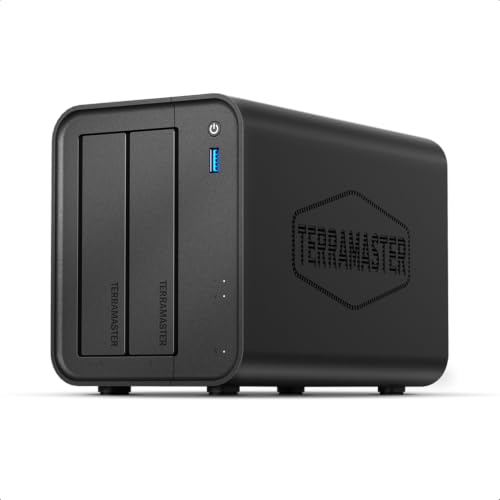
    TERRAMASTER F2-425 2-Bay NAS

    Best 2-Bay for Editing

    TERRAMASTER F2-425 2-Bay NAS

    An Intel x86 quad-core, 4GB of RAM and 2.5GbE in a 2-bay chassis.

    93Outstanding
    Check price
  3. 03
    QNAP TS-264-8G 2-Bay Desktop NAS

    8GB of RAM included gives active editing and multitasking a larger working pool.

    91Excellent
    Check price
  4. Synology's DSM is the easiest, most mature interface for managing a photo archive.

    89Excellent
    Check price
  5. 05
    UGREEN NAS DXP2800 2-Bay

    Best for First-Time NAS

    UGREEN NAS DXP2800 2-Bay

    A 2-bay with RAID 1 mirroring for creators leaving external USB drives behind.

    87Excellent
    Check price
  6. The cheapest way to 2.5GbE, with a quad-core 1.7GHz CPU and 4K media serving.

    84Very Good
    Check price
  7. 07
    UGREEN NAS DH2300 2-Bay

    Best Cheap Archive

    UGREEN NAS DH2300 2-Bay

    A budget 2-bay that supports up to 64TB total capacity.

    81Very Good
    Check price

Most people buy a NAS for capacity and discover the real limit is the network cable. A 1GbE port tops out around 110 MB/s, which is fine for browsing photos and painful when you scrub through 4K footage on the share. A big case with a slow port is a very expensive way to wait, and the problem is invisible on the product page.

We ranked seven NAS units from listing data, weighing bay count, CPU, RAM, networking speed, RAID support and software. Drives are sold separately on every model, so budget for two or four disks, ideally NAS-rated, on top of the chassis price. If you edit video from the share, give networking and CPU the most weight; for photo backup alone, bay count and software matter more.

Before you buy

What Actually Matters

01

Bay count and RAID

Bay count sets how many drives the NAS holds and what RAID level you can run. A 2-bay mirrors drives with RAID 1, so half your disk space goes to redundancy, while a 4-bay with RAID 5 loses only one drive's worth. Read the listing for supported RAID levels. RAID protects against a drive dying, not deletion or theft, so it never replaces a backup.

02

CPU and transcoding

CPU decides whether the NAS can transcode, which is converting big video files on the fly for a phone or TV. x86 chips like the TERRAMASTER's Intel quad-core or the DXP4800 Plus's Pentium Gold handle it far better than low-end processors. Without enough CPU, playback stutters on weak devices. Look for the processor name and core count in the specs.

03

2.5GbE networking

2.5GbE moves roughly 280 MB/s against 110 MB/s for gigabit, but the speed only appears if your computer and switch also support it. Plug a 2.5GbE NAS into a gigabit switch and you get gigabit. Check the NAS port spec, then check the other end of the cable. The Synology DS223 and UGREEN DXP2800 list 1GbE, and the TERRAMASTER lists 2.5GbE.

04

RAM

RAM handles indexing, sync clients, photo apps and containers at once, and starved memory makes the whole box feel slow. The QNAP TS-264 ships with 8GB, the TERRAMASTER 4GB and the Asustor 1GB. Look for the RAM figure on the listing, and check whether it is upgradeable, because some designs solder or restrict memory and leave you stuck with the number you bought.

05

Software ecosystem

The software is what you live with every day: photo apps, mobile backup, sharing permissions and snapshots. Synology DSM is the most polished for beginners, QNAP QTS the deepest for power users. A confusing interface means people skip setting up scheduled backups, which is the entire point of the device. Check the operating system by name and read a few setup reviews.

In-depth reviews

Our Ranked Picks, Reviewed

1

Best for Large Archives

UGREEN NAS DXP4800 Plus 4-Bay

Our verdict: Four bays, RAID 5 and a Pentium Gold 8505 give a growing library room to breathe.

The DXP4800 Plus is a 4-bay diskless NAS built on an Intel Pentium Gold 8505 with five cores. It supports RAID 5, which spreads parity across the drives so one can fail without losing data, and it expands to far more total capacity than any 2-bay unit here.

It ranks first because photo and video libraries only grow. A 2-bay box mirrors two drives and wastes half of them, while four bays under RAID 5 give you more usable space and the same single-drive safety. The faster processor also matters when you want the NAS to transcode 4K clips for playback on a phone.

It is the unit for a working photographer or a family with years of footage. The tradeoff is cost: it sits in the $500+ bucket before you add drives, and a 2-bay model is enough if your archive is under a few terabytes.

Bays
4, diskless
CPU
Intel Pentium Gold 8505, 5-core
RAID
Supports RAID 5
Price tier
$500+

What we like

  • +Four bays with RAID 5
  • +Stronger CPU for transcoding
  • +Far more expandable capacity
  • +Room for a growing archive

Watch out for

  • −Highest price tier, drives extra
  • −Overkill for small libraries

Buy it if: Photographers and families with large, growing photo and video archives.

Skip it if: Your library is small and fits two drives.

2

Best 2-Bay for Editing

TERRAMASTER F2-425 2-Bay NAS

Our verdict: An Intel x86 quad-core, 4GB of RAM and 2.5GbE in a 2-bay chassis.

The TERRAMASTER F2-425 is a diskless 2-bay NAS with an Intel x86 quad-core CPU, 4GB of RAM and a 2.5GbE port, plus multimedia server support. It is the most capable 2-bay processor in the group.

It outranks the QNAP TS-264 on CPU grounds, since x86 processors handle video transcoding well, while the QNAP counters with more RAM. Against the DXP4800 Plus it gives up the extra bays and RAID 5, but it saves a large chunk of money and still delivers faster-than-gigabit transfers.

Editors who proxy-edit video off the NAS will notice the 2.5GbE link, provided their computer has a 2.5GbE port too. The limit is 4GB of RAM and two bays: heavy multi-user work or a large archive will outgrow it.

Bays
2, diskless
CPU
Intel x86 quad-core
RAM
4GB
Network
2.5GbE

What we like

  • +Intel x86 quad-core CPU
  • +2.5GbE LAN port
  • +4GB RAM included
  • +Media server support

Watch out for

  • −Two bays cap expansion
  • −No RAID 5 available

Buy it if: Video editors who want transcoding power in a 2-bay box.

Skip it if: You expect to add drives later.

3

Best for RAM Headroom

QNAP TS-264-8G 2-Bay Desktop NAS

Our verdict: 8GB of RAM included gives active editing and multitasking a larger working pool.

The QNAP TS-264-8G is a 2-bay desktop NAS that ships with 8GB of RAM, running QNAP's QTS platform. Drives are sold separately.

It ranks third because RAM is useful when several people stream, sync and back up at once, and 8GB is twice the TERRAMASTER's 4GB. QNAP's QTS is feature-rich, with a deeper app list than the lean consumer-oriented interfaces, which is a strength for experienced buyers and a learning curve for newcomers.

Buy it if you want to stay with a 2-bay chassis but expect heavy use. The listing does not state the networking speed in our data, so confirm port speed before you buy a switch or cable to match.

Bays
2, diskless
RAM
8GB included
Software
QNAP QTS
Form
Desktop

What we like

  • +8GB RAM out of the box
  • +Feature-rich QTS software
  • +Desktop 2-bay form factor
  • +Room for multitasking

Watch out for

  • −Network speed not confirmed here
  • −QTS has a learning curve

Buy it if: Editors and power users who run many services at once.

Skip it if: You want the simplest possible setup.

4

Best Software

Synology DS223 2-Bay NAS

Our verdict: Synology's DSM is the easiest, most mature interface for managing a photo archive.

The DS223 is a 2-bay diskless NAS aimed at home and small office backup, running Synology DSM with a focus on centralized file protection. It uses standard 1GbE networking.

It lands fourth because the hardware is modest next to the 2.5GbE rivals. What it buys you is software maturity: DSM is widely regarded as the cleanest NAS interface, with a polished photo app and reliable backup tools. For people who value a calm setup over spec numbers, that is worth the lower rating.

Buy it if you will mostly store and back up photos rather than edit video from the share. A single gigabit link caps transfers, so large video projects will feel slow compared with the 2.5GbE units.

Bays
2, diskless
Software
Synology DSM
Network
1GbE
Focus
Home and office backup

What we like

  • +Mature, easy DSM software
  • +Strong backup and protection tools
  • +Straightforward 2-bay setup
  • +Good for photo archives

Watch out for

  • −Only 1GbE networking
  • −Not built for video editing

Buy it if: Photo archivists who want the easiest management software.

Skip it if: You edit video directly from the NAS.

5

Best for First-Time NAS

UGREEN NAS DXP2800 2-Bay

Our verdict: A 2-bay with RAID 1 mirroring for creators leaving external USB drives behind.

The DXP2800 is a 2-bay diskless NAS positioned at creators and enthusiasts. It supports RAID 1 mirroring and uses standard 1GbE networking.

It ranks fifth because it carries a creator-friendly feature set but the gigabit link caps video throughput. Against the Asustor Drivestor 2 Gen 2 below, it gives up 2.5GbE, while the Asustor sits in a lower price bucket. RAID 1 is the key: two drives hold identical copies, so a failed disk does not take your photos with it.

It is a good first NAS if you are moving off a USB drive. The 1GbE port tops out around 110 MB/s, fine for photos and fine for streaming, but slow for large video work.

Bays
2, diskless
RAID
RAID 1 support
Network
1GbE
Price tier
$200 to $500

What we like

  • +RAID 1 mirrored protection
  • +Aimed at creators
  • +Simple 2-bay design
  • +Replaces external USB drives

Watch out for

  • −1GbE limits video work
  • −Drives sold separately

Buy it if: Solo creators leaving external USB drives for the first time.

Skip it if: You need 2.5GbE or heavy transcoding.

6

Best Budget 2.5GbE

Asustor Drivestor 2 Gen 2 AS1202T

Our verdict: The cheapest way to 2.5GbE, with a quad-core 1.7GHz CPU and 4K media serving.

Asustor's AS1202T packs two bays, a 1.7GHz four-core processor, 1GB of DDR4 and a 2.5GbE port into the budget tier, and it can serve 4K media.

Sixth place follows from the memory: 1GB of RAM is thin for demanding sync and transcode tasks, and the CPU is a notch below the Intel-based picks. In return it is the cheapest unit that still has a 2.5GbE port, which gives a real speed lift if your computer has a matching connection.

Buy it for photo libraries and light 4K playback on a budget. Skip it if you plan to run several apps at once, since 1GB of memory is the first thing you will run out of.

CPU
Quad-core 1.7GHz
RAM
1GB DDR4
Network
2.5GbE
Price tier
$100 to $200

What we like

  • +2.5GbE at budget pricing
  • +Quad-core 1.7GHz CPU
  • +4K media server support
  • +Low entry cost

Watch out for

  • −Only 1GB of RAM
  • −Modest processor for transcoding

Buy it if: Budget buyers who want faster-than-gigabit transfers.

Skip it if: You plan to run many apps.

7

Best Cheap Archive

UGREEN NAS DH2300 2-Bay

Our verdict: A budget 2-bay that supports up to 64TB total capacity.

The DH2300 is a compact 2-bay desktop NAS that supports up to 64TB of total capacity, with a budget-tier processor and networking. It is priced at the entry level.

Last place reflects its processor and network are entry-level, so it is built to store, not to transcode. The 64TB ceiling is the number to notice: two large drives give a roomy archive for the price, which suits photos you rarely touch.

Pick it for a cold archive or a family photo backup. It is the wrong tool for editing or heavy streaming, so use the TERRAMASTER or DXP4800 Plus for that.

Bays
2, diskless
Max capacity
Up to 64TB
Form
Compact desktop
Price tier
$100 to $200

What we like

  • +Supports up to 64TB total
  • +Compact desktop form factor
  • +Entry-level pricing
  • +Good for cold storage

Watch out for

  • −Budget-tier CPU and network
  • −Not suited to transcoding

Buy it if: Family photo backups and cold archives on a budget.

Skip it if: You edit or stream 4K video from it.

Methodology

How We Ranked These

Bay count and RAID

How many drives the chassis takes and what protection it supports.

Processor

CPU class for transcoding photos and video for playback.

Network speed

1GbE versus 2.5GbE, which decides editing from the share.

Memory

RAM included for sync, indexing and multiple users.

Software

The management ecosystem and photo tools around the hardware.

Every Primea Score uses the same weights: Performance 30% · Build & Materials 20% · Everyday Usability 20% · Value 20% · Owner Satisfaction 10%. Full scoring rules

Buyer's guide

How to Pick the Right One for You

By Archive Size

Match bays to how much you shoot.

ArchiveOur pick
Large and growingUGREEN NAS DXP4800 Plus 4-Bay
Medium, with video editingTERRAMASTER F2-425 2-Bay NAS
Small, photos onlySynology DS223 2-Bay NAS
Cold storage on a budgetUGREEN NAS DH2300 2-Bay

By Budget

SpendOur pick
$100 to $200, fastest linkAsustor Drivestor 2 Gen 2 AS1202T
$100 to $200, most capacityUGREEN NAS DH2300 2-Bay
$200 to $500TERRAMASTER F2-425 2-Bay NAS
$500 and upUGREEN NAS DXP4800 Plus 4-Bay

2-Bay vs 4-Bay

2-bay

Cheaper, mirrored with RAID 1, with a hard capacity ceiling. Picks: TERRAMASTER F2-425, QNAP TS-264, Synology DS223.

4-bay

Costs more, offers RAID 5 and more capacity. Pick: UGREEN DXP4800 Plus.

Buy 4-bay if you will outgrow two disks in three years.

By Network Speed

NetworkOur pick
2.5GbE with a strong CPUTERRAMASTER F2-425 2-Bay NAS
2.5GbE on a budgetAsustor Drivestor 2 Gen 2 AS1202T
1GbE with best softwareSynology DS223 2-Bay NAS
1GbE with RAID 1UGREEN NAS DXP2800 2-Bay

For Video Editors Specifically

Look for

2.5GbE, an x86 CPU, 4GB of RAM or more, and bays that allow growth.

In this ranking

TERRAMASTER F2-425 for most editors, UGREEN DXP4800 Plus for big projects, QNAP TS-264 for heavy multitasking.

When to Spend More

Spend more if

Your archive is large, you transcode video, or you share with a family. The DXP4800 Plus or QNAP TS-264 earn their cost.

Save if

You mostly back up photos. The Synology DS223, DXP2800 or DH2300 cover it.

Questions

Frequently Asked Questions

Do these include drives?+

No. Every unit here is diskless, so budget for two or four NAS-rated drives on top of the chassis price. The DH2300 supports up to 64TB total, which gives a sense of the capacity ceiling for the budget picks.

What is the biggest mistake buyers make?+

Buying 2.5GbE hardware and plugging it into a gigabit switch or computer. The TERRAMASTER F2-425 and Asustor AS1202T only run faster if the rest of the chain, including the PC port and the switch, supports 2.5GbE.

Is a NAS worth it over cloud storage?+

For large photo and video libraries, yes. You pay once for hardware, keep local speed and avoid subscription tiers that climb with every terabyte. You should still keep a second copy offsite, since the NAS itself shares the house with the fire risk.

How hard is setup?+

Synology DSM is the gentlest, with guided disk setup and clear menus. QNAP QTS on the TS-264 offers more options and a steeper curve. Plan an evening for either: install the drives, create a RAID volume, then add shared folders and a phone backup.

How do I maintain a NAS?+

Update firmware, run drive health checks and replace a failing disk promptly. With RAID 1 on the DXP2800 or RAID 5 on the DXP4800 Plus, one failure is survivable, not two. Keep a spare drive size noted so a swap does not wait on shopping.

Is RAID a backup?+

No. RAID protects against a single drive failing, not deletion, a virus, theft or fire. Keep a second copy elsewhere, even if you buy the DXP4800 Plus, and test a restore once so you know the backup actually works.

Final take

The UGREEN DXP4800 Plus is the NAS to buy if your archive will keep growing. The TERRAMASTER F2-425 is the sweet spot for 2-bay editors, and Synology's DS223 suits people who value simple software over speed. Budget for drives, check that your computer supports 2.5GbE before paying for it, and keep one backup off the NAS.

About the author

Joshua Parkes, Editor in Chief at Primea Reviews

Joshua Parkes

Editor in Chief, Primea Reviews

Joshua owns the Primea Score framework and signs off on every ranking this site publishes. He and the editors work from spec sheets, manuals, warranty terms, certifications and long-term owner feedback, and a guide says so plainly when a listing leaves out the number that decides the purchase. Primea never claims to have physically tested a product it has not, and no brand can pay for placement.

More Ranked & Reviewed Guides