
Primea ReviewsAll Reviews

Primea Reviews is reader-supported. When you buy through our Amazon links we may earn a commission, at no extra cost to you. Rankings are set by our editors and never sold. Learn more

Ranked & Reviewed by Primea Reviews

The 6 Best NAS Hard Drives and Storage Picks for Home Office of 2026, Ranked & Reviewed

By the Primea Editorial TeamUpdated November 1, 202610 min read6 products ranked
The 6 Best NAS Hard Drives and Storage Picks for Home Office of 2026, Ranked & Reviewed

The short answer

The WD Red Plus 8TB is the best NAS drive here, with CMR recording safe for RAID rebuilds. For the enclosure, the Synology DS225+ is the best two-bay for most home offices, and the DS925+ suits growth. The UGREEN DXP4800 Plus has the most processing power, and the Buffalo LinkStation 210 is the simplest start.

The Primea Scoreboard

Ranked & Reviewed

  1. The safe CMR drive to fill an empty bay.

    94Outstanding
    Check price
  2. Polished DSM software on a compact 2-bay box.

    91Excellent
    Check price
  3. Four bays and RAID 5 for a growing office.

    88Excellent
    Check price
  4. A 4-bay box with CPU headroom for several services.

    85Excellent
    Check price
  5. The simplest start, with a 4TB drive already installed.

    82Very Good
    Check price
  6. Basic 2-bay redundancy at the lowest enclosure price.

    79Very Good
    Check price

Nobody warns first-time NAS buyers about shingled recording. A drive that overlaps its tracks looks identical on the shelf and works fine for light use, then crawls for hours during a RAID rebuild, which is the exact moment your files depend on it. Conventional recording, listed as CMR, avoids that trap, and a drive meant for a NAS should say so plainly.

Only one pick here is a bare drive, so we ranked it alongside the enclosures and ready-made units you would put it in. Each was reviewed on spec sheets and owner feedback, scored on recording type, bays, RAID support, processor and software, with price shown only as a bucket. A NAS is a package, so we ranked the whole package.

Before you buy

What Actually Matters

01

CMR vs SMR

CMR writes each track separately, while SMR overlaps tracks to squeeze in more data. SMR can slow badly during a RAID rebuild, which is when your data is most at risk. Look for CMR in the spec sheet or the maker's drive list, as the WD Red Plus lists, before you buy. Cheap desktop drives often hide the recording type.

02

Bay count

One bay offers no redundancy, two bays allow mirroring, and four bays allow RAID 5 or RAID 10. More bays cost more upfront but make growth easier. Count the drives you will need in three years, then buy that capacity, not what you need today. Adding bays later usually means replacing the whole unit.

03

Drives included or not

Most enclosures here are diskless, so the real price is the unit plus the drives. A bundled unit like the Buffalo LinkStation 210 is cheaper to start but caps your options. Read the listing for the phrase diskless or hard drive included, and add the cost of matched drives to compare fairly. A bundled drive is rarely the one you would choose.

04

CPU and transcoding

A stronger CPU handles media conversion and several apps at once, while plain file sharing needs very little. The UGREEN DXP4800 Plus has a five-core Pentium Gold, while the DH2300 is built for basics. If you stream video, check whether hardware transcoding is listed, as the Synology DS225+ lists. A weak chip makes video streams stutter.

05

Software platform

The software controls backups, sharing, remote access and apps, and it is where daily use happens. Synology's DSM is widely used and polished. Check what platform the listing names and whether it offers the apps you want. The hardware matters less if the software is clumsy, so read user manuals before you commit.

In-depth reviews

Our Ranked Picks, Reviewed

1

Best NAS Drive

Western Digital 8TB WD Red Plus NAS Internal Hard Drive

Our verdict: The safe CMR drive to fill an empty bay.

The WD Red Plus 8TB is the one real drive in this roundup, and it is the part of a NAS that matters most. It is a 3.5 inch SATA drive on a 6 Gb/s interface with CMR recording, a 256MB cache and a 5640 RPM spin speed. CMR writes each track separately, which keeps rebuild times predictable. The slower spin trades peak speed for lower heat and noise in a box that runs all day. It sells in the $200 to $500 bucket.

It takes first place because none of the enclosures below stores a byte until you fit drives like this. Spin speed is not its strength, but a NAS is limited by the network far more than by 5640 RPM.

Buy it if you have an empty bay. The caveat: it is a bare drive, so skip it without an enclosure.

Capacity
8TB
Recording
CMR
Cache
256MB
Interface
SATA 6 Gb/s

What we like

  • +CMR, safe for RAID
  • +256MB cache
  • +Quiet 5640 RPM design
  • +Standard 3.5 inch SATA

Watch out for

  • −Bare drive only
  • −Not the fastest spin speed

Buy it if: Owners with an empty NAS bay who need a reliable drive.

Skip it if: You have no NAS enclosure yet.

2

Best 2-Bay NAS

Synology DS225+ 2-Bay Diskless NAS with Hardware Transcoding

Our verdict: Polished DSM software on a compact 2-bay box.

The Synology DS225+ is a two-bay diskless NAS with an Intel CPU, hardware transcoding and Synology's DSM software. It supports RAID 1 mirroring, so two matched drives hold identical copies and one can fail without data loss. It sits in the $200 to $500 bucket, with drives sold separately.

It ranks above the UGREEN units because DSM is the more mature software, with polished backup and sharing tools that new owners tend to get running in an afternoon. Against the DS925+, it wins for most home offices because two mirrored drives are enough and the outlay is much lower. Two bays cap your growth, though, and a 4-bay unit does not.

Buy it for mirrored backup plus modest media streaming, and budget for two CMR drives. The caveat is the fixed two-bay ceiling, so skip it if you expect to want more.

Bays
2
Software
Synology DSM
RAID
RAID 1
Transcoding
Hardware

What we like

  • +Mature DSM software
  • +RAID 1 mirroring
  • +Hardware transcoding
  • +Compact 2-bay size

Watch out for

  • −Drives sold separately
  • −Only two bays

Buy it if: Small offices wanting mirrored drives and easy software.

Skip it if: You expect to need more than two drives.

3

Best for Growth

Synology DS925+ 4-Bay DiskStation (Diskless)

Our verdict: Four bays and RAID 5 for a growing office.

The Synology DS925+ is the four-bay step up, running the same DSM platform with RAID 5 and RAID 10 support. RAID 5 spreads parity across drives so one can fail while capacity stays higher than mirroring, and RAID 10 trades capacity for faster rebuilds. It is built for expanding storage and falls in the $500+ bucket, diskless.

It ranks third because it costs more than the DS225+ and most home offices will never fill four bays. Against the UGREEN DXP4800 Plus, it gives up CPU headroom for Synology's established software, which suits an office that values reliability over raw compute. If you need growth but not heavy apps, this is the better four-bay.

Buy it if storage needs will grow over several years. The caveat is cost: four drives plus the unit make the largest total outlay in this guide.

Bays
4
Software
Synology DSM
RAID
RAID 5 / RAID 10
Drives
Not included

What we like

  • +Four drive bays
  • +RAID 5 and RAID 10
  • +Mature DSM software
  • +Built for expansion

Watch out for

  • −High total cost
  • −Drives sold separately

Buy it if: Offices expecting storage to expand over time.

Skip it if: Two mirrored drives will be enough.

4

Best for Power

UGREEN NAS DXP4800 Plus 4-Bay with Intel Pentium Gold CPU

Our verdict: A 4-bay box with CPU headroom for several services.

The UGREEN DXP4800 Plus is a four-bay diskless NAS built around an Intel Pentium Gold 8505 with five cores, supporting RAID 5 and RAID 10. The spare processing headroom handles transcoding and several services at once, such as media streaming alongside backups, without crawling. It sits in the $500+ bucket, and drives are not included.

It ranks fourth because the Synology DS925+ offers a more established software ecosystem, while the UGREEN gives you more compute per dollar of hardware. For simple file storage, that extra processing power goes unused, and DSM's polish is worth more. It also costs more than the DS225+ and DH2300 below it.

Buy it if you plan to run several apps alongside storage. The caveat is that software maturity matters more than cores for many offices. Skip it if you need only file sharing.

Bays
4
CPU
Pentium Gold 8505
RAID
RAID 5 / RAID 10
Drives
Not included

What we like

  • +5-core Pentium Gold CPU
  • +Four drive bays
  • +RAID 5 and RAID 10
  • +Handles transcoding

Watch out for

  • −Drives not included
  • −Premium price

Buy it if: Power users running transcoding and multiple services.

Skip it if: You only need simple file storage.

5

Best Ready-to-Use

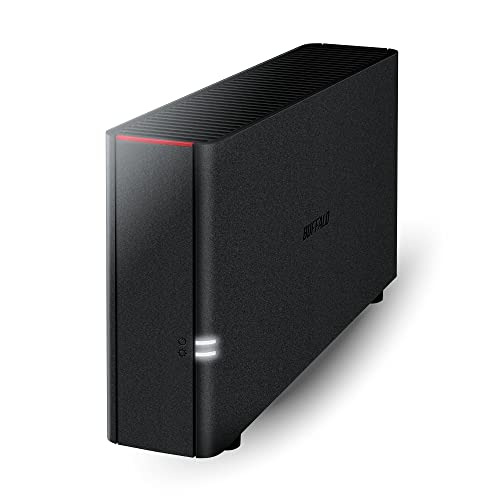
BUFFALO LinkStation 210 4TB 1-Bay NAS (Hard Drive Included)

Our verdict: The simplest start, with a 4TB drive already installed.

The Buffalo LinkStation 210 is the only unit here that needs no extra purchase: a one-bay NAS that ships with a 4TB drive already installed. It works as home cloud or network storage out of the box, with the simplest setup in the group. It falls in the $100 to $200 bucket.

It ranks fifth because one bay means no RAID redundancy. A single drive failure loses the data, which makes it a bad place to keep your only copy. Against the diskless units above, it is cheaper to start but offers no growth path, so you would replace it rather than expand it.

Buy it if you want plug-in shared storage and will back up key files elsewhere. The caveat is the single copy, so skip it when redundancy matters or you expect to need more room.

Bays
1
Included
4TB drive
RAID
None
Setup
Ready out of box

What we like

  • +Drive already included
  • +Simplest setup here
  • +Low entry cost
  • +Home cloud storage

Watch out for

  • −No RAID redundancy
  • −Single bay, no growth

Buy it if: Beginners wanting plug-in network storage.

Skip it if: You need redundancy or room to grow.

6

Best Budget Enclosure

UGREEN NAS DH2300 2-Bay Desktop NAS (Diskless)

Our verdict: Basic 2-bay redundancy at the lowest enclosure price.

The UGREEN DH2300 is a compact two-bay diskless desktop NAS that supports up to 64TB total, with drives sold separately and basic two-bay RAID. It is the cheapest enclosure here, in the $100 to $200 bucket, and gives budget buyers redundancy without a Synology price.

It ranks last because the Synology DS225+ brings more software polish and processing power for a modest step up in price. The DH2300 offers mirrored storage at an entry price, and that is the whole case for it. Its compute is modest, so transcoding and multi-app use are not what it was built for.

Buy it if you want simple mirrored storage on a tight budget and will put two CMR drives in it. The caveat is limited processing power, so skip it for heavy transcoding or apps beyond file sharing.

Bays
2
Capacity
Up to 64TB
Form
Compact desktop
Drives
Not included

What we like

  • +Lowest enclosure price
  • +Two drive bays
  • +Up to 64TB supported
  • +Compact desktop size

Watch out for

  • −Modest compute power
  • −Drives sold separately

Buy it if: Budget buyers wanting simple 2-bay redundancy.

Skip it if: You want transcoding or advanced apps.

Methodology

How We Ranked These

Recording type

CMR drives were treated as the safe default for RAID, and drives or units without that detail got less credit.

Bay count and RAID

More bays and RAID 5 or 10 support scored higher for redundancy and growth.

Software platform

We weighed Synology DSM against other platforms for maturity and ease of use.

Compute headroom

CPU and hardware transcoding mattered for media and multi-service workloads.

Total cost to run

Because most units ship without drives, we counted the added drive spend.

Every Primea Score uses the same weights: Performance 30% · Build & Materials 20% · Everyday Usability 20% · Value 20% · Owner Satisfaction 10%. Full scoring rules

Buyer's guide

How to Pick the Right One for You

By Role

A NAS needs both an enclosure and drives, so start with what you already own.

SituationOur pick
Own an enclosure, need a driveWD Red Plus 8TB
Want 2-bay mirrored backupSynology DS225+
Need 4 bays for growthSynology DS925+
Want drive included, no setupBuffalo LinkStation 210

By Budget

SpendOur pick
$100 to $200 (ready to use)Buffalo LinkStation 210
$100 to $200 (2-bay)UGREEN DH2300
$200 to $500Synology DS225+
$500+Synology DS925+

Ready-Made vs Diskless

Ready-made

A drive-included unit like the Buffalo LinkStation works out of the box but has one bay and no RAID.

Diskless

Diskless units like the Synology and UGREEN models cost more overall but give redundancy and growth with drives such as the WD Red Plus.

Most home offices should default to a diskless 2-bay and add CMR drives.

By Workload

WorkloadOur pick
Backup and file sharingSynology DS225+
Media transcoding and appsUGREEN DXP4800 Plus
Growing team archiveSynology DS925+
Simple budget mirrorUGREEN DH2300

For First-Time NAS Buyers Specifically

Look for

Simple setup, clear software and a CMR drive so a rebuild will not stall.

In this ranking

Pair the Synology DS225+ with the WD Red Plus, or start with the Buffalo LinkStation for zero setup.

When to Spend More

Spend more if

You need RAID 5 or 10 and room to grow, which means the Synology DS925+ or UGREEN DXP4800 Plus.

Save if

You only need basic backup, where the UGREEN DH2300 or Buffalo LinkStation 210 is enough.

Questions

Frequently Asked Questions

Can I use a regular desktop drive in a NAS?+

You can, but it may not be built for constant operation or RAID, and some use SMR recording. A NAS-rated CMR drive like the WD Red Plus is safer for all-day service and rebuilds.

What is the biggest NAS mistake?+

Buying an SMR drive for RAID, which can stall during a rebuild. Check for CMR first, as with the WD Red Plus, and confirm it in the maker's drive list before ordering.

Is the DS925+ worth it over the DS225+?+

Only if you will use more than two drives. The DS925+ supports RAID 5 and RAID 10 for growth. Otherwise the DS225+ with two mirrored drives costs less and covers most home offices and keeps spare cash for drives.

Do I need to buy drives separately?+

For every unit except the Buffalo LinkStation 210, yes. The DS225+, DS925+, DXP4800 Plus and DH2300 are all diskless, so add the cost of matched CMR drives like the WD Red Plus, usually two to four of them.

Does RAID replace backup?+

No. RAID protects against a drive failure but not deletion, ransomware or fire. Keep an offsite or separate copy of key files even with a Synology DS225+ mirrored pair, because a mirror copies mistakes too.

Can a 1-bay NAS protect my data?+

Not alone, since the Buffalo LinkStation 210 has one bay and no redundancy. If the drive fails, the data goes with it. Back up to another drive or cloud storage regularly, and test a restore once.

Final take

Start with the WD Red Plus if you own a NAS and need a CMR drive for an empty bay. If you are buying the enclosure too, the Synology DS225+ with two CMR drives is the right default. Step up to the DS925+ or UGREEN DXP4800 Plus only if storage or workloads will grow, and treat the Buffalo as a single-copy starter.

More Ranked & Reviewed Guides