
Primea ReviewsAll Reviews

Primea Reviews is reader-supported. When you buy through our Amazon links we may earn a commission, at no extra cost to you. Rankings are set by our editors and never sold. Learn more

Ranked & Reviewed by Primea Reviews

The 6 Best NAS Storage Devices for Home Office of 2026, Ranked & Reviewed

By the Primea Editorial TeamUpdated November 1, 202610 min read6 products ranked
The 6 Best NAS Storage Devices for Home Office of 2026, Ranked & Reviewed

The short answer

The Synology DS225+ is the best overall, with an Intel CPU, hardware transcoding and the most polished NAS software. The Asustor AS5402T adds four NVMe cache slots and dual 2.5GbE ports. The UGREEN DXP2800 is the newer alternative, the Synology DS223 is a backup-first hub, the BUFFALO ships with 4TB, and the UGREEN DH2300 has the cheapest enclosure.

The Primea Scoreboard

Ranked & Reviewed

  1. 01
    Synology DS225+

    Best Overall

    Synology DS225+

    Real transcoding power and the most polished NAS software.

    94Outstanding
    Check price
  2. 02
    Asustor AS5402T

    Best for Caching and Speed

    Asustor AS5402T

    Four NVMe cache slots and dual 2.5GbE ports.

    91Excellent
    Check price
  3. 03
    UGREEN NAS DXP2800

    Best Non-Synology Option

    UGREEN NAS DXP2800

    A two-bay box aimed at creators who want something different.

    88Excellent
    Check price
  4. 04
    Synology DS223

    Best Simple Backup Hub

    Synology DS223

    Synology's software without the transcoding premium.

    85Excellent
    Check price
  5. 05
    BUFFALO LinkStation 720 4TB

    Best Drives Included

    BUFFALO LinkStation 720 4TB

    Ships with 4TB of drives, so there is no extra shopping.

    82Very Good
    Check price
  6. 06
    UGREEN NAS DH2300

    Best Entry Price

    UGREEN NAS DH2300

    The cheapest enclosure here, with 64TB of capacity support.

    78Very Good
    Check price

The first NAS mistake is pricing the enclosure and forgetting the drives. Most boxes below arrive diskless, so the real cost is the enclosure plus two hard drives, and the cheapest enclosure rarely makes the cheapest finished system. The second mistake is paying for video transcoding power when the job is nightly document backups for three people.

Our editors reviewed six network storage devices for a home office and ranked them on hardware, software maturity, drive provisioning and fit for small teams. Specs come from the listings, so where a maker states no CPU or memory, the pick loses points. A NAS you cannot size ahead of time is a gamble with your files. Scores favour clear specs and known software over bare price.

Before you buy

What Actually Matters

01

Drives included or not

Most NAS enclosures are diskless, so you must buy drives. Two drives can cost as much as the box itself, which changes the comparison. Check the title for the word diskless or an included capacity such as 4TB. Only the BUFFALO ships with drives, so add the drive cost to every other price before choosing, and remember that bays limit later upgrades.

02

CPU and transcoding

Transcoding converts video on the fly for different devices. Intel CPUs with hardware transcoding handle it smoothly, while ARM chips struggle. If you stream movies or camera footage, it matters; if you only back up documents, it does not. Look for hardware transcoding in the listing, and remember that only the DS225+ states it here. The AS5402T has an Intel CPU too, but does not mention transcoding.

03

Network ports

2.5GbE ports move files faster than gigabit, but only if your router and computer also support them. Otherwise the speed is unused. Check the port count and speed in the listing, then check your own network gear. A second port can also provide failover or link aggregation on some models, but check the manual first.

04

NVMe cache

A cache keeps frequently used files on fast SSD storage, which helps with large project folders opened repeatedly. It does not help a nightly backup. Look for M.2 NVMe slots in the specifications. The Asustor lists four, and the others list none, so caching is a reason to pay for it if you work with large files.

05

Software ecosystem

NAS software handles backups, photos, file sharing and remote access. A mature platform saves setup time and gets security updates. Check which apps the listing names, such as Synology Drive or Photos, and see how long the maker has supported its software. A new platform can mean fewer guides and plugins, and less proven security patching.

In-depth reviews

Our Ranked Picks, Reviewed

1

Best Overall

Synology DS225+

Our verdict: Real transcoding power and the most polished NAS software.

The DS225+ is a two-bay diskless NAS with an Intel CPU and hardware transcoding. It runs Synology DSM, which bundles Synology Drive for file sync, Synology Photos for a private photo library and Surveillance Station for cameras. Hardware transcoding converts video on the fly so a phone or tablet can stream a file in a format it can play.

It ranks first because the Intel chip with transcoding separates it from the ARM and entry models, and DSM is the best-known NAS software. The tradeoff is cost: the enclosure sits in the $200 to $500 bucket, and drives are extra.

Buy it for an office that needs backups, media and photos in one box. Skip it if you only want basic file storage, because you would pay for hardware you never use.

Bays
2, diskless
CPU
Intel, hardware transcoding
Software
Synology DSM
Drives
Sold separately

What we like

  • +Hardware transcoding
  • +Mature DSM software
  • +Drive, Photos, Surveillance apps
  • +Two drive bays

Watch out for

  • −Drives not included
  • −Mid-high enclosure cost

Buy it if: Offices needing backups plus media and photos.

Skip it if: You only need basic file storage.

2

Best for Caching and Speed

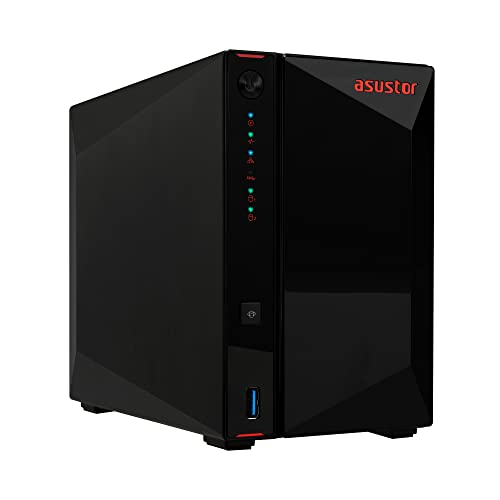
Asustor AS5402T

Our verdict: Four NVMe cache slots and dual 2.5GbE ports.

Inside the AS5402T is a 2.0GHz quad-core Intel processor with 4GB of DDR4 memory, four M.2 NVMe SSD slots and two 2.5GbE ports. The NVMe slots let you build a cache that keeps frequently opened files on fast storage, which speeds up shared project folders.

It ranks second because the hardware beats the Synology on network and caching options, while the software is less familiar and less polished. Dual 2.5GbE helps only when your router, switch and computers also support it.

Buy it for creators and teams that move large files all day. The caveats are that drives are sold separately and Asustor's software has a smaller community than DSM. If you want the easiest software, choose a Synology.

CPU
Intel quad-core 2.0GHz
Memory
4GB DDR4
Cache
4x M.2 NVMe slots
Network
2x 2.5GbE

What we like

  • +Four NVMe cache slots
  • +Dual 2.5GbE ports
  • +4GB DDR4 memory
  • +Quad-core Intel CPU

Watch out for

  • −Drives sold separately
  • −Less familiar software

Buy it if: Creators and teams moving large files.

Skip it if: You want the easiest software.

3

Best Non-Synology Option

UGREEN NAS DXP2800

Our verdict: A two-bay box aimed at creators who want something different.

The DXP2800 is a two-bay diskless NAS running UGREEN NASync OS, positioned for content creators and enthusiasts. It is the main alternative to Synology in this ranking, with a different software stack and a more aggressive price in the $200 to $500 bucket.

It ranks third because the listing offers fewer hardware specifics than the Synology and Asustor above, and the platform is newer. A shorter track record matters for a device that holds your only copy of important files.

Buy it if you want to try a newer platform and are comfortable with some early-adopter risk. Skip it if you want proven software. Before ordering, check the CPU, memory and supported drive sizes on UGREEN's product page, because the listing leaves them out.

Bays
2, diskless
Software
UGREEN NASync OS
Target
Creators and enthusiasts
Drives
Sold separately

What we like

  • +Two-bay design
  • +Newer NASync OS
  • +Aimed at creators
  • +Alternative to Synology

Watch out for

  • −Few listed hardware specs
  • −Shorter track record

Buy it if: Creators open to a newer platform.

Skip it if: You want proven software.

4

Best Simple Backup Hub

Synology DS223

Our verdict: Synology's software without the transcoding premium.

The DS223 is a two-bay diskless NAS running the DSM software ecosystem, positioned as a backup hub for a home or small office. It handles scheduled backups, file sharing and sync without the premium of transcoding hardware.

It ranks fourth because it lacks the transcoding chip of the DS225+, so media streaming is weaker. For pure backup and file sharing it is a sensible choice, and it lands in the $200 to $500 bucket like its sibling.

Buy it for a backup-first office with documents and photos to protect. Skip it if you stream or transcode video. The caveat: the DS225+ costs only a little more for much stronger hardware, so check the price gap before you commit to the weaker box.

Bays
2, diskless
Software
Synology DSM
Role
Home and office backup
Drives
Sold separately

What we like

  • +Synology DSM software
  • +Simple backup hub
  • +Two drive bays
  • +Trusted brand

Watch out for

  • −No transcoding focus
  • −Drives not included

Buy it if: Backup-first home offices.

Skip it if: You stream or transcode video.

5

Best Drives Included

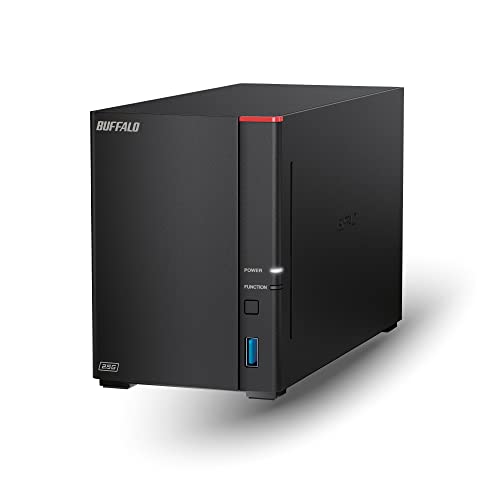
BUFFALO LinkStation 720 4TB

Our verdict: Ships with 4TB of drives, so there is no extra shopping.

The LinkStation 720 is a two-bay NAS that ships with 4TB of drives installed, positioned for private cloud storage in a home office. It is the only pick in the guide with drives pre-installed, which makes the price directly comparable to a finished system.

It ranks fifth because the listing gives little hardware detail beyond the drives. You also cannot choose the drive model, and 4TB is limited capacity out of the box for a growing archive.

Buy it if you want one purchase and no drive shopping. The caveat: with few stated specs, you cannot compare its CPU, memory or software with the Synology boxes. Check what apps and backup tools it supports, because a NAS is only as useful as its software.

Bays
2
Drives
4TB included
Role
Private cloud storage
Setup
Pre-installed drives

What we like

  • +Drives pre-installed
  • +One-purchase setup
  • +Private cloud focus
  • +Two bays

Watch out for

  • −Light on listed specs
  • −Limited capacity out of box

Buy it if: Buyers who want an all-in-one price.

Skip it if: You want to choose your own drives.

6

Best Entry Price

UGREEN NAS DH2300

Our verdict: The cheapest enclosure here, with 64TB of capacity support.

Pitched as a desktop box with two bays, the DH2300 can address as much as 64TB across both drives. It has the lowest enclosure cost in the guide, in the $100 to $200 bucket, and arrives with no drives.

It ranks last because the listing states few performance specs, so it fits light duties best: backups, shared folders and a small photo library. The price is the draw.

Buy it as a first NAS for a modest office. Skip it if you need transcoding or caching. The caveat is that drives are extra and you have no CPU or memory numbers to judge speed. If the NAS will serve several people at once, the DS223 offers more certainty for a moderate step up.

Bays
2, diskless
Capacity
Up to 64TB total
Type
Desktop NAS
Price tier
$100 to $200

What we like

  • +Cheapest enclosure here
  • +Supports up to 64TB
  • +Two-bay desktop design
  • +Good first NAS

Watch out for

  • −Few performance specs listed
  • −Drives sold separately

Buy it if: First-time NAS buyers.

Skip it if: You need transcoding or caching.

Methodology

How We Ranked These

Processing power

CPU and transcoding capability decide how well a NAS handles media and apps.

Network speed

2.5GbE ports ranked above gigabit-only listings.

Caching

NVMe cache slots earned credit for speeding up frequent files.

Software

We compared the maturity of each platform's file, photo and backup apps.

Total cost

We considered whether drives are included, since they add to the real price.

Every Primea Score uses the same weights: Performance 30% · Build & Materials 20% · Everyday Usability 20% · Value 20% · Owner Satisfaction 10%. Full scoring rules

Buyer's guide

How to Pick the Right One for You

By Primary Use

Start from what the NAS will do every day.

UseOur pick
Backups and media streamingSynology DS225+
Large file transfersAsustor AS5402T
Creator workflows, new platformUGREEN NAS DXP2800
Backup onlySynology DS223
Plug-in with drivesBUFFALO LinkStation 720 4TB

By Budget

SpendOur pick
$100 to $200UGREEN NAS DH2300
$200 to $500, backupSynology DS223
$200 to $500, drives includedBUFFALO LinkStation 720 4TB
$200 to $500, transcodingSynology DS225+
$200 to $500, speedAsustor AS5402T

Diskless vs Drives Included

Diskless

Lets you pick drive brand and size but needs extra purchase. Picks: DS225+, DS223, DXP2800, AS5402T, DH2300.

Drives included

Ships ready to run with 4TB installed. Pick: BUFFALO LinkStation 720.

Most buyers should choose diskless for flexibility unless they want the simplest purchase.

By Network Speed

NeedOur pick
Dual 2.5GbE portsAsustor AS5402T
NVMe cacheAsustor AS5402T
Mature softwareSynology DS225+
Basic file sharingUGREEN NAS DH2300

For Small Teams Specifically

Look for

Reliable file sharing, scheduled backups and enough speed for several users.

In this ranking

The Synology DS225+ offers the best software and transcoding, while the Asustor AS5402T has the best network links.

When to Spend More

Spend more if

You stream video or move big files. The DS225+ and AS5402T pay off.

Save if

You only need backups. The DS223 or DH2300 is enough.

Questions

Frequently Asked Questions

Do I need to buy drives separately?+

For most of these units, yes. Only the BUFFALO LinkStation 720 ships with drives installed. The others are diskless, so add the cost of two NAS-rated drives to the price. A matched pair is best for mirroring.

What drives should I use?+

Use drives rated for NAS use, which are built for continuous operation. Check the maker's compatibility list before buying, since not every drive is validated on every enclosure, and an unlisted drive can cause errors.

Is the DS225+ worth it over the DS223?+

If you stream or transcode video, yes. For backups alone, the DS223 is enough and the extra cost of the DS225+ buys unused hardware, since backups do not need transcoding or a faster processor.

How do I set up a two-bay NAS?+

Install the drives, connect the NAS to your router and follow the setup wizard. Then create storage and shared folders, and schedule a backup to a second location. Test a restore before trusting it.

Is RAID a backup?+

No. A mirrored pair protects against one drive failing, but not against deletion, fire or ransomware. Keep a second backup somewhere else, such as an external drive or cloud copy, and test a restore now and then.

Do I need 2.5GbE?+

Only if your router and computers also support it. Otherwise the speed benefit is unused. The AS5402T has dual 2.5GbE ports, so it needs a matching switch to pay off, and cables rated for the speed.

Final take

Buy the DS225+ for backups plus media and photos, the AS5402T when large files move constantly, and the DS223 if you only need backups. Take the BUFFALO if you want one purchase with drives included, and the UGREEN DH2300 for a cheap first NAS. Budget for drives in every case except the BUFFALO.

More Ranked & Reviewed Guides