
Primea ReviewsAll Reviews

Primea Reviews is reader-supported. When you buy through our Amazon links we may earn a commission, at no extra cost to you. Rankings are set by our editors and never sold. Learn more

Ranked & Reviewed by Primea Reviews

The 8 Best NAS for Mac and Time Machine Backup of 2026, Ranked & Reviewed

By the Primea Editorial TeamUpdated November 1, 202611 min read8 products ranked
The 8 Best NAS for Mac and Time Machine Backup of 2026, Ranked & Reviewed

The short answer

The Synology DS223 is the best NAS for Mac and Time Machine: a two-bay with a built-in Time Machine wizard, per-Mac quotas and RAID 1. The QNAP TS-264 suits households with several Macs, and the UGREEN DXP2800 handles large archives. The DXP4800 Plus is the pick for four bays and RAID.

The Primea Scoreboard

Ranked & Reviewed

  1. The easiest Time Machine setup of the group.

    94Outstanding
    Check price
  2. 02
    QNAP TS-264-8G-US 2-Bay Desktop NAS

    The most memory in a 2-bay, for several Macs at once.

    91Excellent
    Check price
  3. 03
    UGREEN NAS DXP2800

    Best for Large Backups

    UGREEN NAS DXP2800

    More processor power for big MacBook Pro archives.

    89Excellent
    Check price
  4. 04
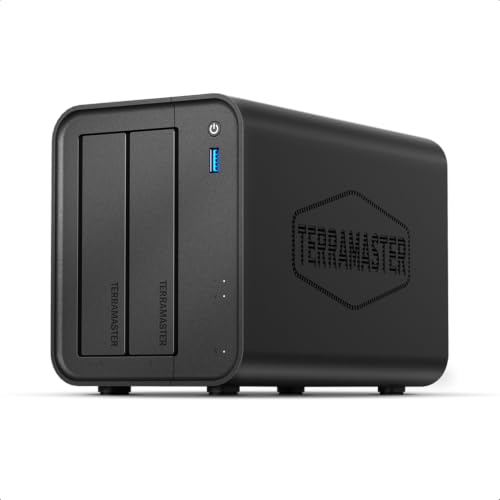
    TERRAMASTER F2-425

    Best Intel Headroom

    TERRAMASTER F2-425

    An Intel quad-core NAS that does more than backups.

    87Excellent
    Check price
  5. 05
    QNAP TS-216G-US 2-Bay 2.5GbE Desktop NAS

    A 2.5GbE port aimed at shortening the first big backup.

    85Excellent
    Check price
  6. 2.5GbE speed in the lower price bucket.

    83Very Good
    Check price
  7. 07
    UGREEN NAS DH2300

    A low-cost enclosure for one Mac's backups.

    81Very Good
    Check price
  8. 08
    UGREEN NAS DXP4800 Plus

    Best for RAID and Many Macs

    UGREEN NAS DXP4800 Plus

    Four bays and real RAID, if you can justify the spend.

    79Very Good
    Check price

Mac owners shopping for a backup NAS usually count drive bays and forget the first backup. Time Machine writes an enormous initial copy, and a slow network port or a weak processor stretches that into a multi-day job that quietly fails if the Mac sleeps. The box that finishes the first copy cleanly is the one that earns trust.

We ranked eight diskless NAS units, all of which list SMB3 Time Machine support, using spec sheets and owner reports. Setup friction, network speed, processor headroom, multi-Mac handling and price bucket set the order, since a backup box is only useful if it runs without attention. None ships with drives, so storage is a separate purchase that should be sized well above your Mac's used space.

Before you buy

What Actually Matters

01

Time Machine support

Time Machine is Apple's built-in backup, and a NAS must expose an SMB3 share for it. Without proper support, backups can fail or be unreliable. Look for SMB3 and Time Machine named in the specs, as every unit here lists, and check whether the maker provides a wizard, as the Synology does, to avoid manual setup and the errors that come with it.

02

Network port speed

A 2.5GbE port moves data faster than gigabit, which helps the first large backup. It only helps if your router and Mac support it. Check your own network, including the switch and the Mac's adapter, before paying for it. The QNAP TS-264, TS-216G, TERRAMASTER and Asustor list 2.5GbE, while the Synology DS223 does not highlight it.

03

RAID and bays

RAID spreads or mirrors data across drives so one failure does not erase your backup. A 2-bay offers RAID 1, and a 4-bay unlocks RAID 5, 6 and 10. Check the listed RAID levels, and remember that RAID protects against a disk failure, not accidental deletion, theft or a house fire.

04

CPU and RAM

The processor and memory handle the sparse bundles Time Machine creates and any extra services. Weak hardware slows several simultaneous backups. Look for the RAM figure in the listing: the QNAP TS-264 has 8GB, the TERRAMASTER 4GB and the Asustor 1GB, which tells you who will cope with a family of Macs backing up at once.

05

Diskless design

Every unit here ships without drives, so you pay separately. Budget for drives sized to roughly two times your Mac's used storage. Read the listing for the word diskless, and add the cost of two drives to the enclosure price, since a two-bay RAID 1 needs matched disks of the same size.

In-depth reviews

Our Ranked Picks, Reviewed

1

Best Overall

Synology DS223 Home & Office Backup Hub

Our verdict: The easiest Time Machine setup of the group.

The Synology DS223 is a two-bay diskless NAS with a guided Time Machine shared folder setup over SMB3 and Bonjour, a per-Mac quota setting in the same flow, and RAID 1 mirroring. The wizard matters: Time Machine depends on a correctly configured share, and a quota stops one Mac eating the whole disk.

It ranks first because it makes the hard part trivial. The QNAP has more memory but a heavier interface, and the UGREEN boxes use a newer app ecosystem.

Buy it for a home with two or three Macs that want simple backups. The caveats are fixed RAM that cannot be upgraded and drives sold separately. Skip it if you want a NAS that also runs heavy extra apps.

Bays
2, diskless
Time Machine
Built-in wizard, SMB3
RAID
RAID 1 supported
RAM
Fixed, not upgradeable

What we like

  • +Guided Time Machine setup
  • +Per-Mac quota setting
  • +RAID 1 mirroring
  • +Bonjour discovery

Watch out for

  • −RAM cannot be upgraded
  • −Drives sold separately

Buy it if: Homes with two or three Macs that want simple backups.

Skip it if: You want a NAS that also runs heavy extra apps.

2

Best for Multiple Macs

QNAP TS-264-8G-US 2-Bay Desktop NAS

Our verdict: The most memory in a 2-bay, for several Macs at once.

The QNAP TS-264 is a two-bay NAS with 8GB of RAM, the most for a two-bay here, 2.5GbE networking, SMB3 Time Machine shares and the full QTS app store. Several Macs backing up at once is a memory-hungry job, and 8GB gives the box room to juggle them.

It ranks second because the interface is more complex than Synology's and the price bucket is higher. It beats the TERRAMASTER on RAM, by double.

Buy it for a household with two or more Macs backing up together. Skip it if you want the simplest possible setup. A 2.5GbE port only helps if your router and Macs support it, so check your network.

Bays
2
RAM
8GB
Network
2.5GbE
OS
QNAP QTS

What we like

  • +8GB RAM headroom
  • +2.5GbE networking
  • +Handles multiple Macs
  • +Full app store

Watch out for

  • −More complex interface
  • −Higher price bucket

Buy it if: Households with two or more Macs backing up together.

Skip it if: You want the simplest possible setup.

3

Best for Large Backups

UGREEN NAS DXP2800

Our verdict: More processor power for big MacBook Pro archives.

The UGREEN DXP2800 is a two-bay NAS built with content-creator hardware, with a higher performance CPU, snapshot-based versioning and SMB3 Time Machine share support. Big Time Machine sparse bundles reward a faster processor, and snapshots add a second layer of history on top of Time Machine itself.

It ranks third because the app ecosystem is newer and it costs more than the DH2300. It beats the Synology on raw CPU power.

Buy it for a MacBook Pro owner with large drives and big archives. Skip it if you only back up a small, single-Mac drive. The newer software has less history behind it, so expect fewer community guides.

Bays
2
Time Machine
SMB3 share
Versioning
Snapshots
CPU
Higher-performance tier

What we like

  • +Faster CPU for big backups
  • +Snapshot versioning
  • +SMB3 Time Machine share
  • +Creator-tier hardware

Watch out for

  • −Newer app ecosystem
  • −Costs more than DH2300

Buy it if: MacBook Pro owners with large drives and big archives.

Skip it if: You only back up a small, single-Mac drive.

4

Best Intel Headroom

TERRAMASTER F2-425

Our verdict: An Intel quad-core NAS that does more than backups.

The TERRAMASTER F2-425 is a two-bay NAS with an Intel x86 quad-core CPU, 4GB of RAM, a 2.5GbE port and SMB3 Time Machine share support. An Intel chip runs more services than most ARM boxes, so the F2-425 can host light extras alongside backups.

It ranks fourth because it has half the QNAP's memory and a less guided Mac setup. It suits tinkerers more than set-and-forget users.

Buy it if you want Time Machine plus other light tasks. Skip it if you want a wizard-driven backup. For plain Time Machine duty, the Synology DS223 is simpler, while this box rewards people who like to configure services themselves. Its quad-core Intel chip leaves room for light extras beyond backups.

CPU
Intel x86 quad-core
RAM
4GB
Network
2.5GbE
Bays
2, diskless

What we like

  • +Intel quad-core CPU
  • +4GB RAM
  • +2.5GbE port
  • +Runs extra light services

Watch out for

  • −Half the QNAP memory
  • −Less guided Mac setup

Buy it if: Buyers who want Time Machine plus other light tasks.

Skip it if: You want a wizard-driven, set-and-forget backup.

5

Best for Fast First Backup

QNAP TS-216G-US 2-Bay 2.5GbE Desktop NAS

Our verdict: A 2.5GbE port aimed at shortening the first big backup.

The QNAP TS-216G is a two-bay NAS with a 2.5GbE port, SMB3 Time Machine share support and the QTS operating system, with standard two-bay RAID. The faster port is aimed at shortening the first big backup.

It ranks fifth because the listing does not give RAM, and it needs 2.5GbE gear to benefit. On a gigabit network it offers no advantage over cheaper boxes.

Buy it if your network already runs 2.5GbE and you want a fast first backup. Skip it if your network is gigabit only. Confirm the RAM before you rely on it with several Macs, because the listing leaves it blank. Memory decides how well the box copes when two laptops wake and start backing up together.

Bays
2
Network
2.5GbE
OS
QNAP QTS
RAID
Standard 2-bay

What we like

  • +2.5GbE port
  • +SMB3 Time Machine share
  • +QTS operating system
  • +2-bay RAID options

Watch out for

  • −RAM not listed
  • −Needs 2.5GbE gear to benefit

Buy it if: Owners with a 2.5GbE network wanting a fast first backup.

Skip it if: Your network is gigabit only.

6

Best First NAS

Asustor Drivestor 2 Gen 2 AS1202T

Our verdict: 2.5GbE speed in the lower price bucket.

The Asustor Drivestor 2 Gen 2 AS1202T is a two-bay NAS with a quad-core 1.7GHz CPU, 1GB of DDR4 RAM, 2.5GbE networking, the ADM operating system, SMB3 Time Machine share support and 4K media server support. It brings 2.5GbE into the lower price bucket.

It ranks sixth because only 1GB of RAM limits headroom. It is a sound first NAS but cannot run many apps.

Buy it as a first NAS that gives 2.5GbE for less. Skip it if you plan to run many apps on the box. For one or two Macs, it will back up fine, though not quickly under load. With only 1GB of memory, treat it as a dedicated backup target rather than a general server.

CPU
Quad-core 1.7GHz
RAM
1GB DDR4
Network
2.5GbE
OS
ADM

What we like

  • +2.5GbE at lower bucket
  • +Quad-core CPU
  • +4K media server support
  • +SMB3 Time Machine share

Watch out for

  • −Only 1GB RAM
  • −Limited headroom

Buy it if: First-time NAS buyers who want 2.5GbE for less.

Skip it if: You plan to run many apps on the box.

7

Best Budget

UGREEN NAS DH2300

Our verdict: A low-cost enclosure for one Mac's backups.

The UGREEN DH2300 is a two-bay diskless enclosure supporting up to 64TB, with SMB3 Time Machine share support and an entry-level CPU and RAM tier. The price is the draw, and 64TB leaves room for years of backups.

It ranks seventh because the hardware is entry level and weak for multiple Macs. The DXP2800 above is faster for more money.

Buy it for a single-Mac household on a tight budget. Skip it if several Macs back up at once. Entry-level hardware slows the first copy, so expect a long initial run and leave the Mac plugged in overnight. Over time, incremental backups are small, so the weakness matters mostly at the start.

Bays
2, diskless
Capacity
Up to 64TB
Time Machine
SMB3 share
Tier
Entry-level CPU and RAM

What we like

  • +Budget-friendly enclosure
  • +Up to 64TB capacity
  • +SMB3 Time Machine share
  • +Two drive bays

Watch out for

  • −Entry-level hardware
  • −Weak for multiple Macs

Buy it if: Single-Mac households on a tight budget.

Skip it if: Several Macs back up to it at once.

8

Best for RAID and Many Macs

UGREEN NAS DXP4800 Plus

Our verdict: Four bays and real RAID, if you can justify the spend.

The UGREEN DXP4800 Plus is a four-bay NAS with an Intel Pentium Gold 8505 five-core CPU, RAID 5, 6 and 10 support, multiple simultaneous Time Machine shares and the highest capacity ceiling in the list. Four bays let you use real RAID for a household backup server.

It ranks last because it is in the highest price bucket and overkill for small homes. The Synology DS223 handles one or two Macs for far less.

Buy it for a household with three or more Macs that wants RAID. Skip it if you have one or two Macs and a modest budget. Add enough drives to justify the four bays.

Bays
4, diskless
CPU
Pentium Gold 8505, 5-core
RAID
5, 6 and 10
Capacity
Highest on the list

What we like

  • +Four bays
  • +RAID 5, 6 and 10
  • +Multiple simultaneous shares
  • +Highest capacity ceiling

Watch out for

  • −Highest price bucket
  • −Overkill for small homes

Buy it if: Households with three or more Macs wanting RAID.

Skip it if: You have one or two Macs and a modest budget.

Methodology

How We Ranked These

Time Machine setup

We looked at how directly each NAS sets up an SMB3 Time Machine share, including quotas and discovery.

Network speed

2.5GbE ports were weighted for how they shorten the first full backup.

Processor and memory

CPU and RAM tiers decide how well a box handles several Macs or large archives.

Redundancy

RAID options and bay count were scored for protecting the backup itself.

Price fit

Each unit was weighed against its bucket and what the hardware delivers for a backup role.

Every Primea Score uses the same weights: Performance 30% · Build & Materials 20% · Everyday Usability 20% · Value 20% · Owner Satisfaction 10%. Full scoring rules

Buyer's guide

How to Pick the Right One for You

By Number of Macs

Mac count is the cleanest first filter.

MacsOur pick
One Mac, tight budgetUGREEN DH2300
Two or three, easy setupSynology DS223
Two or more at onceQNAP TS-264-8G
Three or more with RAIDUGREEN DXP4800 Plus

By Budget

SpendOur pick
$100 to $200UGREEN DH2300, Asustor AS1202T
$200 to $500Synology DS223, QNAP TS-264, UGREEN DXP2800, TERRAMASTER F2-425, QNAP TS-216G
$500 and upUGREEN DXP4800 Plus

2-Bay vs 4-Bay

2-bay

Mirrors two drives with RAID 1 and costs less. Seven of the picks, led by the Synology DS223, are 2-bay.

4-bay

Allows RAID 5, 6 and 10 and more capacity. The UGREEN DXP4800 Plus is the only one.

Most buyers should default to a 2-bay unless three or more Macs share it.

By Network Speed

NetworkOur pick
2.5GbE, fast first backupQNAP TS-216G
2.5GbE on a budgetAsustor AS1202T
2.5GbE with Intel CPUTERRAMASTER F2-425
Gigabit is fineSynology DS223

For MacBook Pros With Large Drives Specifically

Look for

A stronger processor and snapshot support for large sparse bundles.

In this ranking

The UGREEN DXP2800 lists a higher-performance CPU and snapshot versioning.

When to Spend More

Spend more if

Several Macs back up together. The QNAP TS-264 and UGREEN DXP4800 Plus give the most headroom.

Save if

One Mac uses it. The UGREEN DH2300 covers the job.

Questions

Frequently Asked Questions

Do these NAS drives come with disks?+

No. All eight are listed as diskless or without drives mentioned, so plan to buy drives separately. Add that cost to the enclosure price before comparing models, because two large drives can cost as much as the NAS itself.

What is the most common Time Machine mistake?+

Buying drives too small. A backup needs room for history, so size the capacity well above your Mac's used storage, ideally two times. Time Machine then has space to keep older versions and does not start deleting history early.

Is a 2.5GbE NAS worth it?+

Only if your router and Mac support it. Otherwise the port runs at gigabit and you gain nothing. The QNAP TS-216G and Asustor AS1202T both rely on this, so check the Mac's own adapter too.

How do I set up Time Machine on a NAS?+

Create an SMB3 Time Machine share on the NAS, then pick it in macOS Time Machine settings. The Synology DS223 includes a wizard for this, which sets quotas too and takes only a few minutes.

Should I use RAID for backups?+

RAID 1 protects against one drive failing, which is sensible for a backup. It does not replace keeping another copy elsewhere, so consider an offsite or cloud copy for important data, such as photos.

Can several Macs share one NAS?+

Yes, with separate shares or quotas. The QNAP TS-264 and UGREEN DXP4800 Plus are listed for multiple Macs, and the Synology DS223 lets you set a per-Mac quota.

Final take

The Synology DS223 is the right NAS for most Mac households, because its Time Machine wizard removes the setup headaches. Choose the QNAP TS-264 for several Macs, the UGREEN DXP2800 for large archives and the DXP4800 Plus for RAID. Size your drives well above your Mac's used storage.

More Ranked & Reviewed Guides