
Primea ReviewsAll Reviews

Primea Reviews is reader-supported. When you buy through our Amazon links we may earn a commission, at no extra cost to you. Rankings are set by our editors and never sold. Learn more

Ranked & Reviewed by Primea Reviews

The 6 Best NAS Drives for Mac Time Machine Backup Under $700, Ranked & Reviewed

By the Primea Editorial TeamUpdated November 3, 202610 min read6 products ranked
The 6 Best NAS Drives for Mac Time Machine Backup Under $700, Ranked & Reviewed

The short answer

The Synology DS225+ is the best NAS for Mac Time Machine backup for most households, with a polished DSM setup flow and hardware transcoding for media. The Asustor AS5402T is the performance pick with NVMe cache slots and dual 2.5GbE, the UGREEN DXP2800 is the creator-friendly option, and the Synology DS925+ is the long-term 4-bay choice.

The Primea Scoreboard

Ranked & Reviewed

  1. A two-bay Synology with an Intel CPU, hardware transcoding and the most polished Time Machine setup.

    94Outstanding
    Check price
  2. 02
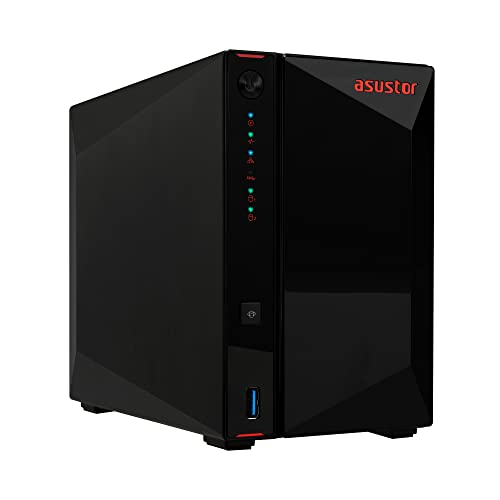
    Asustor AS5402T, 2-Bay NAS

    An Intel quad-core, 4GB of RAM, four M.2 cache slots and dual 2.5GbE ports.

    92Outstanding
    Check price
  3. 03
    UGREEN NAS DXP2800 2-Bay

    Best for Creators

    UGREEN NAS DXP2800 2-Bay

    A two-bay UGREEN NAS aimed at creators who need active project storage alongside backup.

    90Excellent
    Check price
  4. 04
    Synology 4-Bay DiskStation DS925+

    Synology's newest 4-bay with a native Time Machine flow and the longest expected support window.

    88Excellent
    Check price
  5. A four-bay diskless Synology that lets you dedicate bays to Time Machine and to other storage.

    86Excellent
    Check price
  6. A four-bay UGREEN with a 5-core Intel Pentium Gold 8505, the strongest CPU here.

    84Very Good
    Check price

The line on the box that says under $700 hides the real cost of a NAS: every box in this ranking is diskless. You still have to buy the hard drives, and good NAS-rated drives can double the total. A sensible Mac backup setup is a two-bay box with two drives, which leaves a four-bay enclosure for people who know they will grow into it.

This ranking sorts six NAS enclosures by how well they suit a Mac household running Time Machine. We reviewed the listing specifications supplied, covering bays, processor, network ports and operating system, and we judged each on set-up friendliness, headroom and support lifecycle. Where a listing is quiet about something such as RAM, we say so instead of filling the gap.

Before you buy

What Actually Matters

01

Drives are extra

Every NAS here is sold diskless. NAS-rated hard drives can cost as much as the enclosure, so budget for two at least. Check the listing for the word diskless.

02

Time Machine support

Time Machine backs up over the SMB file protocol to a shared folder. A good NAS creates that share, limits its size and handles the macOS handshake. Look for Time Machine named in the feature list.

03

RAID is not a backup

A two-bay mirror protects against a failed disk, but it does not protect against deletion, theft or a fire. Keep an offsite copy of what matters. Treat the NAS as one copy, not the only one.

04

Network ports

Gigabit is plenty for steady daily backups. A 2.5GbE port speeds up the first full backup and large file transfers. Only the Asustor lists dual 2.5GbE in this ranking.

05

Software lifecycle

A NAS is a long-term appliance, so support matters. Established platforms tend to be updated for longer. Check the maker's support policy before you commit.

In-depth reviews

Our Ranked Picks, Reviewed

1

Best Overall

Synology DS225+ Private Cloud Media Server

Our verdict: A two-bay Synology with an Intel CPU, hardware transcoding and the most polished Time Machine setup.

The DS225+ is a diskless two-bay NAS with an Intel CPU, hardware transcoding and a native DSM flow for setting up Time Machine. It falls between $200 and $500 before drives.

It takes first place because Time Machine on a Mac is mostly a software problem, and DSM is the most refined software in this group. You create a shared folder, enable Time Machine from the file service settings and pick the NAS as your backup destination. Two bays let you mirror a pair of drives, so a single disk failure does not lose your history. Hardware transcoding is a bonus if you also stream video.

Buy it for a family Mac backup server that also serves media. Skip it if you want the fastest possible network ports.

Bays
2, diskless
CPU
Intel, hardware transcoding
Time Machine
Native DSM setup flow
Price bucket
$200 to $500

What we like

  • +Most polished Time Machine setup
  • +Intel CPU with hardware transcoding
  • +Two bays suit RAID mirroring
  • +Mature, well-supported DSM

Watch out for

  • −Drives are not included
  • −Network ports are not the fastest

Buy it if: Mac households wanting a trouble-free backup server.

Skip it if: You need multi-gigabit speeds.

2

Best Performance

Asustor AS5402T, 2-Bay NAS

Our verdict: An Intel quad-core, 4GB of RAM, four M.2 cache slots and dual 2.5GbE ports.

The AS5402T is a two-bay NAS with a 2.0GHz Intel quad-core CPU, 4GB of DDR4 RAM, four M.2 NVMe SSD cache slots and dual 2.5GbE network ports. It falls between $200 and $500.

It ranks second because it has the most detailed and strongest spec sheet. NVMe caching can speed up repeated access to frequently used files, and dual 2.5GbE gives you either faster links or link aggregation if your network supports it. For Time Machine, the first full backup is the slow one, and a faster network shortens it. The compromise is software: Asustor's operating system is less widely documented than Synology's DSM.

Choose it if you want headroom and speed. Skip it if you value the easiest Mac setup.

CPU
Intel quad-core 2.0GHz
Memory
4GB DDR4
Cache
4x M.2 NVMe slots
Network
Dual 2.5GbE

What we like

  • +Dual 2.5GbE network ports
  • +Four M.2 NVMe cache slots
  • +Detailed, strong spec sheet
  • +Quad-core Intel CPU

Watch out for

  • −Less polished Mac setup
  • −Smaller software community

Buy it if: Users who want speed and caching.

Skip it if: You want the simplest Time Machine flow.

3

Best for Creators

UGREEN NAS DXP2800 2-Bay

Our verdict: A two-bay UGREEN NAS aimed at creators who need active project storage alongside backup.

The DXP2800 is a two-bay UGREEN NAS running UGREEN's own NAS operating system, positioned for content creator workflows. It falls between $200 and $500.

It ranks third because it targets a specific buyer: someone who edits video or photos and wants project storage on the network plus standard Time Machine backups. UGREEN is a newer name in NAS, so the software has a shorter track record and a smaller body of tutorials than Synology. The listing gives limited technical detail.

Buy it if you are a creator who wants shared project storage. Skip it if you want a long-established platform.

Bays
2
Software
UGREEN NAS OS
Audience
Content creators
Price bucket
$200 to $500

What we like

  • +Two bays for project storage
  • +Aimed at creator workflows
  • +Supports standard Time Machine backup
  • +Competitive price

Watch out for

  • −Newer software platform
  • −Limited listed specs

Buy it if: Photographers and editors needing shared storage.

Skip it if: You want a long-established platform.

4

Best Long-Term 4-Bay

Synology 4-Bay DiskStation DS925+

Our verdict: Synology's newest 4-bay with a native Time Machine flow and the longest expected support window.

The DS925+ is a diskless four-bay Synology, described as the current flagship with a native DSM Time Machine setup and the longest expected official support lifecycle. It is priced at $500 and up.

It ranks fourth because four bays are more than most Mac backups need, and with drives the total can pass your $700 limit. The advantage is longevity. Newer Synology hardware tends to receive software updates for longer, and four bays let you dedicate separate drives to Time Machine and to everything else.

Buy it if you plan to grow. Skip it if you only need to back up a couple of Macs.

Bays
4, diskless
Software
Synology DSM
Time Machine
Native DSM flow
Price bucket
$500 and up

What we like

  • +Four bays for growth
  • +Native Time Machine support
  • +Longest expected support lifecycle
  • +Mature DSM software

Watch out for

  • −Total cost with drives is high
  • −More bays than most need

Buy it if: Households planning long-term storage growth.

Skip it if: You need only a simple Mac backup.

5

Best Separate-Bay Layout

Synology DS425+ Private Cloud Media Server

Our verdict: A four-bay diskless Synology that lets you dedicate bays to Time Machine and to other storage.

The DS425+ is a four-bay diskless NAS with Synology's well-documented DSM software and a native Time Machine setup flow. It is priced at $500 and up.

It ranks fifth because the DS925+ is the newer four-bay model and it matches the function while costing about the same on paper. Its strength is flexibility: with four bays you can dedicate two drives to Time Machine and two to media or files, without mixing the two.

Choose it if you want separate bay groups. Skip it if the newer DS925+ is available at a similar price.

Bays
4, diskless
Software
Synology DSM
Time Machine
Native DSM flow
Price bucket
$500 and up

What we like

  • +Four dedicated bays
  • +Well-documented DSM
  • +Native Time Machine setup
  • +Separates backup from media

Watch out for

  • −Older than the DS925+
  • −Needs four drives to fill

Buy it if: People splitting backup and media storage.

Skip it if: A newer 4-bay is similarly priced.

6

Best Processor

UGREEN NAS DXP4800 Plus 4-Bay

Our verdict: A four-bay UGREEN with a 5-core Intel Pentium Gold 8505, the strongest CPU here.

The DXP4800 Plus is a four-bay UGREEN NAS with a 5-core Intel Pentium Gold 8505 processor and UGREEN's own NAS OS. It is priced at $500 and up.

It ranks last because Time Machine does not need a strong processor, so the CPU is only a benefit if you also run virtual machines, media servers and containers at once. The software is newer than Synology's, and the cost with drives is the highest in the group.

Buy it if you run many services on one box. Skip it if you mainly want Mac backups.

CPU
Intel Pentium Gold 8505, 5-core
Bays
4
Software
UGREEN NAS OS
Price bucket
$500 and up

What we like

  • +Strongest processor in the group
  • +Four bays
  • +Good for multiple services
  • +Own NAS operating system

Watch out for

  • −Newer, less documented software
  • −High total cost

Buy it if: Power users running several services.

Skip it if: You only need Time Machine.

Methodology

How We Ranked These

Time Machine setup

We compared how directly each platform supports Time Machine, favouring native, documented set-up flows.

Bays and expandability

Two and four bay designs were compared for drive redundancy, growth and the total cost with drives.

Processor and memory

Intel CPUs, core counts and RAM figures were weighed for backup speed and multitasking.

Network speed

Gigabit and 2.5GbE ports were assessed for the first full backup and for ongoing transfers.

Software maturity and lifecycle

Established platforms and expected support windows were weighed above newer, less documented systems.

Every Primea Score uses the same weights: Performance 30% · Build & Materials 20% · Everyday Usability 20% · Value 20% · Owner Satisfaction 10%. Full scoring rules

Buyer's guide

How to Pick the Right One for You

By Number of Bays

Two bays handle most Mac backups; four are for growth.

NeedOur pick
Simple Mac backup, mirroredSynology DS225+ Private Cloud Media Server
Fast 2-bay with cachingAsustor AS5402T, 2-Bay NAS
Creator project storageUGREEN NAS DXP2800 2-Bay
Growing 4-bay setupSynology 4-Bay DiskStation DS925+

By Budget

Spend (before drives)Our pick
$200 to $500, easiestSynology DS225+ Private Cloud Media Server
$200 to $500, fastestAsustor AS5402T, 2-Bay NAS
$200 to $500, creatorsUGREEN NAS DXP2800 2-Bay
$500 and upSynology 4-Bay DiskStation DS925+

Synology DSM vs Newer Platforms

Synology DSM

Mature, heavily documented and easy to set up for Time Machine. Picks: Synology DS225+, DS925+ and DS425+.

Newer platforms

Often more hardware for the money but less proven software. Picks: Asustor AS5402T and the UGREEN NAS models.

Default to Synology if backup reliability matters more than raw specs.

By Use Beyond Backup

Extra jobOur pick
Media streaming with transcodingSynology DS225+ Private Cloud Media Server
Active video projectsUGREEN NAS DXP2800 2-Bay
Many services at onceUGREEN NAS DXP4800 Plus 4-Bay
Separate backup and file baysSynology DS425+ Private Cloud Media Server

For a Family of Macs Specifically

Look for

Per-user Time Machine quotas, RAID mirroring and a simple app. Each Mac should have its own share so backups do not fill the disk.

In this ranking

The Synology DS225+ with two NAS drives is the easiest, while the DS925+ suits a larger household.

When to Spend More

Spend more if

You want four bays, a long support window or multi-gigabit networking. The Synology DS925+ or Asustor AS5402T justify the upgrade.

Save if

You back up one or two Macs. The Synology DS225+ in the $200 to $500 range covers it.

Questions

Frequently Asked Questions

Do these include hard drives?+

No. Each is a diskless enclosure, so you must add your own drives. Plan on two NAS-rated drives for a mirrored setup.

What is the biggest mistake with a NAS for Time Machine?+

Leaving Time Machine unlimited. Without a quota, one Mac can fill the whole share, so set a size limit for each backup.

Is the Synology DS225+ worth it over the Asustor AS5402T?+

For ease and Mac polish, yes. For speed and caching, the Asustor wins on paper with dual 2.5GbE and four NVMe slots.

How hard is setup?+

Plan an hour. Install the drives, power on, run the web setup, create a shared folder, enable Time Machine and choose the NAS in macOS.

How should I maintain it?+

Update the operating system, check disk health reports and replace drives at the first warnings. Keep a second backup offsite.

Does Time Machine work over Wi-Fi?+

It can, but the first backup is slow. Use Ethernet for the initial full backup and let Wi-Fi handle the incremental ones.

Final take

The Synology DS225+ is the best NAS for Mac Time Machine backup under $700, thanks to its polished DSM, Intel CPU and two bays. The Asustor AS5402T is the speed pick, the UGREEN DXP2800 suits creators, and the Synology DS925+ is the choice for long-term growth. Add the cost of drives to your budget before you buy.

More Ranked & Reviewed Guides