
Primea ReviewsAll Reviews

Primea Reviews is reader-supported. When you buy through our Amazon links we may earn a commission, at no extra cost to you. Rankings are set by our editors and never sold. Learn more

Ranked & Reviewed by Primea Reviews

The 8 Best 2-Bay NAS for Home Offices of 2026, Ranked & Reviewed

By the Primea Editorial TeamUpdated November 1, 202611 min read8 products ranked
The 8 Best 2-Bay NAS for Home Offices of 2026, Ranked & Reviewed

The short answer

The Synology DS223 is the best 2-bay NAS for home offices because DSM is the easiest NAS software to learn. UGREEN's DXP2800 adds headroom for photo and video work, and the QNAP TS-264 includes 8GB of RAM for apps. TERRAMASTER offers quad-core Intel power, and the Synology DS725+ is the pick for growth.

The Primea Scoreboard

Ranked & Reviewed

  1. The easiest NAS software for first time buyers.

    95Outstanding
    Check price
  2. 02
    UGREEN NAS DXP2800 2-Bay

    Best for Creators

    UGREEN NAS DXP2800 2-Bay

    More processing headroom for photo and video work.

    93Outstanding
    Check price
  3. 8GB of RAM out of the box for running apps.

    91Excellent
    Check price
  4. Quad core Intel power with 2.5GbE and 4GB RAM.

    89Excellent
    Check price
  5. Faster networking if your switch supports it.

    87Excellent
    Check price
  6. Supports up to 64TB total capacity at a low price.

    85Excellent
    Check price
  7. A budget NAS with 2.5GbE and a quad core CPU.

    83Very Good
    Check price
  8. Upgradeable RAM and expansion room, at the top price tier.

    81Very Good
    Check price

Buyers fixate on the box and forget the drives. Every NAS in this ranking ships diskless, so the real price is the enclosure plus two hard drives, and in RAID 1, where the drives mirror each other, you get the capacity of just one. Skimp on the drives and the best chassis in the world still gives you a slow, noisy, short-lived file server.

We reviewed eight 2-bay NAS units on paper, comparing software, networking, RAM, drive support and upgrade paths from the listings. Ranking leans on ease of use first, because in a small office the person administering the NAS is rarely a full-time IT worker. Hardware headroom comes second, with price tier as a check. Budget for two NAS-rated drives before you compare boxes.

Before you buy

What Actually Matters

01

RAID 1 mirroring

RAID 1 writes the same data to both drives, so one can fail without data loss. You only get the capacity of one drive. It is not a backup, because deletions mirror too. Check for RAID 1 support in the title or specs, and keep a second copy offsite or in the cloud, because mirroring protects against a dead drive and nothing else.

02

Diskless enclosure

Diskless means no drives are included, so you must buy two NAS-rated drives. Budget for this on top of the enclosure. Look for the word diskless in the title. Drive choice matters as much as the box, since cheap desktop drives are not designed for continuous operation, and a mismatched pair makes rebuilds slower.

03

RAM and upgrades

RAM affects apps and containers. Some units solder RAM so it cannot be upgraded, as on the DS223 and the Asustor. The QNAP TS-264 includes 8GB, and the DS725+ takes upgradeable DDR4. Check the RAM line before buying, and note that the TS-216G lists none, so ask before assuming it can run apps.

04

Network speed

2.5GbE is faster than gigabit but needs a 2.5GbE switch and computers to benefit. Without them, it runs at gigabit. Check the LAN spec on the listing, and confirm that your router, switch and PC all support the faster speed before paying for it, because the cables need to be rated for it too.

05

Software ecosystem

DSM, QTS, TOS and UGREEN NAS OS differ in polish. Synology's DSM is easiest, and the others offer more hardware for the money. Read the OS name on the listing, then judge who will manage the NAS, because poor software costs more time than weak hardware. Try the demo of each interface if the maker offers one.

In-depth reviews

Our Ranked Picks, Reviewed

1

Best Overall

Synology DS223 Home & Office Backup Hub (2-Bay Diskless NAS)

Our verdict: The easiest NAS software for first time buyers.

The Synology DS223 is a 2-bay diskless NAS running DSM with RAID 1 support, in the $200 to $500 tier. It is a Value-series model with soldered RAM that cannot be upgraded, and it focuses on backup and basic surveillance monitoring. For many home offices, that is exactly the job: a place where laptops back up and files get shared with a couple of colleagues.

It ranks first because DSM is the easiest NAS software to learn, which counts for more than raw power in a small office. The QNAP and TERRAMASTER offer more RAM or CPU at similar money.

Buy it as a first NAS. The caveats are hardware: the RAM is soldered, so you cannot add memory later, and it is not built for running many apps. If you plan on containers or media servers, look at the QNAP TS-264.

Bays
2, diskless
OS
DSM
RAID
RAID 1 supported
RAM
Soldered, not upgradeable

What we like

  • +Easiest NAS software
  • +RAID 1 support
  • +Backup focused
  • +Home and office hub

Watch out for

  • −RAM not upgradeable
  • −Not for heavy apps

Buy it if: First time NAS buyers.

Skip it if: You want to run many apps.

2

Best for Creators

UGREEN NAS DXP2800 2-Bay

Our verdict: More processing headroom for photo and video work.

The UGREEN DXP2800 is a diskless 2-bay NAS running UGREEN NAS OS with RAID 1 support, built with content creator hardware in mind, in the $200 to $500 tier. Photo and video libraries are heavy on both storage and processing: thumbnails, indexing and previews all lean on the CPU, and extra headroom shows up as faster browsing.

It ranks second because that headroom helps media workflows, but UGREEN's software is newer than DSM, so the polish trails Synology. The listing also gives fewer spec numbers than some rivals, which makes it harder to compare on RAM or CPU.

Choose it if you handle large media files and want hardware first. Skip it if you want the most mature software. Drives are sold separately, so add them to the budget, and confirm the RAM and CPU on the manufacturer page.

Bays
2, diskless
OS
UGREEN NAS OS
RAID
RAID 1 supported
Focus
Content creators

What we like

  • +Creator focused hardware
  • +RAID 1 support
  • +More headroom
  • +Mid price tier

Watch out for

  • −Newer software
  • −Drives sold separately

Buy it if: Photo and video workflows.

Skip it if: You want the most polished software.

3

Best for Apps

QNAP TS-264-8G-US 2 Bay Desktop NAS

Our verdict: 8GB of RAM out of the box for running apps.

The QNAP TS-264 is a 2-bay desktop NAS with 8GB of RAM included, QTS software, and multi-app and container support, in the $200 to $500 tier. RAM is the resource that apps consume first. Running a media server, a download manager and a backup service together eats memory quickly, and 8GB out of the box saves an upgrade.

It ranks third because the included RAM is a real advantage over the DS223's soldered chip, but QTS has a steeper learning curve than DSM. For a small office without a dedicated administrator, learning time counts.

Pick it if you will run several apps or media servers at once. Skip it if you only need backup, since the DS223 does that more easily. It is diskless, so you buy the drives separately, and containers add a layer of setup that beginners should expect.

RAM
8GB included
OS
QTS
Bays
2, diskless
Apps
Containers supported

What we like

  • +8GB RAM included
  • +Container support
  • +Multi app capable
  • +No RAM upgrade needed

Watch out for

  • −Steeper learning curve
  • −Drives sold separately

Buy it if: Users running several apps.

Skip it if: You only need backup.

4

Best CPU Power

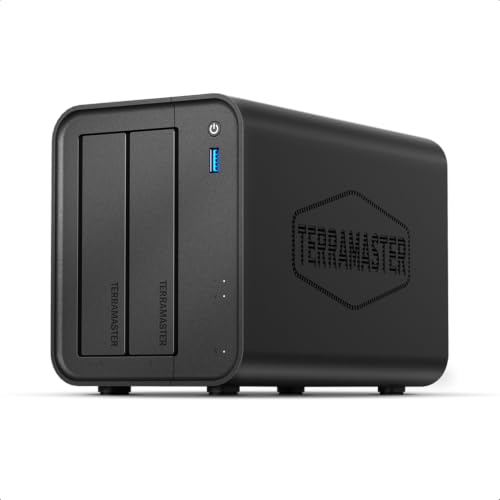
TERRAMASTER F2-425 2-Bay NAS (Intel x86 Quad-Core)

Our verdict: Quad core Intel power with 2.5GbE and 4GB RAM.

The TERRAMASTER F2-425 pairs an Intel x86 quad-core CPU with 4GB of RAM, 2.5GbE LAN and the TOS operating system in a 2-bay diskless chassis, in the $200 to $500 tier. An x86 processor matters because it runs a broad range of software and handles tasks like media transcoding better than lower-end chips.

It ranks fourth because the hardware is strong, yet TOS is less polished than DSM, and polish is what a small office values day to day. The 2.5GbE port moves files faster than gigabit, but only if your switch and computers support it.

Buy it if performance matters more than software finish and you are comfortable with a less refined interface. Skip it if you want simple software. Drives are sold separately, and the extra network speed is wasted on a gigabit-only network.

CPU
Intel x86 quad core
RAM
4GB
Network
2.5GbE
OS
TOS

What we like

  • +Intel quad core CPU
  • +2.5GbE LAN
  • +4GB RAM
  • +Diskless 2 bay

Watch out for

  • −Less polished software
  • −Drives sold separately

Buy it if: Performance first buyers.

Skip it if: You want simple software.

5

Best 2.5GbE

QNAP TS-216G-US 2-Bay 2.5GbE Desktop NAS

Our verdict: Faster networking if your switch supports it.

The QNAP TS-216G is a 2-bay desktop NAS with 2.5GbE networking, QTS and RAID 1 support, diskless, in the $200 to $500 tier. The faster port is the point, since file transfers to a 2.5GbE-equipped computer can run beyond what a gigabit link allows.

It ranks below the TS-264 because the listing gives no RAM figure, so app headroom is unclear. You get the QTS ecosystem and fast networking, but you cannot tell whether it can handle containers. The TS-264 states 8GB.

Pick it if you already have a 2.5GbE switch and mainly want fast file access. Without a matching switch, the faster port goes unused. Check the RAM and CPU on the maker's page, and remember that drives are sold separately.

Network
2.5GbE
OS
QTS
RAID
RAID 1 supported
Bays
2, diskless

What we like

  • +2.5GbE networking
  • +RAID 1 support
  • +QTS software
  • +Desktop form

Watch out for

  • −RAM not listed
  • −Needs 2.5GbE switch

Buy it if: Users with a 2.5GbE switch.

Skip it if: Your network is gigabit.

6

Best Capacity Room

UGREEN NAS DH2300 2-Bay Desktop NAS (Diskless)

Our verdict: Supports up to 64TB total capacity at a low price.

The UGREEN DH2300 is a 2-bay desktop NAS with UGREEN NAS OS and RAID 1 support, supporting up to 64TB total capacity, in the $100 to $200 tier. Large capacity ceilings matter when you plan to swap in bigger drives over the years: the enclosure then outlasts the first set of disks.

It ranks sixth because it is a lower-cost model than the DXP2800 and lists less hardware detail. The software is newer, and the listing offers few numbers on CPU or RAM, so you are trusting it for light duties.

Choose it if you want room for large drives later without changing the enclosure. Skip it if you want proven software or app-heavy performance. Drives are sold separately, and a 64TB ceiling is a promise about future drives, not a claim about speed today.

Capacity
Up to 64TB total
OS
UGREEN NAS OS
RAID
RAID 1 supported
Price tier
$100 to $200

What we like

  • +Up to 64TB total
  • +Low price tier
  • +RAID 1 support
  • +Desktop form

Watch out for

  • −Less hardware detail
  • −Newer software

Buy it if: Buyers adding big drives later.

Skip it if: You want proven software.

7

Best Budget

Asustor Drivestor 2 Gen 2 (AS1202T) 2-Bay NAS

Our verdict: A budget NAS with 2.5GbE and a quad core CPU.

The Asustor Drivestor 2 Gen 2 has a quad-core 1.7GHz CPU, 2.5GbE networking, 1GB of soldered DDR4 RAM and 4K media server support in a 2-bay diskless chassis, in the $100 to $200 tier. For plain file sharing and backup, that is a fair mix at a low price.

It ranks seventh because 1GB of RAM is thin for apps, and soldered memory means you cannot add more later. It is aimed at backup and file serving, and a user who wants containers will run out of room.

Buy it if budget is tight and needs are simple, such as backing up laptops and sharing documents. Skip it if you run many apps. The 4K media support suits a single stream, but do not expect heavy transcoding from 1GB.

CPU
Quad core 1.7GHz
RAM
1GB DDR4, soldered
Network
2.5GbE
Media
4K server support

What we like

  • +Low price tier
  • +2.5GbE networking
  • +Quad core CPU
  • +4K media support

Watch out for

  • −Only 1GB soldered RAM
  • −Limited for apps

Buy it if: Basic backup on a budget.

Skip it if: You run many apps.

8

Best for Growth

Synology DS725+ Expandable NAS (2-Bay Diskless)

Our verdict: Upgradeable RAM and expansion room, at the top price tier.

The Synology DS725+ is a Plus-series 2-bay diskless NAS with upgradeable DDR4 RAM, expansion through Synology expansion units and DSM software, in the $500 and up tier. It is aimed at private cloud and small business use, and it is the only pick here that grows with you.

It ranks last only because of price. Most home offices do not need more than the DS223 provides, and the DS725+ asks for a premium that only pays back when you add memory or expansion units.

Choose it for a business that will outgrow two bays, or for one that will run several services on DSM. Skip it if you only back up files. Drives are sold separately, so total cost climbs further once you add two NAS-rated disks.

Series
Plus series
RAM
Upgradeable DDR4
Expansion
Synology expansion units
OS
DSM

What we like

  • +Upgradeable RAM
  • +Expansion units supported
  • +DSM software
  • +Small business ready

Watch out for

  • −Top price tier
  • −More than most need

Buy it if: Growing small businesses.

Skip it if: You only back up files.

Methodology

How We Ranked These

Software ease

We weighed how approachable each operating system is for a non-IT user.

Hardware headroom

RAM, CPU and upgrade options were compared from the listings.

Networking

Gigabit against 2.5GbE decided speed potential.

Drive support

RAID 1 and capacity ceilings were checked.

Value

Enclosure price tier against features settled ties.

Every Primea Score uses the same weights: Performance 30% · Build & Materials 20% · Everyday Usability 20% · Value 20% · Owner Satisfaction 10%. Full scoring rules

Buyer's guide

How to Pick the Right One for You

By Main Use

What you store decides how much hardware you need.

Main useOur pick
Backup and file sharingSynology DS223 Home & Office Backup Hub (2-Bay Diskless NAS)
Photo and video libraryUGREEN NAS DXP2800 2-Bay
Running several appsQNAP TS-264-8G-US 2 Bay Desktop NAS
Small business growthSynology DS725+ Expandable NAS (2-Bay Diskless)

By Budget

SpendOur pick
$100 to $200Asustor Drivestor 2 Gen 2 (AS1202T) 2-Bay NAS
$100 to $200, big drivesUGREEN NAS DH2300 2-Bay Desktop NAS (Diskless)
$200 to $500Synology DS223 Home & Office Backup Hub (2-Bay Diskless NAS)
$500 and upSynology DS725+ Expandable NAS (2-Bay Diskless)

Synology Ease vs Hardware Value

Software ease

Synology DSM is the easiest to learn. DS223 and DS725+ use it.

Hardware value

More RAM or CPU for the money. QNAP TS-264, TERRAMASTER F2-425 and UGREEN units lean this way.

Most home offices should default to Synology ease unless they run apps.

By Network

NetworkOur pick
Have a 2.5GbE switchQNAP TS-216G-US 2-Bay 2.5GbE Desktop NAS
Budget 2.5GbEAsustor Drivestor 2 Gen 2 (AS1202T) 2-Bay NAS
2.5GbE and Intel CPUTERRAMASTER F2-425 2-Bay NAS (Intel x86 Quad-Core)
Plain gigabitSynology DS223 Home & Office Backup Hub (2-Bay Diskless NAS)

For First Time NAS Owners Specifically

Look for

Simple software, RAID 1 support and a focus on backup rather than apps.

In this ranking

Synology DS223 offers DSM and RAID 1 with a backup focus.

When to Spend More

Spend more if

You expect to grow. Synology DS725+ has upgradeable RAM and expansion.

Save if

You only need backup. Asustor Drivestor 2 Gen 2 and UGREEN DH2300 sit in the $100 to $200 tier.

Questions

Frequently Asked Questions

Do these come with drives?+

No, all are diskless. Buy two NAS-rated drives separately. A cheap desktop drive may fail sooner under continuous use, so budget for the right kind from the start and buy two of the same capacity.

What is the biggest mistake?+

Treating RAID 1 as a backup. It mirrors deletions, so a mistaken delete or ransomware hits both drives. Keep a second copy elsewhere, whichever of these NAS you choose, and test a restore at least once a year.

Is the Plus series worth it over the DS223?+

Only if you need upgradeable RAM and expansion. The DS725+ costs far more than the DS223, so a home office that backs up files gets little extra from it and could spend the difference on larger drives.

How do I set one up?+

Install the drives, power on and follow the setup wizard in the browser. The Synology DSM wizard is the friendliest, while TOS and QTS take a little longer. Set a strong admin password and disable default accounts before putting files on it.

How do I maintain a NAS?+

Keep firmware updated and check drive health regularly. A mirrored array only protects you if you notice a failing drive, so enable notifications on the DS223 or any other model, and replace a failing drive promptly rather than waiting for the second to fail.

Can I run a media server?+

The Asustor lists 4K media server support, and the QNAP TS-264 suits Plex-style apps with 8GB of RAM. For heavy transcoding, the TERRAMASTER's quad-core Intel CPU has more headroom, though TOS software is less polished.

Final take

Buy the Synology DS223 if you are new to NAS and mostly need backup. Take the UGREEN DXP2800 for media work, the QNAP TS-264 for apps and containers, and the DS725+ if the office will outgrow two bays. Budget for two NAS-rated drives, and never treat RAID 1 as a backup.

More Ranked & Reviewed Guides