
Primea ReviewsAll Reviews

Primea Reviews is reader-supported. When you buy through our Amazon links we may earn a commission, at no extra cost to you. Rankings are set by our editors and never sold. Learn more

Ranked & Reviewed by Primea Reviews

The 7 Best Quiet NAS for Home Offices of 2026, Ranked & Reviewed

By the Primea Editorial TeamUpdated November 1, 202610 min read7 products ranked
The 7 Best Quiet NAS for Home Offices of 2026, Ranked & Reviewed

The short answer

The Synology DS223 is the best overall because two bays keep noise modest and its software schedules heavy work for overnight. The Beelink ME Pro is the quietest by design thanks to three M.2 SSD slots and a low-power CPU. TERRAMASTER leads on speed with 2.5GbE, and UGREEN's DXP2800 adds sustained-load cooling. The Buffalo is the simplest start.

The Primea Scoreboard

Ranked & Reviewed

  1. Mature software and overnight scheduling for a desk-side box.

    93Outstanding
    Check price
  2. A low-power mini PC with three SSD slots for silent storage.

    90Excellent
    Check price
  3. Quicker transfers mean the drives spend less time working.

    87Excellent
    Check price
  4. Cooling designed for sustained load, which can mean steadier fans.

    85Excellent
    Check price
  5. A lower-cost box that suits light, quiet backup duty.

    83Very Good
    Check price
  6. Plain two-bay storage with no creator extras.

    81Very Good
    Check price
  7. A one-bay box with a 2TB drive already inside.

    79Very Good
    Check price

A NAS is quiet only while it idles. The sounds that drive people out of a home office come from two moments: drives spinning up and seeking, and fans ramping during a long transfer. Nobody can promise a silent box if hard drives are inside. None of the listings here publishes a decibel figure, so any reviewer quoting one is guessing, and we will not do the same.

In practice, we ranked seven storage boxes on the factors that actually decide noise in a small office: bay count, SSD capability, cooling design, how quickly transfers finish and whether heavy jobs can be moved overnight. Scores follow the Primea framework, using spec sheets and listing details only, with owner feedback treated as a hint about fan behaviour rather than a measurement.

Before you buy

What Actually Matters

01

Drive type

Hard drives spin and click, while SSDs have no moving parts and make no mechanical noise. A NAS with M.2 or SSD slots can run close to silent. The Beelink ME Pro lists three M.2 slots and two hard drive bays. Check the spec table for M.2 or SSD support before assuming the box can run quietly, and note whether the SSDs are included.

02

Bay count

Each bay adds a drive and its noise. One or two bays keep sound down, while four or more bays add spinning drives and heavier cooling. Every NAS here has one or two bays. Check the bay count in the title, and remember a diskless unit lets you choose quieter drives, while an included drive limits you.

03

Workload

Constant video transcoding or heavy indexing makes fans ramp, while backup and file sharing are lighter. A NAS serving 4K media works harder than one copying files overnight. Match the hardware to your real jobs. If you only back up laptops, the Synology DS223 or UGREEN DH2300 is enough and generates less noise.

04

Scheduling

Moving heavy tasks overnight keeps noise away from working hours. Backups, indexing and maintenance can run on a timer when the office is empty. The Synology DS223 lists scheduled overnight tasks in its software. Look for scheduling features in the software description, and confirm that they cover backups and maintenance.

05

Missing noise data

None of these listings publishes decibels, so treat quiet claims as design hints rather than facts. Look at owner feedback on fan ramp and drive clatter, and check whether the box uses SSDs or a low-power CPU. Never trust an unsourced dB number, because noise varies with drives, room and placement, and a box on a hard desk sounds louder than one on a shelf.

In-depth reviews

Our Ranked Picks, Reviewed

1

Best Overall

Synology DS223 Home & Office Backup Hub (2-Bay Diskless NAS)

Our verdict: Mature software and overnight scheduling for a desk-side box.

The Synology DS223 earns first place by being sensible about noise rather than claiming silence. It is a two-bay diskless NAS running Synology DSM, aimed at home and small offices, with file centralisation, backup and scheduled overnight tasks in the software. Two bays mean two drives, which limits the clatter compared with larger boxes.

It beats the Beelink on software maturity, and the TERRAMASTER on scheduling clarity, because the overnight task feature moves loud work such as indexing and backups away from your working hours. At $200 to $500 it lands in the same bracket as the other leaders.

Buy it for a home office that mostly backs up laptops and shares files. The honest caveat is that no decibel figure is published, and a diskless unit means the drive choice sets the noise. Pick quiet drives and leave it overnight.

Bays
2, diskless
Software
Synology DSM
Scheduling
Overnight tasks
Focus
Home and small office

What we like

  • +Overnight task scheduling
  • +Mature DSM software
  • +Home-office focus
  • +Two bays

Watch out for

  • −Drives not included
  • −Noise depends on drives

Buy it if: A desk-side backup box run mostly overnight.

Skip it if: You want drives already installed.

3

Best Fast Transfers

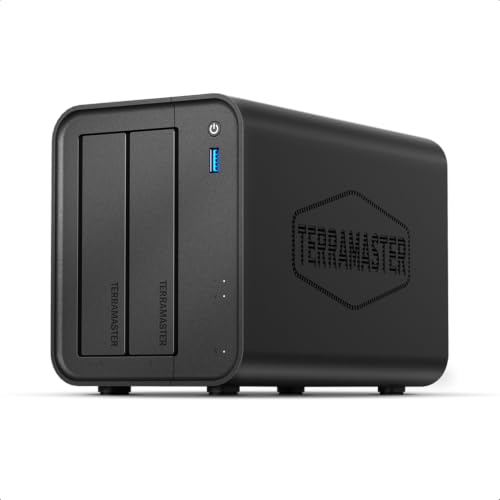
TERRAMASTER F2-425 2-Bay NAS Storage

Our verdict: Quicker transfers mean the drives spend less time working.

The TERRAMASTER F2-425 competes on speed. Two bays arrive empty, backed by an Intel x86 quad-core processor, 4GB RAM and a 2.5GbE port, and the box can serve multimedia. A faster port means transfers end sooner, so the drives and fan spend less time working during your day.

It ranks third because speed is only an indirect noise benefit. The 2.5GbE link needs a matching switch or computer port to deliver anything, and the listing publishes no cooling or sound detail. The Synology DS223 is easier to plan around thanks to its scheduling. The Asustor below also offers 2.5GbE for less money.

Buy it for large file moves such as footage or image libraries. The caveat is that you must supply 2.5GbE networking and drives, and noise is not described anywhere in the listing.

CPU
Intel x86 quad-core
RAM
4GB
Network
2.5GbE
Bays
2, diskless

What we like

  • +2.5GbE port
  • +Intel quad-core CPU
  • +4GB of RAM
  • +Multimedia capable

Watch out for

  • −Needs 2.5GbE gear
  • −No noise data listed

Buy it if: Large file transfers that finish quickly.

Skip it if: Your network is gigabit only.

4

Best Sustained-Load Cooling

UGREEN NAS DXP2800, 2-Bay for Content Creators

Our verdict: Cooling designed for sustained load, which can mean steadier fans.

The UGREEN DXP2800 is a two-bay diskless NAS aimed at content creators, with cooling designed for sustained load stability and the UGREEN NAS OS ecosystem. Sustained load is when fan noise rises, so a design that holds temperatures steady can avoid the ramp up and down that is most irritating in a quiet room.

It ranks fourth because stability is not the same as quiet, and the listing states no fan noise figure. The Beelink gives you a quieter path through SSDs, while the Synology schedules loud tasks away from the workday. Against the DH2300 below, it costs more and targets heavier use.

Choose it if you edit video or handle large projects at the desk. The caveat is that creator-focused performance can mean more spinning and more heat, so give it ventilation and put it out of earshot.

Bays
2, diskless
Cooling
Built for sustained load
Software
UGREEN NAS OS
Form
Compact desktop

What we like

  • +Sustained-load cooling
  • +Compact desktop form
  • +Creator-grade performance
  • +Two bays

Watch out for

  • −More NAS than needed
  • −No noise figures

Buy it if: Creators with long, heavy transfers.

Skip it if: You just want basic backup.

5

Best Budget Quiet Backup

Asustor Drivestor 2 Gen 2 AS1202T, 2-Bay NAS

Our verdict: A lower-cost box that suits light, quiet backup duty.

The Asustor Drivestor 2 Gen 2 is the cheapest way here to get 2.5GbE. Inside are two bays, no drives, a 1.7GHz quad-core chip, 1GB DDR4 RAM and 4K media serving, all in the $100 to $200 bracket. A modest processor generates less heat, which helps the fan stay slow.

It ranks fifth because 1GB RAM is thin for multitasking, and the listing says nothing about scheduling or cooling. The TERRAMASTER above offers 4GB RAM and a more capable CPU in the $200 to $500 bracket. This one wins only on price.

Buy it for backup duty and light media serving on a tight budget. The caveat is memory: a 1GB machine will struggle if you pile on apps, and a busy NAS makes more noise as it works harder.

CPU
Quad-core 1.7GHz
RAM
1GB DDR4
Network
2.5GbE
Bays
2, diskless

What we like

  • +Lower price range
  • +2.5GbE port
  • +Quad-core CPU
  • +4K media support

Watch out for

  • −Only 1GB of RAM
  • −Not for heavy transcoding

Buy it if: Backup-only offices on a budget.

Skip it if: You stream and transcode a lot.

6

Best Simple Two-Bay

UGREEN NAS DH2300, 2-Bay Desktop NAS (Diskless)

Our verdict: Plain two-bay storage with no creator extras.

The UGREEN DH2300 is the simple two-bay option. It is a diskless desktop NAS supporting up to 64TB, with UGREEN NAS OS and a focus on backup and file sharing, in the $100 to $200 bracket. A backup-first design suits a quiet office because jobs can run on a timer.

It ranks sixth because it lists no 2.5GbE or processor detail, so you cannot judge its speed. Compared with the DXP2800 it costs less and aims lower, which is fine for light office duty. The Asustor adds 2.5GbE at a similar price.

Choose it for simple backups and file sharing in a small office. The caveat is that the listing does not describe cooling or fan behaviour, so check owner feedback on noise before relying on it near your desk.

Bays
2, diskless
Capacity
Up to 64TB
Software
UGREEN NAS OS
Focus
Backup and sharing

What we like

  • +Simple focus
  • +Up to 64TB
  • +Compact desktop form
  • +Lower price range

Watch out for

  • −Limited headroom
  • −Sparse listing

Buy it if: Plain backup and file sharing.

Skip it if: You want extra services or speed.

7

Simplest Setup

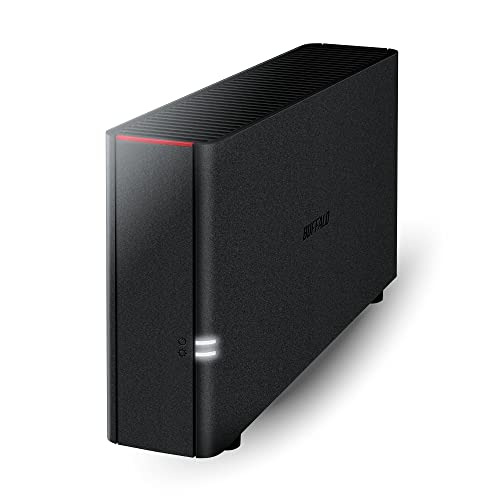
BUFFALO LinkStation 210 2TB, 1-Bay NAS (Drives Included)

Our verdict: A one-bay box with a 2TB drive already inside.

The Buffalo LinkStation 210 is the single-bay beginner. It ships with a 2TB drive included, offers home cloud and file sharing, and sets up without a separate drive purchase, in the $100 to $200 bracket. One bay and one drive is the lowest mechanical noise you can get from a spinning NAS.

It ranks last because one bay means no redundancy: if the drive fails, your data is at risk unless you back up elsewhere. It also lists no 2.5GbE, scheduling or SSD support. Against the Synology DS223, you give up bays, software depth and growth.

Buy it for a home user who wants simple network storage and no shopping for drives. The caveat is that the included drive is the only choice you get, so you cannot swap to an SSD later.

Bays
1
Drive
2TB included
Use
Home cloud, file sharing
Setup
Simple

What we like

  • +Drive included
  • +Simple setup
  • +Single-drive footprint
  • +Home cloud storage

Watch out for

  • −No redundancy
  • −Basic features only

Buy it if: A first NAS with minimal setup.

Skip it if: You need mirrored protection.

Methodology

How We Ranked These

Noise design signals

Bay count, SSD support and cooling design stood in for noise, since no listing gives decibels.

Scheduling and software

Overnight tasks and mature software let heavy work happen away from the desk.

Transfer speed

Faster networking finishes copies sooner, shortening noisy periods.

Fit for backup duty

Light backup duty is quieter than constant transcoding, so we matched hardware to role.

Price fit

Each pick was weighed against its price range.

Every Primea Score uses the same weights: Performance 30% · Build & Materials 20% · Everyday Usability 20% · Value 20% · Owner Satisfaction 10%. Full scoring rules

Buyer's guide

How to Pick the Right One for You

By Noise Strategy

There are three ways to keep a NAS quiet.

StrategyOur pick
Run heavy jobs overnightSynology DS223
Use SSDs, no spinningBeelink ME Pro
Finish transfers quicklyTERRAMASTER F2-425
Use a single driveBUFFALO LinkStation 210

By Budget

SpendOur pick
$100 to $200Asustor AS1202T, UGREEN DH2300, BUFFALO LinkStation 210
$200 to $500Synology DS223, Beelink ME Pro, TERRAMASTER F2-425, UGREEN DXP2800

SSD vs Hard Drive

SSD

No moving parts and near silent, but costlier per terabyte. The Beelink ME Pro is the pick.

Hard drive

Cheap capacity but audible. The Synology DS223 and others use drive bays.

Most home offices should default to hard drives with overnight scheduling, unless silence is critical.

By Workload

WorkloadOur pick
Daily backupSynology DS223
Large creative filesUGREEN DXP2800
Light backup onlyAsustor AS1202T
Plain sharingUGREEN DH2300

For Desk-Side Placement Specifically

Look for

Compact size, few bays and the option to run SSDs.

In this ranking

The Beelink ME Pro and the single-bay BUFFALO are the smallest sound sources.

When to Spend More

Spend more if

Silence matters. The Beelink ME Pro supports SSDs and the Synology DS223 schedules overnight.

Save if

The NAS can sit in a closet. The Asustor or UGREEN DH2300 is enough.

Questions

Frequently Asked Questions

Are any of these truly silent?+

Only an SSD-based setup comes close, such as the Beelink ME Pro with M.2 drives and no spinning platters. Hard drive models like the Synology DS223 always make some sound when working, especially during backups.

What is the biggest mistake with a quiet NAS?+

Trusting a quiet claim with no data behind it. None of these listings publish decibels, so judge the Beelink, Synology and UGREEN boxes by bay count, drive type and scheduling, then read owner comments on fan behaviour.

Does a 2.5GbE port reduce noise?+

Indirectly, since faster transfers end sooner and the drives spend less time working. It needs matching network gear on both ends to deliver any speed gain. The TERRAMASTER F2-425 and Asustor AS1202T both list 2.5GbE, but a plain gigabit switch will cap them.

Do any come with drives?+

Only the BUFFALO LinkStation 210 lists a 2TB drive included. The Synology DS223, TERRAMASTER, UGREEN and Asustor models are diskless, so drive choice is yours and largely decides how much noise you hear at the desk.

How do I schedule overnight tasks?+

The Synology DS223 supports scheduled overnight tasks in its software. Open DSM, find the backup and maintenance schedules, and set heavy jobs to run late at night so they finish well before you start work.

Why not a USB storage box?+

A direct-attached unit like the QNAP TR-004 is not network-attached, so we left it out of the ranking. A true NAS such as the Synology DS223 shares files with every device on your network, which is the point.

Final take

Choose the Synology DS223 if you want a proven, schedulable two-bay box. Pick the Beelink ME Pro when silence is the priority and you can live on SSDs. Take the TERRAMASTER F2-425 for faster transfers that end sooner. Remember that no listing publishes dB figures, so read owner feedback on fan behaviour and put the box where its noise can be shut away.

More Ranked & Reviewed Guides