

Primea ReviewsAll Reviews

Primea Reviews is reader-supported. When you buy through our Amazon links we may earn a commission, at no extra cost to you. Rankings are set by our editors and never sold. Learn more

Ranked & Reviewed by Primea Reviews

The 7 Best Budget Printers for a Home Office, Ranked & Reviewed

By the Primea Editorial TeamUpdated November 3, 202611 min read7 products ranked
The 7 Best Budget Printers for a Home Office, Ranked & Reviewed

The short answer

The Epson EcoTank ET-2800 is the budget printer to buy if you print every week, because refillable ink bottles cut the two-year running cost far below cartridge machines. The Canon PIXMA TR4720 is the best low-cost all-in-one for scanning multi-page paperwork, and the Brother HL-L2405W is the wireless mono laser for text-heavy offices. The Canon PIXMA TS4320 is the cheapest way into a full-feature inkjet.

The Primea Scoreboard

Ranked & Reviewed

  1. A cartridge-free tank printer that delivers the lowest two-year ink cost in the ranking.

    94Outstanding
    Check price
  2. A low-cost color all-in-one with an auto document feeder for multi-page scanning and copying.

    91Excellent
    Check price
  3. A compact wireless mono laser that suits text documents and works with Alexa voice commands.

    89Excellent
    Check price
  4. Duplex color inkjet with a 1.42-inch OLED display that guides you through errors.

    87Excellent
    Check price
  5. A simple-to-set-up all-in-one with a 3-month Instant Ink trial.

    85Excellent
    Check price
  6. A compact duplex color inkjet with scanner and copier at the lowest upfront cost.

    83Very Good
    Check price
  7. A 19 PPM mono laser with wireless, no scanner, no copier and no duplex.

    80Very Good
    Check price

The sticker price is the least important number on a budget printer. A machine that costs little on the shelf can cost several times more over two years in cartridges, and that is the trap that catches most home office buyers: they save at checkout and pay for it at every refill. The question to ask is how often you print, and what a page costs when you do.

This ranking sorts seven printers on that basis. We reviewed listings, feature sets and ink systems, and weighed running cost, scan and copy features, duplex printing, wireless setup and support terms against the price bucket. Where a listing does not give a page yield or ink cost, we do not invent one. We judge the type of ink system and let you decide how much you print.

Before you buy

What Actually Matters

01

Cost per page

Cartridge printers are cheap to buy and costly to feed, while ink tank and laser printers invert that. Estimate your monthly pages and compare. Light users may be fine with a cheap inkjet, and heavy users should look at the EcoTank or a laser.

02

Laser versus inkjet

Laser printers give crisp text and tolerate long idle periods, but the budget models are black and white. Inkjets print color and photos, but ink can dry out if you do not print for weeks. Choose by your mix of documents.

03

Scan, copy and feeder

An all-in-one adds a flatbed scanner and copier. An auto document feeder, as on the TR4720, scans multiple pages unattended. If you handle contracts or receipts, check the listing for a feeder.

04

Duplex printing

Automatic duplex prints both sides of a page and saves paper. The TS4320 and TS6520 offer it, while the LBP6030w does not. If you print long documents, it is worth having.

05

Subscription traps

Programs such as Instant Ink and Refresh can lower costs for some users but add recurring charges, and some printers refuse to work without them. Read the terms before enrolling.

In-depth reviews

Our Ranked Picks, Reviewed

1

Best for Low Running Cost

Epson EcoTank ET-2800 Wireless Color All-in-One Cartridge-Free Supertank Printer

Our verdict: A cartridge-free tank printer that delivers the lowest two-year ink cost in the ranking.

Epson's ET-2800 swaps cartridges for refillable ink bottles, and still prints, scans and copies in color over Wi-Fi. It lands in the $100 to $200 tier, the top of the budget range.

It wins because ink is where a printer's real cost lives. Refilling a tank from a bottle is far cheaper per page than swapping cartridges, so the higher purchase price is recovered if you print regularly. It is also compact for a tank model. The trade is the up-front cost, which is the highest here, and a cheaper machine can make more sense if you print only a few pages each month.

Buy it if you print weekly or more, or you are tired of cartridge prices. Skip it if you print only occasionally, since ink in a tank can dry out if the printer sits idle for long stretches.

Type
Color inkjet all-in-one
Ink
Refillable ink bottles
Functions
Print, scan, copy
Price bucket
$100 to $200

What we like

  • +Refillable tanks slash cost per page
  • +Prints, scans and copies wirelessly
  • +Compact for an ink tank model
  • +No cartridges to replace

Watch out for

  • −Highest upfront price here
  • −Overkill for rare printing

Buy it if: Home offices that print every week.

Skip it if: You print only a few pages a month.

2

Best for Scanning Documents

Canon PIXMA TR4720 All-in-One Wireless Printer

Our verdict: A low-cost color all-in-one with an auto document feeder for multi-page scanning and copying.

Canon built the TR4720 around an auto document feeder, then added wireless, mobile printing and a legacy fax. Color inkjet, $50 to $100.

It ranks second because the document feeder is the feature that separates a real office printer from a basic one. Scanning a ten-page contract without lifting the lid for each sheet saves a lot of time. The fax is a legacy bonus few offices use. Against the EcoTank it is far cheaper to buy, but it uses cartridges, so running costs are higher if you print a lot.

Buy it if you scan and copy more than you print. Skip it if you print every day, where cartridge costs add up.

Type
Color inkjet all-in-one
Feeder
Auto document feeder
Extras
Wireless, mobile printing, fax
Price bucket
$50 to $100

What we like

  • +Auto document feeder for multi-page jobs
  • +Wireless and mobile printing
  • +Low price for an all-in-one
  • +Built-in fax for legacy needs

Watch out for

  • −Cartridge running costs
  • −Fax is rarely useful today

Buy it if: Offices that scan and copy paperwork often.

Skip it if: You print daily and want cheap ink.

3

Best Wireless Mono Laser

Brother HL-L2405W Wireless Compact Monochrome Laser Printer

Our verdict: A compact wireless mono laser that suits text documents and works with Alexa voice commands.

Brother's HL-L2405W is a small black-and-white laser that prints over Wi-Fi and from phones, answers to Alexa commands and comes with a Refresh Subscription trial. There is no scanner or copier, and the price tier is $100 to $200.

It ranks third because laser toner suits text-heavy offices. Toner does not dry out the way inkjet ink can, so the printer survives long idle periods, which matters for a home office that prints in bursts. It loses to the EcoTank on features, since it has no scanner, and to the TR4720 on versatility. Check the subscription terms before enrolling, since subscription plans add recurring cost.

Buy it for invoices, contracts and reports. Skip it if you need color or a scanner.

Type
Monochrome laser, print only
Connectivity
Wireless and mobile
Voice
Alexa commands
Price bucket
$100 to $200

What we like

  • +Laser toner will not dry out
  • +Compact desktop footprint
  • +Wireless and Alexa support
  • +Good for text-heavy work

Watch out for

  • −No scan or copy
  • −Black-and-white only

Buy it if: Text-heavy offices that print in bursts.

Skip it if: You need color or scanning.

4

Best Guided Interface

Canon PIXMA TS6520 Wireless Color Inkjet Printer

Our verdict: Duplex color inkjet with a 1.42-inch OLED display that guides you through errors.

Look at the control panel first: a 1.42-inch OLED display sits on the TS6520, alongside duplex printing and a built-in copier and scanner. Color inkjet, $50 to $100.

It ranks fourth because the display is a practical edge. Paper jams, low ink and setup prompts show on screen, instead of leaving you hunting for an LED pattern in the manual. Duplex printing halves paper use for double-sided documents. It ranks below the TR4720 because it has no document feeder in its listing, which makes multi-page scanning slower.

Buy it if you value clear on-screen guidance. Skip it if you scan stacks of pages.

Type
Color inkjet all-in-one
Display
1.42-inch OLED
Duplex
Yes
Price bucket
$50 to $100

What we like

  • +OLED display guides you through errors
  • +Duplex printing saves paper
  • +Built-in copier and scanner
  • +Compact design

Watch out for

  • −No document feeder listed
  • −Cartridge running costs

Buy it if: Users who want clear on-screen guidance.

Skip it if: You scan multi-page documents often.

5

Best for Easy Setup

HP DeskJet 4355 Wireless All-in-One Color Inkjet Printer

Our verdict: A simple-to-set-up all-in-one with a 3-month Instant Ink trial.

HP aims the DeskJet 4355 at people unpacking their first office printer: color print, scan and copy, a short wireless setup flow, and a 3-month Instant Ink trial. The $50 to $100 price tier applies, and the listing mentions optional AI-capable printing features.

It ranks fifth because ease of onboarding is its strength, and for a first home office that matters. The tradeoff is Instant Ink: it is a subscription, and subscription plans can lock you into recurring charges and sometimes make the printer depend on the service. Read the terms before you enroll. Against the Canon models it is comparable on features and lacks a document feeder or display to stand out.

Buy it if you want the simplest setup. Skip it if you dislike subscription ink programs.

Type
Color inkjet all-in-one
Functions
Print, scan, copy
Trial
3-month Instant Ink
Price bucket
$50 to $100

What we like

  • +Simple wireless setup flow
  • +Prints, scans and copies in color
  • +Three-month Instant Ink trial
  • +Compact and low priced

Watch out for

  • −Subscription ink adds recurring cost
  • −No document feeder

Buy it if: First-time home office setups.

Skip it if: You dislike ink subscriptions.

6

Best Lowest-Cost Inkjet

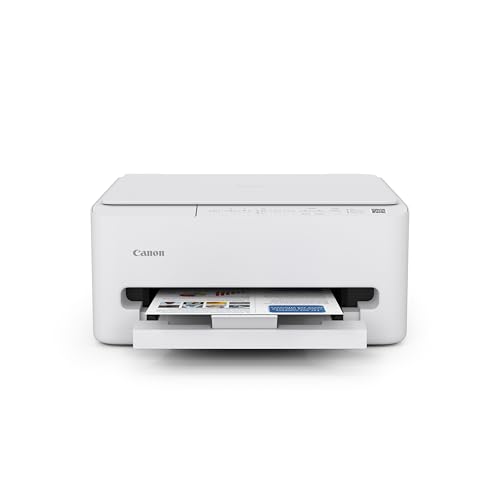
Canon PIXMA TS4320 Wireless Color Inkjet Printer

Our verdict: A compact duplex color inkjet with scanner and copier at the lowest upfront cost.

At the entry of Canon's inkjet range, the TS4320 packs duplex printing, a scanner and copier, mobile app printing and a 1-year limited warranty into a small body. Expect $50 to $100.

It ranks sixth because the other Canon inkjets add either a document feeder or an OLED display, and the TS4320 has neither. It is a single-tray machine, so paper handling is basic. Still, duplex at this price is a good deal for occasional use.

Buy it if you print occasionally and want the lowest outlay. Skip it if you will print a lot, where cartridge costs will exceed the savings.

Type
Color inkjet all-in-one
Duplex
Yes
Tray
Single tray
Warranty
1-year limited

What we like

  • +Duplex printing at a low price
  • +Built-in scanner and copier
  • +Mobile app printing support
  • +Compact single-tray design

Watch out for

  • −No feeder or display
  • −Cartridge running costs

Buy it if: Occasional printers on a tight budget.

Skip it if: You print weekly and want low ink costs.

7

Cheapest Per-Page Text

Canon imageCLASS LBP6030w Monochrome Laser Printer

Our verdict: A 19 PPM mono laser with wireless, no scanner, no copier and no duplex.

Canon rates the LBP6030w at 19 PPM, and it is wireless with a 1-year limited warranty. Scanning, copying and duplex are all absent, and it falls in the $50 to $100 tier.

It ranks last because it does one thing. For a home office that only prints text documents, that can be enough, and the laser approach keeps per-page cost low. But no duplex and no scanner mean extra steps and potentially a second device.

Buy it for plain text printing at the lowest per-page cost. Skip it if you need to scan, copy or print on both sides.

Type
Monochrome laser, print only
Speed
19 PPM rated
Missing
No scan, copy or duplex
Warranty
1-year limited

What we like

  • +Low per-page cost for text
  • +Compact wireless design
  • +Rated 19 pages per minute
  • +Laser toner does not dry out

Watch out for

  • −No scan, copy or duplex
  • −Black-and-white only

Buy it if: Text-only printing at the lowest cost.

Skip it if: You need scanning or double-sided output.

Methodology

How We Ranked These

Running cost

Ink tank, cartridge and toner systems were compared, since ink or toner dominates the cost of ownership.

Office features

Scanning, copying, auto document feeders, duplex and faxing were checked from the listings.

Setup and daily use

Wireless setup, mobile printing, on-screen guidance and voice control were reviewed.

Support and subscriptions

Warranty terms and ink subscription trials were weighed, with attention to recurring costs.

Value for the price bucket

Each printer was scored against the $50 to $100 and $100 to $200 buckets.

Every Primea Score uses the same weights: Performance 30% · Build & Materials 20% · Everyday Usability 20% · Value 20% · Owner Satisfaction 10%. Full scoring rules

Buyer's guide

How to Pick the Right One for You

By Printing Volume

How often you print decides the printer type.

VolumeOur pick
Weekly or moreEpson EcoTank ET-2800 Wireless Color All-in-One Cartridge-Free Supertank Printer
Text only, in burstsBrother HL-L2405W Wireless Compact Monochrome Laser Printer
Occasional, with scanningCanon PIXMA TR4720 All-in-One Wireless Printer
Rare, lowest outlayCanon PIXMA TS4320 Wireless Color Inkjet Printer

By Budget

SpendOur pick
$50 to $100, scanningCanon PIXMA TR4720 All-in-One Wireless Printer
$50 to $100, guidedCanon PIXMA TS6520 Wireless Color Inkjet Printer
$50 to $100, easy setupHP DeskJet 4355 Wireless All-in-One Color Inkjet Printer
$100 to $200Epson EcoTank ET-2800 Wireless Color All-in-One Cartridge-Free Supertank Printer

Inkjet vs Laser

Inkjet

Prints color and photos and usually includes a scanner, but ink can dry out. Picks: EcoTank ET-2800, TR4720, TS6520, TS4320, DeskJet 4355.

Laser

Sharp text, long-lasting toner and tolerant of idle spells, but black and white only. Picks: Brother HL-L2405W, Canon LBP6030w.

Default to inkjet if you need color or scanning, and laser for text-heavy work.

By Office Task

TaskOur pick
Contracts and invoicesBrother HL-L2405W Wireless Compact Monochrome Laser Printer
Scanning paperworkCanon PIXMA TR4720 All-in-One Wireless Printer
Double-sided reportsCanon PIXMA TS6520 Wireless Color Inkjet Printer
Plain text, lowest costCanon imageCLASS LBP6030w Monochrome Laser Printer

For a Remote Worker Specifically

Look for

Reliable wireless setup, a scanner for signing documents, and low ink cost if you print more than a few pages a week.

In this ranking

EcoTank ET-2800 for regular printing, TR4720 for paperwork and DeskJet 4355 for the simplest setup.

When to Spend More

Spend more if

You print weekly and want to cut cartridge costs. The EcoTank ET-2800 pays back its higher price.

Save if

You print rarely. The TS4320 or TR4720 meets the need for $50 to $100.

Questions

Frequently Asked Questions

Are budget printers compatible with my laptop and phone?+

Most support wireless printing and mobile apps. The Canon models list mobile printing, the Brother adds Alexa support, and the EcoTank is wireless. Check your operating system on the maker's support page before buying.

What is the biggest mistake with cheap printers?+

Judging by purchase price. Cartridges can cost more over two years than the printer, so a cheap inkjet is a poor buy for heavy use. Match the ink system to how much you print.

Is the EcoTank worth it over a $50 to $100 inkjet?+

If you print every week, yes, because refill bottles are much cheaper per page. If you print a handful of pages a month, a cartridge machine like the TS4320 costs less overall.

How hard is setup?+

Most take about 15 to 30 minutes: install ink, load paper, connect to Wi-Fi through the control panel or app. The HP DeskJet 4355 emphasises a simple setup flow.

How do I keep inkjet nozzles from clogging?+

Print a page now and then, especially in dry climates, and power the printer off from its button. Laser printers like the Brother avoid this problem.

Do I need the fax on the TR4720?+

Almost certainly not. It is a legacy feature that some offices still use. For most home offices, the document feeder is the more useful addition.

Final take

For a home office that prints often, the Epson EcoTank ET-2800 is the budget printer to buy, because cheap refills outweigh the higher price. The Canon PIXMA TR4720 is the best low-cost all-in-one for scanning paperwork, and the Brother HL-L2405W is the choice for text-only offices. The TS4320 is the minimum-outlay inkjet. Decide how many pages you print, then pick the ink system.

More Ranked & Reviewed Guides