
Primea ReviewsAll Reviews

Primea Reviews is reader-supported. When you buy through our Amazon links we may earn a commission, at no extra cost to you. Rankings are set by our editors and never sold. Learn more

Ranked & Reviewed by Primea Reviews

The 5 Best Duplex Printers for Home Offices of 2026, Ranked & Reviewed

By the Primea Editorial TeamUpdated November 1, 20269 min read5 products ranked
The 5 Best Duplex Printers for Home Offices of 2026, Ranked & Reviewed

The short answer

The HP OfficeJet Pro 8125e is the best duplex printer for a home office, confirming two-sided printing and an automatic document feeder at $50 to $100. The Brother DCP-L2640DW is the laser pick for text volume. The older HP 8125 costs more for the same features, and the Canon PIXMA models cover small desks.

The Primea Scoreboard

Ranked & Reviewed

  1. Confirmed duplex plus an automatic document feeder.

    93Outstanding
    Check price
  2. A compact monochrome laser for text-heavy volume.

    90Excellent
    Check price
  3. The same feature set as the 8125e at a higher bucket.

    87Excellent
    Check price
  4. Compact color inkjet with a clear OLED status screen.

    83Very Good
    Check price
  5. A plain compact duplex inkjet with a one-year warranty.

    80Very Good
    Check price

Duplex gets claimed loosely in printer listings. Some printers genuinely flip the sheet and print on both sides. Others only scan or copy two-sided, and a few mean you flip the pages yourself. If you print contracts, reports or school packets, that distinction decides whether paper use drops by half or stays exactly where it was.

We reviewed eight printers and kept the five whose listings explicitly confirm duplex printing, leaving out three that do not. The ranking weighs the document feeder, laser versus inkjet, supply plans and footprint, and shows price buckets only. Subscription terms matter more than usual here, because three of the five bundle a trial of a monthly ink or toner plan, and those trials end quietly. Add up what you print each month before you choose.

Before you buy

What Actually Matters

01

Automatic duplex printing

Automatic duplex printing means the printer flips the sheet itself to print both sides. Some printers only scan or copy two-sided. Look for duplex printing in the title or specs, not just two-sided copying, and check that the listing says automatic and applies to printing, because manual duplex needs you to reinsert pages and wastes the saving.

02

Laser or inkjet

Laser suits text and high volume, while inkjet handles color and photos. Monochrome laser cuts cost per page for documents. Choose based on what you print most and how often, and remember inkjet nozzles can clog if the printer sits unused, which a laser avoids, so occasional printers lean laser.

03

Document feeder

An automatic document feeder scans a stack without lifting the lid each time, which saves time on contracts. Look for ADF in the listing, as on the HP 8125e and 8125. The Canon models and the Brother do not list one, so each scan page is a manual job, and a ten-page contract takes ten lifts of the lid. That adds up over a month of paperwork.

04

Supply plans

Instant Ink and Refresh Subscription are monthly plans for ink or toner. They can lower cost but lock you in, and the fees continue after the trial. Read the plan terms before enrolling, and compare against the price of cartridges for the pages you print. Cancel before the trial ends if you will not use it.

05

Footprint

Printers sit on desks, so depth and width matter. Compact models fit shelves. Check the dimensions against your space, including the open output tray, and leave room above for the scanner lid and behind for the paper path, since a printer jammed against a wall cannot feed properly. Measure the shelf before you order.

In-depth reviews

Our Ranked Picks, Reviewed

1

Best Overall

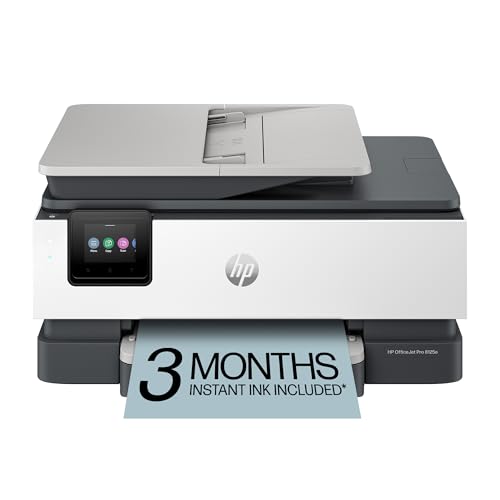
HP OfficeJet Pro 8125e Wireless All-in-One with Duplex Printing

Our verdict: Confirmed duplex plus an automatic document feeder.

The OfficeJet Pro 8125e is a wireless all-in-one with confirmed duplex printing, an automatic document feeder and a three-month Instant Ink trial, in the $50 to $100 bucket. The feeder is the underrated part. It lets you copy or scan a stack of pages without lifting the lid each time, and combined with automatic two-sided printing it covers the paper tasks of most small offices. The listing also lists AI-capable printing features.

It ranks first because it joins duplex with feeder scanning at the lowest price of the HP pair. The older 8125 sits a bucket higher with the same features.

It suits an office that scans stacks of paper. The caveat is that Instant Ink is a subscription after the trial, and inkjet running costs favor light users.

Duplex
Confirmed printing
Scanning
Automatic document feeder
Connectivity
Wireless
Ink plan
3-month Instant Ink trial

What we like

  • +Confirmed duplex
  • +Document feeder
  • +Wireless
  • +Instant Ink trial

Watch out for

  • −Subscription after trial
  • −Inkjet running costs

Buy it if: Home offices scanning and printing paper stacks.

Skip it if: You dislike ink subscriptions.

2

Best Laser Pick

Brother DCP-L2640DW Wireless Compact Monochrome Laser Printer with Duplex

Our verdict: A compact monochrome laser for text-heavy volume.

The Brother DCP-L2640DW is a compact monochrome laser with confirmed duplex printing, copy and scan, a Refresh Subscription toner trial and Alexa support, in the $200 to $500 bucket. Laser printing fuses toner to the page, which produces crisp text and holds up through thousands of pages without the clogged nozzles that idle inkjets suffer.

It ranks second because it is monochrome only and lists no document feeder, unlike the HP. It also sits in the highest bucket in the group. But for text-heavy volume, a laser's cost per page and consistency are hard to beat.

Best for contracts, reports and school packets. The caveat is that there is no color printing, so skip it if you need colored charts. Check the toner plan terms, since the trial leads into a subscription.

Type
Monochrome laser
Duplex
Confirmed printing
Functions
Copy and scan
Toner plan
Refresh trial

What we like

  • +Laser text output
  • +Confirmed duplex
  • +Copy and scan
  • +Alexa support

Watch out for

  • −No color
  • −Highest price bucket

Buy it if: Text-heavy home offices.

Skip it if: You need color pages.

3

Best Mid-Range HP

HP OfficeJet Pro 8125 Wireless All-in-One with Duplex Printing

Our verdict: The same feature set as the 8125e at a higher bucket.

This OfficeJet Pro 8125 lists confirmed duplex printing, an automatic document feeder, a three-month Instant Ink trial and AI-capable printing features over wireless, in the $100 to $200 bucket. The spec sheet reads the same as the 8125e.

It ranks third because it costs a bucket more than the 8125e for no stated advantage. If both are in stock, the e model is the obvious purchase. The listing does not say what, if anything, the older name adds.

It suits buyers who find this listing in stock and cannot get the 8125e. The caveat is the price difference with no obvious extra. Compare both product pages before paying, and check the Instant Ink terms, since the plan continues after the trial.

Duplex
Confirmed printing
Scanning
Document feeder
Connectivity
Wireless
Price bucket
$100-200

What we like

  • +Confirmed duplex
  • +Document feeder
  • +Wireless
  • +AI-capable features

Watch out for

  • −Costs more than 8125e
  • −Instant Ink after trial

Buy it if: Anyone unable to find the 8125e.

Skip it if: The 8125e is available.

4

Best Compact Display

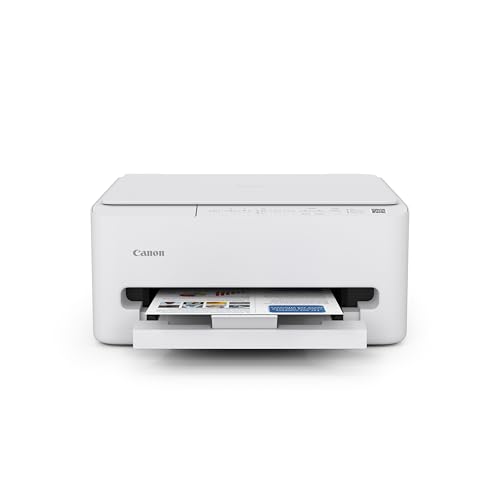
Canon PIXMA TS6520 Wireless Color Inkjet Printer with Duplex Printing

Our verdict: Compact color inkjet with a clear OLED status screen.

The Canon PIXMA TS6520 offers confirmed duplex printing, a 1.42 inch OLED display, a built-in copier and scanner and a compact body, in the $50 to $100 bucket. A small OLED status screen makes setup and error messages readable without a phone, which is a quiet convenience on a printer with a simple panel.

It ranks fourth because it has no automatic document feeder, unlike the HP models, so every multi-page scan means lifting the lid again. It matches the HP on duplex and sits in the same bucket as the 8125e.

It suits small desks that need two-sided color. The caveat is manual scanning. Skip it if you digitize multi-page documents, because the feeder on the HP saves minutes on every stack.

Duplex
Confirmed printing
Display
1.42 in OLED
Functions
Copier and scanner
Size
Compact

What we like

  • +Confirmed duplex
  • +OLED status screen
  • +Compact design
  • +Copier and scanner

Watch out for

  • −No document feeder listed
  • −Small screen

Buy it if: Small desks needing color printing.

Skip it if: You scan multi-page documents.

5

Best Budget Duplex

Canon PIXMA TS4320 Wireless Color Inkjet Printer for Duplex Printing

Our verdict: A plain compact duplex inkjet with a one-year warranty.

The Canon PIXMA TS4320 lists confirmed duplex printing, a built-in copier and scanner, a compact single-tray design, a one-year limited warranty and easy setup, in the $50 to $100 bucket. The single tray keeps the footprint small, and the warranty is a stated, rare assurance in this price band.

It ranks last because it has no display and no feeder, and a single tray limits paper types. You cannot load plain and photo paper at the same time. For light two-sided printing, it does the job, but the HP gives you a feeder in the same bucket.

A reasonable choice for occasional duplex jobs at home. The caveat is the limited extras. Skip it if you print or scan often, or if you handle varied paper.

Duplex
Confirmed printing
Tray
Single, compact
Warranty
1-year limited
Functions
Copier and scanner

What we like

  • +Confirmed duplex
  • +Compact single tray
  • +One-year warranty
  • +Easy setup

Watch out for

  • −Few extras
  • −Single tray only

Buy it if: Light two-sided printing at home.

Skip it if: You need a feeder or display.

Methodology

How We Ranked These

Duplex confirmation

Only listings that confirm automatic two-sided printing were ranked.

Document handling

An automatic feeder was weighed for scanning and copying stacks.

Print technology

Laser and inkjet were compared on suitability for text and color.

Size and footprint

Compact bodies counted for small home offices.

Price bucket value

Features were compared against each price bucket.

Every Primea Score uses the same weights: Performance 30% · Build & Materials 20% · Everyday Usability 20% · Value 20% · Owner Satisfaction 10%. Full scoring rules

Buyer's guide

How to Pick the Right One for You

By Print Volume

How much you print decides laser versus inkjet.

VolumeOur pick
High, mostly textBrother DCP-L2640DW Monochrome Laser
Medium, mixedHP OfficeJet Pro 8125e
Light, colorCanon PIXMA TS6520
OccasionalCanon PIXMA TS4320

By Budget

SpendOur pick
$50-100 (best)HP OfficeJet Pro 8125e
$50-100 (compact)Canon PIXMA TS6520
$100-200HP OfficeJet Pro 8125
$200-500Brother DCP-L2640DW

Laser vs Inkjet

Laser

Sharper text and cheaper pages for documents. The Brother DCP-L2640DW is the laser pick.

Inkjet

Color and photos at a lower upfront price. The HP and Canon models are inkjets.

Most home offices should default to inkjet unless they print hundreds of text pages monthly.

By Scanning Needs

NeedOur pick
Scan stacksHP OfficeJet Pro 8125e
Quick one-page copiesCanon PIXMA TS6520
Basic scanningCanon PIXMA TS4320
Voice assistant controlBrother DCP-L2640DW

For Contract-Heavy Work Specifically

Look for

Confirmed duplex, an automatic feeder and sharp text output.

In this ranking

The HP 8125e adds a feeder, while the Brother laser focuses on crisp text.

When to Spend More

Spend more if

You print text daily and want the Brother laser.

Save if

Printing is occasional, where the Canon TS4320 is enough.

Questions

Frequently Asked Questions

What is duplex printing?+

It is automatic printing on both sides of a sheet. The printer handles the flip, so you do not reinsert pages, and paper use roughly halves on long documents. All five here confirm it, which is why they made the ranking.

Does duplex scanning count?+

Not the same. Check the listing for duplex printing, not just two-sided copying. Some models scan both sides, but still print on one side at a time, so read the exact wording in the specs.

Is a subscription ink plan worth it?+

For frequent printing it can help. For occasional use, buying cartridges may cost less. The HP trial lasts three months, and the plan then bills you, so decide before it ends, or set a calendar reminder to cancel.

Can I print from my phone?+

Most wireless models support mobile printing. Check the listing for the apps, since the HP, Brother and Canon printers each use their own. Alexa support is listed on the Brother, and the HP lists wireless printing, so check your phone's compatibility.

How do I clean the print heads?+

Run the cleaning cycle from the settings menu. Do it only when prints show streaks, because each cycle uses ink, and repeated cleaning drains the cartridge for no gain. Laser models like the Brother do not need it.

Does duplex slow printing?+

Yes, because the sheet is flipped. For long documents the slowdown is small, and the saved paper outweighs it.

Final take

Buy the HP OfficeJet Pro 8125e for mixed printing with a feeder, or the Brother laser for contracts and reports. The HP 8125 only makes sense if the 8125e is out of stock. Canon's TS6520 and TS4320 suit small desks with light duplex needs. Read the supply plan terms before you enroll.

More Ranked & Reviewed Guides