
Primea ReviewsAll Reviews

Primea Reviews is reader-supported. When you buy through our Amazon links we may earn a commission, at no extra cost to you. Rankings are set by our editors and never sold. Learn more

Ranked & Reviewed by Primea Reviews

The 5 Best Color Laser Printers and Laser Alternatives for Home Offices of 2026, Ranked & Reviewed

By the Primea Editorial TeamUpdated November 1, 202610 min read5 products ranked
The 5 Best Color Laser Printers and Laser Alternatives for Home Offices of 2026, Ranked & Reviewed

The short answer

The Canon Color imageCLASS MF753Cdw II is the best color laser printer for a home office, and the only true four-toner color laser here: 35 ppm, wireless duplex, scan, copy, fax, an ADF and a three-year warranty, for $200 to $500. The Epson EcoTank ET-4950 includes up to three years of ink, and the ET-4800 adds Ethernet for less.

The Primea Scoreboard

Ranked & Reviewed

  1. The only true four-toner color laser in this ranking.

    94Outstanding
    Check price
  2. Not a laser, but up to three years of ink is included.

    90Excellent
    Check price
  3. A cheaper tank printer with an Ethernet port.

    86Excellent
    Check price
  4. Two paper trays for letterhead and plain paper side by side.

    83Very Good
    Check price
  5. The cheapest realistic way into color home-office printing.

    80Very Good
    Check price

Search results for color laser printers are full of inkjets with laser-sounding names. A true color laser uses four toner cartridges and a drum, and its big selling point is that it does not dry out when you print rarely. That one property is why an infrequent printer sits for a month and still prints perfectly on day thirty-one.

We ranked five printers and were upfront about it: only one, the Canon, is an actual color laser. The other four are ink tank or cartridge inkjets that serve the same home-office role, and each is labeled for what it is. Our order comes from spec sheets and owner reports, covering engine type, speed, running-cost approach, paper handling and price range.

Before you buy

What Actually Matters

01

Laser vs inkjet

Lasers fuse toner onto paper with heat and do not dry out when idle. Inkjets spray liquid that can clog. Check the title for the word laser and the number of toner cartridges. A true color laser lists four toners, as the Canon does. Words like OfficeJet or ink tank mean an inkjet. Four toner cartridges and a drum are the laser giveaway.

02

Print speed

Pages per minute is how fast pages emerge after the first. 35 ppm suits volume and 18 ppm suits light use. Look for the ppm figure. The Canon lists 35 and the Epson ET-4950 18, while the others do not state a speed. Draft modes on inkjets speed pages up but lower quality.

03

Running cost

Toner, cartridges and tank bottles all have different costs per page. Tank printers tend to cost least over time. Look at what ink is included. The ET-4950 lists up to three years of ink, while cartridge models like the Brother and HP cost more to run. Price a full year of supplies, not just the box.

04

Paper trays

A second tray lets you keep letterhead loaded. It saves swapping paper. Search for the tray count. The Brother MFC-J4555DW lists two trays, and a single-tray printer makes you reload when you change stock. Note that each tray takes space on the desk, and a letterhead tray avoids misprinting an invoice on plain paper.

05

Warranty

A longer warranty reduces risk on a printer you depend on. Check the warranty length in the specs. The Canon lists three years limited, and most of the others do not state a term, so ask the seller before you buy. A printer you depend on for client work deserves more coverage.

In-depth reviews

Our Ranked Picks, Reviewed

1

Best Overall

Canon Color imageCLASS MF753Cdw II Wireless Duplex Laser Printer

Our verdict: The only true four-toner color laser in this ranking.

The MF753Cdw II uses a true four-toner color laser engine rated at 35 pages per minute, with wireless duplex, scanner, copier, fax and a document feeder. It carries a three-year limited warranty and sells for $200 to $500. Toner is a dry powder fused by heat, so a laser sitting idle for weeks starts without clogged nozzles or head cleaning cycles.

It ranks first by default and by merit, because it is the one printer here that actually matches the title and it will not clog if left idle for weeks. The alternatives below trade that reliability for lower running costs. Against the Brother, it is faster and has a feeder.

Choose it for color documents at real volume. The caveat is a hefty footprint and higher toner costs than a tank system. Skip it if you want the lowest per-page cost.

Engine
4-toner color laser
Speed
35 ppm
Extras
Duplex, scan, copy, fax, ADF
Warranty
3-year limited

What we like

  • +True color laser engine
  • +35 ppm rated speed
  • +Full multifunction with feeder
  • +No idle ink drying risk

Watch out for

  • −Large and heavy
  • −Toner costs add up

Buy it if: Color documents printed at real volume.

Skip it if: You want the lowest per-page cost.

2

Best Low Running Cost

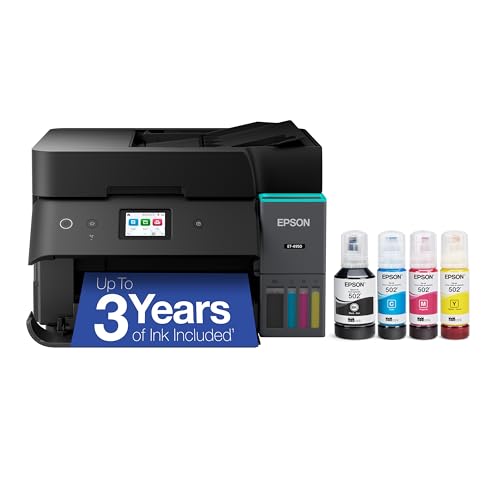
Epson EcoTank ET-4950 Wireless All-in-One Color Supertank Printer

Our verdict: Not a laser, but up to three years of ink is included.

The ET-4950 is a color ink-tank printer rather than a laser. It lists up to three years of ink in the box, an 18 ppm print speed, a 2.4 inch color touchscreen and an automatic document feeder. It sells for $200 to $500. Refilling from bottles instead of swapping cartridges slashes the cost per page, which is why many offices skip toner.

It places second because the bundled ink changes the running-cost picture, which is the main reason people shop for a laser in the first place. Compared with the Canon, you give up speed and the laser engine. Against the ET-4800, it adds ink in the box and a touchscreen.

Pick it for a mix of photos and documents. The caveat is that it is not a laser, and tank printers still need occasional use to avoid clogs. Skip it if you must have a true laser engine.

Engine
Ink tank, not laser
Ink included
Up to 3 years
Speed
18 ppm
Screen
2.4 inch touchscreen

What we like

  • +Up to 3 years of ink
  • +Document feeder
  • +Touchscreen
  • +Good for photos

Watch out for

  • −Not a laser
  • −Slower than the Canon

Buy it if: Mixed color photos and documents on a low running cost.

Skip it if: You must have a true laser engine.

3

Best Wired Tank

Epson EcoTank ET-4800 Wireless All-in-One Cartridge-Free Supertank Printer

Our verdict: A cheaper tank printer with an Ethernet port.

The ET-4800 is a color ink-tank engine with an Ethernet port as well as wireless, a scanner, copier, fax and feeder, and cartridge-free bottle refills. It sells for $100 to $200 and costs less than the ET-4950. A wired connection stays up when wifi drops, which suits an office with a cabled network.

It ranks third because it gives up the bundled ink and touchscreen of its sibling, though the price drop is meaningful. The Ethernet jack suits an office with a wired network. Against the Brother, it avoids cartridges but lists no second tray.

Choose it for a stable wired connection without cartridges. The caveat is that it is also not a laser and has no bundled ink noted. Skip it if you want a laser or bundled ink.

Engine
Ink tank, not laser
Network
Ethernet and wireless
Refill
Cartridge-free bottles
Extras
Scan, copy, fax, ADF

What we like

  • +Ethernet port
  • +Cartridge-free refills
  • +Document feeder
  • +Lower price than ET-4950

Watch out for

  • −Not a laser
  • −No bundled ink noted

Buy it if: Wired-network offices that avoid cartridges.

Skip it if: You want a laser or bundled ink.

4

Best Two-Tray Inkjet

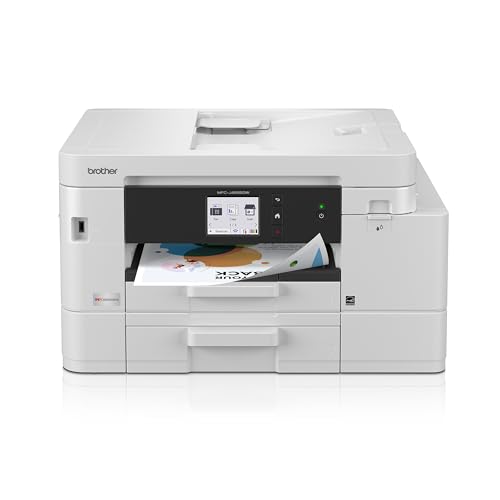
Brother INKvestment MFC-J4555DW Wireless Color Inkjet All-in-One

Our verdict: Two paper trays for letterhead and plain paper side by side.

A cartridge-based color inkjet, not a laser, with a 2.7 inch touchscreen, two paper trays and higher-capacity INKvestment cartridges. A Refresh Subscription trial is included. It sells for $200 to $500. A second tray lets you keep letterhead loaded beside plain paper, which saves swapping every time you print an invoice.

It ranks fourth because the two trays are a real convenience for letterhead, but the price matches the Epson tank models, which do more on running costs. Against the HP OfficeJet Pro, it adds a second tray and a larger screen at a higher bracket.

Buy it if you switch between letterhead and plain paper. The caveat is that cartridges cost more per page than tanks. Skip it if running cost is your top concern.

Engine
Cartridge inkjet, not laser
Trays
2
Screen
2.7 inch touchscreen
Cartridges
INKvestment high-capacity

What we like

  • +Two paper trays
  • +Touchscreen
  • +High-capacity cartridges
  • +Subscription trial included

Watch out for

  • −Not a laser
  • −Priced like the tank models

Buy it if: Offices loading letterhead and plain paper separately.

Skip it if: Running cost is your top concern.

5

Best Budget Entry

HP OfficeJet Pro 8125 Wireless All-in-One Color Inkjet Printer

Our verdict: The cheapest realistic way into color home-office printing.

A standard cartridge color inkjet with an automatic document feeder, duplex printing, a three-month Instant Ink trial, AI-capable setup and a compact all-in-one body. It sells for $100 to $200. A feeder and duplex at this price are features that help a home office from day one.

It ranks last because it is the least laser-like pick and the cartridge approach carries the highest running cost. What it offers is a low entry price with duplex and a feeder. Against the Epson ET-4800, it uses cartridges, which dry out if the printer sits idle.

Choose it if you print color only now and then. The caveat is that cartridges can dry if the printer sits idle. Skip it if you print rarely and need ink that never dries.

Engine
Cartridge inkjet, not laser
Handling
Feeder and duplex
Trial
3-month Instant Ink
Design
Compact all-in-one

What we like

  • +Low entry price
  • +Duplex and feeder
  • +Compact body
  • +Easy setup

Watch out for

  • −Not a laser
  • −Cartridges may dry out

Buy it if: Occasional color printing on a budget.

Skip it if: You print rarely and need ink that never dries.

Methodology

How We Ranked These

Engine type

True color lasers ranked above inkjets and tank printers for reliability after idle periods.

Speed

Listed ppm rates were used where given, with no speed credit for unlisted figures.

Running cost approach

Toner, bundled tank ink and cartridges each carry different long-run costs.

Paper handling

Feeders, duplex and extra trays decide how much babysitting a printer needs.

Price fit

Each price range was weighed against what the printer includes.

Every Primea Score uses the same weights: Performance 30% · Build & Materials 20% · Everyday Usability 20% · Value 20% · Owner Satisfaction 10%. Full scoring rules

Buyer's guide

How to Pick the Right One for You

By Printing Volume

Volume decides whether a laser is worth it.

VolumeOur pick
Steady color volumeCanon MF753Cdw II
Moderate, low costEpson EcoTank ET-4950
Moderate, wiredEpson EcoTank ET-4800
OccasionalHP OfficeJet Pro 8125

By Budget

SpendOur pick
$100 to $200HP OfficeJet Pro 8125, Epson EcoTank ET-4800
$200 to $500Canon MF753Cdw II, Epson EcoTank ET-4950, Brother MFC-J4555DW

Laser vs Ink Tank

Laser

Doesn't dry out and prints fast. The Canon MF753Cdw II is the only one here.

Ink tank

Lower running costs, with bottles or bundled ink. The Epson ET-4950 and ET-4800 are the picks.

Most home offices that print daily should default to the laser; occasional printers should default to a tank.

By Connection

NeedOur pick
Ethernet portEpson EcoTank ET-4800
Wireless duplexCanon MF753Cdw II
TouchscreenEpson ET-4950, Brother J4555DW
CompactHP OfficeJet Pro 8125

For Letterhead Jobs Specifically

Look for

A second paper tray so stationery stays loaded.

In this ranking

The Brother MFC-J4555DW lists two paper trays.

When to Spend More

Spend more if

You print color weekly. The Canon MF753Cdw II avoids idle drying and warrants the cost.

Save if

You print rarely. The HP OfficeJet Pro 8125 is enough.

Questions

Frequently Asked Questions

Are these all color lasers?+

No. Only the Canon MF753Cdw II is a true color laser. The others are ink tank or cartridge inkjets, which is why we labeled each one. If a true laser is non-negotiable, the Canon is the only choice here.

What is the biggest mistake buying a color laser?+

Trusting product names. Many inkjets use words like OfficeJet, so check for toner. The HP OfficeJet Pro 8125 is an inkjet despite the office branding, and the Brother is an inkjet too.

Is a laser worth it over a tank printer?+

If you print color daily, yes, for speed and idle reliability, and toner pages hold up well to handling. For occasional use, a tank like the Epson ET-4950 can cost less over a year. Total cost also depends on how many pages you print.

Do these do two-sided printing?+

The Canon and HP OfficeJet list duplex. Check the others on their pages, since the Epson tank listings here name scanning and a feeder but do not mention duplex. Confirm before you buy if two-sided matters.

How do I keep inkjets from clogging?+

Print something every week or two. Idle cartridges and nozzles tend to dry, which is why a laser like the Canon is the safer choice for rare use. An Epson tank clogs less often but still benefits from regular use.

Is the Instant Ink trial free?+

The HP lists a three-month trial of Instant Ink, a plan that bills by pages printed. Read the enrollment terms before continuing, and cancel if you print little, since a subscription plan costs the same whether you print or not. Mark your calendar before the trial ends.

Final take

Buy the Canon MF753Cdw II if you print color at real volume and want ink that never dries. Choose the Epson ET-4950 for the lowest running cost with bundled ink, the ET-4800 for a wired office on a budget, and the Brother MFC-J4555DW for two paper trays. The HP OfficeJet Pro 8125 is a cheap entry for occasional color. Remember that four of five are not lasers.

More Ranked & Reviewed Guides