
Primea ReviewsAll Reviews

Primea Reviews is reader-supported. When you buy through our Amazon links we may earn a commission, at no extra cost to you. Rankings are set by our editors and never sold. Learn more

Ranked & Reviewed by Primea Reviews

The 7 Best NAS Drives for Automatic Computer Backup at Home, Ranked & Reviewed

By the Primea Editorial TeamUpdated November 3, 202611 min read7 products ranked
The 7 Best NAS Drives for Automatic Computer Backup at Home, Ranked & Reviewed

The short answer

The Synology DS223 is the NAS to buy for automatic computer backup because its free Active Backup for Business handles full PC and Mac images with versioning. The UGREEN DXP4800 Plus suits households with three or more computers, the QNAP TS-264 is the pick for heavy concurrent jobs, and the Asustor Drivestor 2 Gen 2 is the cheapest way to back up a single machine with 2.5GbE.

The Primea Scoreboard

Ranked & Reviewed

  1. A two-bay NAS with free full-image PC and Mac backup through Active Backup for Business.

    94Outstanding
    Check price
  2. 02
    UGREEN NAS DXP4800 Plus

    Best for Multiple Computers

    UGREEN NAS DXP4800 Plus

    A four-bay NAS with an Intel Pentium Gold 8505 and RAID 5, 6 and 10 for bigger households.

    92Outstanding
    Check price
  3. 03
    QNAP TS-264-8G-US 2-Bay Desktop NAS

    Best for Concurrent Jobs

    QNAP TS-264-8G-US 2-Bay Desktop NAS

    8GB of RAM, 2.5GbE and Hybrid Backup Sync, the roomiest two-bay in this ranking.

    90Excellent
    Check price
  4. 04
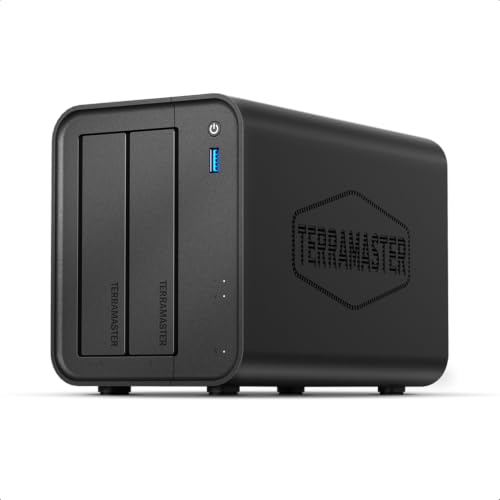
    TERRAMASTER F2-425

    Best Intel Headroom

    TERRAMASTER F2-425

    An Intel x86 quad-core, 4GB of RAM and 2.5GbE in a two-bay enclosure.

    88Excellent
    Check price
  5. 05
    UGREEN NAS DXP2800

    Best for Large Media Files

    UGREEN NAS DXP2800

    A two-bay, content-creator tier NAS with scheduled rsync, cloud sync and snapshot versioning.

    86Excellent
    Check price
  6. A two-bay QNAP with 2.5GbE and Hybrid Backup Sync, for faster first backups.

    82Very Good
    Check price
  7. A quad-core 1.7GHz two-bay with 1GB DDR4 and 2.5GbE, in the $100 to $200 bracket.

    80Very Good
    Check price

The costly mistake with a NAS is treating RAID as a backup. A two-bay box mirroring two drives protects you if one disk dies, but it does nothing when ransomware encrypts your files, you delete a folder by accident or the unit is stolen. What makes a NAS a backup device is the software that copies your computers to it on a schedule, keeps old versions, and ideally pushes a second copy somewhere else.

We reviewed eight diskless NAS enclosures from their spec sheets and listings, ranking them by backup software, network speed, processor and memory headroom, bay count and the cost of getting started. Every unit ships without drives, so budget for disks on top. Price buckets replace exact prices, and where a listing is silent we say so.

Before you buy

What Actually Matters

01

Backup software

A NAS only protects you if it copies your computers on a schedule. Look for named tools such as Active Backup for Business or Hybrid Backup Sync, and for versioning or snapshots. A listing that only says file server is not a backup solution.

02

RAID is not a backup

RAID 1 mirrors two drives so one can fail without data loss. It will not save you from ransomware, deletion or theft. Treat RAID as uptime protection and use versioned backups plus an off-site copy as your actual safety net.

03

Network port

A gigabit port moves roughly 100MB per second at best, and 2.5GbE more than doubles that. The first backup of a large computer can take a day on gigabit. Check that your router and computer also support 2.5GbE before paying for it.

04

Processor and memory

Backup is light work, but multiple computers, snapshots and cloud sync add load. 1GB is thin, 4GB is comfortable and 8GB suits busy households. Check whether RAM is upgradeable, since the Synology DS223 has fixed memory.

05

Drives and capacity

Every NAS here ships diskless, so you must buy drives. Choose NAS-rated disks, and plan for at least double the data you protect, to keep several versions. Four-bay units allow RAID 5 or 6 for more usable space.

In-depth reviews

Our Ranked Picks, Reviewed

1

Best Backup Software

Synology DS223 Home & Office Backup Hub

Our verdict: A two-bay NAS with free full-image PC and Mac backup through Active Backup for Business.

The DS223 is a two-bay diskless NAS with RAID 1 support, and it includes Active Backup for Business, which the listing describes as free full image backup for PCs and Macs. The DSM scheduler adds versioned backups, so you can roll back to an earlier state of a file. The RAM is fixed and cannot be upgraded.

It wins because the software is the whole point of a backup NAS, and Synology has the most mature option here. Image-level backup means you can restore an entire machine after a drive failure, not just documents. Versioning protects against ransomware and accidental deletion. The cost is hardware: the processor and fixed memory are modest next to the newer rivals, and the network port is the standard kind rather than 2.5GbE.

Buy it if you are backing up two or three computers and want the most reliable set-and-forget software. Skip it if you plan to edit video straight from the NAS.

Bays
2, diskless
Backup software
Active Backup for Business (free)
RAID
RAID 1 supported
RAM
Fixed, not upgradeable

What we like

  • +Free full PC and Mac image backup
  • +Versioned backups via DSM scheduler
  • +RAID 1 mirrors the two drives
  • +Mature, well-supported software

Watch out for

  • −RAM cannot be upgraded
  • −Modest hardware for the price

Buy it if: Households backing up two or three computers.

Skip it if: You need fast media editing from the NAS.

2

Best for Multiple Computers

UGREEN NAS DXP4800 Plus

Our verdict: A four-bay NAS with an Intel Pentium Gold 8505 and RAID 5, 6 and 10 for bigger households.

The DXP4800 Plus is a four-bay diskless NAS built around an Intel Pentium Gold 8505 five-core processor. It supports RAID 5, 6 and 10, handles several backup jobs at once and has the highest capacity ceiling in this ranking.

It takes second place because four bays change what a NAS can be. RAID 5 or 6 gives you more usable space than a mirror while surviving a disk failure, and the faster processor stops simultaneous backups from queuing. For a home with three or more computers, or a small office, that headroom matters. It ranks below the Synology only because UGREEN's software is newer, with less track record on backup specifically, and the $500 and up price is a big step.

Buy it if you have many computers, large photo or video libraries, or expect the household to grow. Skip it if you back up one laptop.

Bays
4, diskless
CPU
Intel Pentium Gold 8505, 5-core
RAID
5, 6 and 10 supported
Bracket
$500+

What we like

  • +Four bays with RAID 5, 6 and 10
  • +Fast Intel processor for many jobs
  • +Highest capacity ceiling in the list
  • +Handles several backups at once

Watch out for

  • −Top price bracket of $500 and up
  • −Newer software with less track record

Buy it if: Households or small offices with 3+ computers.

Skip it if: You only back up one or two machines.

3

Best for Concurrent Jobs

QNAP TS-264-8G-US 2-Bay Desktop NAS

Our verdict: 8GB of RAM, 2.5GbE and Hybrid Backup Sync, the roomiest two-bay in this ranking.

The TS-264 has 8GB of RAM, the most for a two-bay model in this list, plus 2.5GbE networking and Hybrid Backup Sync for local and cloud jobs. QNAP's QTS operating system includes a full app store.

It ranks third because memory and 2.5GbE let it run several backup and cloud-sync jobs without a bottleneck, and Hybrid Backup Sync gives you an off-site copy. The tradeoff is complexity: QTS has more options than DSM and a steeper learning curve, and the app store invites you to run a dozen services you may not need. It sits below the UGREEN four-bay only on capacity, since it has two bays.

Buy it if you want to run backup, cloud sync and a few other apps at the same time. Skip it if you want the simplest possible set-up.

Bays
2 desktop
RAM
8GB
Network
2.5GbE
Software
Hybrid Backup Sync, QTS

What we like

  • +8GB RAM is high for two bays
  • +2.5GbE speeds up large backups
  • +Hybrid Backup Sync adds cloud copies
  • +Full QTS app store

Watch out for

  • −QTS has a steeper learning curve
  • −Costs more than other two-bays

Buy it if: Users running several backup and sync jobs together.

Skip it if: You want the simplest possible setup.

4

Best Intel Headroom

TERRAMASTER F2-425

Our verdict: An Intel x86 quad-core, 4GB of RAM and 2.5GbE in a two-bay enclosure.

The F2-425 pairs an Intel x86 quad-core processor with 4GB of RAM and a 2.5GbE LAN port in a diskless two-bay enclosure. TOS, TerraMaster's operating system, handles scheduled backups.

It lands fourth because the hardware is strong for the price and leaves room for other light services alongside backup. An x86 chip also means broad software compatibility. The downside is software maturity: TOS has fewer polished backup tools than Synology's, and the listing does not mention full image backup or built-in cloud sync. It is a capable platform, but you may spend more time configuring it.

Buy it if you are comfortable setting up a NAS and want Intel horsepower for backup plus a media server or two. Skip it if you want one-click, image-level backup out of the box.

CPU
Intel x86 quad-core
RAM
4GB
Network
2.5GbE
Bays
2, diskless

What we like

  • +Intel x86 quad-core processor
  • +4GB RAM supports extra services
  • +2.5GbE speeds up transfers
  • +TOS handles scheduled backups

Watch out for

  • −Backup software is less polished
  • −Image backup is not listed

Buy it if: Tinkerers who want backup plus light services.

Skip it if: You want one-click full image backup.

5

Best for Large Media Files

UGREEN NAS DXP2800

Our verdict: A two-bay, content-creator tier NAS with scheduled rsync, cloud sync and snapshot versioning.

The DXP2800 is a two-bay NAS with content-creator tier hardware and a higher-performance CPU for large file sets. It runs scheduled rsync and cloud-sync backup jobs, with snapshot-based versioning, on UGREEN's own OS and app ecosystem.

It places fifth because it is built for big files, such as photo catalogs and video projects, more than for plain document backup. Snapshots give you point-in-time recovery, which is useful against accidental deletes. It ranks below the Synology because the software is younger and there is no dedicated image backup tool named on the listing, so full-system restores are less certain.

Buy it if your computers hold large media libraries and you want a faster processor than the entry models. Plan a secondary off-site copy, since a single box in one room is not a full strategy.

Bays
2
Backup
Scheduled rsync and cloud sync
Versioning
Snapshot-based
CPU
Higher-performance tier

What we like

  • +Strong CPU for large file sets
  • +Snapshot-based versioning
  • +Scheduled rsync and cloud sync
  • +Good for media libraries

Watch out for

  • −No image backup tool is listed
  • −Newer software ecosystem

Buy it if: Photographers and video editors backing up big files.

Skip it if: You need full-system image restores.

6

Best QNAP Entry Point

QNAP TS-216G-US 2-Bay 2.5GbE Desktop NAS

Our verdict: A two-bay QNAP with 2.5GbE and Hybrid Backup Sync, for faster first backups.

The TS-216G is a two-bay desktop NAS with a 2.5GbE port, Hybrid Backup Sync for scheduled local and cloud jobs, QNAP's QTS operating system and standard two-bay RAID support.

It ranks seventh because it overlaps heavily with the TS-264 above but offers less. The listing gives no RAM figure, so headroom for concurrent jobs is uncertain, and the price sits in the same $200 to $500 bracket. Where it makes sense is a network that is already 2.5GbE or about to be, and a buyer who prefers QNAP's software.

Buy it if you want QNAP's backup tools and faster first backups at a fair price. For a bit more, the TS-264 gives much more RAM headroom.

Bays
2 desktop
Network
2.5GbE
Software
QTS, Hybrid Backup Sync
RAID
Standard 2-bay

What we like

  • +2.5GbE shortens first backups
  • +Hybrid Backup Sync for cloud copies
  • +Standard 2-bay RAID support
  • +Established QNAP software

Watch out for

  • −RAM is not listed
  • −TS-264 offers more for little extra

Buy it if: QNAP fans on a 2.5GbE network.

Skip it if: You want the most RAM for the money.

7

Best Entry 2.5GbE

Asustor Drivestor 2 Gen 2 AS1202T

Our verdict: A quad-core 1.7GHz two-bay with 1GB DDR4 and 2.5GbE, in the $100 to $200 bracket.

The Drivestor 2 Gen 2 is a two-bay NAS with a quad-core 1.7GHz processor, 1GB of DDR4 RAM and 2.5GbE networking. Asustor's ADM operating system has backup apps for Windows and Mac, and the unit can act as a 4K media server.

Its best argument is 2.5GbE at the lowest price in this ranking. A first backup of a big drive can take many hours, and a faster network port shortens it, provided your router and computer also support it. The 1GB of RAM is thin, so running a media server alongside backup jobs can slow things down.

Buy it if you are a first-time NAS buyer who wants 2.5GbE without the mid-range price. Check that your computer has a matching port, or the speed advantage will not appear.

CPU
Quad-core 1.7GHz
RAM
1GB DDR4
Network
2.5GbE
Bracket
$100 to $200

What we like

  • +2.5GbE at a low price
  • +ADM includes Windows and Mac backup apps
  • +Doubles as a 4K media server
  • +Beginner-friendly price

Watch out for

  • −Only 1GB of RAM
  • −Slows when running extra services

Buy it if: First-time buyers who want 2.5GbE on a budget.

Skip it if: You plan to run many apps at once.

Methodology

How We Ranked These

Backup software

We compared image backup, scheduled rsync, Hybrid Backup Sync and snapshot versioning, because software decides whether a NAS is really a backup device.

Network speed

2.5GbE ports were weighed against standard gigabit, since the first full backup of a large drive is the slowest.

Processor and memory

CPU class and RAM from 1GB to 8GB were checked for the ability to run concurrent backup and cloud-sync jobs.

Bays and RAID options

Two-bay mirroring and four-bay RAID 5, 6 and 10 were compared for capacity, resilience and growth.

Value and starting cost

Feature depth was set against the $100 to $200, $200 to $500 and $500 and up brackets, remembering that drives are extra.

Every Primea Score uses the same weights: Performance 30% · Build & Materials 20% · Everyday Usability 20% · Value 20% · Owner Satisfaction 10%. Full scoring rules

Buyer's guide

How to Pick the Right One for You

By Number of Computers

How many machines you protect drives almost every other choice.

ComputersOur pick
OneAsustor Drivestor 2 Gen 2 AS1202T
Two or threeSynology DS223 Home & Office Backup Hub
Three or more, growingUGREEN NAS DXP4800 Plus
Several plus cloud syncQNAP TS-264-8G-US 2-Bay Desktop NAS

By Budget

SpendOur pick
$100 to $200Asustor Drivestor 2 Gen 2 AS1202T
$200 to $500 (software)Synology DS223 Home & Office Backup Hub
$200 to $500 (concurrent jobs)QNAP TS-264-8G-US 2-Bay Desktop NAS
$500 and upUGREEN NAS DXP4800 Plus

Image Backup vs File Sync

Full image backup

Copies the whole system so you can restore a dead computer. Pick: Synology DS223 with Active Backup for Business.

File and folder sync

Copies chosen folders on a schedule, with snapshots or cloud sync. Picks: QNAP TS-264, QNAP TS-216G, UGREEN DXP2800, TERRAMASTER F2-425.

Default to image backup if you want a one-step recovery from a dead drive.

By Network Speed

NetworkOur pick
Standard gigabitSynology DS223 Home & Office Backup Hub
2.5GbE, budgetAsustor Drivestor 2 Gen 2 AS1202T
2.5GbE with strong CPUTERRAMASTER F2-425
2.5GbE with 8GB RAMQNAP TS-264-8G-US 2-Bay Desktop NAS

For Creative Professionals Specifically

Look for

A fast processor, 2.5GbE, snapshots for versioning and room to grow. Large photo and video libraries need more bays and a lot of free space.

In this ranking

The UGREEN DXP4800 Plus for big libraries, the UGREEN DXP2800 for a smaller studio, and the QNAP TS-264 for concurrent jobs.

When to Spend More

Spend more if

The data is irreplaceable or you protect several machines. The UGREEN DXP4800 Plus or the Synology DS223 gives you better software and resilience.

Save if

You protect one computer with modest data. The Asustor Drivestor 2 covers it for $100 to $200.

Questions

Frequently Asked Questions

Do I need to buy hard drives separately?+

Yes. Every NAS in this ranking is sold diskless, so budget for one or two NAS-rated drives. Pick disks with at least double the capacity of the data you want to protect, so you can keep older versions.

What is the most common mistake with a backup NAS?+

Believing RAID is a backup. RAID keeps the box running if a disk fails, but it cannot restore a deleted or encrypted file. Use versioned backups and keep a second copy off-site or in the cloud.

Is the Synology DS223 worth it over a cheaper UGREEN?+

For backup, yes. The free Active Backup for Business image tool and the mature DSM scheduler are stronger than the scheduled jobs on newer rivals. If you only protect one computer with small files, the Asustor Drivestor 2 is enough.

How hard is setup?+

Install the drives, connect power and Ethernet, then follow the web-based wizard. Most buyers have a first scheduled backup running in under an hour. The first full backup can take many hours over gigabit.

Will it work with both Windows and Mac?+

Yes. Synology's Active Backup for Business covers PC and Mac images, and Asustor's ADM lists backup apps for Windows and Mac. For the others, check the maker's supported clients before you buy.

Do I still need cloud backup?+

Ideally, yes. A NAS in the same room does not protect against fire, theft or a power surge. QNAP's Hybrid Backup Sync and UGREEN's cloud sync can push a copy off-site automatically.

Final take

For most households, the Synology DS223 is the best NAS for automatic computer backup, with free image-level PC and Mac protection and versioning. Larger homes and small offices should look at the UGREEN DXP4800 Plus, while the QNAP TS-264 suits people who run many jobs at once. The Asustor Drivestor 2 is the budget route for a single computer. Whatever you choose, add an off-site copy.

More Ranked & Reviewed Guides