
Primea ReviewsAll Reviews

Primea Reviews is reader-supported. When you buy through our Amazon links we may earn a commission, at no extra cost to you. Rankings are set by our editors and never sold. Learn more

Ranked & Reviewed by Primea Reviews

The 7 Best Budget NAS for Beginners of 2026, Ranked & Reviewed

By the Primea Editorial TeamUpdated November 1, 202610 min read7 products ranked
The 7 Best Budget NAS for Beginners of 2026, Ranked & Reviewed

The short answer

The UGREEN DH2300 is the best budget NAS for beginners: a 2-bay diskless desktop unit with beginner-oriented UGOS software, RAID 1 mirroring and up to 64TB, for $100 to $200. The Synology DS223 has the most guided software, the Buffalo LinkStation 210 comes with a drive, and the Asustor Drivestor 2 offers 2.5GbE for less.

The Primea Scoreboard

Ranked & Reviewed

  1. The easiest on-ramp to a proper 2-bay NAS at a modest price.

    94Outstanding
    Check price
  2. The most guided setup here, at a higher price.

    91Excellent
    Check price
  3. Plug in, share files, done: no drive shopping required.

    88Excellent
    Check price
  4. 2.5GbE networking in the lowest price bucket.

    85Excellent
    Check price
  5. More CPU and RAM than a beginner needs today, useful tomorrow.

    82Very Good
    Check price
  6. Same simple box as the 2TB, with three times the space.

    80Very Good
    Check price
  7. A mini PC that doubles as a NAS, not a simple appliance.

    78Very Good
    Check price

First-time NAS buyers tend to fall into the same trap. They buy the cheapest enclosure, then find that the real cost is the hard drives, plus the hours spent learning the software. A NAS is a small always-on computer, and for a beginner the friendliness of its interface counts for more than raw speed. A confusing menu is how photos end up in a folder nobody backs up.

We reviewed seven network storage options and ranked them from spec sheets and product listings: software approach, bay count, RAID support, networking speed and whether drives are included. We left out a USB-attached RAID enclosure because it connects to one computer and is not network storage. Price shown is for the box, so add drives to every diskless pick.

Before you buy

What Actually Matters

01

Software experience

NAS software is the interface where you create folders, users and backups. A beginner-oriented system saves hours of confusion and reduces the risk of misconfigured sharing. Look for names such as UGOS or DSM and read whether setup is described as guided. Poor software is the real cost of a cheap NAS, since a confusing app makes people skip backups.

02

Bay count and RAID

A bay holds one drive, and RAID 1 mirrors two drives so one can fail without data loss. Without it, a single drive failure erases everything stored. Check the listing for the words RAID 1 and the number of bays before buying. The Buffalo models are one bay and offer no RAID, so a drive failure there means lost files. Mirroring is not a backup, though.

03

Diskless versus drives included

Diskless units cost less up front but need you to buy compatible NAS drives. Drive-included units are ready immediately but limited in size. Look for the word diskless in the title and add drive cost to your budget. Two NAS-rated drives can cost as much as the enclosure.

04

Network speed

Gigabit Ethernet tops out around 110 megabytes per second in practice, while 2.5GbE is roughly two and a half times faster. It only helps if your router or switch also supports 2.5GbE. Check both the NAS port speed and your own network gear. The Asustor and TerraMaster list 2.5GbE. Cables matter too, so use Cat 5e or better.

05

CPU and RAM

These set how many apps and media streams the NAS can handle at once. Plain file storage needs little, but 4K media serving benefits from more. Check the CPU model and RAM figure in the bullet points instead of assuming. The Asustor lists 1GB, the TerraMaster 4GB and the Beelink 12GB. More headroom means fewer slowdowns when two people stream at once.

In-depth reviews

Our Ranked Picks, Reviewed

1

Best Overall

UGREEN NAS DH2300 2-Bay Desktop NAS (Diskless)

Our verdict: The easiest on-ramp to a proper 2-bay NAS at a modest price.

The DH2300 is a diskless 2-bay desktop NAS running UGREEN's UGOS software, which is pitched at newcomers. It supports RAID 0 and 1, handles up to 64TB total, and uses Gigabit Ethernet. It sells for $100 to $200. RAID 1 writes the same data to both drives, so one can fail and your files survive, which is the safety net a beginner needs most.

It ranks above the Synology because it sits in a lower price bucket and still gives you mirrored storage. You give up the deep ecosystem of Synology's software, but for backups and shared folders the gap is small for a beginner. Against the Asustor, it matches the price but is slower on the network.

Buy it if you want a clean first NAS and are happy to supply your own drives. The caveat is that Gigabit networking caps transfer speed, so large video files will not feel instant. Skip it if you need faster than Gigabit.

Bays
2, diskless
Max capacity
64TB total
RAID
0 and 1
Network
Gigabit Ethernet

What we like

  • +Beginner-oriented UGOS software
  • +RAID 1 mirroring
  • +Lower price bucket
  • +Up to 64TB total

Watch out for

  • −Gigabit only
  • −Drives not included

Buy it if: First-time buyers who want simple software and mirrored drives.

Skip it if: You need faster than Gigabit transfers.

2

Best Software Experience

Synology DS223 Home & Office Backup Hub (2-Bay Diskless NAS)

Our verdict: The most guided setup here, at a higher price.

The DS223 is a 2-bay diskless NAS built around Synology DSM, a mature operating system with centralized file access, monitoring and RAID 1 mirroring. Networking is Gigabit. It sells for $200 to $500. A mature interface walks beginners through creating volumes, users and backup tasks, which cuts the risk of leaving a share open to everyone.

It sits just behind the UGREEN because it costs more for hardware that is similarly modest. What you pay for is software polish and a long track record of update support. Against the Buffalo, it adds mirroring and expansion.

Choose it if your biggest worry is getting stuck during setup and you will use the NAS for years. The caveat is the price and Gigabit-only networking. Skip it if you want the lowest entry price, since the UGREEN gets you most of the same result for less.

Bays
2, diskless
Software
Synology DSM
RAID
RAID 1 mirroring
Network
Gigabit Ethernet

What we like

  • +Mature DSM software
  • +Guided setup
  • +RAID 1 support
  • +Centralized monitoring

Watch out for

  • −Costs more than rivals
  • −Gigabit networking only

Buy it if: Beginners who want the smoothest software and will keep it long term.

Skip it if: You want the lowest entry price.

3

Best Ready-to-Run

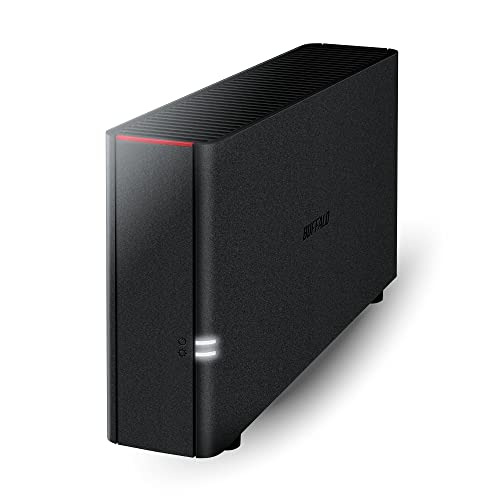
Buffalo LinkStation 210 2TB 1-Bay NAS (Drives Included)

Our verdict: Plug in, share files, done: no drive shopping required.

A one-bay NAS that ships with a 2TB drive already inside and is preconfigured out of the box. It offers home cloud and network storage over Gigabit Ethernet, with no RAID because there is only one drive. It sells for $100 to $200. Drive included means no compatibility questions, and preconfigured means you can share files within minutes.

It ranks third since the single bay means no redundancy: if the drive fails, your files go with it. Against the UGREEN and Synology, you trade protection and flexibility for a much simpler start and no extra purchases. Against the 6TB version, it costs less and holds a third of the data.

It suits people who just want shared storage and a backup target today. The caveat is that you should keep a second copy of anything important. Skip it if you want mirrored drives or room to expand.

Bays
1
Included drive
2TB
RAID
None
Network
Gigabit Ethernet

What we like

  • +Drive included
  • +Preconfigured out of box
  • +Simple home cloud
  • +Lower price bucket

Watch out for

  • −No RAID protection
  • −Fixed single bay

Buy it if: True beginners who want storage running without buying drives.

Skip it if: You want mirrored drives or room to expand.

4

Best Speed for the Money

Asustor Drivestor 2 Gen 2 AS1202T 2-Bay NAS (Diskless)

Our verdict: 2.5GbE networking in the lowest price bucket.

The Drivestor 2 is a 2-bay diskless NAS with a quad-core 1.7GHz CPU, 1GB DDR4 RAM and 2.5GbE networking. It also supports 4K media serving and sells for $100 to $200. A 2.5GbE port moves data roughly two and a half times faster than Gigabit, but only if the rest of your network matches.

It ranks fourth because 1GB of RAM is thin for anything beyond file sharing, while the TerraMaster below carries 4GB. Its edge over the UGREEN is the faster 2.5GbE port at a similar price. A quad-core chip handles a few media streams without struggling.

Pick it if you have a 2.5GbE router or switch and want quicker transfers. The caveat is that on a Gigabit network that advantage goes unused. Skip it if you plan to run many apps at once.

Bays
2, diskless
CPU
Quad-core 1.7GHz
RAM
1GB DDR4
Network
2.5GbE

What we like

  • +2.5GbE networking
  • +Quad-core CPU
  • +4K media server support
  • +Lower price bucket

Watch out for

  • −Only 1GB RAM
  • −Gains need 2.5GbE gear

Buy it if: Budget buyers with a 2.5GbE network who stream media.

Skip it if: You plan to run many apps at once.

5

Best Room to Grow

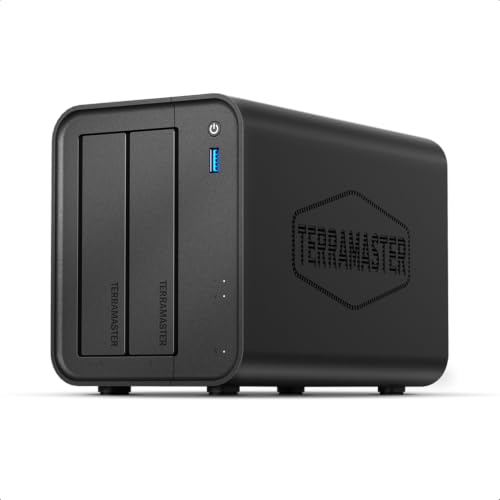
TerraMaster F2-425 2-Bay NAS (Intel x86 Quad-Core, Diskless)

Our verdict: More CPU and RAM than a beginner needs today, useful tomorrow.

The F2-425 is a diskless 2-bay unit with an Intel x86 quad-core CPU, 4GB RAM and 2.5GbE LAN, with multimedia server support. It sells for $200 to $500. An x86 processor runs a wider range of software and handles media transcoding better than entry-level ARM chips, which matters if your needs grow.

It ranks below the Asustor on value because you pay noticeably more, but it has four times the RAM and the more capable x86 processor. That headroom matters if you add apps or media transcoding later. Against the Synology, it offers faster networking and more RAM for a similar price tier.

Buy it if you expect your NAS needs to grow. The caveat is that it is overkill for backup only. Skip it if you only need simple file backup.

CPU
Intel x86 quad-core
RAM
4GB
Network
2.5GbE LAN
Bays
2, diskless

What we like

  • +x86 quad-core CPU
  • +4GB RAM
  • +2.5GbE networking
  • +Multimedia server support

Watch out for

  • −Higher price bucket
  • −Overkill for backup only

Buy it if: Beginners who expect to run more apps over time.

Skip it if: You only need simple file backup.

6

Best Included Capacity

Buffalo LinkStation 210 6TB 1-Bay NAS (Drives Included)

Our verdict: Same simple box as the 2TB, with three times the space.

This is the same preconfigured one-bay LinkStation as the 2TB version, shipping with a 6TB drive and Gigabit Ethernet. There is still no RAID. It sells for $200 to $500. Three times the space suits photo and video libraries, though a single large drive concentrates risk.

It ranks below the 2TB because it moves into a higher price bucket while keeping the single-drive risk. More space in one drive means more to lose at once if it fails. Against the DH2300, it costs more upfront and offers no mirroring, though the drive is included.

Choose it if you have a lot of files to store and want zero setup. The caveat is that one failure takes everything, so pair it with an external backup. Skip it if you want redundancy built in.

Bays
1
Included drive
6TB
RAID
None
Network
Gigabit Ethernet

What we like

  • +6TB included
  • +Preconfigured out of box
  • +No RAID learning curve
  • +Home cloud functions

Watch out for

  • −Single drive risk
  • −Costs more than 2TB model

Buy it if: Beginners with lots of photos or video and no wish to configure RAID.

Skip it if: You want redundancy built in.

Methodology

How We Ranked These

Software friendliness

We favored guided, beginner-oriented interfaces over general-purpose operating systems that demand more setup knowledge.

Data protection

Bay count and RAID options were weighed, since a single drive offers no protection from failure.

Network speed

Gigabit versus 2.5GbE ports were compared, as the network link caps real file transfer rates.

Hardware headroom

CPU and RAM on the spec sheet were judged against realistic beginner and growth workloads.

Total startup cost

Whether drives are included changes the true price, so we counted that in the value ranking.

Every Primea Score uses the same weights: Performance 30% · Build & Materials 20% · Everyday Usability 20% · Value 20% · Owner Satisfaction 10%. Full scoring rules

Buyer's guide

How to Pick the Right One for You

By Experience Level

Match the box to how comfortable you are configuring things.

Your situationOur pick
Never used a NAS, want guidanceSynology DS223 Home & Office Backup Hub
Beginner wanting mirrored drives for lessUGREEN NAS DH2300 2-Bay Desktop NAS
Zero setup, drives includedBuffalo LinkStation 210 2TB
Happy to tinker with an operating systemBeelink Mini PC ME Pro 2-Bay NAS

By Budget

SpendOur pick
$100-200 disklessUGREEN NAS DH2300 2-Bay Desktop NAS
$100-200 with driveBuffalo LinkStation 210 2TB
$100-200 faster networkAsustor Drivestor 2 Gen 2 AS1202T
$200-500Synology DS223 or TerraMaster F2-425

Diskless vs Drives Included

Diskless

You choose and buy the drives, which gives you control over capacity and lets you use RAID 1 across two bays. The UGREEN DH2300, Synology DS223, Asustor AS1202T and TerraMaster F2-425 all work this way.

Drives included

The unit arrives ready to use with a drive inside, cutting setup decisions, but you get one bay and no RAID. The two Buffalo LinkStation 210 models fit here.

Most beginners with files they care about should default to a diskless 2-bay unit and mirror two drives.

By Network Speed

Your networkOur pick
Standard Gigabit routerUGREEN NAS DH2300
2.5GbE router or switch, low budgetAsustor Drivestor 2 Gen 2 AS1202T
2.5GbE and more appsTerraMaster F2-425
Dual LAN needsBeelink Mini PC ME Pro

For Photo and Family Backup Specifically

Look for

Two bays with RAID 1 so a drive failure does not lose irreplaceable photos, plus simple software that automates backups from phones and PCs.

In this ranking

The UGREEN DH2300 offers RAID 1 with beginner software at a lower price, and the Synology DS223 does the same with more polish.

When to Spend More

Spend more if

You want long-term software support and polish, which points to the Synology DS223, or CPU headroom for media apps, which the TerraMaster F2-425 offers.

Save if

You mainly need shared folders and one backup copy. The UGREEN DH2300 or the Buffalo LinkStation 210 2TB handle that for less.

Questions

Frequently Asked Questions

Do I need to buy hard drives separately?+

For diskless models like the UGREEN, Synology, Asustor, TerraMaster and Beelink, yes. The Buffalo LinkStation 210 models include a drive. Budget for NAS-rated drives, since they are built for continuous running. Buy two matching drives for a mirrored pair, and check the maker's compatibility list.

What is the biggest beginner mistake?+

Treating a NAS as a backup by itself. RAID protects against one drive failing, not against deletion, ransomware or theft, so keep a second copy of important files elsewhere, such as an external drive or cloud backup. Test restoring a file once.

Is 2.5GbE worth it over Gigabit?+

Only if your router or switch also supports it. Otherwise you pay for speed you cannot use, and the UGREEN at Gigabit is a better value. Most home networks are still Gigabit.

How hard is setup?+

Guided systems like Synology DSM and UGREEN UGOS walk you through creating a volume and user accounts. The Buffalo LinkStation is preconfigured and is the least work. Plan an afternoon for the rest, including user accounts and a first backup.

How do I maintain a NAS?+

Keep the firmware updated, watch drive health alerts and make sure the unit has airflow. Replace a failed drive in a mirrored setup promptly, such as on the DH2300. Label the drive bays so you know which to swap.

Why did you leave out the QNAP TR-004?+

It connects by USB to one computer, so it is direct-attached storage rather than network-accessible. It does not fit a guide about NAS devices, which share files with every device at home.

Final take

Buy the UGREEN DH2300 for a first NAS with mirrored drives and simple software. Choose the Synology DS223 for the smoothest setup and long update history, and the Buffalo LinkStation 210 if you want storage running today with no drive shopping. The Asustor suits a 2.5GbE network, the TerraMaster growth, and the Beelink tinkerers. Always keep a second copy of important files.

More Ranked & Reviewed Guides