
Primea ReviewsAll Reviews

Primea Reviews is reader-supported. When you buy through our Amazon links we may earn a commission, at no extra cost to you. Rankings are set by our editors and never sold. Learn more

Ranked & Reviewed by Primea Reviews

The 6 Best Digital Photo Frames That Play Video of 2026, Ranked & Reviewed

By the Primea Editorial TeamUpdated November 4, 202610 min read6 products ranked
The 6 Best Digital Photo Frames That Play Video of 2026, Ranked & Reviewed

The short answer

The PhotoSpring 10-inch is the best frame for video: it names a 5-minute clip limit, needs no subscription and takes uploads by email, app or web. The Uhale 15.6-inch is the pick for a living-room wall, with a 1920x1080 touch screen and 64GB of storage. The Frameo 15.6 and 10.1 cover the Frameo app crowd, and the KECAG is the only frame that plays video with no Wi-Fi at all.

The Primea Scoreboard

Ranked & Reviewed

  1. The only frame that names its video limit, five minutes, and charges no subscription.

    93Outstanding
    Check price
  2. A big 1920x1080 touch screen with 64GB for a lot of family video.

    91Excellent
    Check price
  3. The large Frameo option for families already sharing through the Frameo app.

    89Excellent
    Check price
  4. A shelf-sized Frameo with half the storage of the big model.

    87Excellent
    Check price
  5. Plays video and music from a USB stick with no Wi-Fi or app.

    84Very Good
    Check price
  6. A 10-inch Wi-Fi frame with a built-in speaker, but few confirmed specs.

    81Very Good
    Check price

Most photo frames that advertise video are really photo frames with a loophole. They accept a short clip, play it muted or compressed, and drop it if it is a few seconds too long. Grandparents then wonder why the birthday video their daughter sent never appeared. The difference between a frame that plays video and one that merely tolerates it is clip length, storage and how files reach the frame.

So we ranked six frames on how well they handle moving pictures. We reviewed spec sheets and owner feedback, comparing named video limits, panel resolution, onboard memory and the sending method, then scored each on the Primea framework. We weighed ease of sharing heavily, because the person receiving the frame is rarely the person loading it.

Before you buy

What Actually Matters

01

Stated clip length

Many frames accept video but quietly cap it or skip long files, so a birthday toast can simply refuse to play. A named limit, like PhotoSpring's five minutes, tells you what will run. Check the title and bullets for a number in minutes. If none appears, assume short clips only and ask the seller before gifting.

02

Sharing method

Email, app, web and USB each suit different senders. Email, offered by the PhotoSpring, needs no install and works for anyone. App sharing on the Frameo and Uhale is fast but requires every sender to download software. USB, as on the KECAG, needs physical access. Match the method to the least technical person who will send you clips.

03

Panel resolution

Video looks soft on a low-resolution panel, especially at 15 inches where the same pixels spread over more glass. The 15.6-inch picks list 1920x1080, while the 10.1-inch Frameo lists only HD. Check for a stated resolution on the listing; if it is absent, the panel is probably modest and clips will look less sharp than your phone.

04

Onboard storage

Video files are far larger than photos, so a 32GB frame fills faster than a 64GB one, and a full frame silently stops accepting new family clips. The two 15.6-inch frames offer 64GB. Look for gigabytes in the bullets, and remember that a frame with no storage figure leaves you guessing about capacity.

05

Subscription costs

Some cloud frames charge for storage or sharing after a trial, turning a gift into a recurring bill for the recipient. PhotoSpring states no subscription. For others, search the listing and manual for the words plan, premium or cloud fee. A frame that locks features behind payment costs more than its sticker.

In-depth reviews

Our Ranked Picks, Reviewed

1

Best Overall

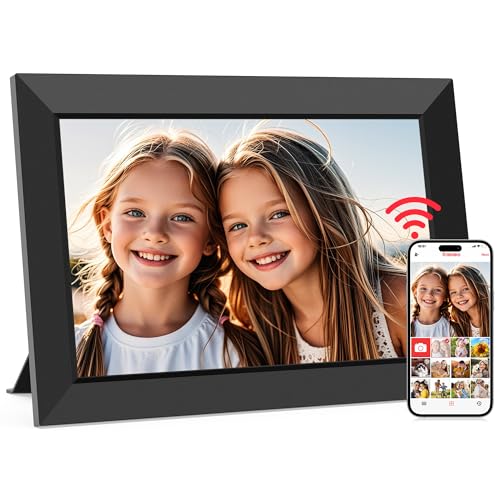
PhotoSpring No Subscription, 10in WiFi Digital Picture Frame, Play Videos up to 5min

Our verdict: The only frame that names its video limit, five minutes, and charges no subscription.

PhotoSpring is a 10-inch Wi-Fi frame that plays video clips up to five minutes long and takes uploads by email, app or web browser. Most competitors never state a clip length, so a stated five minutes is a real commitment you can plan around.

It leads because of that clarity and the three upload routes. Anyone in the family can email a clip without installing an app, which solves the problem that sinks the Frameo-style frames below it when a relative refuses to download anything. Against the 15.6-inch frames, you give up screen area but keep a frame that fits a shelf or a nightstand.

Buy it for gifts to less technical relatives. The caveat is size and resolution: the listing does not state panel resolution, and ten inches is small for group video on a wall.

Screen
10-inch Wi-Fi
Video limit
Up to 5 minutes
Upload methods
Email, app, web
Subscription
None

What we like

  • +Named five-minute video limit
  • +No subscription fee
  • +Email, app and web uploads
  • +Shelf-friendly size

Watch out for

  • −Resolution not published
  • −Small for wall viewing
  • −Storage size not stated

Buy it if: Gifting to relatives who want video clips without installing apps.

Skip it if: You want a big wall display with a stated panel resolution.

2

Best Large Screen

64GB 15.6" Large Digital Picture Frame, Uhale WiFi, FHD IPS Touch Screen, Share Photos/Videos from Phone Instantly

Our verdict: A big 1920x1080 touch screen with 64GB for a lot of family video.

This Uhale frame has a 15.6-inch 1920x1080 IPS touch screen, 64GB of storage and phone sharing for photos and videos. At that size, video looks like a small television rather than a stamp-sized preview.

It ranks second because it trades PhotoSpring's stated clip limit for sheer screen area and storage. The listing names video sharing but gives no per-clip length, so you cannot plan around a number. Against the identically sized Frameo, the Uhale app ecosystem is the difference rather than hardware, so compare which app your family will actually use.

Buy it for a living-room wall or kitchen counter where several people watch together. The caveat is physical: a 15.6-inch frame needs a power outlet nearby and a bigger footprint than the 10-inch picks.

Screen
15.6-inch IPS touch
Resolution
1920x1080 FHD
Storage
64GB
Sharing
Phone app, instant

What we like

  • +Large FHD touch screen
  • +64GB of storage
  • +Instant phone sharing
  • +IPS panel for wide angles

Watch out for

  • −No stated video length
  • −Needs a nearby outlet
  • −Bulky for small shelves

Buy it if: Families watching video together on a wall or counter.

Skip it if: You want a stated clip limit or a small shelf frame.

3

Best Frameo Large

64GB 15.6" Frameo Digital Picture Frame WiFi, 1920x1080 IPS FHD Touch Screen, Send Photos from Your Phone

Our verdict: The large Frameo option for families already sharing through the Frameo app.

This frame runs the Frameo platform on a 15.6-inch 1920x1080 IPS touch screen with 64GB of memory. Frameo lets friends and relatives send photos and clips to the frame from the phone app, so the gifting side takes minutes.

It sits behind the Uhale because the hardware is almost identical and the listing leans on photo sending, with video supported through the platform rather than a named clip length. Against the 10.1-inch Frameo below, you gain screen and storage; against PhotoSpring, you lose the email upload route that makes that frame easy for non-app users.

Buy it if your family already uses Frameo to group-share. The caveat is that everyone sending needs the app, so the person least comfortable with phones is shut out.

Screen
15.6-inch IPS touch
Resolution
1920x1080 FHD
Memory
64GB
Platform
Frameo

What we like

  • +Frameo app sharing
  • +Full HD panel
  • +64GB memory
  • +Touch screen controls

Watch out for

  • −Senders need the app
  • −Video length not named
  • −Large footprint

Buy it if: Families who already share photos and clips through Frameo.

Skip it if: Your relatives will not install an app to send video.

4

Best Compact Frameo

Frameo 10.1 Inch WiFi Digital Picture Frame, Smart Cloud Electronic Photo Frame, Share Photos/Videos from Phone

Our verdict: A shelf-sized Frameo with half the storage of the big model.

This 10.1-inch Frameo frame uses an HD IPS touch screen and 32GB of storage, and shares photos and videos from a phone through the Frameo app. It is the compact version of the platform.

It lands fourth because storage and resolution both step down from the 15.6-inch models: 32GB against 64GB, and HD against 1920x1080. If your clips are short and frequent, the capacity is workable, but heavy video senders will fill it faster. Against the PhotoSpring, the sharing is app-only and the video limit is not stated.

Buy it for a desk or shelf where the cloud-style sharing matters more than raw screen size. The caveat is the same Frameo trade-off: every sender must install the app, and 32GB is the smallest memory among the Wi-Fi frames here.

Screen
10.1-inch HD IPS touch
Storage
32GB
Platform
Frameo cloud sharing
Form
Shelf or desk

What we like

  • +Compact shelf size
  • +Frameo app sharing
  • +HD IPS touch screen
  • +Shares video from phones

Watch out for

  • −Only 32GB of storage
  • −Resolution below Full HD
  • −Senders need the app

Buy it if: Desks and shelves where the Frameo app is already in use.

Skip it if: You send long or frequent video and need more storage.

5

Best No Wi-Fi

KECAG 10.1" Digital Picture Frame, Photos/Videos/Music, No WiFi/App Needed

Our verdict: Plays video and music from a USB stick with no Wi-Fi or app.

The KECAG is a 10.1-inch frame that plays photos, videos and music without Wi-Fi or an app, and it includes a 32GB USB drive. You load files onto the drive, plug it in, and it plays.

That approach ranks it fifth because there is no remote sharing: nothing arrives automatically from family, so you or a helper must physically load the drive. Against the Wi-Fi frames above, it is the opposite philosophy, trading convenience for independence from accounts and home networks. It suits care homes and rooms with no signal.

Buy it for someone who wants a self-contained player. The caveat is the loading step: updating content means moving a drive, so it fits a set playlist better than a live family stream.

Screen
10.1-inch
Connectivity
No Wi-Fi or app needed
Storage
Free 32GB USB drive
Media
Photos, video, music

What we like

  • +Works with no Wi-Fi
  • +Plays photos, video and music
  • +32GB USB drive included
  • +No account to manage

Watch out for

  • −No remote photo sharing
  • −Updates need a USB swap
  • −Video length not named

Buy it if: Care rooms or homes without Wi-Fi that want a fixed video playlist.

Skip it if: You want relatives to send new clips from their phones.

6

Best With Speaker

Brookstone 10 Inch Wi-Fi Digital Picture Frame with Video Playback, Built-in Speaker

Our verdict: A 10-inch Wi-Fi frame with a built-in speaker, but few confirmed specs.

Brookstone's 10-inch Wi-Fi frame plays video and includes a built-in speaker. The speaker is a real convenience, since clips with voices are most of what families send.

It ranks last because the listing confirms very little beyond video playback and the speaker. There is no stated clip length, storage size or resolution, whereas PhotoSpring names five minutes and the Frameo models list memory. You are paying for the speaker and the brand name rather than verified numbers.

Buy it if sound in the frame matters and you will confirm specs before ordering. The caveat is exactly that gap: with no storage or resolution figure on the listing, you cannot judge how much video it will hold.

Screen
10-inch Wi-Fi
Video
Playback supported
Audio
Built-in speaker
Brand
Brookstone

What we like

  • +Built-in speaker for clips
  • +Wi-Fi connectivity
  • +Video playback supported
  • +Recognizable brand

Watch out for

  • −Storage not stated
  • −Resolution not stated
  • −Clip length not stated

Buy it if: Buyers who want audio from the frame itself and accept fewer published specs.

Skip it if: You need a confirmed clip limit, storage size or resolution.

Methodology

How We Ranked These

Video handling

We favored frames that name a clip length or a video platform over those that only say video is supported.

Screen and resolution

Panel size and stated resolution decide whether video looks like a movie or a thumbnail, so confirmed Full HD scored higher.

Storage

Onboard memory, from 32GB to 64GB, sets how many clips the frame holds before older ones need deleting.

Sharing method

We scored how files reach the frame, whether email, app, web or USB, with weight on how easy it is for non-technical senders.

Value

Subscription-free ownership and confirmed specs for the price bracket drove the value score.

Every Primea Score uses the same weights: Performance 30% · Build & Materials 20% · Everyday Usability 20% · Value 20% · Owner Satisfaction 10%. Full scoring rules

Buyer's guide

How to Pick the Right One for You

By Screen Size

Decide where the frame will sit.

PlacementOur pick
Living room wall or counter64GB 15.6" Large Digital Picture Frame, Uhale WiFi, FHD IPS Touch Screen, Share Photos/Videos from Phone Instantly
Large, Frameo family64GB 15.6" Frameo Digital Picture Frame WiFi, 1920x1080 IPS FHD Touch Screen, Send Photos from Your Phone
Shelf or nightstandPhotoSpring No Subscription, 10in WiFi Digital Picture Frame, Play Videos up to 5min
Compact FrameoFrameo 10.1 Inch WiFi Digital Picture Frame, Smart Cloud Electronic Photo Frame, Share Photos/Videos from Phone

By Budget

SpendOur pick
$50 to $100 (best video limit)PhotoSpring No Subscription, 10in WiFi Digital Picture Frame, Play Videos up to 5min
$50 to $100 (biggest screen)64GB 15.6" Large Digital Picture Frame, Uhale WiFi, FHD IPS Touch Screen, Share Photos/Videos from Phone Instantly
$50 to $100 (no Wi-Fi)KECAG 10.1" Digital Picture Frame, Photos/Videos/Music, No WiFi/App Needed
$50 to $100 (with speaker)Brookstone 10 Inch Wi-Fi Digital Picture Frame with Video Playback, Built-in Speaker

Wi-Fi Sharing vs USB Playback

Wi-Fi sharing

Relatives send clips remotely, which keeps the frame fresh. It needs a home network and often an app. Picks: PhotoSpring, Uhale, both Frameo models and Brookstone.

USB playback

You load a drive and it plays with no network or account. Updates are manual. Pick: KECAG 10.1-inch.

Default to Wi-Fi sharing unless the room has no signal or you want a fixed playlist.

By Sender Skill

Who sends the clipsOur pick
Anyone with email, no appPhotoSpring No Subscription, 10in WiFi Digital Picture Frame, Play Videos up to 5min
Family already on an app64GB 15.6" Frameo Digital Picture Frame WiFi, 1920x1080 IPS FHD Touch Screen, Send Photos from Your Phone
Phone sharing, large screen64GB 15.6" Large Digital Picture Frame, Uhale WiFi, FHD IPS Touch Screen, Share Photos/Videos from Phone Instantly
You load it yourselfKECAG 10.1" Digital Picture Frame, Photos/Videos/Music, No WiFi/App Needed

For Playing Video Specifically

Look for

A named clip length, at least 32GB of storage, a stated resolution and a sharing method your family will actually use.

In this ranking

PhotoSpring names five minutes, and the 15.6-inch Uhale lists 1920x1080 with 64GB. Those two cover the strongest video claims.

When to Spend More

Spend more if

You want group viewing on a wall. The 15.6-inch Uhale or Frameo gives Full HD and 64GB for the money.

Save if

The frame lives on a shelf for short clips. The PhotoSpring or KECAG covers that without the larger panel.

Questions

Frequently Asked Questions

How long a video will the PhotoSpring play?+

Its title states videos up to five minutes. Longer clips may not play, so trim anything over that in your phone's editor first. The Uhale and Frameo listings name no limit, so test a long clip against their apps before gifting.

Do I need an account for the Frameo frames?+

Frameo frames pair to the Frameo app, so each sender joins using a code. The KECAG avoids this completely, playing from a USB drive. Plan for the pairing step during setup, as relatives often get stuck there.

Is the Uhale worth it over the PhotoSpring?+

Choose the Uhale for screen size: 15.6 inches at 1920x1080 and 64GB suits shared viewing across a room. Choose the PhotoSpring for its named five-minute limit, email uploads and shelf-friendly size. The wall-versus-shelf question usually decides it, so measure the spot first.

How do I set up the KECAG?+

Copy photos, videos and music onto the included 32GB USB drive, plug it into the frame and select playback. No Wi-Fi or app is needed. Keep the file formats common, since an unusual codec may refuse to play.

How should I clean the touch screens?+

Switch the Uhale or Frameo off, then wipe the IPS panel with a dry microfiber cloth. Avoid sprays, which can seep behind a touch layer. Fingerprints show most on the 15.6-inch screens, so a weekly wipe keeps video bright.

What if my frame fills up with video?+

The 32GB Frameo 10.1 fills faster than the 64GB 15.6-inch models, because clips are far larger than photos. Delete old videos from the frame's menu or app, and send shorter clips instead of full recordings.

Final take

For most buyers the PhotoSpring 10-inch is the right frame: a named five-minute video limit, no subscription and three easy upload routes. For a living-room wall, upgrade to the Uhale 15.6-inch with 1920x1080 and 64GB. Frameo families should pick the 15.6-inch for room or the 10.1-inch for a shelf. And where there is no Wi-Fi, the KECAG plays video from a USB drive.

More Ranked & Reviewed Guides