
Primea ReviewsAll Reviews

Primea Reviews is reader-supported. When you buy through our Amazon links we may earn a commission, at no extra cost to you. Rankings are set by our editors and never sold. Learn more

Ranked & Reviewed by Primea Reviews

The 6 Best Digital Notebooks with Cloud Sync, Ranked & Reviewed

Joshua ParkesBy Joshua Parkes, Editor in ChiefUpdated November 11, 202610 min read6 products ranked
The 6 Best Digital Notebooks with Cloud Sync, Ranked & Reviewed

The short answer

The reMarkable 2 is the best digital notebook with cloud sync, thanks to its paper-like e-ink screen and weeks of battery. The Rocketbook Core is the best low-cost option, smart pen sets like SyncPen sync as you write, and the Paper Pro is the premium upgrade.

The Primea Scoreboard

Ranked & Reviewed

  1. An e-ink writing tablet with weeks of battery and automatic cloud sync.

    94Outstanding
    Check price
  2. The top-tier reMarkable with the Marker Plus and automatic file sync.

    92Outstanding
    Check price
  3. Write on paper, scan with the app and wipe the pages clean.

    90Excellent
    Check price
  4. A smart pen and folio that sync as you write, with cloud storage.

    87Excellent
    Check price
  5. A budget smart pen that streams notes to your phone and records audio.

    85Excellent
    Check price
  6. A top-bound notepad of 16 wipeable sheets with lined and dot grid pages.

    83Very Good
    Check price

Digital notebooks come in three very different forms, and buyers who compare them head to head end up disappointed. An e-ink tablet, a smart pen on paper and a wipeable notebook each solve a different problem, and the gap in price between them is far bigger than the gap in what lands in your cloud folder. The first question is how you like to write, not which brand is best.

We ranked six options by sync method, writing feel and total cost, using listing data and maker specs. Where a listing is thin, such as for the generic smart pen sets, we say so instead of guessing. If you only want searchable copies of occasional pages, the cheapest pick on the list may be the right one for you.

Before you buy

What Actually Matters

01

Sync method

Sync method is how a page gets from your hand to the cloud, and it decides whether the system fits into a busy day. The reMarkable syncs automatically, smart pens like Noteorius and SyncPen stream as you write, and Rocketbook only syncs when you scan. Each manual step is one you will skip on a hectic week. Check whether the listing says automatic, real-time or scan.

02

E-ink vs paper

The writing surface sets how the note feels and what you must keep charged. E-ink gives a glare-free screen that lasts weeks, a smart pen on real paper keeps the familiar feel but needs a charged pen and an open app, and a reusable notebook costs least. Check whether the listing names a screen, a pen or reusable pages, because the three behave nothing alike.

03

Cloud destinations

Cloud destinations are the services your notes land in, and they decide whether your handwriting flows into the tools you already use. Rocketbook scans to services such as Drive, Dropbox or email through its app, while reMarkable syncs to its own cloud with a companion app. Look for your preferred storage by name in the listing before buying, not after.

04

Handwriting recognition

Handwriting recognition turns ink into searchable text, which is the real payoff of going digital. Accuracy depends on your handwriting and the app, and neat printing converts better than fast cursive. SyncPen lists handwriting-to-text and audio, and the reMarkable converts in its app. Write a few typical pages and read what comes back before you rely on search.

05

Total cost

Total cost goes beyond the sticker, because the pen, folio, refills or subscriptions can change the math. The reMarkable models sell with the Marker Plus, Rocketbook needs compatible pens to stay wipeable, and smart pens need their pads or folio. Add everything you need to take a first note, then compare that total to the paper version of the same job.

In-depth reviews

Our Ranked Picks, Reviewed

1

Best Overall

reMarkable 2 with Marker Plus

Our verdict: An e-ink writing tablet with weeks of battery and automatic cloud sync.

The reMarkable 2 is an e-ink digital notebook that ships with the Marker Plus, syncs files to the cloud and runs for weeks on a charge. It is priced between $200 and $500.

E-ink matters for handwriting because the screen has no glare or backlight, and writing on it feels closer to paper than a glass tablet does. Syncing is the part that makes it a notebook rather than a gadget: pages appear in the companion app on your phone and computer, where you can search and export them.

Buy it for daily note-taking with a minimum of distraction. It is a single-purpose device, so you will not browse or run other apps, and it costs far more than a reusable paper notebook.

Type
E-ink digital notebook
Pen
Marker Plus included
Sync
Cloud sync
Battery
Weeks per charge

What we like

  • +Paper-like e-ink writing
  • +Weeks of battery life
  • +Marker Plus included
  • +Cloud sync to the app

Watch out for

  • −Single-purpose device
  • −Far costlier than paper

Buy it if: Daily note-takers who want a paper feel and cloud sync.

Skip it if: You want a general-purpose tablet.

2

Best Premium

reMarkable Paper Pro with Marker Plus

Our verdict: The top-tier reMarkable with the Marker Plus and automatic file sync.

The Paper Pro is reMarkable's flagship e-ink notebook, sold with the Marker Plus and automatic digital file sync. It is in the $500+ tier.

It ranks second because the writing and sync experience matches the reMarkable 2, so the extra money buys the newer hardware, not a different workflow. If you already like the 2's behavior, the Paper Pro refines it. For most people the cheaper model captures nearly the same value.

Buy it if budget is not the limit and you want the latest model. Skip it if you just want to try e-ink note-taking, since the listing gives little else to justify the premium.

Type
E-ink digital notebook
Pen
Marker Plus included
Sync
Automatic file sync
Price tier
$500+

What we like

  • +Flagship reMarkable hardware
  • +Marker Plus included
  • +Automatic file sync
  • +E-ink paper feel

Watch out for

  • −Highest e-ink price here
  • −Little added over the 2 for most

Buy it if: Buyers who want the latest hardware and a premium notebook.

Skip it if: You are on a budget.

3

Best Reusable Paper

Rocketbook Core Reusable Spiral Notebook

Our verdict: Write on paper, scan with the app and wipe the pages clean.

The Rocketbook Core is a reusable letter-size spiral notebook with dotted pages that you scan to cloud services through its app. You wipe the pages clean to reuse them. It costs $25 to $50.

Reusable notebooks suit people who want digital copies without a new device. The workflow is write, scan, wipe, and you can send each page to Drive, Dropbox or email. It is far cheaper than e-ink.

Buy it for students and casual note-takers who like real pens on paper. The limit is the scan step: nothing syncs in real time, and you need the compatible pen or marker to keep the pages wipeable.

Type
Reusable paper notebook
Size
Letter, 8.5 x 11
Pages
Dotted
Sync
App scan to cloud

What we like

  • +Wipe clean and reuse
  • +Scans to cloud services
  • +Letter-size dotted pages
  • +Very low cost

Watch out for

  • −Manual scan step
  • −Needs compatible pens

Buy it if: Students and casual note-takers who like paper.

Skip it if: You want real-time sync.

4

Best Smart Pen Set

Noteorius Smart Notebook with Pen and Folio

Our verdict: A smart pen and folio that sync as you write, with cloud storage.

The Noteorius set pairs a smart pen with a folio and pad, syncs as you write and links to cloud storage through its app. It is in the $100 to $200 tier.

The appeal of a smart pen is that you write on ordinary paper in the folio and the strokes appear on your phone as you go. It sits below the reMarkable because the experience depends on the app, and handwriting recognition varies by pen.

Buy it for meetings where you want paper and a searchable record. The folio and pen are the whole system, so a lost pen means a lost workflow.

Type
Smart pen and paper digitizer
Sync
Real-time as you write
Cloud
App sync with cloud storage
Included
Pen and folio

What we like

  • +Syncs in real time
  • +Cloud storage via app
  • +Pen and folio included
  • +Writes on real paper

Watch out for

  • −Depends on the app
  • −Handwriting accuracy varies

Buy it if: Meeting notes on paper with a digital copy.

Skip it if: You want a self-contained device.

5

Best Budget Smart Pen

SyncPen Digital Notebook Smart Pen Set

Our verdict: A budget smart pen that streams notes to your phone and records audio.

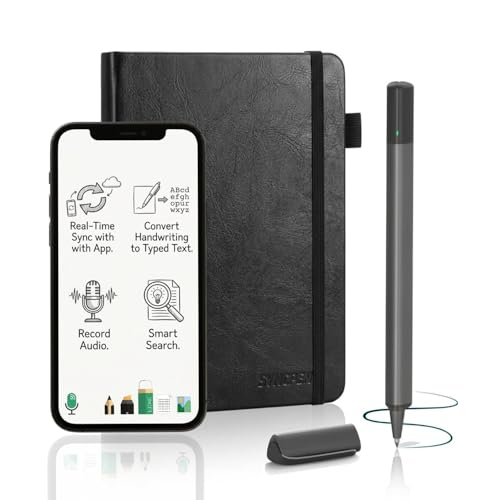
SyncPen is a smart pen kit that streams your handwriting to a phone as you write, converts it to text and can record audio too. It costs $50 to $100.

Audio recording alongside written notes is the standout: you can tap a line and replay what was said. OCR converts handwriting into text. It ranks below Noteorius on listing detail, though the price is lower, and the thin spec list makes it harder to judge the pen, battery and notepad.

Buy it for lectures and meetings. Accuracy depends on your handwriting, so write a few pages and check the conversion before relying on it.

Type
Smart pen and paper
Sync
Streams to phone app
Features
Handwriting-to-text and audio
Price tier
$50 to $100

What we like

  • +Streams notes to the phone
  • +Converts handwriting to text
  • +Records audio too
  • +Budget price

Watch out for

  • −OCR accuracy varies
  • −Fewer specs listed

Buy it if: Lectures and meetings with audio playback.

Skip it if: You need guaranteed text accuracy.

6

Best Flip Format

Rocketbook Flip Smart Notepad

Our verdict: A top-bound notepad of 16 wipeable sheets with lined and dot grid pages.

The Rocketbook Flip is a top-bound smart notepad with 16 sheets, lined and dot grid pages, app scanning and wipe-clean reuse. It costs $25 to $50.

It sits last among the paper picks because 16 sheets are fewer than the Core's notebook, though the flip format suits standing and quick notes. The same scan, send and wipe workflow applies, so you gain portability and lose capacity. It also needs the same compatible pens as the Core to stay wipeable.

Buy it for a desk notepad to capture ideas. Pick the Core if you want a full spiral notebook.

Type
Reusable notepad
Sheets
16
Pages
Lined and dot grid
Sync
App scanning

What we like

  • +Flip format for quick notes
  • +Lined and dot grid pages
  • +Wipe clean and reuse
  • +App scanning

Watch out for

  • −Only 16 sheets
  • −Manual scan step

Buy it if: Quick notes and standing desks.

Skip it if: You want a full notebook.

Methodology

How We Ranked These

Sync method

Real-time, automatic or scan-based, and where files go.

Writing feel

Paper-like e-ink, real paper or a wipeable surface.

Included hardware

Pen, folio or device included.

Ongoing effort

Charging, scanning and wiping steps.

Price tier

Cost against the workflow.

Every Primea Score uses the same weights: Performance 30% · Build & Materials 20% · Everyday Usability 20% · Value 20% · Owner Satisfaction 10%. Full scoring rules

Buyer's guide

How to Pick the Right One for You

By Writing Style

Pick the way you like to write first.

Real-Time Sync vs Scan-Based

Real-time

Notes appear as you write. Picks: reMarkable, Noteorius, SyncPen.

Scan-based

You scan each page with the app. Picks: Rocketbook Core and Flip.

Choose real-time sync for meetings, scan-based for casual use.

For Students Specifically

Look for

Low cost, cloud sync to a class folder and a durable cover.

In this ranking

Rocketbook Core for most, SyncPen for lectures with audio, reMarkable 2 if you can afford it.

When to Spend More

Spend more if

You write every day and want paper feel and weeks of battery. The reMarkable 2 earns it.

Save if

You take notes now and then. Rocketbook is enough.

Questions

Frequently Asked Questions

Which cloud services work?+

Rocketbook scans to cloud services through its app, so Drive, Dropbox and email routes are set by marker symbols on each page. The reMarkable syncs to its own cloud and companion app. Check the listing for your preferred service by name.

What is the common mistake?+

Buying a smart pen set expecting an e-ink experience. Noteorius and SyncPen still use paper and a phone app, so you need the pen charged and the app open. Only the reMarkable gives a self-contained screen that lasts weeks.

Is e-ink worth it over a Rocketbook?+

If you write daily, yes. The reMarkable 2 runs for weeks per charge, syncs without a scan step and feels closer to paper than glass. For occasional notes, the Rocketbook Core costs a fraction of the price and does enough.

How do I set up a Rocketbook?+

Download the app, write with a compatible pen, then scan the page with your phone. Mark the symbol at the bottom to route it to a destination, and wipe the page with a damp cloth to reuse it.

How do I maintain these?+

Wipe Rocketbook pages with a damp cloth, charge the smart pens before each meeting and keep the reMarkable software updated. Replace the Marker Plus tip when it wears.

Can I search my handwriting?+

On devices with OCR, yes. SyncPen lists handwriting-to-text, and the reMarkable converts handwriting in its app, though accuracy varies with your handwriting. Neat block printing converts best, so test a few pages before you trust search.

Final take

The reMarkable 2 is the digital notebook to buy for daily writing, and the Rocketbook Core is the budget way into cloud sync. Pick SyncPen or Noteorius if you want paper and real-time sync, and treat the Paper Pro as the premium upgrade. Choose the sync method first, then the price.

About the author

Joshua Parkes, Editor in Chief at Primea Reviews

Joshua Parkes

Editor in Chief, Primea Reviews

Joshua owns the Primea Score framework and signs off on every ranking this site publishes. He and the editors work from spec sheets, manuals, warranty terms, certifications and long-term owner feedback, and a guide says so plainly when a listing leaves out the number that decides the purchase. Primea never claims to have physically tested a product it has not, and no brand can pay for placement.

More Ranked & Reviewed Guides