
Primea ReviewsAll Reviews

Primea Reviews is reader-supported. When you buy through our Amazon links we may earn a commission, at no extra cost to you. Rankings are set by our editors and never sold. Learn more

Ranked & Reviewed by Primea Reviews

The 7 Best Digital Notebooks for Handwriting, E-Ink and Smart Pens, Ranked & Reviewed

By the Primea Editorial TeamUpdated November 3, 202610 min read7 products ranked
The 7 Best Digital Notebooks for Handwriting, E-Ink and Smart Pens, Ranked & Reviewed

The short answer

The reMarkable 2 with Marker Plus is the digital notebook to buy for most people who love handwriting, offering an e-paper screen, a stylus and cloud sync. The reMarkable Paper Pro adds a color display for those who want the premium option, the Rocketbook Core is the cheap reusable-paper pick, and the SyncPen is the budget route into smart pens.

The Primea Scoreboard

Ranked & Reviewed

  1. The e-paper notebook that most closely imitates writing on paper.

    95Outstanding
    Check price
  2. A color e-paper notebook, bundled with a stylus and a folio.

    93Outstanding
    Check price
  3. An 11 inch color e-reader that also doubles as a notebook.

    91Excellent
    Check price
  4. A reusable letter-size spiral notebook that scans to the cloud.

    88Excellent
    Check price
  5. A smart pen set that syncs paper notes to an app with OCR and audio.

    85Excellent
    Check price
  6. A smart pen and notebook set with a folio, synced to the cloud.

    83Very Good
    Check price
  7. A reusable flip notepad with lined and dot grid pages.

    80Very Good
    Check price

The phrase digital notebook covers three completely different products, and buying the wrong type is the most common regret. One kind is an e-ink tablet where you write straight on a screen. Another is a reusable paper notebook that you scan with a phone. The third is a smart pen that records strokes made on ordinary paper.

We ranked seven options across all three types, and we sort them by how well they replace a paper notebook rather than by raw spec counts. The listings give types, included accessories, sync behavior and price buckets, which is what we rely on. Battery lives and screen sizes that are not stated are not guessed.

Before you buy

What Actually Matters

01

Which type you actually need

An e-ink tablet is a screen you write on, reusable paper is a notebook you photograph, and a smart pen records ordinary handwriting on special paper. They differ in cost by ten times. Decide whether you want a device, or just a way to digitize paper, before comparing models.

02

Writing feel and latency

E-paper devices aim to mimic paper friction and respond quickly to the stylus. Reusable paper offers true paper feel, while smart pens write with real ink. Pay attention to listing language such as paper-like display and writes directly on the e-paper screen.

03

Sync and searchability

Digital notes are only valuable if you can find them later. Real-time sync, as in the SyncPen and Noteorius, updates automatically, while Rocketbook needs a manual scan. OCR, which turns handwriting into text, is the feature that makes notes searchable.

04

Storage and ecosystem

On-device storage matters for e-ink tablets that keep notes locally and sync to a cloud. The Kindle Scribe Colorsoft lists 64GB, which is plenty for notes and books. Check what cloud services the app supports, and whether a subscription is needed for extras.

05

Display type and light

Color e-paper adds expressiveness but costs more, and a front light, as on the Kindle Scribe Colorsoft, helps with reading in the evening. Monochrome is perfectly good for plain notes. Choose color only if you mark up diagrams or highlight heavily.

In-depth reviews

Our Ranked Picks, Reviewed

1

Best Overall

reMarkable 2 with Marker Plus

Our verdict: The e-paper notebook that most closely imitates writing on paper.

The reMarkable 2 is an e-ink digital notebook, sold here with the Marker Plus stylus. You write directly on the e-paper screen, and files are stored and synced digitally.

It ranks first because it is a focused device: it does one thing, writing and reading, and does not push notifications or apps at you. E-paper is easy on the eyes, readable in sunlight and, unlike a tablet, does not tempt you into other tasks. The Marker Plus adds a built-in eraser end, a nicety if you edit as you go. The tradeoff is the price, between $200 and $500, and the monochrome display.

Buy it if you take lots of handwritten notes or sketch ideas and want them searchable and synced. Skip it if you need color or a general-purpose tablet.

Type
E-ink digital notebook
Stylus
Marker Plus included
Display
E-paper, write directly
Storage
Files stored and synced digitally

What we like

  • +Writes directly on e-paper
  • +Stylus included in the bundle
  • +Distraction free by design
  • +Synced files stay searchable

Watch out for

  • −Monochrome display only
  • −Costs far more than paper options

Buy it if: Heavy note takers who want a paper-like experience.

Skip it if: You need color or general tablet apps.

2

Best Premium Color

reMarkable Paper Pro with Marker Plus and Basalt Book Folio

Our verdict: A color e-paper notebook, bundled with a stylus and a folio.

The Paper Pro is the premium reMarkable, with a color e-paper display. This bundle includes the Marker Plus stylus and the Basalt Book Folio, so it arrives ready to use.

It ranks second because color is a real upgrade for diagrams, annotated documents and highlighting, but the price starts at $500. For most note takers, the monochrome reMarkable 2 does the core job for much less. The folio is a handy extra, though accessories add to the cost.

Choose it if color matters to you or you mark up documents heavily. Skip it if you mostly write plain text notes, where the extra money buys little.

Type
E-ink digital notebook
Display
Color e-paper
Included
Marker Plus and Basalt Book Folio
Price bucket
$500 and up

What we like

  • +Color e-paper display
  • +Stylus and folio in the box
  • +Same focused writing experience
  • +Good for diagrams and markup

Watch out for

  • −Premium price at $500 and up
  • −Color adds cost for plain notes

Buy it if: Designers and students who annotate in color.

Skip it if: Black and white handwriting is enough for you.

3

Best Notebook and E-Reader

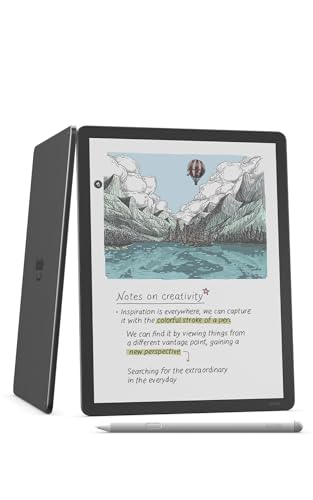
Amazon Kindle Scribe Colorsoft 64GB, 11 inch paper-like color display with front light, Pen included, Graphite

Our verdict: An 11 inch color e-reader that also doubles as a notebook.

The Kindle Scribe Colorsoft has an 11 inch paper-like color display with a front light, 64GB of storage and an included pen. It combines a notebook with an e-reader, so it can hold books as well as handwritten notes.

It ranks third because it serves two jobs, reading and writing, while the reMarkable devices lean toward writing. The front light is a clear advantage for reading in bed. It also sits at $500 and above, so the dual purpose is costly. If you mainly read, a Kindle is a better value, and if you mainly write, a reMarkable is more focused.

Buy it if you want to read and take notes on the same screen. Skip it if handwriting is the whole point, since the notebook features are a secondary use.

Display
11 inch paper-like color, front light
Storage
64GB
Pen
Included
Role
Notebook and e-reader

What we like

  • +Large 11 inch color display
  • +Front light for reading anywhere
  • +Pen included with the device
  • +Doubles as an e-reader

Watch out for

  • −Premium price point
  • −Notebook is secondary to reading

Buy it if: Readers who also want to handwrite notes.

Skip it if: You want the best pure writing tablet.

4

Best Reusable Paper

Rocketbook Core Reusable Spiral Notebook, Letter Size 8.5x11, Black, Dotted Pages, App-Connected, Erasable, Durable Cover

Our verdict: A reusable letter-size spiral notebook that scans to the cloud.

The Rocketbook Core is a reusable paper notebook, letter size at 8.5 x 11 inches, with dotted pages. You write on it, scan the page with the app, send it to a cloud service and wipe the page clean to reuse it.

It ranks fourth because it delivers a digital workflow at a bargain price, $25 to $50, but it is still paper in the end. Pen choice matters, since you need a compatible erasable pen, and wiping takes a damp cloth. It is not a replacement for a true e-paper device, but it needs no charging and no screen.

Buy it if you want to digitize notes cheaply and like the feel of paper. Skip it if you want instant on-device search and sync.

Type
Reusable paper notebook
Size
Letter 8.5 x 11 in
Pages
Dotted
Sync
App-connected cloud scanning

What we like

  • +Low cost for a digital workflow
  • +Wipe clean and reuse pages
  • +No battery or charging needed
  • +Dotted pages suit sketches

Watch out for

  • −Needs special pens and a cloth
  • −Scanning is a manual step

Buy it if: Students and teams on a tight budget.

Skip it if: You want real-time sync and on-device search.

5

Best Budget Smart Pen

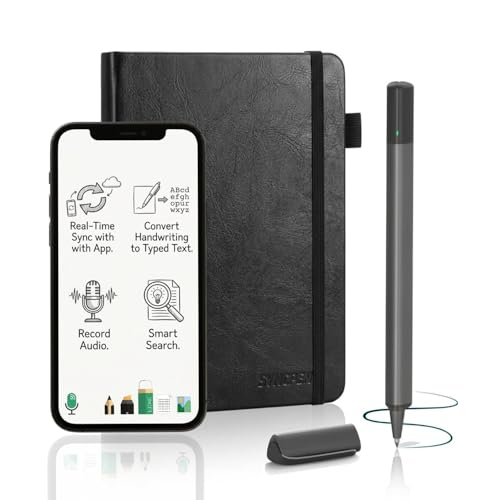
SyncPen Digital Notebook Smart Pen Set, Real Time Sync from Paper to App

Our verdict: A smart pen set that syncs paper notes to an app with OCR and audio.

The SyncPen set pairs a smart pen with special paper and syncs your writing to an app in real time. It adds OCR, which converts handwriting to text, and audio recording. Expect to pay $50 to $100.

Fifth place goes here because smart pens remain the budget route for people who want real ink on real paper and a digital copy. OCR accuracy depends heavily on handwriting, so messy writers should expect corrections. The audio recording ties spoken words to notes, which is useful in lectures. It lacks the polish of e-paper.

Choose it if you love writing on paper but want a searchable copy. Skip it if you need accurate OCR on rushed handwriting.

Type
Smart pen and paper digitizer
Sync
Real time, paper to app
Extras
OCR and audio recording
Price bucket
$50 to $100

What we like

  • +Real ink on real paper
  • +Real time sync to the app
  • +OCR turns handwriting into text
  • +Audio recording for lectures

Watch out for

  • −OCR accuracy depends on handwriting
  • −Needs its own compatible paper

Buy it if: Students who record lectures and write on paper.

Skip it if: You write quickly in messy script.

6

Best Smart Pen Bundle

Noteorius Smart Notebook with Pen and Folio, Reusable Digital Writing Pad

Our verdict: A smart pen and notebook set with a folio, synced to the cloud.

The Noteorius set includes a smart pen and a folio, with real-time sync as you write and app sync to cloud storage. Pricing runs $100 to $200.

Sixth place reflects a cost about double the SyncPen while it lists no OCR or audio. The folio is a pleasant extra that keeps the notebook, pen and pad together. Weighing the two, the SyncPen gives more documented features for less money.

Pick it if you like a tidy folio and sync. Skip it if you want the most documented features per dollar.

Type
Smart pen and paper digitizer
Sync
Real time, cloud via app
Included
Pen and folio
Price bucket
$100 to $200

What we like

  • +Pen and folio in one set
  • +Real time sync as you write
  • +App sync with cloud storage
  • +Reusable digital writing pad

Watch out for

  • −Costs more than the SyncPen
  • −No OCR or audio listed

Buy it if: Writers who want a tidy folio and cloud sync.

Skip it if: You want the most features for your money.

7

Best Flip Notepad

Rocketbook Flip Smart Notepad, Teal Cover, Lined/Dot Grid Rule, 8.5x11, 16 Sheets

Our verdict: A reusable flip notepad with lined and dot grid pages.

The Rocketbook Flip is a reusable notepad in a flip format with lined and dot grid pages, 8.5 x 11 inches, and 16 sheets. It uses the same wipe-clean, app-scanned approach as the Core.

Last place follows because 16 sheets is a small page count, and the flip format suits quick lists and meeting notes better than a full day of studying. The mixed lined and dot grid layout is a nice touch for flexibility. Pricing matches the Core at $25 to $50.

Buy it for quick notes and a desk pad. Skip it if you want a longer-lasting notebook with more pages.

Type
Reusable paper notepad
Size
Letter 8.5 x 11 in
Pages
16 sheets, lined and dot grid
Sync
App-connected scanning

What we like

  • +Flip format suits quick notes
  • +Lined and dot grid pages
  • +Wipe clean and reuse
  • +App scanning included

Watch out for

  • −Only 16 sheets in the pad
  • −Needs a compatible erasable pen

Buy it if: Quick meeting notes and to-do lists.

Skip it if: You want a notebook with many pages.

Methodology

How We Ranked These

Device type

E-ink tablets, reusable paper and smart pens were grouped first, since each type answers a different need.

Writing experience

Writing directly on e-paper, on wipe-clean paper or with a smart pen was compared for how close it feels to a real notebook.

Sync and storage

Real-time sync, cloud scanning and on-device storage such as 64GB were weighed for convenience.

Included accessories

Styluses, pens, folios and covers were counted, as they change what you need to buy afterwards.

Value by price bucket

Features were set against the $25 to $50, $100 to $200, $200 to $500 and $500 and up brackets.

Every Primea Score uses the same weights: Performance 30% · Build & Materials 20% · Everyday Usability 20% · Value 20% · Owner Satisfaction 10%. Full scoring rules

Buyer's guide

How to Pick the Right One for You

By Type

Pick the type before you pick the brand.

TypeOur pick
E-ink tabletreMarkable 2 with Marker Plus
E-ink with colorreMarkable Paper Pro
Reusable paperRocketbook Core Reusable Spiral Notebook
Smart penSyncPen Digital Notebook Smart Pen Set

By Budget

SpendOur pick
$25 to $50Rocketbook Core Reusable Spiral Notebook
$50 to $100SyncPen Digital Notebook Smart Pen Set
$100 to $200Noteorius Smart Notebook with Pen and Folio
$200 to $500reMarkable 2 with Marker Plus

E-Ink Tablet vs Smart Pen

E-ink tablet

Write on a screen with instant sync, no paper needed. Picks: reMarkable 2, reMarkable Paper Pro, Kindle Scribe Colorsoft.

Smart pen

Write on real paper and get a digital copy. Cheaper, but OCR varies. Picks: SyncPen, Noteorius.

Default to an e-ink tablet if you write daily and can afford it.

By Main Use

UseOur pick
Handwritten notesreMarkable 2 with Marker Plus
Reading and notesKindle Scribe Colorsoft 64GB
Lectures with audioSyncPen Digital Notebook Smart Pen Set
Quick listsRocketbook Flip Smart Notepad

For Students Specifically

Look for

Searchable notes, enough pages for a semester and a price that fits a student budget. Audio linked to notes helps in lectures.

In this ranking

SyncPen for lecture recording, Rocketbook Core for low cost, and reMarkable 2 for those who can spend.

When to Spend More

Spend more if

You write daily and value a paper-like feel. The reMarkable 2 and Paper Pro reward that.

Save if

You only need a few digital copies. The Rocketbook Core handles it.

Questions

Frequently Asked Questions

Do digital notebooks work with my phone or computer?+

Most sync through an app to your phone and cloud services. The Rocketbook scans through a phone camera, and the smart pens sync over Bluetooth, so check app support for your phone.

What is the biggest mistake when buying a digital notebook?+

Picking the wrong type. Buying an e-ink tablet when you only needed searchable paper wastes money, and buying paper when you wanted instant sync is frustrating. Choose the type first.

Is the reMarkable 2 worth it over the Rocketbook Core?+

If you write daily, yes. The reMarkable gives instant sync and a screen, while the Rocketbook needs scanning and wiping. For occasional notes, the Rocketbook saves a lot.

How do I set up a smart pen?+

Install the app, pair the pen over Bluetooth and write on the compatible paper. Calibrate if the app asks. Keep the paper in the supported format, since the pen reads its pattern.

How do I care for a Rocketbook?+

Use the supported erasable pens, wipe pages with a damp cloth and avoid heat or soaking. Scan before wiping, since the cleared page cannot be recovered.

Can e-ink tablets replace a regular tablet?+

No. They focus on writing and reading, and lack the apps, video and color range of a tablet. Treat them as a notebook, not a computer.

Final take

The reMarkable 2 with Marker Plus is the digital notebook most people should buy for handwriting, with an e-paper screen and synced files. The Paper Pro adds color for those who can pay, the Kindle Scribe Colorsoft suits readers, and the Rocketbook Core is the best low-cost way to digitize paper. Choose the type first, then the brand.

More Ranked & Reviewed Guides