
Primea ReviewsAll Reviews

Primea Reviews is reader-supported. When you buy through our Amazon links we may earn a commission, at no extra cost to you. Rankings are set by our editors and never sold. Learn more

Ranked & Reviewed by Primea Reviews

The 8 Best Digital Notebooks Under $300 of 2026, Ranked & Reviewed

By the Primea Editorial TeamUpdated November 1, 20269 min read8 products ranked
The 8 Best Digital Notebooks Under $300 of 2026, Ranked & Reviewed

The short answer

The Rocketbook Core is the best digital notebook for most people, with full letter pages, a wipe-clean surface and a mature scanning app. The SyncPen is the pick for live capture, adding OCR and audio. The Fusion suits planner users, the Flip kit is the easiest start, and the Ophayapen and Smart Sync are cheaper smart pen alternatives.

The Primea Scoreboard

Ranked & Reviewed

  1. Full letter-size dotted pages that wipe clean, scanned through a mature app.

    92Outstanding
    Check price
  2. Real-time sync from paper to app, plus OCR and audio recording.

    90Excellent
    Check price
  3. Planner spreads and reusable note pages in one executive-size book.

    88Excellent
    Check price
  4. Everything in one box: navy notepad, pen and cloth.

    86Excellent
    Check price
  5. A compact smart pen and notebook with real-time mobile sync.

    84Very Good
    Check price
  6. A real-time digital writing pad set with pen and pad included.

    83Very Good
    Check price
  7. The same wipe-and-scan idea in a light executive-size pad.

    81Very Good
    Check price
  8. A letter-size flip pad with lined and dot grid pages.

    80Very Good
    Check price

Stay under $300 and the premium e-ink tablets fall away, leaving two cheaper routes: reusable notebooks that you photograph, and smart pens that record as you write. Both keep you on real paper with a real pen, which is why people who dislike screens keep coming back to them. The difference lies in the moment your handwriting becomes digital.

A Rocketbook turns a page digital only when you scan it with a phone. A smart pen streams every stroke to an app the instant it is made, in exchange for a battery to charge. Our editors reviewed eight options from their specifications and ranked them on page size, capture method, extras and ecosystem maturity, using the Primea framework. Where a listing leaves out a spec, we say so instead of guessing.

Before you buy

What Actually Matters

01

Wipeable paper or smart pen

Wipeable paper stays analogue until you scan it, while a smart pen digitizes as you write. If you take notes in bursts and scan at the end, wipeable paper is cheaper and simpler. If you want live capture, choose a smart pen and accept charging. Check the listing for the capture method and sync type, and for whether a battery is involved.

02

Erasable pen compatibility

Reusable notebooks only wipe clean with compatible pens, and the wrong pen leaves ink that will not erase. That is the main source of disappointment with the format. Look for pen included on the listing, as with the Flip kit, or buy a compatible pen alongside the notebook rather than hoping a gel pen works, because ordinary ink stays permanent on the coated page.

03

Handwriting recognition

OCR converts handwriting into text, and its accuracy depends heavily on how neat and consistent your writing is. If searchability matters, it can save hours, but a poor result needs retyping. Read recent buyer feedback on OCR accuracy for your handwriting style, and test it within the return window before you trust it with lectures.

04

Page size for your notes

Letter size gives room for diagrams and long lecture notes, while executive size suits lists and meetings. Pick the size you will actually fill, because a bigger book is heavier to carry and a smaller one forces crowded pages and more flipping. Compare listed dimensions rather than assuming, since sizes vary by brand and format.

05

Where your notes land

Notes only help if they land where you work. Check which cloud services the app connects to, and whether it saves to the ones you already use. A notebook that fits your workflow is worth more than extra features. Look in the listing or app description for supported services, and confirm export formats such as PDF or text.

In-depth reviews

Our Ranked Picks, Reviewed

1

Best Overall

Rocketbook Core Reusable Spiral Notebook, Letter Size

Our verdict: Full letter-size dotted pages that wipe clean, scanned through a mature app.

The Core is the benchmark for reusable notebooks. Its pages are 8.5 by 11 inches, dotted for sketches and diagrams, and bound in a spiral that lies flat. You write with a compatible erasable pen, photograph the page in the app, and it files to the cloud service of your choice. Then you wipe the page and reuse it.

It ranks first because nothing else under $300 offers as much room to write. The Flip pads and Fusion are smaller, and the smart pen sets cost more. A mature app means fewer scan failures than newer rivals.

Buy it for lectures, meetings and anyone who wants a big, cheap page. The honest caveat: capture is a scan step, not live sync, so notes are not digital until you photograph them.

Size
Letter, 8.5 x 11 in
Pages
Dotted, wipeable
Binding
Spiral, durable cover
Sync
App scan

What we like

  • +Biggest page in the group
  • +Wipes clean and reuses
  • +Mature, well-known app
  • +Among the cheapest picks

Watch out for

  • −Needs a compatible erasable pen
  • −Scan step, not live sync
  • −Nothing stored on the book

Buy it if: Anyone who wants a large, cheap, reusable page.

Skip it if: You want notes to sync as you write.

2

Best Smart Pen

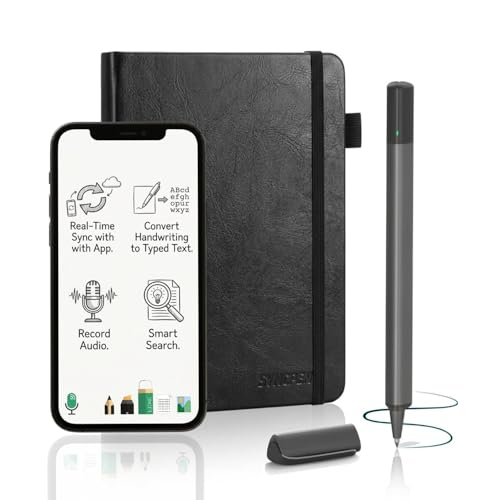
SyncPen Digital Notebook Smart Pen Set

Our verdict: Real-time sync from paper to app, plus OCR and audio recording.

The SyncPen is a Bluetooth pen that captures handwriting as you write and sends it to an app in real time. The set adds optical character recognition, which converts handwriting into searchable text, and audio recording so a lecture can be tied to your notes. You still write on real paper.

It ranks second because it costs more than any Rocketbook, in the $50 to $100 bucket, and needs a charged battery. In exchange it removes the scan step the Core requires, which is the main friction for people who take notes constantly.

Buy it for lectures and meetings where you want live capture. The caveats are practical: the pen needs charging, OCR accuracy depends on handwriting quality, and the ecosystem is smaller than Rocketbook's, so check app support before buying.

Capture
Real time to app
Extras
OCR and audio
Link
Bluetooth pen
Surface
Real paper

What we like

  • +Notes sync as you write
  • +OCR converts handwriting
  • +Audio recording built in
  • +Real paper feel

Watch out for

  • −Pen needs charging
  • −OCR depends on handwriting
  • −Smaller ecosystem

Buy it if: Lecture and meeting note takers who want live capture.

Skip it if: You do not want a device to charge.

3

Best Planner Hybrid

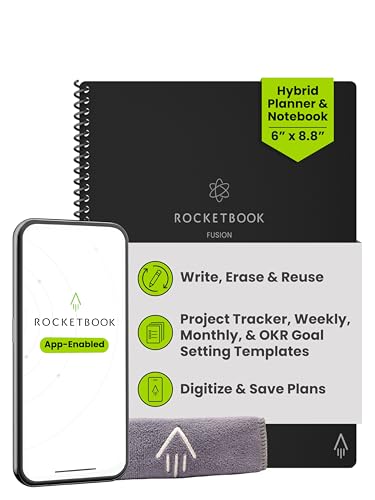
Rocketbook Fusion Hybrid Reusable Planner Notebook, Executive

Our verdict: Planner spreads and reusable note pages in one executive-size book.

The Fusion combines planner spreads and reusable note pages in a 6 by 8.8 inch executive book. Weekly layouts sit beside wipeable pages, so a schedule and the notes it generates stay in one place, and the same app scans either to the cloud.

It ranks third because the fixed planner layout is less flexible than the Core's dotted pages for sketching or free-form notes, and the page is smaller. It is better aimed at an agenda-driven day than at a student who needs space.

Buy it if your week lives on a calendar and you carry one small book. Skip it if you sketch or take dense notes. Like all Rocketbooks, it needs a compatible erasable pen, and the scan step still applies to the planner pages.

Size
6 x 8.8 in
Layout
Planner plus notes
Pages
Wipeable
Sync
App scan

What we like

  • +Planner and notes together
  • +Compact executive size
  • +Pages wipe and reuse
  • +Cloud scanning

Watch out for

  • −Fixed planner layout
  • −Erasable pen required
  • −Scan after writing

Buy it if: Calendar-driven people who want one small book.

Skip it if: You sketch or write free-form.

4

Best Starter Kit

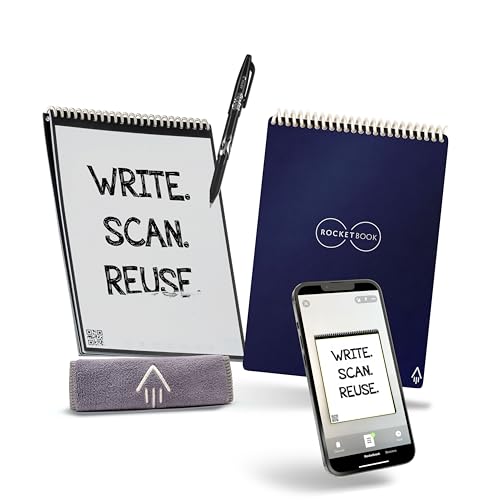
Rocketbook Flip Smart Notepad Kit with Pen, Cloth and App

Our verdict: Everything in one box: navy notepad, pen and cloth.

The Flip kit is the easiest on-ramp. The 6 by 8.8 inch pad uses a flip format, with dotted and lined combo pages, and the box includes a pen and a cloth, the two items that make the wipe-and-reuse routine work. You can be writing within minutes of opening it.

It ranks fourth because the smaller page suits meetings more than long lectures, and the Core costs about the same for more room. The kit spares you from guessing which erasable pen to buy, which is where first-time buyers go wrong.

Buy it as a cheap trial of the idea. The caveat is capacity: the pad is small, there is no on-device storage, and you must scan after writing.

Size
6 x 8.8 in
In the box
Pen, cloth, app
Pages
Dotted and lined
Reuse
Wipe clean

What we like

  • +Pen and cloth included
  • +Dotted and lined pages
  • +Quick to start
  • +Reusable

Watch out for

  • −Smaller page
  • −Scan after writing
  • −No on-device storage

Buy it if: First-time buyers who want a complete kit.

Skip it if: You want a full-size page.

5

Best Compact Smart Pen Set

Ophayapen Smart Pen and Smart Digital Notebook

Our verdict: A compact smart pen and notebook with real-time mobile sync.

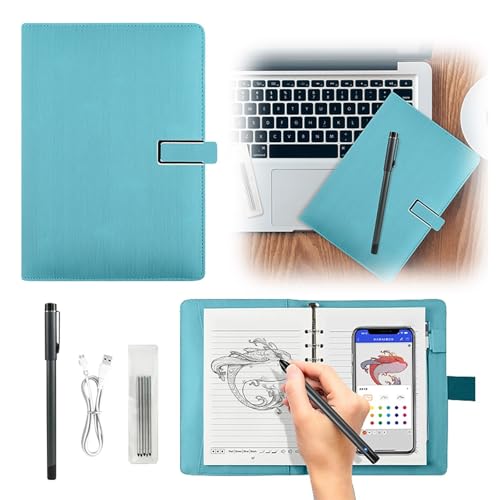
The Ophayapen is a pen and notebook pair that syncs to a mobile app live, so there is no scan step and you still write on paper. It sits in the $50 to $100 bucket and, as a compact set, travels well.

It ranks fifth, below the SyncPen, because the listing offers fewer extras such as OCR or audio, and the brand is smaller. A less established ecosystem raises the risk that app updates lag, so it is worth checking current buyer feedback.

Buy it if you want live mobile sync without paying for the extras. The pen needs periodic charging, and the set is bulkier than a paper-only pad. Skip it if long-term support matters, since the SyncPen and Rocketbook ecosystems have a longer record behind them.

Capture
Real-time mobile sync
Format
Compact set
Surface
Real paper
Price tier
Mid-range

What we like

  • +Live mobile sync
  • +Writes on real paper
  • +Compact set
  • +Comfortably under budget

Watch out for

  • −Pen needs charging
  • −Smaller brand
  • −Bulkier than a pad

Buy it if: People who want live sync and accept a smaller brand.

Skip it if: You want long-established support.

6

Best Eco-Minded Set

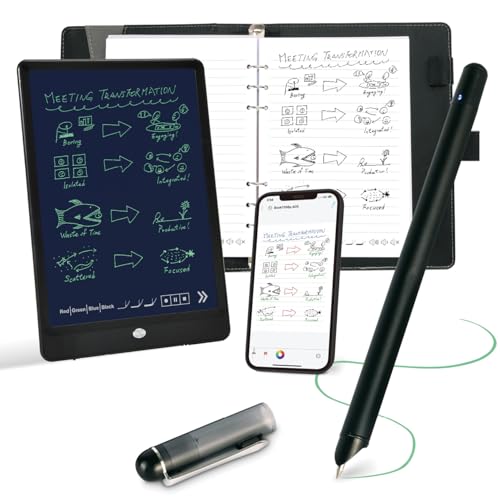
Smart Sync Reusable Notebook, Functional Digital Notepad

Our verdict: A real-time digital writing pad set with pen and pad included.

Smart Sync is billed as an eco-friendly reusable notebook set that includes a pen and a pad, capturing writing in real time on a physical surface. It targets buyers who like the idea of a reusable page and live capture together.

It ranks below the Ophayapen because less is documented about it. The brand is smaller, OCR and text conversion accuracy should be confirmed before you rely on it, and the pen needs charging.

Buy it if the reusable pitch appeals and you are willing to test it within the return window. Skip it if you need a proven track record or searchable handwriting. For the same price bracket, the SyncPen gives you audio recording and a clearer picture of what works.

Type
Digital writing pad set
Included
Pen and pad
Capture
Real time
Design
Reusable

What we like

  • +Pen and pad included
  • +Live writing capture
  • +Reusable design
  • +Writes on a real surface

Watch out for

  • −Smaller brand
  • −Pen needs charging
  • −Check OCR accuracy

Buy it if: Reusable-minded buyers who want live capture.

Skip it if: You need a proven track record.

7

Best Pad Only

Rocketbook Flip Reusable Smart Notepad, Executive 6x8.8

Our verdict: The same wipe-and-scan idea in a light executive-size pad.

This is the Flip pad on its own: executive size, wipe-clean pages and app scanning in a light format. It offers more room than the Mini format and carries easily in a bag. At under $25 it is the cheapest digital notebook in the guide.

It ranks seventh because the kit adds the pen and cloth and the Core adds page size. Buy this version only if you already own a compatible erasable pen, otherwise the missing pen is a hidden cost.

It suits light note taking, to-do lists and meeting jottings. The caveats are no pen in the box, no storage on the pad, and a scan after every session. Against the letter-size Flip, it is smaller, but it fits a jacket pocket or a slim bag more easily.

Size
6 x 8.8 in
Format
Flip pad
Reuse
Wipe clean
Sync
App scan

What we like

  • +More room than the Mini
  • +Wipes clean
  • +Light to carry
  • +App-connected

Watch out for

  • −Pen not included
  • −Scan after writing
  • −No storage

Buy it if: Light note takers who own an erasable pen.

Skip it if: You need the pen in the box.

8

Best Mixed Rules

Rocketbook Flip Smart Notepad, Letter, 16 Sheets

Our verdict: A letter-size flip pad with lined and dot grid pages.

The letter Flip has 16 sheets that mix lined and dot grid rules in an 8.5 by 11 inch pad, with the standard Rocketbook wipe-and-scan routine. Having both rule styles lets one pad serve text notes and sketches.

It ranks last because 16 sheets is a small allotment next to the spiral Core, and it needs a compatible erasable pen. The Core gives the same page size in a bound book with more pages for similar money.

Buy it if you want letter size but prefer a flip format that sits flat on a clipboard or lap. The caveat: it has no spiral binding, so single sheets can curl, and a scan is still required after each session.

Size
Letter
Sheets
16
Rules
Lined and dot grid
Reuse
Wipe clean

What we like

  • +Letter size
  • +Two rule styles
  • +Reusable
  • +App-connected

Watch out for

  • −Only 16 sheets
  • −Needs erasable pen
  • −Scan after writing

Buy it if: Letter-size flip users who want mixed rules.

Skip it if: You want a bound book.

Methodology

How We Ranked These

Page size

Letter, executive and compact pages were compared against the note styles each suits.

When notes go digital

Scan-after-writing and live-sync workflows were separated, since this is the main practical difference.

Consumables

We counted what you must keep supplying: erasable pens, cloths, and charging.

App maturity

Established apps and brands were favoured over newer ones with less documented behaviour.

Price bracket

Each pick was judged within the sub-$300 range against the others here.

Every Primea Score uses the same weights: Performance 30% · Build & Materials 20% · Everyday Usability 20% · Value 20% · Owner Satisfaction 10%. Full scoring rules

Buyer's guide

How to Pick the Right One for You

By Note-Taking Habit

Match the tool to how you write.

HabitOur pick
Big pages, cheap, scan laterRocketbook Core Reusable Spiral Notebook, Letter Size
Live capture in lecturesSyncPen Digital Notebook Smart Pen Set
Weekly planning and notesRocketbook Fusion Hybrid Reusable Planner Notebook, Executive
First try, no setupRocketbook Flip Smart Notepad Kit with Pen, Cloth and App
Live sync, smaller brand fineOphayapen Smart Pen and Smart Digital Notebook

By Budget

SpendOur pick
Under $25Rocketbook Flip Smart Notepad, Letter, 16 Sheets
$25 to $40Rocketbook Core Reusable Spiral Notebook, Letter Size
$40 to $80Rocketbook Fusion Hybrid Reusable Planner Notebook, Executive
$80 to $150SyncPen Digital Notebook Smart Pen Set

Scan Later vs Live Sync

Scan later

Write, then photograph the page. No battery, low cost. Picks: Rocketbook Core, Fusion, and the Flip models.

Live sync

A Bluetooth pen sends strokes as you write. Costs more and needs charging. Picks: SyncPen, Ophayapen and Smart Sync.

Choose live sync only if waiting to scan would cost you notes.

By Page Size

SizeOur pick
Letter, boundRocketbook Core Reusable Spiral Notebook, Letter Size
Letter, flipRocketbook Flip Smart Notepad, Letter, 16 Sheets
ExecutiveRocketbook Flip Reusable Smart Notepad, Executive 6x8.8
Pen set, compactSmart Sync Reusable Notebook, Functional Digital Notepad

For Students Specifically

Look for

A full-size page, an app that saves to your shared drive, and low enough cost that losing it is not a crisis.

In this comparison

The Rocketbook Core Reusable Spiral Notebook, Letter Size: big pages and reusable for a whole term.

When to Spend More

Spend more if

Live capture and OCR save you real time. The SyncPen Digital Notebook Smart Pen Set is the most capable pick here.

Save if

You scan a few pages a week. The Rocketbook Core covers that for very little.

Questions

Frequently Asked Questions

What is the best digital notebook under $300?+

For most people the Rocketbook Core, thanks to its full letter-size pages and mature app. If you want live sync instead of scanning, the SyncPen is the better fit, though it costs more and needs charging.

Do Rocketbook notebooks need a special pen?+

Yes. A compatible erasable pen is required for pages to wipe clean. The Flip kit includes one, while the Core, Fusion and pad-only versions expect you to bring your own, so factor that cost in.

Do smart pens work on any paper?+

These sets come with their own notebook, so use that. Check each listing for paper requirements, because a smart pen usually relies on a printed pattern or sensor that ordinary paper lacks, so substitution tends to fail.

Can I search my handwriting?+

The SyncPen offers OCR, but accuracy depends on your writing. Test it early within the return window and write clearly, because poor recognition turns searchable notes into retyping. Neat, consistent letters improve results.

Is a Flip pad better than the Core?+

Only for portability. The Core has bigger pages and a spiral binding, while the Flip is a lighter pad that fits a bag. If you write a lot, the Core is better, and the spiral lies flat on a desk.

Do I need to charge anything?+

Smart pens such as the SyncPen and Ophayapen need periodic charging. Rocketbook notebooks need no power, which suits users who forget to charge devices, and removes a point of failure in a lecture.

Final take

Buy the Rocketbook Core for a large, cheap, reusable page, and the SyncPen if scanning after every meeting is a chore you will skip. Take the Flip kit to try the idea cheaply, and the Fusion if your week is a calendar. Treat the smaller smart pen brands as bargains that deserve a hard look at current feedback.

More Ranked & Reviewed Guides