
Primea ReviewsAll Reviews

Primea Reviews is reader-supported. When you buy through our Amazon links we may earn a commission, at no extra cost to you. Rankings are set by our editors and never sold. Learn more

Ranked & Reviewed by Primea Reviews

The 7 Best Smart Digital Notebooks of 2026, Ranked & Reviewed

By the Primea Editorial TeamUpdated November 3, 202611 min read7 products ranked
The 7 Best Smart Digital Notebooks of 2026, Ranked & Reviewed

The short answer

The reMarkable Paper Pro with Marker Plus is the smart notebook to buy if you want a color e-ink device that syncs files on its own. The reMarkable 2 is the better value for plain black and white note taking, the SyncPen is the cheapest way to get real-time paper to app capture, and the Rocketbook Core is the easiest entry for people who only want scans in the cloud.

The Primea Scoreboard

Ranked & Reviewed

  1. A color e-paper slate with a pen in the box and files that sync without any fuss.

    96Outstanding
    Check price
  2. The proven monochrome e-ink slate with weeks of battery and the pen included.

    94Outstanding
    Check price
  3. Real paper, a Bluetooth pen and live app sync for well under the cost of e-ink.

    91Excellent
    Check price
  4. A pen, folio and notebook bundled with real-time sync to cloud storage.

    88Excellent
    Check price
  5. A wipe-clean letter-size notebook that scans pages straight to your cloud accounts.

    86Excellent
    Check price
  6. A top-flip notepad with lined and dot grid pages that scans to the app.

    83Very Good
    Check price
  7. A smart pen set that lists Android and iOS support, at a premium price.

    79Very Good
    Check price

The phrase smart notebook covers three very different machines, and mixing them up is the most expensive mistake in this category. One kind is an e-ink slate that replaces paper entirely. Another is a smart pen that watches you write on special paper and streams the strokes to a phone. The third is an ordinary-feeling notebook with pages you wipe clean after scanning. They solve different problems, and none of them is a drop-in replacement for the others.

This ranking sorts seven options by how well each one delivers on the promise of notes that end up searchable and backed up without effort. We reviewed spec sheets and listings for display type, pen hardware, sync method, battery claims and what ships in the box, then ranked them against each other. Where a listing is vague, we say so rather than fill the gap with guesses.

Before you buy

What Actually Matters

01

Capture method

A smart notebook either replaces paper, watches you write on paper, or scans paper after the fact. E-ink slates like the reMarkable models are the first kind, smart pens like the SyncPen are the second, and Rocketbooks are the third. Decide which workflow you will actually follow, because a scan step you forget is a notebook that never reaches the cloud.

02

Sync reliability

Automatic sync means files appear in your account without a manual export, which is what the reMarkable devices list. Real-time sync means strokes stream to an app as you write, which requires a live Bluetooth link. On a listing, look for the words automatic or real-time and check whether a phone must be nearby.

03

Battery and charging

E-ink devices draw power only when the page changes, so the reMarkable 2 listing promises weeks of use per charge. A smart pen needs its own battery and has to be topped up regularly. A Rocketbook needs nothing at all. Match the charging burden to how forgetful you are.

04

Pen and paper compatibility

Smart pens usually read a printed pattern on special paper, so you cannot swap in any notebook you like. Rocketbook pages respond best to a specific pen type and a damp wipe. E-ink slates include their own pen, such as the Marker Plus. Check what ships in the box, because an add-on pen can be a surprise cost.

05

Handwriting to text

OCR converts handwriting into searchable text, and the SyncPen listing mentions it. Accuracy depends on your handwriting and the app, and listings rarely quantify it. If search matters more than the original ink, favor a product that names OCR and supports your language.

In-depth reviews

Our Ranked Picks, Reviewed

1

Best Overall

reMarkable Paper Pro with Marker Plus

Our verdict: A color e-paper slate with a pen in the box and files that sync without any fuss.

The Paper Pro is a dedicated e-ink notebook, which means it is a single-purpose device with no notifications and no app store to pull you away from the page. It uses a color e-paper display and ships with the Marker Plus, so the pen is part of the purchase instead of an add-on. Files sync automatically to the companion service, which is the feature that earns the word smart.

It ranks first because it is the only pick here that offers color on a paper-like screen, and color matters more than it sounds once you annotate PDFs or color-code meeting notes. It sits above the reMarkable 2 because the display is the upgrade you notice every day, while the sync behavior is shared by both. The tradeoff is cost. This is the priciest entry in the guide, and e-ink color panels still refresh more slowly than the black and white ones.

Buy it if you write or annotate for hours each day and want one device to hold everything. Skip it if you mostly doodle shopping lists, because a Rocketbook costs a fraction and does that job well enough.

Type
E-ink digital notebook
Display
Color e-paper
Pen
Marker Plus included
Sync
Automatic file sync

What we like

  • +Color e-paper makes annotations easier to scan
  • +Marker Plus is included in the box
  • +Files sync automatically with no manual export steps
  • +No notifications or apps to break your focus

Watch out for

  • −Most expensive notebook in this whole ranking
  • −Color e-ink redraws noticeably slower than the monochrome panels
  • −Single-purpose device cannot replace a full general tablet

Buy it if: Daily note takers and PDF annotators who want one distraction-free device.

Skip it if: Your note taking is occasional and a $25 notebook would cover it.

2

Best Value E-Ink

reMarkable 2 with Marker Plus

Our verdict: The proven monochrome e-ink slate with weeks of battery and the pen included.

The reMarkable 2 is the older sibling and still the sensible default for most people who want a real digital notebook. It is an e-ink device that ships with the Marker Plus, syncs files automatically, and the listing promises weeks of battery life between charges. That long battery figure is typical of e-ink, because the screen only draws power when the image changes.

It lands second because it gives you nearly the same writing workflow as the Paper Pro for noticeably less money. What you lose is color, so highlights and diagrams are all shades of gray. For a reader who works in black ink anyway, that is a small loss. It beats the SyncPen because the notes live on the device itself instead of depending on a phone being nearby.

It suits students, consultants and managers who live in meeting notes and PDFs. The caveat is that it is still a premium purchase in the $200 to $500 range, and the pen tips wear down with heavy use, so budget for replacements.

Type
E-ink digital notebook
Pen
Marker Plus included
Battery
Weeks per charge
Price bucket
$200 to $500

What we like

  • +Weeks of battery life between each wall charge
  • +Marker Plus pen ships in the box
  • +Sync happens automatically in the background without any prompting
  • +Black and white screen redraws quickly while you write

Watch out for

  • −Monochrome screen cannot show any highlight colors at all
  • −Still a premium purchase for casual users
  • −Pen tips wear down with heavy writing

Buy it if: Students and professionals who want e-ink notes without paying for color.

Skip it if: You need color highlighting for charts or annotated documents.

3

Best Budget Smart Pen

SyncPen Digital Notebook Smart Pen Set, Real Time Sync from Paper to App

Our verdict: Real paper, a Bluetooth pen and live app sync for well under the cost of e-ink.

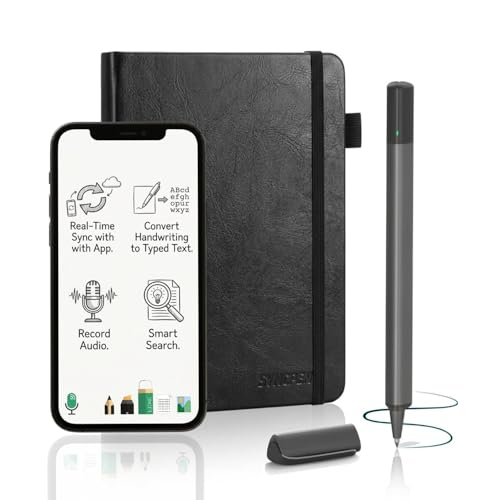
The SyncPen is a smart pen and paper digitizer set. You write on actual paper, the pen tracks your strokes, and the companion app receives them live over Bluetooth. The listing also mentions OCR and audio recording, which means handwriting can be converted to text and a meeting recording can be tied to what you were writing at that moment.

It ranks third because it delivers the closest thing to smart behavior in the $50 to $100 range. It sits behind the two reMarkable devices because it depends on a phone and the app, and the paper is the part you cannot swap casually. It sits ahead of the Noteorius because the price bucket is half as steep for the same stated feature set.

Buy it if you love the feel of real ink and want your meetings searchable. The caveat is that a smart pen needs charging and a working Bluetooth link, and OCR accuracy on rushed handwriting is only as good as the app, which the listing does not quantify.

Type
Smart pen and paper set
Sync
Real-time, paper to app
Extras
OCR and audio recording
Connection
Bluetooth

What we like

  • +Writes on real paper with live app sync
  • +OCR turns your handwriting into fully searchable typed text
  • +Audio recording pairs voice with your notes
  • +Costs far less than any e-ink device

Watch out for

  • −Needs a charged pen and Bluetooth link
  • −Handwriting recognition quality depends on the app
  • −Special paper limits which notebooks you can use

Buy it if: Meeting heavy workers who want paper feel plus searchable notes cheaply.

Skip it if: You dislike carrying a charged pen and a phone together.

4

Best Complete Pen Kit

Noteorius Smart Notebook with Pen and Folio, Reusable Digital Writing Pad

Our verdict: A pen, folio and notebook bundled with real-time sync to cloud storage.

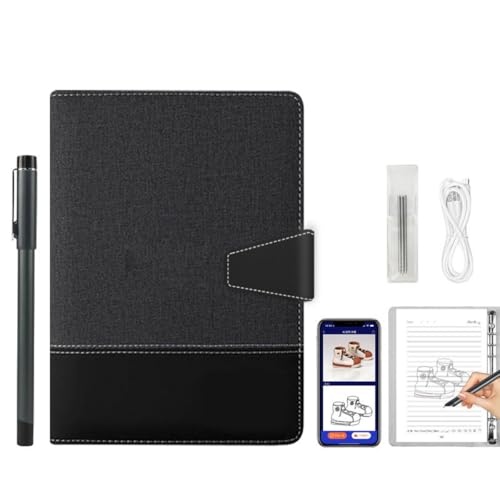
The Noteorius bundle gives you the pen, the folio and the notebook in one box, and it uses the same smart pen and paper approach as the SyncPen. Strokes sync in real time as you write, and the app can push notes to cloud storage. A folio matters more than you might think, because it keeps the pad aligned and protected in a bag.

It ranks fourth because the feature list matches the SyncPen but the listing places it in the $100 to $200 bucket, which is a hard premium to justify. What it does offer is the tidiest package, so someone who wants everything in one purchase will find it convenient. It ranks above the Rocketbooks because real-time capture is a genuinely different experience from scanning a page afterward.

It works for people who like a portfolio-style carry case and want to start writing the same day. The caveat is that the listing gives no detail on handwriting conversion, so check that before you commit.

Type
Smart pen and paper set
Sync
Real-time as you write
In the box
Pen and folio included
Cloud
App sync with cloud storage

What we like

  • +Pen, folio and notebook arrive as one set
  • +Strokes appear in the app as you write
  • +Cloud storage sync keeps notes backed up
  • +Folio protects the pad inside a bag

Watch out for

  • −Priced above the SyncPen for similar features
  • −Listing gives no detail on handwriting conversion
  • −Pen needs charging like any smart pen

Buy it if: Buyers who want an all-in-one kit with a protective folio.

Skip it if: The SyncPen offers the same capture for half the money.

5

Best Reusable Notebook

Rocketbook Core Reusable Spiral Notebook, Letter Size 8.5x11, Black, Dotted Pages, App-Connected, Erasable, Durable Cover

Our verdict: A wipe-clean letter-size notebook that scans pages straight to your cloud accounts.

The Rocketbook Core is the simplest smart notebook idea: a letter-size spiral book with dotted pages that you scan with a phone app and then wipe clean for reuse. Pages are 8.5 by 11 inches, the cover is durable, and the app sends scans to cloud services. There is no battery and no pen to charge, which removes the biggest failure point in this category.

It ranks fifth because the experience is capture only. You do not get real-time sync, handwriting stays an image, and the wipe step takes a damp cloth and a little patience. It beats the Flip because the spiral bound book holds many more pages and suits a full week of meetings, where the notepad format runs out quickly.

Buy it if you want to cut paper waste and need a cheap bridge between ink and the cloud. The caveat is that you must use the correct pen type, and a rushed wipe can leave faint ghosting on the dotted grid.

Type
Reusable paper notebook
Size
Letter, 8.5 x 11 in
Pages
Dotted, wipe clean
Scanning
App to cloud services

What we like

  • +No battery or charging to worry about
  • +Scans send straight to your chosen cloud storage accounts
  • +Letter size gives plenty of writing room
  • +Wipe clean pages cut down on waste

Watch out for

  • −Capture is a scan, not live sync
  • −Handwriting remains an image in most cases
  • −Wiping pages takes time and a damp cloth

Buy it if: Students and light users who want cheap cloud-backed paper notes.

Skip it if: You want notes to sync live while you write.

6

Best Portable Notepad

Rocketbook Flip Smart Notepad, Teal Cover, Lined/Dot Grid Rule, 8.5x11, 16 Sheets

Our verdict: A top-flip notepad with lined and dot grid pages that scans to the app.

The Flip is a top-bound notepad with 16 sheets in letter size, mixing lined and dot grid rulings. It uses the same app-connected scanning and wipe-clean reuse as the Core, but the format is built for quick jots and standing meetings, where you flip a page over the top rather than turn it sideways.

It ranks sixth because 16 sheets is a small page count, so a heavy note taker will be wiping pages constantly. It stays ahead of the last pick because you at least know what the product is: a cheap, honest way to digitize paper. The mix of lined and dot grid rulings is useful for anyone who switches between text and sketches.

It suits people who carry a notepad for brief to-do lists and short calls. The caveat is the same as the Core: scanning is a step you must remember, and the app is only as good as your habit of using it.

Type
Reusable paper notepad
Size
Letter, 8.5 x 11 in
Sheets
16 sheets
Rulings
Lined and dot grid

What we like

  • +Top flip format suits quick standing meetings and calls
  • +Lined and dot grid pages both included
  • +Cheap way to try app-connected notes before upgrading
  • +Wipe clean reuse keeps paper waste low

Watch out for

  • −Only 16 sheets before you must wipe
  • −Scanning is a manual step every time
  • −No real-time sync of any kind while you write

Buy it if: Short meetings, to-do lists and quick sketches on the go.

Skip it if: You fill several pages a day and hate wiping.

7

Best for Mixed Android and iOS

Digital Notebook Tablet with Smart Pen, Real-Time Sync Electronic Writing

Our verdict: A smart pen set that lists Android and iOS support, at a premium price.

This unbranded-sounding set pairs a smart pen with a paper digitizer and promises real-time electronic writing sync. Its one distinct selling point is that the listing explicitly confirms compatibility with both Android and iOS, which is useful for teams where colleagues carry different phones.

It ranks last because it lands in the $500 and up bucket while offering the same smart pen concept the SyncPen delivers for a fraction of that cost. Without a clear brand story, detailed spec list or stated extras like OCR, the premium is hard to defend. We are not saying it will perform badly. We are saying the listing does not tell you what the extra money buys.

It is only worth a look if cross-platform confirmation is a hard requirement. Otherwise, the SyncPen is the cleaner purchase.

Type
Smart pen and paper set
Sync
Real-time electronic writing
Platforms
Android and iOS
Price bucket
$500 and up

What we like

  • +Listing explicitly confirms support for Android and iOS
  • +Real-time sync shows strokes in the app as written
  • +Suits teams that carry mixed phone brands together
  • +Smart pen workflow that still uses real paper pages

Watch out for

  • −Highest price bucket for a basic pen set
  • −Listing gives few specs to justify cost
  • −No OCR or audio features are stated

Buy it if: Mixed-device teams that need written confirmation of platform support.

Skip it if: You can use the SyncPen for much less.

Methodology

How We Ranked These

Capture method

We compared e-ink slates, smart pens on special paper and scan-and-wipe notebooks, because the capture method decides whether notes arrive live, on demand or only when you remember.

Sync and storage

Automatic file sync, Bluetooth app streaming and cloud scanning were weighed by how much manual effort each one asks of you after the meeting ends.

Hardware and battery

Listed display type, pen inclusion and battery claims were reviewed, with extra credit for devices that avoid charging a pen every day.

Writing feel and page size

Letter-size pages, ruling options and the difference between paper and e-paper were judged for how natural long writing sessions are.

Value in its price bucket

Each product was set against the $25 to $50, $50 to $100, $100 to $200, $200 to $500 and $500 plus buckets, rewarding features that justify the spend.

Every Primea Score uses the same weights: Performance 30% · Build & Materials 20% · Everyday Usability 20% · Value 20% · Owner Satisfaction 10%. Full scoring rules

Buyer's guide

How to Pick the Right One for You

By Capture Method

Start with how you want notes to leave the page, because this one choice narrows the field fast.

Capture styleOur pick
Full e-ink replacement with colorreMarkable Paper Pro with Marker Plus
E-ink in black and whitereMarkable 2 with Marker Plus
Smart pen on real paperSyncPen Digital Notebook Smart Pen Set, Real Time Sync from Paper to App
Scan and wipe notebookRocketbook Core Reusable Spiral Notebook, Letter Size 8.5x11, Black, Dotted Pages, App-Connected, Erasable, Durable Cover

By Budget

SpendOur pick
$25 to $50Rocketbook Core Reusable Spiral Notebook, Letter Size 8.5x11, Black, Dotted Pages, App-Connected, Erasable, Durable Cover
$50 to $100SyncPen Digital Notebook Smart Pen Set, Real Time Sync from Paper to App
$100 to $200Noteorius Smart Notebook with Pen and Folio, Reusable Digital Writing Pad
$200 to $500reMarkable 2 with Marker Plus
$500 and upreMarkable Paper Pro with Marker Plus

E-Ink Slate vs Smart Pen

E-ink slate

The notes live on the device, there is nothing to pair, and the battery lasts weeks. You pay more and accept a screen instead of paper. Picks: reMarkable Paper Pro and reMarkable 2.

Smart pen on paper

You keep the feel of real ink and pay far less, but you need a charged pen and a phone nearby. Picks: SyncPen and Noteorius.

Default to the e-ink slate if you write daily, and the smart pen if you write in meetings a few times a week.

By Platform

Phone situationOur pick
Android and iOS across one teamDigital Notebook Tablet with Smart Pen, Real-Time Sync Electronic Writing
Any phone, scan to cloudRocketbook Flip Smart Notepad, Teal Cover, Lined/Dot Grid Rule, 8.5x11, 16 Sheets
Notes kept on the device itselfreMarkable 2 with Marker Plus
Pen streams to a phone appSyncPen Digital Notebook Smart Pen Set, Real Time Sync from Paper to App

For Meeting Notes Specifically

Look for

Fast capture without ceremony, audio that ties to your writing, and a notebook that survives a bag. Searchable text is a bonus when you need to find a decision weeks later.

In this ranking

The SyncPen for its OCR and audio recording, the reMarkable 2 for a distraction-free slate, and the Rocketbook Flip for short standing meetings.

When to Spend More

Spend more if

You write or annotate for hours every day and want color, a long battery and automatic sync. The reMarkable Paper Pro and reMarkable 2 are built for that.

Save if

You only need occasional digital copies. The Rocketbook Core handles that for a small outlay, and the SyncPen adds live sync without e-ink pricing.

Questions

Frequently Asked Questions

Do smart notebooks work with both iPhone and Android?+

The Digital Notebook Tablet with Smart Pen is the only listing that states Android and iOS support outright. The others work through a companion app, so check the app store for your phone before ordering.

What is the most common mistake when buying a smart notebook?+

Buying a scan-and-wipe notebook and expecting real-time sync. A Rocketbook only digitizes a page when you photograph it with the app. If you want live capture, you need a smart pen set or an e-ink slate.

Is the reMarkable Paper Pro worth it over the reMarkable 2?+

It is worth it if you annotate PDFs or color-code notes, because the Paper Pro has a color e-paper display. For black ink only, the reMarkable 2 delivers the same writing workflow for less money.

How hard is setup?+

Smart pens need charging, a Bluetooth pairing and an app account, which takes a few minutes. E-ink slates ask you to sign in and connect to Wi-Fi. A Rocketbook only needs the app and a compatible pen.

How do I clean a reusable notebook page?+

Wipe it with a slightly damp cloth, and let it dry fully before writing again. Rubbing too hard or leaving ink on for a long time can leave faint ghosting, especially on the dotted grid.

Can I search my handwriting?+

Only if the product supports OCR, and the SyncPen is the one that lists it here. Results vary with your handwriting, so test a few pages early on before you move your whole workflow over.

Final take

For anyone who writes every day, the reMarkable Paper Pro with Marker Plus is the best smart notebook here, with color e-paper and automatic sync. The reMarkable 2 gets you most of the way for less, and the SyncPen is the smartest low-cost route for people who prefer real paper. Choose the Rocketbook Core if all you need is a cheap, battery-free way to get pages into the cloud. Decide first whether you want live sync or after-the-fact scans, and the right product becomes obvious.

More Ranked & Reviewed Guides