
Primea ReviewsAll Reviews

Primea Reviews is reader-supported. When you buy through our Amazon links we may earn a commission, at no extra cost to you. Rankings are set by our editors and never sold. Learn more

Ranked & Reviewed by Primea Reviews

The 7 Best Digital Notebooks for Work in 2026, Ranked & Reviewed

By the Primea Editorial TeamUpdated November 3, 202611 min read7 products ranked
The 7 Best Digital Notebooks for Work in 2026, Ranked & Reviewed

The short answer

The reMarkable 2 with Marker Plus is the best digital notebook for daily professional note-taking because it does one job and keeps notifications out of the room. The reMarkable Paper Pro is the pick for anyone who marks up documents all day, the Kindle Scribe Colorsoft suits people who also read long reports, and the Noteorius set keeps live sync on real paper. The two Rocketbook options are the cheap way to digitize meeting notes.

The Primea Scoreboard

Ranked & Reviewed

  1. A focused e-ink notebook that stays out of your way and syncs files on its own.

    94Outstanding
    Check price
  2. 02
    reMarkable Paper Pro with Marker Plus

    The same focused idea with a color e-paper screen and a bigger surface for marking up files.

    92Outstanding
    Check price
  3. 03
    Amazon Kindle Scribe Colorsoft 64GB

    Best for Reading and Annotating

    Amazon Kindle Scribe Colorsoft 64GB

    An 11 inch color e-reader that also takes handwritten notes, best when reading is half the job.

    89Excellent
    Check price
  4. A smart pen and folio that pushes your handwriting to an app as you write on paper.

    86Excellent
    Check price
  5. Real-time paper-to-app sync with OCR and audio recording at a budget price.

    84Very Good
    Check price
  6. 06
    Rocketbook Flip Reusable Smart Notepad Kit

    Best Ready-to-Use Meeting Kit

    Rocketbook Flip Reusable Smart Notepad Kit

    A complete reusable notepad kit with pen, cloth and app for meeting notes on a tiny budget.

    81Very Good
    Check price
  7. A letter-size reusable spiral with app scanning to cloud services, the lowest-cost route here.

    79Very Good
    Check price

Most people buy a digital notebook for work and discover within a month that they bought the wrong kind. The category hides three very different tools behind one name: an e-ink tablet you write on, a smart pen that records ink on ordinary paper, and a reusable notebook you photograph after the meeting. Each solves a different problem, and swapping one for another is where the regret comes from.

This ranking sorts seven options by how well they fit working life: capture speed in a meeting, how files reach your laptop, how well they handle marking up a PDF, and how much attention the device asks for. We ranked them from spec sheets, listings and owner feedback, and we say plainly where a detail is not published instead of guessing.

Before you buy

What Actually Matters

01

Device type

Digital notebooks fall into three families: e-ink tablets, smart pens with paper, and reusable paper you scan. They differ in cost, effort and what they can do with a document. Decide which family fits your workflow before you compare models, because a cheap reusable notebook cannot mark up a PDF and a tablet is overkill for sketching a meeting. The listing usually states the type in the title or first bullets.

02

Sync method

Sync can be live, automatic after saving, or manual through a scan. Live sync matters when a colleague needs your notes right away. Manual scanning matters if you are disciplined about filing at the end of the day. Check which cloud services the app supports on the listing, and whether your company allows them, because that decides whether the tool is usable at work.

03

Markup capability

If you need to annotate contracts, proposals or drawings, you need a screen device. Smart pens and reusable notebooks only capture what you write on their own pages. Look for explicit PDF support and screen size, since a small page forces constant zooming on a letter-size document.

04

Battery and upkeep

E-ink devices run for weeks, smart pens need charging, and reusable paper needs nothing but the occasional wipe. A dead pen in the middle of a client call is a real failure, so be honest about whether you will remember to charge. Battery claims on the listing are the best signal, and weeks of life is what to look for on an e-ink device.

05

Handwriting recognition

Converting handwriting to searchable text depends on OCR quality and on how legible you write. It is useful for finding an old note, but it is rarely perfect. If search matters to you, favor products that list OCR explicitly and plan to proofread anything you copy into an email.

In-depth reviews

Our Ranked Picks, Reviewed

1

Best Overall

reMarkable 2 with Marker Plus

Our verdict: A focused e-ink notebook that stays out of your way and syncs files on its own.

The reMarkable 2 is a dedicated e-ink writing tablet with the Marker Plus included, so there is nothing else to buy before you start. It has a distraction-free interface, automatic file sync, and a battery rated in weeks rather than hours.

It wins because it does a single thing well. There are no email badges and no chat pings, which is exactly why heavy note-takers keep using it past the first month. It ranks above the Paper Pro because the cheaper bracket buys the same core writing experience, and above the Kindle Scribe because it is built around handwriting rather than reading. The tradeoff is a monochrome screen, so color-coded diagrams are off the table.

Buy it if you take notes every day and want them to land in a cloud folder without effort. Skip it if you mostly annotate colored charts or want a device that doubles as a general tablet.

Display
E-ink, monochrome
Pen
Marker Plus included
Battery
Weeks per charge
Price
$200 to $500

What we like

  • +Distraction-free interface keeps focus
  • +Marker Plus pen comes in the box
  • +Battery lasts for weeks
  • +Files sync automatically to your account

Watch out for

  • −Monochrome screen only
  • −Costs far more than paper options

Buy it if: Daily note-takers who want focus and automatic sync.

Skip it if: You need color or a general-purpose tablet.

2

Best for Document Markup

reMarkable Paper Pro with Marker Plus

Our verdict: The same focused idea with a color e-paper screen and a bigger surface for marking up files.

The Paper Pro keeps the reMarkable approach and adds a color e-paper display and a larger writing surface. The Marker Plus is included. For anyone who reviews contracts, decks or drawings, the extra room and color highlights change how comfortable a long review session feels.

It sits second only because of price. It lands in the $500 and up bracket, and the daily note-taking experience is not dramatically different from the reMarkable 2 if you mostly write meeting notes. Where it pulls ahead is annotation: highlighting in distinct colors makes a marked-up document readable at a glance, and a larger page means less zooming on a dense PDF.

Buy it if marking up documents is the core of your week and color helps you sort comments. Skip it if your notes are plain text and sketches, because the cheaper reMarkable 2 covers that job for far less.

Display
Color e-paper
Pen
Marker Plus included
Surface
Larger writing area
Price
$500 and up

What we like

  • +Color e-paper helps sort comments
  • +Larger surface suits dense PDFs
  • +Marker Plus pen is included
  • +Same focused interface as the 2

Watch out for

  • −Top price bracket in this list
  • −Little gain for plain note-taking

Buy it if: Reviewers who mark up contracts, decks and drawings.

Skip it if: You only write meeting notes in one color.

3

Best for Reading and Annotating

Amazon Kindle Scribe Colorsoft 64GB

Our verdict: An 11 inch color e-reader that also takes handwritten notes, best when reading is half the job.

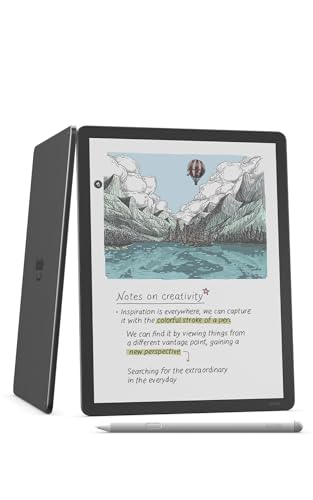
The Kindle Scribe Colorsoft pairs an 11 inch paper-like color display with a front light and an included pen. It is part e-reader, part notebook, with 64GB of storage for long documents and books.

It ranks third because it leans toward reading. If your week includes long reports, white papers and the occasional book, being able to read comfortably and scribble in the margin on one screen is a real convenience, and the front light helps in dim rooms. A pure note-taking device like the reMarkable feels more dedicated to handwriting, and the Kindle ecosystem is oriented around Amazon content rather than office workflows.

Buy it if you annotate long documents and also read for pleasure. Skip it if you want the cleanest handwriting-first experience or sync tuned for office folders.

Display
11 in color, front light
Storage
64GB
Pen
Included
Price
$500 and up

What we like

  • +Large 11 inch color screen
  • +Front light for dim rooms
  • +Pen included with the device
  • +Doubles as a proper e-reader

Watch out for

  • −Built around Amazon content
  • −Priciest bracket in this ranking

Buy it if: Readers who annotate long reports and books.

Skip it if: Handwriting-first note-taking is the whole point.

4

Best Live-Sync Paper

Noteorius Smart Notebook with Pen and Folio

Our verdict: A smart pen and folio that pushes your handwriting to an app as you write on paper.

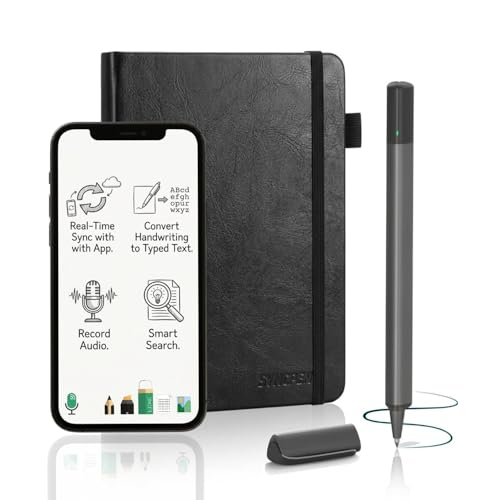
The Noteorius is a smart pen and paper digitizer set that syncs in real time as you write. The pen and folio are included, and notes can reach cloud storage through the companion app.

It earns fourth place by splitting the difference between paper and screens. You keep the feel of a pen on paper, which many people write better with, and your notes show up in an app without a scanning step. It ranks below the e-ink devices because it cannot mark up a PDF, and a pen-based digitizer depends on the app and a charged pen. The cost is in the $100 to $200 range, a sensible middle step.

Buy it if you like writing on paper but need notes available digitally during the meeting. Skip it if you want to annotate files or hate charging peripherals.

Type
Smart pen and folio
Sync
Real time as you write
Storage
App with cloud sync
Price
$100 to $200

What we like

  • +Writes on real paper
  • +Syncs live as you write
  • +Pen and folio both included
  • +Cloud storage through the app

Watch out for

  • −Cannot mark up documents
  • −Depends on a charged pen

Buy it if: Paper lovers who need notes in an app instantly.

Skip it if: You want to annotate PDFs on screen.

5

Best Budget Smart Pen

SyncPen Digital Notebook Smart Pen Set

Our verdict: Real-time paper-to-app sync with OCR and audio recording at a budget price.

The SyncPen is a smart pen set that syncs from paper to an app in real time, with OCR for turning handwriting into text and audio recording alongside the notes. Street cost is modest, in the $50 to $100 range.

Fifth place reflects how it undercuts the Noteorius while keeping the key idea. The audio recording is the standout for meetings, since replaying what was said at the moment you wrote a line is useful when your shorthand falls short. Handwriting recognition quality is something you should plan to check, because OCR accuracy depends heavily on how neatly you write. The cheaper price also means you should not expect premium build.

Buy it if you want synced notes with audio context and a tight budget. Skip it if your handwriting is fast and messy, since transcription will need cleanup.

Type
Smart pen and paper set
Sync
Real time to app
Extras
OCR and audio recording
Price
$50 to $100

What we like

  • +Real-time paper-to-app sync
  • +OCR converts handwriting to text
  • +Audio recording adds meeting context
  • +Low entry cost for smart pens

Watch out for

  • −OCR depends on neat handwriting
  • −Less polished than premium options

Buy it if: Budget buyers who want audio-linked meeting notes.

Skip it if: You write quickly and expect perfect transcription.

6

Best Ready-to-Use Meeting Kit

Rocketbook Flip Reusable Smart Notepad Kit

Our verdict: A complete reusable notepad kit with pen, cloth and app for meeting notes on a tiny budget.

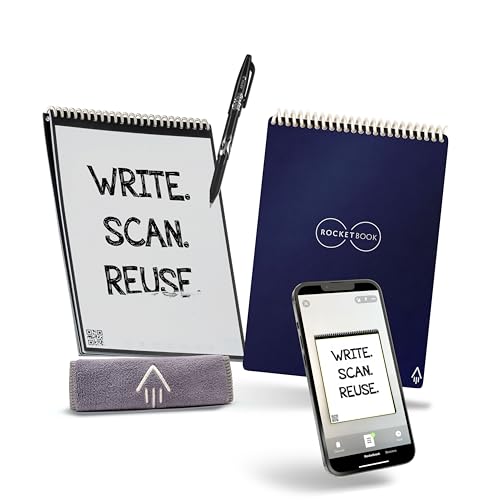
The Rocketbook Flip is a reusable paper notepad in a 6 by 8.8 inch size with dotted and lined combo pages. The pen, cloth and app all come in the box, and pages wipe clean for reuse.

It ranks sixth because it digitizes after the fact rather than live. You write, scan the page with the app, send it to a cloud service, then wipe it and start again. That adds a step, but it costs only $25 to $50 and nothing needs charging. Against the Rocketbook Core below it, the Flip is more portable and includes the full starter kit, which is why it takes the higher slot for work meetings.

Buy it if you want a no-battery way to get meeting notes into a folder. Skip it if you need live sync or want to annotate documents.

Size
6 x 8.8 in
Pages
Dotted and lined combo
Includes
Pen, cloth and app
Price
$25 to $50

What we like

  • +Complete kit works out of the box
  • +Pages wipe clean and reuse
  • +No battery or charging needed
  • +Dotted and lined pages included

Watch out for

  • −Scanning step after each page
  • −No live sync or document markup

Buy it if: Meeting-goers who want cheap, battery-free capture.

Skip it if: You need notes synced while you write.

7

Best Cheapest Digitizing

Rocketbook Core Reusable Spiral Notebook

Our verdict: A letter-size reusable spiral with app scanning to cloud services, the lowest-cost route here.

The Rocketbook Core is a letter-size, 8.5 by 11 inch spiral notebook with dotted pages and a durable cover. Pages are erasable, and the app scans them to cloud services.

It takes the last spot because it is the most manual option in the ranking. You scan every page yourself, and the notebook is larger and less pocketable than the Flip. What it offers is the biggest writing area for the money in the $25 to $50 bracket, which suits desk workers who write at length or sketch diagrams in meetings.

Buy it if you want the cheapest reusable notebook with full-page writing room. Skip it if you carry your notes around all day, or if you want any kind of automatic sync.

Size
Letter, 8.5 x 11 in
Pages
Dotted, erasable
Binding
Spiral with durable cover
Price
$25 to $50

What we like

  • +Full letter-size writing area
  • +Erasable pages can be reused
  • +App scans to cloud services
  • +Durable cover handles daily carry

Watch out for

  • −Every page scanned by hand
  • −Bulky compared with the Flip

Buy it if: Desk workers who sketch and write long notes.

Skip it if: You want live sync or a pocketable size.

Methodology

How We Ranked These

Capture workflow

How quickly you can start writing in a meeting and whether the tool needs charging, scanning or setup first.

Sync and file handling

Whether notes reach your cloud storage automatically, live, or only after a manual scan.

Document markup

Whether the device can open a PDF and let you annotate it, which separates tablets from pens and paper.

Focus and battery

How much the device distracts you and how long it runs before it needs power.

Value for the category

What the price buys against other options of the same type, since a pen and a tablet are not directly comparable.

Every Primea Score uses the same weights: Performance 30% · Build & Materials 20% · Everyday Usability 20% · Value 20% · Owner Satisfaction 10%. Full scoring rules

Buyer's guide

How to Pick the Right One for You

By Device Type

The type of device decides most of the experience, so start here.

TypeOur pick
E-ink tablet for handwritingreMarkable 2 with Marker Plus
E-ink tablet with colorreMarkable Paper Pro with Marker Plus
E-reader that takes notesAmazon Kindle Scribe Colorsoft 64GB
Smart pen on paperNoteorius Smart Notebook with Pen and Folio
Reusable scan-and-wipe paperRocketbook Flip Reusable Smart Notepad Kit

By Budget

SpendOur pick
$25 to $50Rocketbook Core Reusable Spiral Notebook
$50 to $100SyncPen Digital Notebook Smart Pen Set
$100 to $200Noteorius Smart Notebook with Pen and Folio
$200 to $500reMarkable 2 with Marker Plus
$500 and upreMarkable Paper Pro with Marker Plus

E-ink Tablet vs Smart Pen

E-ink tablet

You write on a screen that behaves like paper, and you can open and mark up documents. The reMarkable 2 and Paper Pro are the focused choices, while the Kindle Scribe Colorsoft adds reading.

Smart pen

You write on real paper and the pen records the strokes. The Noteorius and SyncPen cost far less, but they only capture your own writing and need a charged pen.

If you will open and annotate documents, buy the reMarkable 2. If you just want notes in an app, a smart pen is plenty.

By Sync Style

Sync styleOur pick
Automatic file sync from devicereMarkable 2 with Marker Plus
Live sync while writingNoteorius Smart Notebook with Pen and Folio
Live sync plus audio and OCRSyncPen Digital Notebook Smart Pen Set
Manual scan after the meetingRocketbook Core Reusable Spiral Notebook

For Meeting Notes Specifically

Look for

Fast start with nothing to boot or charge, a page size that fits a notepad-sized habit, and a clear route to your shared folder.

In this ranking

The Rocketbook Flip kit is the simplest grab-and-go option, the SyncPen adds audio, and the reMarkable 2 is the choice if you meet all day.

When to Spend More

Spend more if

You annotate documents daily or write for hours. The reMarkable Paper Pro rewards that use with a bigger color surface, and the reMarkable 2 gives most of the benefit for less.

Save if

You write a few pages a week. A Rocketbook kit gets notes into the cloud for a fraction of the cost, and you can upgrade later once you know your habits.

Questions

Frequently Asked Questions

Can a digital notebook replace a laptop for work?+

No, it replaces paper rather than your computer. E-ink devices handle handwriting and document reading well, but they are not meant for email, spreadsheets or video calls. Treat one as a focused companion to your laptop.

What is the common mistake when buying a digital notebook?+

People buy a reusable paper notebook expecting live sync, or a smart pen expecting PDF markup. Each type has a clear limit. Match the type to the job first, then pick a model.

Is the reMarkable worth it over a Rocketbook?+

If you write every day and annotate files, yes, because the screen, sync and battery remove friction. If you write occasionally, a Rocketbook delivers most of the digitizing benefit at a much lower cost. The gap is in effort, not in whether your notes end up in the cloud.

How does setup work for these notebooks?+

Screen devices need an account and a first sync, which takes minutes. Smart pens pair over Bluetooth with an app, and Rocketbook needs the app plus a cloud destination chosen once. None of them require special software on your computer.

How do I maintain a reusable notebook?+

Wipe pages with the supplied cloth and a little moisture, then let them dry before writing again. Keep an eye on ghosting from old ink, and replace the pen if it starts to skip. Store the notebook away from heat.

Does handwriting recognition work reliably?+

It works well on neat print and less well on fast cursive. Products that list OCR can search your notes, but you should proofread before sharing text. If your writing is messy, rely on the image of the page instead.

Final take

For most professionals the reMarkable 2 with Marker Plus is the right buy, because it makes note-taking a focused habit and syncs without fuss. Step up to the Paper Pro if color markup of documents is your main task, or choose the Kindle Scribe Colorsoft if reading long files matters as much as writing. If you prefer paper, the Noteorius gives live sync and the Rocketbook Flip kit is the cheapest way to start.

More Ranked & Reviewed Guides