

Primea ReviewsAll Reviews

Primea Reviews is reader-supported. When you buy through our Amazon links we may earn a commission, at no extra cost to you. Rankings are set by our editors and never sold. Learn more

Ranked & Reviewed by Primea Reviews

The 6 Best Large-Key Calculators for Low Vision and Tremor, Ranked & Reviewed

Joshua ParkesBy Joshua Parkes, Editor in ChiefUpdated November 11, 20268 min read6 products ranked
The 6 Best Large-Key Calculators for Low Vision and Tremor, Ranked & Reviewed

The short answer

The pendancy Giant Key is the best large-key calculator, with a 5 inch display and giant buttons. M&G's recessed keys are the best for tremor, CATIGA is the simplest to use, and HIHUHEN adds memory keys for budgets.

The Primea Scoreboard

Ranked & Reviewed

  1. A 5 inch, 12 digit display and giant response keys on a 30 degree tilted face.

    94Outstanding
    Check price
  2. Recessed, raised big buttons on a solar and AAA powered 12 digit unit.

    92Outstanding
    Check price
  3. Big sensitive buttons, a large 12 digit LCD and four basic functions.

    90Excellent
    Check price
  4. Big buttons with MC, MR, M+ and M- memory, a rounding switch and a 12 digit LCD.

    88Excellent
    Check price
  5. Computer-style keys, a large 12 digit LCD and solar-assisted AA power.

    86Excellent
    Check price
  6. Mechanical switch keys with an audible click on a 6.2 x 4.4 inch body.

    82Very Good
    Check price

A large-key calculator is only useful if the display is large too. Plenty of models advertise oversize buttons while keeping a small readout, which solves half the problem for someone with low vision and none of it for someone who cannot read the result. The reverse also happens: a big screen sitting above cramped, flush keys that a shaky finger cannot hit cleanly.

We ranked six desk calculators on display size, key design, memory functions and power. Every pick costs under $25, so the decision comes down to eyesight, hand steadiness and what you actually calculate: grocery sums, a checkbook or monthly budgets.

Before you buy

What Actually Matters

01

Display size

Display size is the spec that decides whether a low-vision user can read the answer at all. Digit count tells you little, because a 12 digit LCD can be tiny or huge. The pendancy's 5 inch panel dwarfs the standard readouts on the others. On a listing, look for the screen measured in inches, plus a tilt angle if one is stated.

02

Key design

Key design controls accuracy when tremor or arthritis makes aiming difficult. Recessed keys with a raised edge, like the M&G, guide a fingertip back to center, while sensitive keys, like the CATIGA's, register a light press from weak hands. Flush keys slide sideways. Check the listing text for the words recessed, raised, giant or oversize, since photos hide key depth.

03

Memory and rounding

Memory keys and a rounding switch turn a calculator from a sum checker into a bookkeeping tool. MC, MR, M+ and M- hold a running total while you work through a list, and rounding fixes the decimals. Among these picks only the HIHUHEN lists them. If you add receipts or balance a checkbook, confirm all four memory keys appear on the listing.

04

Power source

Power source decides whether the screen is readable in a dim kitchen or a bedroom corner. Solar-only units fade without light, so a battery backup matters. The M&G takes an AAA, the HIHUHEN a single AA, and the CATIGA ships with its battery included. Check the listing for the battery type and whether a cell comes in the box.

05

Tactile feedback

Tactile feedback tells you a press registered when you cannot see the display clearly. Mechanical switches, as on the Mr. Pen, give an audible click and firm travel, while soft membrane keys give less certainty. The tradeoff is noise in a quiet room. Look for the words mechanical, click or key travel in the listing, and decide whether the sound would bother you.

In-depth reviews

Our Ranked Picks, Reviewed

1

Best Overall

pendancy Giant Key 5-Inch Display Calculator

Our verdict: A 5 inch, 12 digit display and giant response keys on a 30 degree tilted face.

The pendancy calculator pairs a 5 inch, 12 digit LCD with giant response buttons in orange, blue and gray on an ABS plastic body, with the display tilted at 30 degrees. It costs under $25.

For low vision, the readout size is the whole game. A 5 inch display is several times larger than a standard desk calculator's, and the tilted face brings it toward your eyes instead of leaving it flat on the desk. The colored keys also help you find operators without reading every label.

Buy it for macular degeneration, tremor or simple reading comfort. It is big, so it needs desk space, and it will not slip into a drawer.

Display
5 inch, 12 digit LCD
Keys
Giant response buttons
Angle
30 degree display
Body
ABS plastic

What we like

  • +5 inch 12 digit display
  • +Giant response keys
  • +30 degree tilted display
  • +Color-coded key groups

Watch out for

  • −Large footprint
  • −Hard to store in a drawer

Buy it if: Low vision and tremor users who want the biggest readout.

Skip it if: You have little desk space.

2

Best Key Design

M&G Recessed Big Button Calculator

Our verdict: Recessed, raised big buttons on a solar and AAA powered 12 digit unit.

M&G's calculator pairs recessed big buttons with a raised key design, sturdy plastic keys, a 12 digit LCD and solar plus AAA battery power. It costs under $25.

Recessed keys are the right answer to tremor: a fingertip drops into the well and stays centered instead of skating onto the neighbor, and the raised edge gives a tactile landmark. It ranks second because its display, though large, is not the 5 inch panel on the pendancy, and readout size is the bigger problem for low vision.

Buy it if you want deliberate key travel in a normal desk footprint. The AAA backup keeps the screen alive in dim light, but expect to replace that cell eventually.

Keys
Recessed big buttons, raised
Display
12 digit LCD
Power
Solar plus AAA battery
Key material
Sturdy plastic

What we like

  • +Recessed big buttons
  • +Raised key design
  • +Solar plus AAA power
  • +Sturdy plastic keys

Watch out for

  • −Smaller display than the giant model
  • −AAA battery eventually needed

Buy it if: Users with tremor who want deliberate key presses.

Skip it if: You need the largest display.

3

Best Simple Pick

CATIGA 12 Digit Big Button Calculator

Our verdict: Big sensitive buttons, a large 12 digit LCD and four basic functions.

CATIGA's calculator has big sensitive buttons, a large 12 digit LCD, four basic functions and solar plus battery power, with the battery included. It costs under $25.

Four functions keep the layout clean: no scientific or tax keys to mis-hit. Sensitive buttons answer a light touch, which suits weak fingers, and that is the reason it outranks the HIHUHEN for pure ease of use. It sits third because the absence of memory keys limits it to one-off sums rather than running totals.

Buy it for shopping, bills and basic arithmetic. If you add columns of figures, choose the HIHUHEN, which carries MC, MR, M+ and M-.

Keys
Big sensitive buttons
Display
12 digit large LCD
Functions
4 basic
Power
Solar plus battery

What we like

  • +Big sensitive buttons
  • +Large 12 digit display
  • +Four-function simplicity
  • +Battery included

Watch out for

  • −No memory keys
  • −Basic functions only

Buy it if: Bills and everyday sums.

Skip it if: You need memory functions.

4

Best Memory Keys

HIHUHEN Big Button Electronic Calculator

Our verdict: Big buttons with MC, MR, M+ and M- memory, a rounding switch and a 12 digit LCD.

HIHUHEN's calculator has a big-button layout, a 12 digit Japanese LCD, MC, MR, M+ and M- memory keys, a rounding switch and solar plus one AA battery power. It costs under $25.

Memory keys let you build a running total across a list of receipts, and the rounding switch fixes decimals so a budget lands on whole cents. That makes it the best working calculator of the six, but it ranks fourth because the listing never calls the keys recessed or giant, which matters more for low vision than features.

Buy it for checkbook and budget work with larger-than-standard keys. Skip it if you only need simple sums, since the extra keys are more to learn.

Keys
Big button layout
Display
12 digit Japanese LCD
Memory
MC, MR, M+, M-
Power
Solar plus 1 AA

What we like

  • +Memory keys for running totals
  • +Rounding switch
  • +12 digit LCD
  • +Solar plus AA battery

Watch out for

  • −Key size not stated as giant
  • −More keys to learn

Buy it if: Budgets and checkbooks needing memory keys.

Skip it if: You only add a few numbers.

5

Best Computer-Style Keys

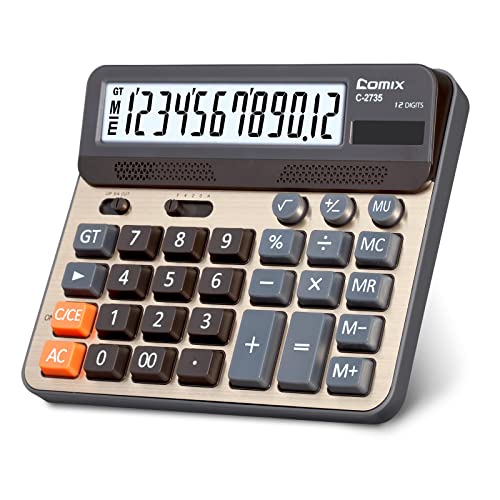
Comix 12 Digit Large Button Desk Calculator

Our verdict: Computer-style keys, a large 12 digit LCD and solar-assisted AA power.

The Comix desk model dresses in gold and reads out twelve digits on a big screen. Its keys copy the layout of a computer keyboard, a single AA cell comes in the box, and a small solar strip supports it. Price is under $25.

Computer-style keys have the feel of a keyboard, so typists find them natural. The listing does not say the keys are oversize, which is why it ranks below the big-button picks for low vision.

Buy it for a general desk with a bright display. For poor eyesight pick the pendancy.

Display
12 digit large LCD
Keys
Computer style
Power
AA battery plus solar
Finish
Gold

What we like

  • +Large 12 digit LCD
  • +Computer-style keys
  • +AA battery included
  • +Solar assist panel

Watch out for

  • −Keys not described as oversized
  • −Less accessible for low vision

Buy it if: Typists who want a familiar key feel.

Skip it if: You need very large keys.

6

Best Tactile Click

Mr. Pen Mechanical Switch Calculator

Our verdict: Mechanical switch keys with an audible click on a 6.2 x 4.4 inch body.

Mr. Pen's calculator uses mechanical switch keys with an audible click, a 12 digit large LCD and a 6.2 by 4.4 inch pink body. It costs under $25.

The click confirms every press, which helps people who cannot read the display well enough to trust a silent key. It ranks last because the compact body means standard-size keys, and a small footprint is the opposite of what low vision or tremor calls for.

Buy it if tactile confirmation matters more than key size, or you need something that fits a small desk. It will not match the pendancy for visibility, and the clicking is audible in a quiet room.

Keys
Mechanical switches
Feedback
Audible click
Display
12 digit large LCD
Size
6.2 x 4.4 inches

What we like

  • +Mechanical switch keys
  • +Audible click feedback
  • +12 digit LCD
  • +Compact 6.2 x 4.4 body

Watch out for

  • −Keys are standard size
  • −Click may be noisy

Buy it if: People who want tactile and audible confirmation.

Skip it if: You need giant keys.

Methodology

How We Ranked These

Display size

Readout size and digit count.

Key design

Size, recessing and feedback.

Functions

Basic, memory or rounding keys.

Power

Solar, battery or both.

Footprint

Desk space and weight.

Every Primea Score uses the same weights: Performance 30% · Build & Materials 20% · Everyday Usability 20% · Value 20% · Owner Satisfaction 10%. Full scoring rules

Buyer's guide

How to Pick the Right One for You

By Vision Need

Display size comes first.

Basic vs Memory Functions

Basic four-function

Simple layout with fewer keys. Picks: CATIGA, pendancy, M&G.

Memory and rounding

Running totals for budgets. Pick: HIHUHEN.

Choose basic unless you track budgets.

For Seniors Specifically

Look for

A large display, recessed or giant keys and easy battery replacement.

In this ranking

pendancy for vision, M&G for tremor, HIHUHEN for budgets.

When to Spend More

Spend more if

You use it daily and need the best visibility. All picks are under $25, so the pendancy is the one to choose.

Save if

You add a few numbers. The CATIGA is enough.

Questions

Frequently Asked Questions

Will the display be easy to read?+

The pendancy is the easiest to read: its 12 digit LCD measures 5 inches and tilts 30 degrees toward you. The M&G, CATIGA, HIHUHEN and Comix all use large 12 digit LCDs, but none are described at that size, so expect noticeably smaller figures from them.

What is the common mistake?+

Pairing big keys with a small screen, or the reverse. The Comix and CATIGA have large LCDs but keys the listings do not call oversize. The pendancy is the one pick that scales both, which is why it leads. Read the key description and the display size separately before ordering.

Is a large-key model worth it over a phone?+

For tremor or low vision, yes. A phone calculator needs precise touchscreen taps on a small target, while physical keys give feedback. The M&G's recessed keys steady a wandering finger, and the pendancy's giant buttons are easy to find. Both also work without charging or unlocking anything.

How do I set it up?+

Setup is a matter of checking power. The CATIGA lists its battery as included and the Comix ships with one AA, while the HIHUHEN and M&G rely on solar plus a backup cell. Place any solar model near a window or lamp for its first use, then confirm the display is crisp.

How do I maintain it?+

Wipe the keys with a dry cloth and avoid liquid cleaners, which can seep under the keycaps. Replace the AA or AAA backup in the HIHUHEN, M&G or Comix roughly every year or two, and keep the solar strip uncovered so it can carry the load in daylight.

Does it have memory functions?+

Only the HIHUHEN lists the full set: MC, MR, M+ and M-, plus a rounding switch. The CATIGA is explicitly four basic functions with no memory keys. If you want running totals for a checkbook, the HIHUHEN is the pick, though its keys are not billed as giant.

Final take

The pendancy Giant Key is the large-key calculator to buy if vision is the issue, and M&G's recessed keys suit tremor. CATIGA is the simple choice and HIHUHEN adds memory. All cost under $25, so choose on display size first.

About the author

Joshua Parkes, Editor in Chief at Primea Reviews

Joshua Parkes

Editor in Chief, Primea Reviews

Joshua owns the Primea Score framework and signs off on every ranking this site publishes. He and the editors work from spec sheets, manuals, warranty terms, certifications and long-term owner feedback, and a guide says so plainly when a listing leaves out the number that decides the purchase. Primea never claims to have physically tested a product it has not, and no brand can pay for placement.

More Ranked & Reviewed Guides