

Primea ReviewsAll Reviews

Primea Reviews is reader-supported. When you buy through our Amazon links we may earn a commission, at no extra cost to you. Rankings are set by our editors and never sold. Learn more

Ranked & Reviewed by Primea Reviews

The 6 Best Large Button Calculators for Seniors and Low Vision, Ranked & Reviewed

Joshua ParkesBy Joshua Parkes, Editor in ChiefUpdated November 11, 20268 min read6 products ranked
The 6 Best Large Button Calculators for Seniors and Low Vision, Ranked & Reviewed

The short answer

The Cirbic Talking Calculator is the one to buy first, because it announces every entry and result, so a mistyped digit gets caught by ear as well as by eye. The pxy has the 4 inch screen and a familiar 10-key layout, the yxzzhx stretches to 5 inches, and the Comix is the one that will not slide around the desk.

The Primea Scoreboard

Ranked & Reviewed

  1. 01
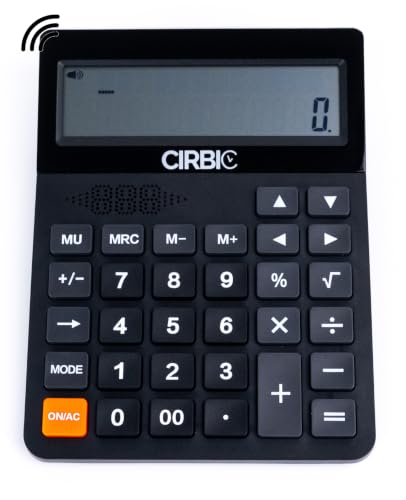
    Cirbic Talking Desktop Calculator

    Best Talking Calculator

    Cirbic Talking Desktop Calculator

    Speaks each entry and result, with adjustable volume, a dual-line LCD and oversized high contrast keys.

    94Outstanding
    Check price
  2. A 4 inch, 12-digit LCD with a computer-style 10-key layout and solar or battery power.

    92Outstanding
    Check price
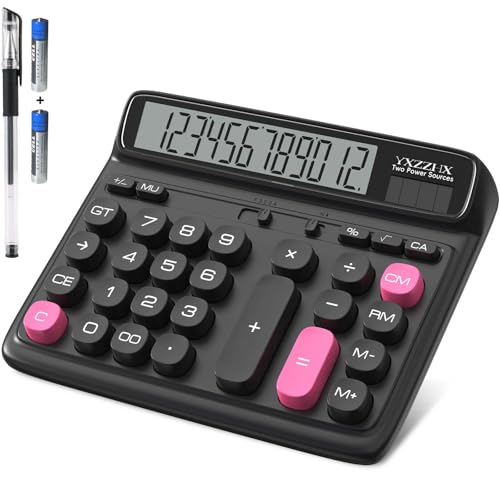
  3. A 5 inch, 12-digit LCD with a tilted screen, solar or battery power and 2 AA batteries supplied.

    90Excellent
    Check price
  4. Double-size plus and equals keys, a tilted jumbo 12-digit display and solar plus battery power.

    88Excellent
    Check price
  5. Large computer-style keys, a 30 degree angled screen and four anti-slip pads.

    86Excellent
    Check price
  6. 06
    CATIGA 12 Digit Big Button Desk Calculator

    A basic four-function calculator with big sensitive buttons, solar power and a battery included.

    83Very Good
    Check price

Big keys get the credit, but most calculator errors by older users are not misses. They are doubles and slips: a press that registers twice, or a digit misread from a small or glaring screen. The fix is a clear display, positive key feel and, ideally, a second way to check each entry, such as a spoken readback.

So this ranking weighs the screen and feedback alongside key size. We reviewed six large-button desk calculators from their listings, comparing display size and tilt, key layout, power source, stability and whether a talking mode exists. Missing figures are called out as missing, and the picks span a few different kinds of reader.

Before you buy

What Actually Matters

01

Display size and digits

Numeral height, not digit count, is what an older reader actually sees. Every pick shows twelve digits, but the yxzzhx's 5 inch screen draws bigger figures than the pxy's 4 inch panel, while the Cirbic, Lily's Home, Comix and CATIGA publish no screen size at all. Look for a measured dimension in inches, and be skeptical of the word large alone.

02

Screen angle

Screen angle controls glare and viewing comfort at a desk. A flat display under ceiling lights washes out, and a seated user looks down at it on a steep angle. A tilted face, like the Comix's 30 degrees or the yxzzhx's ergonomic tilt, aims digits at the eyes. Look for tilted or an angle in degrees on the listing.

03

Key layout and size

Key layout and size determine how many mistakes a hand makes. The pxy copies the 10-key pad that bookkeepers know, Lily's Home enlarges the plus and equals keys that long additions lean on, and the CATIGA keeps four functions only. Familiar layout beats novelty. Check for named key size or layout, and prefer widely spaced keys over crowded ones.

04

Talking mode

A talking mode reads each number and result aloud, so a mis-hit digit gets caught by ear before it ruins a total. The Cirbic announces entries and answers, with volume from mute to loud, which matters in a shared room. Not every listing is clear, so look for the words talking or voice and a volume or mute control.

05

Stability and power

A calculator that slides under a pressing hand makes a tremor worse, and a dead cell stops everything. The Comix lists four anti-slip pads, and the pxy and yxzzhx run on solar or battery, with 2 AA included on the yxzzhx. Check the listing for feet or pads, and confirm batteries come in the box.

In-depth reviews

Our Ranked Picks, Reviewed

1

Best Talking Calculator

Cirbic Talking Desktop Calculator

Our verdict: Speaks each entry and result, with adjustable volume, a dual-line LCD and oversized high contrast keys.

The Cirbic announces numbers as you enter them and reads the result. Volume is adjustable from mute to loud, the display is a large dual-line LCD, and the keys are oversized and high contrast.

It ranks first because spoken confirmation catches the errors that eyes miss: if you press a 3 and hear a 8, you know before the total is wrong. A dual-line display shows the entry and the running result together, which helps when checking a list. The mute option means it can be used quietly. It has no 4 or 5 inch screen like the pxy and yxzzhx, so the numerals are smaller.

Recommended where eyesight makes digits hard to trust and a spoken check is welcome. One limit: the listing gives no screen size or power details.

Voice
Announces numbers and results
Volume
Adjustable, mute to loud
Display
Large dual-line LCD
Keys
Oversized, high contrast

What we like

  • +Speaks entries and results
  • +Volume goes from mute to loud
  • +Dual-line display shows both
  • +Oversized high contrast keys

Watch out for

  • −Screen size not listed
  • −Voice may disturb a quiet room

Buy it if: People with low vision who want spoken confirmation of every entry.

Skip it if: You want the largest possible numerals.

2

Best Familiar Layout

pxy 12-Digit Big Button Desk Calculator

Our verdict: A 4 inch, 12-digit LCD with a computer-style 10-key layout and solar or battery power.

The pxy has a 12-digit, 4 inch extra large LCD, big 10-key buttons in a computer keyboard layout, and two-way solar and battery power.

It ranks second because a 10-key layout matches the keypad that bookkeepers and cashiers have used for decades, so there is nothing to relearn. A 4 inch display gives big numerals, and two-way power means it keeps working when the battery runs flat in a bright room. It lacks the talking mode of the Cirbic, so errors are caught only visually.

This is the choice for someone who already knows a numeric keypad and wants a big, clear screen without extras. The drawback is that it gives no audio or tilt information.

Display
12 digit, 4 inch LCD
Keys
10 key big buttons
Power
Solar or battery
Layout
Computer keyboard style

What we like

  • +Big 4 inch display
  • +Familiar 10-key layout
  • +Solar or battery power
  • +12-digit readout

Watch out for

  • −No spoken confirmation
  • −No tilt angle stated

Buy it if: People who already know a numeric keypad and want a big, clear screen.

Skip it if: You want audio confirmation of entries.

3

Biggest Screen

yxzzhx 5-Inch LCD Desktop Calculator

Our verdict: A 5 inch, 12-digit LCD with a tilted screen, solar or battery power and 2 AA batteries supplied.

The yxzzhx has a 5 inch, 12-digit LCD, two-way solar or battery power with 2 AA batteries provided, and an ergonomic screen tilt for desk use.

It ranks third because the 5 inch screen is the biggest here, giving the largest numerals. Tilt helps by turning the display toward the eyes and cutting glare from overhead lights. It sits behind the pxy since the listing does not describe the key size or layout. It also loses the Cirbic's audio check.

It will suit readers who need the biggest numerals and like to sit back from the desk. Check the keys before you buy, as the listing says little about them.

Display
5 inch LCD, 12 digits
Power
Solar or battery
Batteries
2 AA provided
Screen
Tilted for desk use

What we like

  • +Biggest 5 inch screen
  • +Tilt reduces glare
  • +Batteries are included
  • +Solar and battery power

Watch out for

  • −Key size not described
  • −No talking mode

Buy it if: Readers who need the biggest numerals and sit back from the desk.

Skip it if: Key size matters more to you than the screen.

4

Best Plus and Equals Keys

Lily's Home Jumbo 12-Digit Calculator (White)

Our verdict: Double-size plus and equals keys, a tilted jumbo 12-digit display and solar plus battery power.

Lily's Home has a jumbo 12-digit tilted LCD, large key tops, double-size plus and equals keys, and solar plus battery power. It is white.

It ranks fourth because double-size plus and equals keys are a sensible design: those are the two keys pressed most when adding long lists, and bigger targets cut the slips. The tilted LCD helps legibility on a flat desk. It trails the pxy because the listing says only jumbo, with no screen size to compare, and it has no spoken check.

Good for anyone totaling long columns daily who wants the two busiest keys oversized. The downside is that the numeral size is unverified.

Display
Jumbo 12 digit, tilted
Keys
Large, double size + and =
Power
Solar and battery
Color
White

What we like

  • +Double-size plus and equals
  • +Tilted eye-angle display
  • +Large key tops
  • +Solar and battery power

Watch out for

  • −Screen size not stated
  • −No audio feedback

Buy it if: People who sum long lists and want the plus and equals keys easiest to hit.

Skip it if: You want a measured screen size.

5

Best Stability

Comix 12 Digit Large Button Calculator (White)

Our verdict: Large computer-style keys, a 30 degree angled screen and four anti-slip pads.

The Comix has large computer-style keys, a 12-digit bold display set at a 30 degree angle, four anti-slip pads and a clear key sound.

It ranks fifth because stability is the underrated spec: a calculator that slides when pressed forces a shaky hand to chase it. The four anti-slip pads hold it in place, and the audible key click confirms a press. It lacks a stated screen size and has no solar mention.

This one is for people who want a stable, familiar calculator that stays put under pressing hands. Its limit is that the listing gives no power details or display dimension.

Keys
Large computer keys
Display
12 digit, 30 degree angle
Feet
4 anti-slip pads
Feedback
Clear key sound

What we like

  • +Four anti-slip pads
  • +Audible key click
  • +30 degree angled screen
  • +Large computer-style keys

Watch out for

  • −No screen size stated
  • −Power source not described

Buy it if: People who want a calculator that stays put under pressing hands.

Skip it if: You want a talking or solar model.

6

Best Basic First Calculator

CATIGA 12 Digit Big Button Desk Calculator

Our verdict: A basic four-function calculator with big sensitive buttons, solar power and a battery included.

The CATIGA has big sensitive buttons, a large 12-digit LCD, basic four-function operation, and solar plus an included battery.

It ranks last because it is the plainest model: no tilt, no talking mode and no stated screen size. A four-function layout is the strength for a first-time user, with no percent or memory keys to confuse, and the sensitive buttons answer a light touch. That same sensitivity can cause accidental double presses.

This is the entry point for a relative who distrusts gadgets and just wants sums. Its weak point is the lack of stated dimensions and extras.

Keys
Big sensitive buttons
Display
Large LCD, 12 digits
Functions
Basic 4 function
Power
Solar and included battery

What we like

  • +Four functions, nothing confusing
  • +Light, sensitive buttons
  • +Battery included
  • +Solar powered too

Watch out for

  • −No screen size listed
  • −Sensitive keys may double-press

Buy it if: A first large-button calculator for someone who avoids gadgets.

Skip it if: You need tilt, audio or memory keys.

Methodology

How We Ranked These

Display size and angle

Stated screen size, digit count and tilt decide how readable the numbers are from a normal seat.

Key design

Key size, spacing and layout determine how many errors a stiff or shaky hand makes.

Feedback

Spoken entries, key clicks and anti-slip feet help users catch and avoid mistakes.

Power

Solar plus battery, or included batteries, avoid a dead calculator at the wrong moment.

Simplicity

A basic layout with few functions scored well for users who dislike technology.

Every Primea Score uses the same weights: Performance 30% · Build & Materials 20% · Everyday Usability 20% · Value 20% · Owner Satisfaction 10%. Full scoring rules

Buyer's guide

How to Pick the Right One for You

By Main Difficulty

Pick the model that fixes the specific problem.

Main difficultyOur pick
Catching typing errorsCirbic Talking Desktop Calculator
Reading small numeralsyxzzhx 5-Inch LCD Desktop Calculator
Hitting the right keysLily's Home Jumbo 12-Digit Calculator (White)
Calculator slides aroundComix 12 Digit Large Button Calculator (White)

Talking vs Silent

Talking

Speaks entries and results, so errors are caught by ear. Needs a quiet enough room and a volume setting. Pick: Cirbic.

Silent large-display

Relies on the screen and keys alone, and is quicker for people who read easily. Picks: pxy, yxzzhx, Lily's Home, Comix, CATIGA.

Default to talking if the user has any trouble reading digits.

For Low Vision Specifically

Look for

The largest stated screen, high contrast keys, a tilted display and a talking option. Avoid glossy screens that reflect light.

In this ranking

Cirbic for high contrast keys and spoken numbers, and yxzzhx for the 5 inch screen.

When to Spend More

Spend more if

You manage accounts or taxes daily. A talking model like the Cirbic adds an audio check to every entry.

Save if

You only need occasional sums. The CATIGA covers the basics.

Questions

Frequently Asked Questions

Do these calculators handle percentages and memory?+

Percent and memory keys are not promised by most of these listings. The CATIGA is explicitly four-function, which makes it the simplest, and the pxy's 10-key layout may carry more. If you need percent or memory, confirm the keys on the listing first.

What is the commonest mistake?+

Choosing by screen size alone. The yxzzhx has the biggest 5 inch screen, but its listing says little about the keys, and a shaky hand needs both. Lily's Home enlarges the plus and equals keys, which solves a different problem than the screen does.

Is a talking calculator worth it over a standard one?+

For low vision or error-prone entry, yes. The Cirbic reads each number and the result aloud, so you catch a wrong digit before it becomes a wrong total. If you read the screen easily and keep quiet rooms, a silent pxy is cheaper and calmer.

How do I set it up?+

Most are ready on the first press. Insert the batteries if needed, such as the 2 AA provided with the yxzzhx, and set the calculator on a flat surface. On the Cirbic, set the volume level first, so the first answer is not a surprise.

How do I maintain the calculator?+

Wipe the surface with a slightly damp cloth, and never spray liquid onto the keys. Solar models such as the pxy keep running in light, but replace the battery if the display fades in a dim room, since the solar cell cannot carry the load there.

Will the keys be too sensitive for tremor?+

They can. Sensitive keys register light touches, which helps weak fingers but can double-register under a tremor, and the CATIGA is built that way. The Comix has a clear key sound and four anti-slip pads, which suit a shaky hand better.

Final take

The Cirbic Talking Calculator is the safest pick for most seniors, because hearing an entry read back stops most errors. The pxy is the better choice for experienced users who just want a big, familiar layout, and the yxzzhx for the largest numerals. Choose the Comix if stability is the issue.

About the author

Joshua Parkes, Editor in Chief at Primea Reviews

Joshua Parkes

Editor in Chief, Primea Reviews

Joshua owns the Primea Score framework and signs off on every ranking this site publishes. He and the editors work from spec sheets, manuals, warranty terms, certifications and long-term owner feedback, and a guide says so plainly when a listing leaves out the number that decides the purchase. Primea never claims to have physically tested a product it has not, and no brand can pay for placement.

More Ranked & Reviewed Guides