
Primea ReviewsAll Reviews

Primea Reviews is reader-supported. When you buy through our Amazon links we may earn a commission, at no extra cost to you. Rankings are set by our editors and never sold. Learn more

Ranked & Reviewed by Primea Reviews

The 4 Best Tablets for Low-Vision Seniors of 2026, Ranked & Reviewed

By the Primea Editorial TeamUpdated November 1, 202610 min read4 products ranked
The 4 Best Tablets for Low-Vision Seniors of 2026, Ranked & Reviewed

The short answer

The Apple iPad 11-inch is the best tablet for low-vision seniors: an 11 inch screen, 128GB of storage and keyboard compatibility for $200 to $500. The TECLAST T65 has the biggest display at 13.4 inches, the GrandPad is the simplest, and the Amazon Fire HD 10 is the budget pick.

The Primea Scoreboard

Ranked & Reviewed

  1. An 11 inch screen with 128GB and keyboard support.

    93Outstanding
    Check price
  2. The largest display here, at 13.4 inches.

    90Excellent
    Check price
  3. A cellular tablet and phone designed around seniors.

    86Excellent
    Check price
  4. A 10.1 inch screen at a budget price.

    82Very Good
    Check price

Families often assume any tablet helps with low vision, then discover the text is still small and the home screen is a wall of icons. Two things change the experience most. The first is physical screen size, because a bigger panel shows bigger text without the blur that comes from zooming. The second is how simple the interface is, since a cluttered menu defeats even large type.

We reviewed eight tablets on paper, and only four had specs that honestly support this use. We ranked those four on screen size, storage and ease of use from the spec sheets. We cannot judge accessibility settings from the data we have, so check text size, contrast and voice controls yourself before you buy. Prices appear as buckets.

Before you buy

What Actually Matters

01

Screen size

Larger physical screens show larger text and icons without zooming, which reduces squinting and blur. Zoomed text on a small panel loses sharpness, while the same text on a bigger panel stays crisp. Look for the diagonal size in inches in the title or specs. The TECLAST lists 13.4 inches, the Fire HD 10 lists 10.1. Weight rises with size, so consider a stand.

02

Interface simplicity

A cluttered home screen is hard even with large text, because the eye must search for the right icon. Senior-focused devices strip menus down to a handful of big buttons. Check the listing description for how the interface is presented, and ask whether family can set up a simple layout. Fewer, larger icons beat a full grid.

03

Storage

Storage holds apps, photos and downloads. 32GB fills up quickly while 128GB gives room for years of photos. Find the GB figure in the specs: the iPad lists 128GB, the Fire HD 10 lists 32GB and the TECLAST 20GB. If you rarely download, lean on streaming and keep a modest tablet. Photos and video are what fill a tablet fastest.

04

Keyboard or stylus support

Some users find on-screen typing hard, because a flat glass keyboard gives no feedback to the fingertips. A physical keyboard or stylus helps. Check the specs for keyboard compatibility, like the iPad's, or stylus support, like the Fire HD 10's. Voice input is a third route worth testing in the store, and a stand keeps the screen at a readable angle.

05

Connectivity

Cellular or 4G models work without home Wi-Fi. This matters for video calls and emergencies away from the house. Look for the cellular or 4G label, as on the GrandPad and TECLAST. A Wi-Fi-only tablet needs a phone hotspot outside the home, which is an extra step for anyone with limited sight. A cellular model skips that step.

In-depth reviews

Our Ranked Picks, Reviewed

1

Best Overall

Apple iPad 11-inch: A16 chip

Our verdict: An 11 inch screen with 128GB and keyboard support.

The iPad 11-inch has an 11 inch display, 128GB of storage and keyboard compatibility, and sells for $200 to $500. At 11 inches, there is room to enlarge text a long way before lines wrap awkwardly, and a paired keyboard helps if touch typing is hard on glass. Storage of 128GB means photos from grandchildren and downloaded books will not push it into low-space warnings.

It leads this short list because 11 inches is a comfortable canvas for enlarged text. The tradeoff against the TECLAST is screen size: it is smaller than 13.4 inches, but it comes from a major brand with a polished interface. Against the Fire HD 10, it offers four times the storage.

It suits seniors who want a mainstream tablet and may have family help with setup. The caveat is that our facts do not describe accessibility features, so confirm them in settings. Skip it if you want the biggest screen.

Screen
11 inch
Storage
128GB
Keyboard
Compatible
Price bucket
$200-500

What we like

  • +11 inch screen
  • +128GB storage
  • +Keyboard compatible
  • +Mainstream tablet

Watch out for

  • −Smaller than 13.4 inch
  • −Accessibility not detailed here

Buy it if: Seniors who want a mainstream tablet with family setup help.

Skip it if: You want the biggest possible screen.

2

Biggest Screen

TECLAST T65 13.4" Android16 4G Tablet

Our verdict: The largest display here, at 13.4 inches.

The TECLAST T65 has a 13.4 inch screen, runs Android 16 and includes 4G, with 20GB listed. It sells for $100 to $200. A larger panel enlarges everything proportionally, so icons, buttons and photos become easier to hit and read without zooming into a blur. 4G connectivity means it works for video calls away from home Wi-Fi.

It ranks second because its display is the biggest in the group. The tradeoff against the iPad is storage and polish: 20GB is limited, and a bigger tablet is heavier to hold. Against the GrandPad, it is a general-purpose device with more freedom but less hand-holding.

It suits a senior who reads at a table or stand. The caveat is that the spec sheet lists only screen and storage, so check weight and software support. Skip it if you want a light tablet for the hand.

Screen
13.4 inch
Storage
20GB listed
Software
Android 16
Connectivity
4G

What we like

  • +13.4 inch display
  • +4G connectivity
  • +Android 16
  • +Under $200

Watch out for

  • −Only 20GB listed
  • −Large and heavy to hold

Buy it if: Seniors who read on a table or stand.

Skip it if: You want a light tablet for the hand.

3

Simplest to Use

GrandPad Easy to Use Tablet & Phone for Seniors [Locked - Not

Our verdict: A cellular tablet and phone designed around seniors.

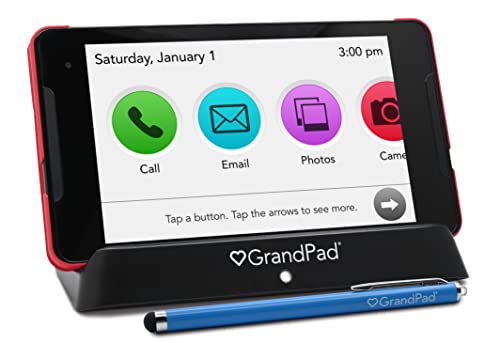
The GrandPad is sold as an easy-to-use tablet and phone for seniors, with cellular connectivity. It sits in the $200 to $500 range. A locked design strips away the menus, app stores and settings that confuse new users, and the one-device approach covers calls and video chats in a single simplified interface.

It takes third place because the facts give no screen size or storage to compare, though the product is aimed squarely at seniors. The tradeoff is that a locked, senior-focused device is less flexible than a standard tablet. You cannot install any app you like, and you depend on what the maker allows. Against the iPad, you gain simplicity but lose choice.

It suits seniors who want a simple tool with minimal setup. The caveat is the missing spec detail, so check the listing for screen size. Skip it if you want to run your own apps.

Type
Tablet and phone
Connectivity
Cellular
Audience
Seniors
Price bucket
$200-500

What we like

  • +Built for seniors
  • +Cellular connectivity
  • +Tablet and phone
  • +Simple concept

Watch out for

  • −Screen size not listed
  • −Less flexible than standard tablets

Buy it if: Seniors who want a simple device with little setup.

Skip it if: You want to install any app you like.

4

Best Budget

Amazon Fire HD 10 tablet

Our verdict: A 10.1 inch screen at a budget price.

The Fire HD 10 has a 10.1 inch screen, 32GB of storage and stylus support, and sells for $100 to $200. A 10.1 inch panel is roomy for video calls and reading, and the stylus is an unusual extra at this price: it helps anyone who finds fingertip taps imprecise.

It ranks fourth because 32GB is small next to the iPad's 128GB, and the screen is smaller than the TECLAST's 13.4 inches. Storage fills fast once you add photos, so streaming books and video is a better habit than downloading them.

It suits a first tablet on a budget. The caveat is limited storage and a screen smaller than the iPad and TECLAST. Skip it if you want to store many downloads.

Screen
10.1 inch
Storage
32GB
Stylus
Supported
Price bucket
$100-200

What we like

  • +10.1 inch screen
  • +Stylus support
  • +Budget price bucket
  • +Simple tablet

Watch out for

  • −Only 32GB storage
  • −Smaller than iPad and TECLAST

Buy it if: A first budget tablet for reading and calls.

Skip it if: You want to store many downloads.

Methodology

How We Ranked These

Screen size

We compared listed display size, the most reliable proxy for readability.

Storage

We weighed stated storage against everyday app and photo needs.

Ease of use

We considered senior-focused design and simple interfaces.

Input options

We noted keyboard and stylus support for those who struggle with touch.

Value

We placed each tablet in its price bucket.

Every Primea Score uses the same weights: Performance 30% · Build & Materials 20% · Everyday Usability 20% · Value 20% · Owner Satisfaction 10%. Full scoring rules

Buyer's guide

How to Pick the Right One for You

By Screen Size

Bigger is easier to read.

NeedOur pick
Largest displayTECLAST T65 13.4" Android16 4G Tablet
Comfortable all-rounderApple iPad 11-inch: A16 chip
Mid-size budgetAmazon Fire HD 10 tablet
Screen size not the priorityGrandPad Easy to Use Tablet & Phone for Seniors [Locked - Not

By Budget

SpendOur pick
$100-200Amazon Fire HD 10 tablet
$100-200, bigger screenTECLAST T65 13.4" Android16 4G Tablet
$200-500, mainstreamApple iPad 11-inch: A16 chip
$200-500, simplestGrandPad Easy to Use Tablet & Phone for Seniors [Locked - Not

Standard vs Senior-Focused

Standard tablet

Flexible, any app, but more menus. The iPad, TECLAST and Fire HD 10 are standard.

Senior-focused

Simplified and locked down. The GrandPad is built this way.

Most buyers with family help should default to a standard tablet; choose the GrandPad if simplicity beats flexibility.

By Input Method

PreferenceOur pick
Physical keyboardApple iPad 11-inch: A16 chip
StylusAmazon Fire HD 10 tablet
Touch only, big screenTECLAST T65 13.4" Android16 4G Tablet
Cellular phone callsGrandPad Easy to Use Tablet & Phone for Seniors [Locked - Not

For Reading and Video Calls Specifically

Look for

A 10 inch or larger display and enough storage for apps.

In this ranking

The iPad 11-inch has 11 inches and 128GB, and the TECLAST offers 13.4 inches.

When to Spend More

Spend more if

You want plenty of storage and a mainstream tablet. The iPad has 128GB.

Save if

You mainly watch video. The Fire HD 10 covers that for under $200.

Questions

Frequently Asked Questions

Does screen size really help low vision?+

Yes. A larger display shows bigger text and icons without heavy zooming, which keeps letters sharper than a magnified small screen. The TECLAST at 13.4 inches is the largest here, and the iPad at 11 inches is a comfortable middle size for reading.

Which tablet is simplest for a senior?+

The GrandPad is designed for seniors and locks down the interface. A standard tablet such as the iPad can be simplified with a larger font setting, but it demands more setup from family, and the Fire HD 10 is a lighter option if setup help is on hand.

Is the iPad worth it over a Fire HD 10?+

The iPad has 128GB and keyboard support, with a mainstream interface. The Fire HD 10 is cheaper with a 10.1 inch screen and 32GB, and adds stylus support. Choose by budget and storage, and pick the iPad if you plan to keep many photos.

Do these have accessibility features?+

Our spec data does not list them. Check the settings menu for text size and contrast before buying, and test whether voice controls work well for your senior. A store demo of the iPad or Fire HD 10 is worth the trip.

Do I need cellular?+

Only if you want service away from Wi-Fi. The GrandPad and TECLAST list cellular or 4G. Otherwise a Wi-Fi tablet such as the iPad or Fire HD 10 is enough at home, and costs less to run each month.

How much storage is enough?+

32GB is tight for apps and photos, and 128GB is comfortable. Choose based on how much you store locally. The iPad lists 128GB, and the TECLAST lists only 20GB, which is small for a 13.4 inch screen, so plan on cloud storage.

Final take

Choose the iPad 11-inch for a mainstream tablet with family help on setup, the TECLAST T65 for the largest screen, and the GrandPad if simplicity beats flexibility. The Fire HD 10 suits a first, budget tablet. Whatever you pick, confirm text size, contrast and voice settings on the device itself, since the specs here do not describe them.

More Ranked & Reviewed Guides