
Primea ReviewsAll Reviews

Primea Reviews is reader-supported. When you buy through our Amazon links we may earn a commission, at no extra cost to you. Rankings are set by our editors and never sold. Learn more

Ranked & Reviewed by Primea Reviews

The 8 Best Tablets for Seniors, from Simple Locked Tablets to iPad, Ranked & Reviewed

By the Primea Editorial TeamUpdated November 3, 202610 min read8 products ranked
The 8 Best Tablets for Seniors, from Simple Locked Tablets to iPad, Ranked & Reviewed

The short answer

The Apple iPad 11-inch is the tablet to buy for most seniors who have a family member to help with setup, thanks to its large screen, long software support and simple interface. GrandPad is the pick for someone who needs a locked-down tablet that a family manages, and the Samsung Galaxy Tab A11+ and Amazon Fire HD 10 are the sensible mid-price Android and Amazon choices.

The Primea Scoreboard

Ranked & Reviewed

  1. 01
    Apple iPad 11-inch: A16 chip

    Best Overall for Seniors

    Apple iPad 11-inch: A16 chip

    An 11 inch iPad with an A16 chip, 128GB and keyboard support, the easiest to live with.

    94Outstanding
    Check price
  2. A cellular tablet built for seniors and managed by family, though it is locked to its own service.

    91Excellent
    Check price
  3. 03
    Samsung Galaxy Tab A11+ 6GB RAM

    Best Mid-Price Android

    Samsung Galaxy Tab A11+ 6GB RAM

    A Galaxy tablet with 6GB RAM and 128GB, a safe Android pick in the $200 to $500 range.

    89Excellent
    Check price
  4. 04
    Amazon Fire HD 10 tablet

    Best Value Large Screen

    Amazon Fire HD 10 tablet

    A 10.1 inch Fire tablet with 32GB and stylus support, in the $100 to $200 bracket.

    87Excellent
    Check price
  5. An 8.7 inch, 64GB lightweight tablet with up to 12.5 hours of YouTube playback claimed.

    85Excellent
    Check price
  6. 06
    AOC 10 Inch Tablet Android 16

    A 10 inch Android 16 tablet with 128GB, in the $100 to $200 bracket.

    83Very Good
    Check price
  7. 07
    Amazon Fire HD 8 tablet

    Best Compact Fire

    Amazon Fire HD 8 tablet

    An 8 inch Fire tablet with 64GB, a small and inexpensive option in the $100 to $200 range.

    81Very Good
    Check price
  8. 08
    TECLAST T65 13.4" Android16 4G Tablet

    Biggest Screen on a Budget

    TECLAST T65 13.4" Android16 4G Tablet

    A 13.4 inch Android 16 tablet with 4G, the largest screen here for $100 to $200.

    79Very Good
    Check price

Most tablets fail seniors in the same place: not the hardware, but the first week. A new tablet greets its owner with account sign-ins, update prompts, permissions pop-ups and a home screen full of icons, and a person who never asked for any of it gives up. The best tablet for an older adult is the one that someone sets up properly once, with big text, a few icons and a way to get help.

We reviewed eight tablets from their listings, ranking them on screen size, storage, ease of setup, how locked-down they can be, battery claims and price. The listings are brief, so we flag gaps rather than guess at specs. Nothing here comes from using the tablets ourselves, and price buckets replace exact prices. If a family member can do the setup, the ranking changes, so we say where it matters.

Before you buy

What Actually Matters

01

A simple, stable interface

The tablet should have a few big icons and few surprises. iPadOS, Samsung's Easy Mode and GrandPad's locked system all aim at this. Check that text size and display zoom can be increased, and avoid tablets that fill the screen with ads.

02

Screen size

A 10 or 11 inch screen is comfortable for reading and video calls, while 8 inch models are lighter but harder on weak eyes. For low vision, a larger screen on a stand beats a small one. Check the inches in the listing.

03

Setup and remote help

Someone will have to set it up, and ideally help later. iPad and Android both support remote help tools. GrandPad lets family manage it from afar. Ask who will do the setup before you choose.

04

Storage

Photos and video fill 32GB quickly. 64GB is workable and 128GB is comfortable. Check the storage figure in the title, because it is often the cheapest spec to cut.

05

Support and security

An older person is a target for scams, so security updates matter. Apple and Samsung have the best update records, and lesser-known brands are less predictable. Turn on automatic updates at setup.

In-depth reviews

Our Ranked Picks, Reviewed

1

Best Overall for Seniors

Apple iPad 11-inch: A16 chip

Our verdict: An 11 inch iPad with an A16 chip, 128GB and keyboard support, the easiest to live with.

The iPad 11-inch has an A16 chip, 128GB of storage, an 11 inch screen and keyboard compatibility.

It ranks first because the iPad is the tablet most seniors learn fastest. The interface is consistent, text and icons scale up through Accessibility settings, and apps for video calls, photos and reading are plentiful. Apple's long software support also means the tablet stays secure for years. The 11 inch screen is comfortable for reading and video calls.

Buy it if a family member can set it up and enable Larger Text and Display Zoom. Skip it if you need a locked-down device that cannot be changed accidentally.

Screen
11 inch
Chip
A16
Storage
128GB
Extra
Keyboard compatible

What we like

  • +Consistent, easy-to-learn interface
  • +Large 11 inch screen
  • +Long software support
  • +Strong accessibility settings

Watch out for

  • −Needs a helper for first setup
  • −Higher price than Fire or Lenovo

Buy it if: Seniors with a family member to help set it up.

Skip it if: You want a locked, managed device.

2

Best Locked-Down Simplicity

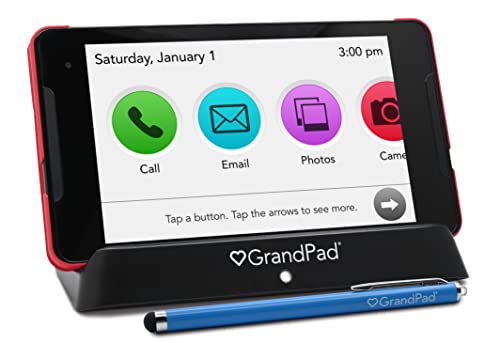
GrandPad Easy to Use Tablet & Phone for Seniors [Locked - Not Compatible with Standard Plans]

Our verdict: A cellular tablet built for seniors and managed by family, though it is locked to its own service.

GrandPad is a tablet and phone designed for seniors, with cellular connectivity. The listing labels it locked, meaning it works only with GrandPad's own service and not with standard carrier plans.

The case for GrandPad is that a family sets it up, limits the apps to a safe handful and manages it remotely. A senior sees large icons for calls, photos and messages, and cannot get lost in menus or stumble onto scams. The compromise is the service: a locked device depends on GrandPad's plan, which carries a recurring cost beyond the hardware, so read the terms before buying.

Buy it if you want a fully managed device for someone with memory or confidence issues. Skip it if you would rather avoid a service plan.

Connectivity
Cellular
Design
Built for seniors
Lock
Locked to GrandPad service
Bracket
$200 to $500

What we like

  • +Designed specifically for seniors
  • +Family can manage it remotely
  • +Simple, limited set of apps
  • +Cellular, no wifi setup needed

Watch out for

  • −Locked to GrandPad's own service
  • −Recurring service cost likely

Buy it if: Seniors who need a managed, simple device.

Skip it if: You want to avoid a service plan.

3

Best Mid-Price Android

Samsung Galaxy Tab A11+ 6GB RAM

Our verdict: A Galaxy tablet with 6GB RAM and 128GB, a safe Android pick in the $200 to $500 range.

Samsung pairs 6GB of memory with 128GB of room in the Galaxy Tab A11+, at a mid-range price. Samsung's One UI includes an Easy Mode that simplifies the home screen with larger icons.

It ranks third because the combination of RAM and storage keeps the tablet responsive, which matters for an older person who gets frustrated by lag. Samsung also has a good record for software updates among Android makers, and Easy Mode is an actual senior feature. It ranks below the iPad on interface consistency, since Android settings can be more scattered.

Buy it if you prefer Android or already own Samsung products. Skip it if you want the most consistent interface.

Memory
6GB RAM
Storage
128GB
Brand
Samsung
Bracket
$200 to $500

What we like

  • +6GB RAM keeps it responsive
  • +128GB storage for photos
  • +Easy Mode simplifies the screen
  • +Reputable update record

Watch out for

  • −Android settings are scattered
  • −Costs more than Fire tablets

Buy it if: Seniors who prefer Android or Samsung.

Skip it if: You want the simplest interface.

4

Best Value Large Screen

Amazon Fire HD 10 tablet

Our verdict: A 10.1 inch Fire tablet with 32GB and stylus support, in the $100 to $200 bracket.

Amazon gives the Fire HD 10 a 10.1 inch display, 32GB of space and pen input, at a budget price. It is built around Amazon's content and the Alexa voice assistant.

It ranks fourth because a 10.1 inch screen is a good size for reading, video calls and photos, and the price is friendly. Alexa lets a senior ask for the weather, a call or a video with their voice. The limits are storage, which is smaller than rivals, and the Amazon-centered software, which has a smaller app store than Google or Apple. Fire tablets can also show ads on the lock screen unless you pay to remove them.

Buy it if the senior already uses Amazon services and wants a large screen for little money. Skip it if you need a wide app choice.

Screen
10.1 inch
Storage
32GB
Extra
Stylus support
Bracket
$100 to $200

What we like

  • +Large 10.1 inch screen
  • +Friendly price
  • +Stylus support
  • +Alexa voice help

Watch out for

  • −Only 32GB of storage
  • −Smaller app store than rivals

Buy it if: Amazon users who want a big screen cheaply.

Skip it if: You want many apps.

5

Best Lightweight Pick

Lenovo Tab One - Lightweight Tablet - up to 12.5 Hours of YouTube

Our verdict: An 8.7 inch, 64GB lightweight tablet with up to 12.5 hours of YouTube playback claimed.

The Lenovo Tab One has an 8.7 inch screen, 64GB of storage and a claimed battery life of up to 12.5 hours of YouTube.

It ranks fifth because light weight matters to seniors who hold a tablet in bed or in a chair with weak wrists. The 8.7 inch size is easier to grip than a 10 inch model, and the battery claim means fewer charging chores. The cost is a smaller screen for reading and video calls, and the battery figure is a maker claim.

Buy it if a light, easy-to-hold tablet matters most. Skip it if your eyes need a bigger display.

Screen
8.7 inch
Storage
64GB
Battery
Up to 12.5 hours of YouTube
Bracket
$100 to $200

What we like

  • +Light and easy to hold
  • +Long battery claim
  • +64GB of storage
  • +Reasonable price

Watch out for

  • −Smaller screen for weak eyes
  • −Battery figure is a maker claim

Buy it if: Seniors who hold a tablet for a long time.

Skip it if: You need a large display.

6

Best Budget Storage

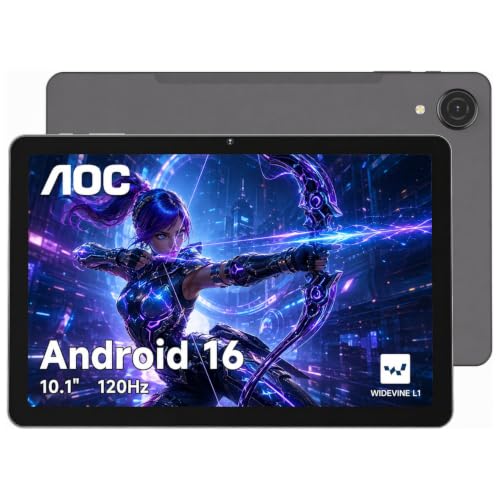
AOC 10 Inch Tablet Android 16

Our verdict: A 10 inch Android 16 tablet with 128GB, in the $100 to $200 bracket.

The AOC tablet has a 10 inch screen, 128GB of storage and Android 16.

It ranks sixth because the 128GB and the current Android version are generous at the price. A senior who wants to store photos and download a few apps will not run out of space. AOC is better known for monitors than tablets, though, so long-term software support and customer service are less certain than from Samsung or Apple.

Buy it if you want storage and a 10 inch screen at a low price. Skip it if you value a proven update record.

Screen
10 inch
Storage
128GB
OS
Android 16
Bracket
$100 to $200

What we like

  • +128GB of storage at a low price
  • +Current Android version
  • +10 inch screen
  • +Good value

Watch out for

  • −Uncertain update and support record
  • −Less known as a tablet brand

Buy it if: Budget buyers who want storage.

Skip it if: You want a proven support record.

7

Best Compact Fire

Amazon Fire HD 8 tablet

Our verdict: An 8 inch Fire tablet with 64GB, a small and inexpensive option in the $100 to $200 range.

The Fire HD 8 has 64GB of storage and an 8 inch class screen, in the $100 to $200 bracket. It shares Amazon's content, Alexa and app store with the larger Fire HD 10.

It ranks seventh because the screen is small for older eyes, and the larger sibling is only a little dearer. The 64GB of storage is better than the HD 10's 32GB listing, which is its practical advantage. It suits a senior who wants a compact tablet for e-books and video chats from the armchair.

Buy it if you want the smallest and simplest Fire tablet. Skip it if you want a larger screen.

Storage
64GB
Platform
Fire, Alexa
Size
8 inch class
Bracket
$100 to $200

What we like

  • +64GB of storage
  • +Compact and portable
  • +Alexa voice help
  • +Friendly price

Watch out for

  • −Small screen for older eyes
  • −Smaller app store

Buy it if: E-books and video chats from an armchair.

Skip it if: You need a large screen.

8

Biggest Screen on a Budget

TECLAST T65 13.4" Android16 4G Tablet

Our verdict: A 13.4 inch Android 16 tablet with 4G, the largest screen here for $100 to $200.

The TECLAST T65 has a 13.4 inch screen, 4G connectivity and Android 16, at $100 to $200. The listing mentions 20GB, which likely refers to a memory figure, but does not clarify.

The screen is the draw: 13.4 inches gives very large text and photos, which a person with low vision will appreciate. 4G means it works away from wifi with a data plan. It ranks last because TECLAST is a smaller brand with a less certain support record, a big tablet is heavy to hold, and the listing is vague about memory and storage.

Buy it if screen size is the top need, and you will use it on a stand. Skip it if you want a light tablet.

Screen
13.4 inch
Network
4G
OS
Android 16
Bracket
$100 to $200

What we like

  • +Very large 13.4 inch screen
  • +4G connectivity
  • +Current Android version
  • +Low price for the size

Watch out for

  • −Heavy to hold
  • −Memory and storage details unclear

Buy it if: Low-vision users with a tablet stand.

Skip it if: You want a light tablet.

Methodology

How We Ranked These

Ease of use

We favored consistent interfaces, accessibility settings and managed or locked-down designs that reduce confusion.

Screen size

Sizes from 8.7 to 13.4 inches were compared for reading comfort, video calls and photo viewing for older eyes.

Storage and performance

128GB, 64GB and 32GB listings, and the 6GB RAM Samsung, were weighed for responsiveness and photo storage.

Support and updates

Brands with long update records ranked above lesser-known makers whose support history is unclear.

Value

Feature depth was set against the $100 to $200 and $200 to $500 brackets, with a note on service costs.

Every Primea Score uses the same weights: Performance 30% · Build & Materials 20% · Everyday Usability 20% · Value 20% · Owner Satisfaction 10%. Full scoring rules

Buyer's guide

How to Pick the Right One for You

By Level of Help

How much support the senior will have decides the best device.

SupportOur pick
A family member sets it upApple iPad 11-inch: A16 chip
Family manages it remotelyGrandPad Easy to Use Tablet & Phone for Seniors [Locked - Not Compatible with Standard Plans]
Limited help, likes AndroidSamsung Galaxy Tab A11+ 6GB RAM
Limited help, uses AmazonAmazon Fire HD 10 tablet

By Budget

SpendOur pick
$100 to $200 (large screen)Amazon Fire HD 10 tablet
$100 to $200 (storage)AOC 10 Inch Tablet Android 16
$100 to $200 (light)Lenovo Tab One - Lightweight Tablet - up to 12.5 Hours of YouTube
$200 to $500Apple iPad 11-inch: A16 chip

Managed vs Open Tablet

Managed or locked

Fewer apps, fewer mistakes, remote family control, but tied to a service. Pick: GrandPad.

Open tablet

Full choice of apps and no service plan, but more ways to get confused. Picks: iPad, Galaxy Tab A11+, Fire, Lenovo, AOC, TECLAST.

Default to an open tablet unless the user needs a locked device.

By Vision and Hands

NeedOur pick
Low vision, very large screenTECLAST T65 13.4" Android16 4G Tablet
Weak wrists, light weightLenovo Tab One - Lightweight Tablet - up to 12.5 Hours of YouTube
Reading and callsApple iPad 11-inch: A16 chip
Voice requestsAmazon Fire HD 10 tablet

For First-Time Tablet Users Specifically

Look for

A consistent interface, large text options, a family helper for setup and automatic updates. Pre-load the video-call app and a few favorites.

In this ranking

The iPad for ease, GrandPad for a managed device, and the Samsung Galaxy Tab A11+ for Android.

When to Spend More

Spend more if

The tablet is a long-term daily device. The iPad and Samsung hold up better and stay supported longer.

Save if

The tablet is for occasional video calls and reading. A Fire HD or Lenovo Tab One does the job for $100 to $200.

Questions

Frequently Asked Questions

What is the easiest tablet for a senior to use?+

An iPad is the easiest for most people because the interface is consistent, and accessibility features are built in. GrandPad is the easiest if the family wants to manage the device and limit apps.

What is the biggest mistake when buying a tablet for a senior?+

Handing over a new tablet with no setup. Create accounts, set larger text, turn on automatic updates, add a few shortcuts and show how to make a video call. The first week decides whether it gets used.

Is GrandPad worth it over an iPad?+

If the user needs a managed device and the family wants remote control, yes. If the senior can handle a normal tablet, the iPad is cheaper to run and offers far more apps.

How hard is setup?+

Plan an hour with the senior: sign in to accounts, adjust text size, install two or three apps and save contacts. Write down passwords in a safe place. GrandPad's family portal simplifies this.

Can seniors fall for scams on tablets?+

Yes, they are common targets. Turn on spam filtering, teach them not to share codes or passwords, and consider a locked-down tablet if they are vulnerable. Keep the system updated.

Do I need a cellular tablet?+

Only if there is no wifi at home or the tablet travels. GrandPad and the TECLAST include cellular, and the others use wifi. A cellular plan is an extra monthly cost.

Final take

For most seniors with a helper, the Apple iPad 11-inch is the best tablet here, thanks to its consistent interface, 11 inch screen and long support. GrandPad is the choice for a managed, locked-down device, and the Samsung Galaxy Tab A11+ and Amazon Fire HD 10 cover Android and Amazon fans. Spend your first hour on setup, not on specs.

More Ranked & Reviewed Guides