

Primea ReviewsAll Reviews

Primea Reviews is reader-supported. When you buy through our Amazon links we may earn a commission, at no extra cost to you. Rankings are set by our editors and never sold. Learn more

Ranked & Reviewed by Primea Reviews

The 6 Best Large-Button Calculators for Visually Impaired Users, Ranked & Reviewed

Joshua ParkesBy Joshua Parkes, Editor in ChiefUpdated November 11, 202610 min read6 products ranked
The 6 Best Large-Button Calculators for Visually Impaired Users, Ranked & Reviewed

The short answer

The Cirbic Loud and Clear is the best pick, combining a loud voice, volume from mute to loud and high-contrast big keys. The Low Vision Store model announces every key press, the iPepul angles the screen for easier viewing, and the pendancy suits users with usable sight who want a silent 5 inch display.

The Primea Scoreboard

Ranked & Reviewed

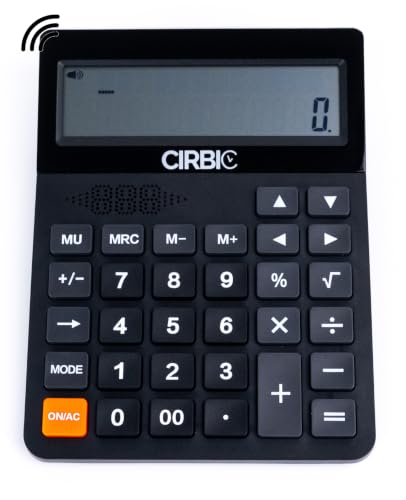
  1. A loud, clear voice with volume from mute to loud, a dual-line display and high-contrast big keys.

    93Outstanding
    Check price
  2. A two-line large display that speaks numbers, results and function keys.

    91Excellent
    Check price
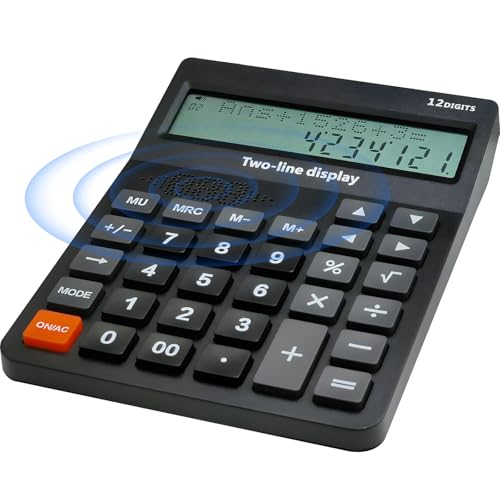
  3. A 12 digit two-line LCD tilted 45 degrees with voice, a four-function layout and large buttons.

    88Excellent
    Check price
  4. 04
    MAUJOY Talking Desk Calculator

    Best for Percent and Roots

    MAUJOY Talking Desk Calculator

    A 12 digit dual-line talking calculator with big buttons plus percent and square root.

    85Excellent
    Check price
  5. A 5 inch, 12 digit LCD tilted 30 degrees with color-coded giant buttons.

    82Very Good
    Check price
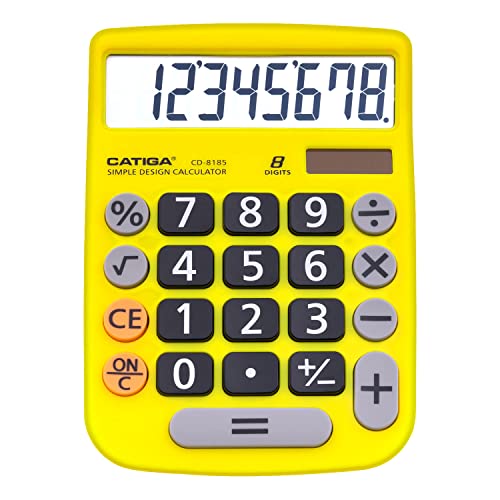
  6. An 8 digit solar-powered calculator with a tilted screen and large keys.

    79Very Good
    Check price

A talking calculator and a big-display calculator solve different problems, and mixing them up is the common mistake. If you can read large type, a huge screen and high-contrast keys are the right tool. If you cannot rely on the screen at all, the voice matters more than the display, and the display is a bonus.

We ranked six calculators from the listings: voice output, display size and angle, key size and contrast, function range and power source. Several talk, one has a solar panel, and one is silent but enormous. No calculator is medical equipment, so judge each against your own vision, and consider a trial with an occupational therapist or low-vision specialist.

Before you buy

What Actually Matters

01

Voice output

A talking calculator speaks each digit and result, which is a lifeline if the screen is hard to see. Better models also announce function keys, so you know you pressed plus and not minus. Check the listing for voice details, since some only read results. Voice is also a check on typos, which are easy to make when you cannot see the display.

02

Volume control

Speech is useful until you are in a quiet office or a shared room. A volume range that goes down to mute, as on the Cirbic, makes the calculator usable anywhere. Look for volume or mute controls on the listing. Hearing a result read twice before you write it down catches most slips.

03

Display size and angle

A large screen helps partial-sight users, and a tilted display lets seated users see without bending. The pendancy's screen is 5 inches and tilted 30 degrees. Check the display size, digit count and angle on the listing. A shallow angle also reduces glare from overhead lights.

04

Key size and contrast

Big buttons reduce misses, and high contrast makes them readable. Color coding, like the pendancy's, helps separate operators from numbers. Look for large or giant keys and note contrast wording on the listing. A tactile bump on the five key helps orient your fingers.

05

Power source

Solar needs a good light source and may fade indoors, while battery models work anywhere. The CATIGA is solar powered. Check the power source, and keep spare batteries on hand for the talking models. Keep spare batteries beside a talking model, since voice drains them faster.

In-depth reviews

Our Ranked Picks, Reviewed

1

Best Overall

Cirbic Loud and Clear Talking Calculator

Our verdict: A loud, clear voice with volume from mute to loud, a dual-line display and high-contrast big keys.

The Cirbic announces numbers and results in a loud, clear voice, offers volume from mute to loud, and pairs a large dual-line display with high-contrast big keys.

It ranks first because it serves two kinds of user at once: partial-sight users who read the screen and rely on speech when the glare is bad. Volume that drops to mute is the detail that makes it usable at a shared table. It beats the iPepul on contrast keys, though the iPepul has an angled screen.

Buy it if you have partial sight and want both speech and contrast. Skip it if you want percent and square root keys. Check the volume before using it in a public place.

Voice
Numbers and results
Volume
Mute to loud
Display
Large dual-line
Keys
High contrast, big

What we like

  • +Loud, clear voice
  • +Volume from mute to loud
  • +High-contrast big keys
  • +Large dual-line display

Watch out for

  • −Function range not detailed
  • −No angled screen listed

Buy it if: People with partial sight who want speech and contrast together.

Skip it if: You need a silent big-screen calculator.

2

Best Full Announcements

The Low Vision Store Two-Line Talking Calculator

Our verdict: A two-line large display that speaks numbers, results and function keys.

The Low Vision Store model has a large two-line LCD that announces every number, result and function key aloud, and is sold as a low-vision aid.

It ranks second because speaking function keys is the feature that matters for total reliance on audio: you know whether you pressed plus or minus. It trails the Cirbic on stated contrast and volume range. Key size is not stated in the listing.

Buy it if you cannot rely on the screen and need each key press confirmed. Skip it if you want documented key contrast. Set the volume before you start.

Display
Large two-line LCD
Voice
Numbers, functions, results
Function keys
Announced
Use
Low vision aid

What we like

  • +Announces function keys
  • +Speaks numbers and results
  • +Large two-line LCD
  • +Built for low vision

Watch out for

  • −Key size not stated
  • −Volume range not listed

Buy it if: People who cannot rely on the screen.

Skip it if: You want listed key contrast.

3

Best Angled Screen

iPepul 2-Line Talking Desktop Calculator

Our verdict: A 12 digit two-line LCD tilted 45 degrees with voice, a four-function layout and large buttons.

The iPepul has a voice that reads numbers and results, a 2 line 12 digit LCD on a 45 degree angled display, four functions and large buttons.

It ranks third because the 45 degree tilt helps seated users who bend to read. It loses to the Cirbic and Low Vision Store models on listed volume or function announcements, and it has only four functions.

Buy it if you sit low or lean in to see. Skip it if you need percent or square root. Bring it close to a window for the best view.

Voice
Reads numbers and results
Display
2 line, 12 digits
Angle
45 degrees
Functions
Four

What we like

  • +45 degree angled display
  • +Voice reads results
  • +12 digit two-line display
  • +Large buttons

Watch out for

  • −Only four functions
  • −Volume control not listed

Buy it if: People who sit low or bend to see.

Skip it if: You need more than four functions.

4

Best for Percent and Roots

MAUJOY Talking Desk Calculator

Our verdict: A 12 digit dual-line talking calculator with big buttons plus percent and square root.

The MAUJOY has a built-in voice with real-time audio, a 12 digit dual-line display, big buttons, and percent and square root keys.

It ranks fourth because the extra math keys suit discounts and rates, but it costs more, at $25-50, than the others. Real-time audio gives feedback with every key press.

Buy it if you want talking feedback plus percent and square root. Skip it if you only add and subtract. It earns its extra cost on tax season days.

Voice
Real-time audio
Display
12 digit, dual line
Keys
Big buttons
Extra
Percent, square root

What we like

  • +Real-time audio feedback
  • +Percent and square root keys
  • +12 digit dual-line display
  • +Big buttons

Watch out for

  • −Costs more than rivals
  • −Contrast not described

Buy it if: Users who also need percent and square root.

Skip it if: You want the lowest price.

5

Best Silent Big Screen

pendancy 5-Inch Big Number Calculator

Our verdict: A 5 inch, 12 digit LCD tilted 30 degrees with color-coded giant buttons.

The pendancy has a 5 inch LCD with a 12 digit readout, a 30 degree display angle, giant response buttons and color-coded keys.

It ranks fifth because it does not talk, so it depends on usable sight. The huge screen and color cues beat anything else here for someone who can see large type.

Buy it if you can read large digits and want a silent device. Skip it if you rely on speech. Pair it with a lamp on dark days.

Display
5 inch LCD, 12 digits
Angle
30 degrees
Keys
Giant, color coded
Voice
None

What we like

  • +Huge 5 inch screen
  • +Color-coded keys
  • +30 degree angled display
  • +Giant response buttons

Watch out for

  • −No voice
  • −Needs usable sight

Buy it if: People with usable sight who want a huge silent screen.

Skip it if: You rely on speech.

6

Best Solar

CATIGA 8 Digit Solar Big Button Calculator

Our verdict: An 8 digit solar-powered calculator with a tilted screen and large keys.

The CATIGA has an 8 digit LCD tilted for viewing, large responsive buttons, solar power and a sturdy plastic body.

It ranks last because the 8 digit display is the smallest here and it does not speak. It suits someone who needs roomy keys and no batteries.

Buy it if you want big keys and solar power. Skip it if you need speech or a large screen. Keep a spare calculator with a voice for backup.

Display
8 digit, tilted
Keys
Large responsive
Power
Solar
Body
Sturdy plastic

What we like

  • +Solar power needs no batteries
  • +Large responsive buttons
  • +Tilted screen
  • +Sturdy plastic body

Watch out for

  • −Only 8 digits
  • −No voice

Buy it if: People who need roomy keys and no batteries.

Skip it if: You need speech.

Methodology

How We Ranked These

Voice output

We compared whether each calculator speaks numbers, results and function keys.

Display

Size, digits and tilt were weighed.

Keys

Key size, contrast and color coding matter for low vision.

Functions

We checked for percent, square root and a basic function set.

Power

Solar and battery use affect daily reliability.

Every Primea Score uses the same weights: Performance 30% · Build & Materials 20% · Everyday Usability 20% · Value 20% · Owner Satisfaction 10%. Full scoring rules

Buyer's guide

How to Pick the Right One for You

By Level of Vision

Choose speech or screen first.

VisionOur pick
Cannot rely on screenLow Vision Store Two-Line Talking Calculator
Partial sight, wants speechCirbic Loud and Clear Talking Calculator
Usable sight, wants huge screenpendancy 5-Inch Big Number Calculator
Low vision, silent keysCATIGA 8 Digit Solar Big Button Calculator

Talking vs Silent Big Screen

Talking

Speaks digits and results so you need not read. Picks: Cirbic, Low Vision Store, iPepul and MAUJOY.

Silent big screen

Huge digits and color keys for users who can see. Picks: pendancy and CATIGA.

Default to talking if reading digits is unreliable.

By Seating Position

Tilt helps when you sit low.

For Accounting at Home Specifically

Look for

Percent and square root keys, a voice you can mute and a 12 digit display.

In this ranking

MAUJOY for percent and roots, Cirbic for adjustable volume.

When to Spend More

Spend more if

You use the calculator daily for bills and rates. The MAUJOY adds percent and square root.

Save if

You add and subtract. The Cirbic or Low Vision Store model covers it under $25.

Questions

Frequently Asked Questions

Do talking calculators work in noisy rooms?+

The Cirbic has volume from mute to loud, so you can raise it in a noisy space. The iPepul and MAUJOY list voice without a stated volume range, so check before buying. A headphone jack would help, but none is listed here.

What is the most common mistake?+

Buying a big screen when speech is needed. The pendancy has a 5 inch display but no voice, so it fails if you cannot read digits. The Cirbic or Low Vision Store model announces them. Test the voice with a few digits first.

Is the MAUJOY worth it over the Cirbic?+

Only if you need percent and square root. The MAUJOY adds those and real-time audio at $25-50, while the Cirbic has volume control and high-contrast keys under $25. Pick by how you read, not by price.

How do I set one up?+

Insert batteries, switch on and test the voice with a few digits. The CATIGA needs no setup beyond light, because it runs on solar. Keep it near good light.

How do I look after a calculator?+

Keep it dry, replace batteries before they leak and wipe the keys clean. A tilted screen like the iPepul's collects dust, so wipe it gently. Check the speaker grille for dust.

Can a calculator replace a magnifier?+

No. A calculator with a big screen, like the pendancy's 5 inch display, helps with digits but not other reading. Pair it with a magnifier for printed bills. A lamp beside the desk helps too.

Final take

The Cirbic Loud and Clear Talking Calculator is the best choice because it speaks loudly, controls volume and offers high-contrast keys. The Low Vision Store model announces every key, the iPepul tilts the screen, and the pendancy suits users who can still see big digits. Match the tool to your vision.

About the author

Joshua Parkes, Editor in Chief at Primea Reviews

Joshua Parkes

Editor in Chief, Primea Reviews

Joshua owns the Primea Score framework and signs off on every ranking this site publishes. He and the editors work from spec sheets, manuals, warranty terms, certifications and long-term owner feedback, and a guide says so plainly when a listing leaves out the number that decides the purchase. Primea never claims to have physically tested a product it has not, and no brand can pay for placement.

More Ranked & Reviewed Guides