
Primea ReviewsAll Reviews

Primea Reviews is reader-supported. When you buy through our Amazon links we may earn a commission, at no extra cost to you. Rankings are set by our editors and never sold. Learn more

Ranked & Reviewed by Primea Reviews

The 7 Best Large Button Calculators Under $100 for Office Math and Paper Trails, Ranked & Reviewed

By the Primea Editorial TeamUpdated November 3, 202610 min read7 products ranked
The 7 Best Large Button Calculators Under $100 for Office Math and Paper Trails, Ranked & Reviewed

The short answer

The CATIGA thermal printer is the pick for anyone who needs a paper trail, with ink-free tape at 8.0 lines per second and a large fluorescent display. The Sharp two-color printer is the sturdy choice for heavy adding, the Sharp EL-1801V is the plain AC-powered workhorse, and the DECKLIT is the one to buy if you would rather skip paper entirely.

The Primea Scoreboard

Ranked & Reviewed

  1. Ink-free thermal tape at 8.0 lines per second, with an extra large fluorescent display.

    94Outstanding
    Check price
  2. A weighted two-color adding machine that stays planted through long entry sessions.

    92Outstanding
    Check price
  3. 03
    Sharp EL-1801V Ink Printing Calculator

    A 12 digit LCD printing calculator powered from the wall, aimed at office use.

    90Excellent
    Check price
  4. A scrolling LCD stands in for the tape, with check and correct for fixing entries.

    88Excellent
    Check price
  5. A 5.5 inch two-line screen with solar and battery power and a 120-step check, for less.

    86Excellent
    Check price
  6. Fourteen digits and a 5-inch screen with solar power, and no frills at all.

    84Very Good
    Check price
  7. Cost, sell and margin keys on a compact ink-roller printer.

    82Very Good
    Check price

A larger budget changes the question. Under $50 you are choosing a screen. Under $100 you are choosing a workflow, because this is where printing calculators appear, and a printer is a commitment to paper, ink or heat-sensitive rolls. Buying one you do not need is the common error, and so is skipping one you do.

We sorted seven desk calculators by how well they suit office bookkeeping rather than casual sums. The review draws on listings and published specs: print method, display type, power source and special keys. Where the listing is silent, we stay silent too, and nothing here is based on bench use.

Before you buy

What Actually Matters

01

Do You Need a Tape

A printed tape is a record you can attach to paperwork or hand to a client. It also adds paper and ink or heat paper to the shopping list. Decide whether anyone outside your desk ever needs to see the calculation before choosing a printer.

02

Thermal vs Ink

Thermal machines use heat-sensitive paper, so there is no ink, though the print fades with time. Ink machines make lasting marks on plain paper but need rollers or ribbons. Check the listing for the print method and note how long you must keep the tape.

03

Display Type

LCD screens are easy on the eyes and cheap to run, while fluorescent displays glow brightly in dim rooms. Digit count matters for bigger totals, with 12 standard and 14 useful for larger sums. Look for display size and digits on the listing.

04

Power Source

AC power never runs out but pins the machine to an outlet. Solar and battery models can sit anywhere. Check the listing for AC, solar or battery wording before you commit to a position on your desk.

05

Special Keys

Tax, cost, sell and margin keys save repeated mental math in shops and offices. A step check lets you review a long entry before trusting it. Scan the key list on the listing against the calculations you actually do.

In-depth reviews

Our Ranked Picks, Reviewed

1

Best Printing Calculator

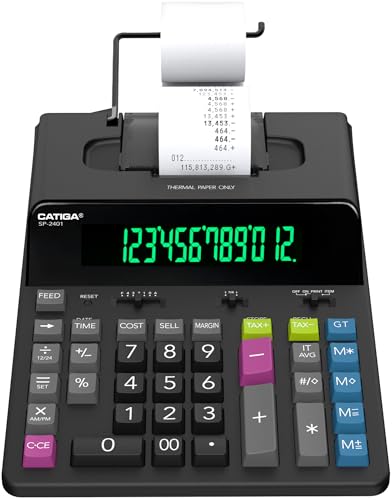
CATIGA 12 Digit Thermal Printing Calculator with Tape

Our verdict: Ink-free thermal tape at 8.0 lines per second, with an extra large fluorescent display.

The CATIGA prints on heat-sensitive paper at 8.0 lines per second, so there is no ribbon or cartridge to replace. It pairs a 12 digit extra large fluorescent display with tax calculation and a clock and calendar, and sells for $50 to $100.

It wins this ranking because the combination covers the whole bookkeeping routine in one box: key a column, read the glowing display, and tear off a tape. Thermal printing removes the classic complaint about dried-out ink rollers. The cost is the paper itself, which needs to be the right width and fades if stored in sun or heat, so keep a copy of anything you must retain for years.

Get it if you hand clients or auditors a printed record. Skip it if you never need paper.

Print speed
8.0 lines per second
Printing
Thermal, no ink
Display
Extra large fluorescent
Extras
Tax keys, clock, calendar

What we like

  • +No ink or ribbon to replace
  • +Bright fluorescent display reads easily
  • +Tax keys and clock built in
  • +Quick tape output

Watch out for

  • −Thermal paper fades over time
  • −Needs a supply of paper rolls

Buy it if: Bookkeepers who give out printed tapes.

Skip it if: You never need a paper copy.

2

Best for Heavy Adding

Sharp 12-Digit Two-Color Desktop Print Calculator

Our verdict: A weighted two-color adding machine that stays planted through long entry sessions.

This Sharp prints in two colors on a weighted base, with a high-contrast display and a footprint of 12.88 by 8.75 inches, priced $50 to $100. It is a classic adding machine in the traditional sense.

It ranks second because stability is an underrated feature. Lightweight printers creep across a desk as you pound the keys, and a heavy base prevents that. Showing negatives in a second colour helps you spot refunds and credits at a glance on the tape. It trails the CATIGA because it relies on ink and has no clock or tax-key detail in its listing.

It suits people who add long columns all day. Skip it if desk space is short.

Printing
Two-color ink
Digits
12
Base
Weighted
Footprint
12.88 x 8.75 in

What we like

  • +Weighted base resists sliding
  • +Red and black tape flags negatives
  • +High-contrast display
  • +Traditional adding machine layout

Watch out for

  • −Needs ink replacement over time
  • −Large footprint for small desks

Buy it if: High-volume adders who value stability.

Skip it if: You are short on desk space.

3

Best AC-Powered Workhorse

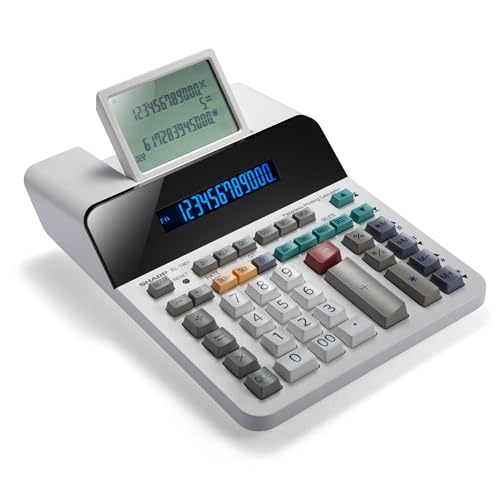
Sharp EL-1801V Ink Printing Calculator

Our verdict: A 12 digit LCD printing calculator powered from the wall, aimed at office use.

The EL-1801V is an ink printing calculator with a 12-digit LCD, AC power and a durable design aimed at business and office use, priced $50 to $100. The wall power means it never goes flat in the middle of a month-end close.

It ranks third because dependability beats novelty for this job. Mains power avoids battery swaps, and an LCD is easy on the eyes under office lighting. It gives up the two-color tape of its sibling and has less detail on extra keys, so it is the plain, honest option.

Choose it for a fixed desk that always has an outlet nearby. Skip it if you want to move the machine around.

Display
12-digit LCD
Power
AC powered
Printing
Ink
Use
Business and office

What we like

  • +AC power avoids battery swaps
  • +12-digit LCD reads clearly
  • +Durable office-focused design
  • +Simple, familiar operation

Watch out for

  • −Tied to a wall outlet
  • −Ink replacement needed

Buy it if: Fixed office desks with a nearby outlet.

Skip it if: You want a portable calculator.

4

Best No-Paper Record

Sharp Paperless Printing Desk Calculator

Our verdict: A scrolling LCD stands in for the tape, with check and correct for fixing entries.

The paperless Sharp has a large 12 digit LCD and a scrolling display that replaces the paper roll, plus a check and correct function, priced $50 to $100. It works like an adding machine without ever running out of paper.

It ranks fourth because scrolling back through a column is quick, but a screen cannot be handed to a client or stapled to a receipt. For people who need to audit their own entries and not share them, that limit does not matter. It sits below the printers because most office buyers at this budget want something they can file.

It works for private bookkeeping. Skip it if you must file physical tapes.

Display
Large 12 digit LCD
Tape
Scrolling on screen
Function
Check and correct
Consumables
None

What we like

  • +Never needs paper or ink
  • +Scroll back through entries
  • +Correct mistakes on screen
  • +Large LCD for easy reading

Watch out for

  • −Nothing to hand to anyone
  • −Power details not listed

Buy it if: Private bookkeeping with on-screen review.

Skip it if: You must file physical tapes.

5

Best Low-Cost Display

DECKLIT 120-Step Check Large Button Calculator

Our verdict: A 5.5 inch two-line screen with solar and battery power and a 120-step check, for less.

The DECKLIT offers a 12 digit, two-line, 5.5 inch LCD with both solar and battery power, a 120-step calculation check and a configurable tax rate, priced $25 to $50. It is the cheapest product here that has real bookkeeping tools.

It ranks fifth in this guide because the budget here is large enough to cover a printer, and the DECKLIT has none. Judged on its own, the screen is excellent: the entry and the total show together, and the 120-step review catches slips. It is the right buy when a tape is optional.

It suits desks that need a clear display more than paper. Skip it if you want a tape.

Display
5.5 inch, two line
Power
Solar and battery
Review
120-step check
Tax
Configurable rate

What we like

  • +Entry and total shown together
  • +Solar and battery power
  • +120-step check finds slips
  • +Lowest price in this group

Watch out for

  • −No printer or tape output
  • −Bulky screen housing

Buy it if: Desks where a clear screen matters most.

Skip it if: You need a paper tape.

6

Best Plain Solar Choice

Desktop 14 Digit Large Calculator with 5-Inch LCD and Solar Power

Our verdict: Fourteen digits and a 5-inch screen with solar power, and no frills at all.

This model carries 14 digits on a 5-inch LCD and runs on solar power, priced $25 to $50. It is a simple office calculator with big numerals.

It ranks sixth because the extra two digits help with larger totals, but nothing else on the listing separates it from the DECKLIT, which adds a second display line and a step check for similar money. It is a fair buy for reception desks, classrooms and home use where totals are just totals.

Choose it for simplicity. Skip it if you want tax keys or any tape.

Digits
14
Display
5-inch LCD
Power
Solar
Type
Desktop

What we like

  • +14 digits for larger sums
  • +Big 5-inch display
  • +Solar power, nothing to charge
  • +Inexpensive and simple

Watch out for

  • −No printing or tax keys
  • −Lacks a step check

Buy it if: Reception desks and basic home use.

Skip it if: You want tax keys or a tape.

7

Best for Retail Pricing

Victor 12-Digit Compact Adding Machine Printing Calculator

Our verdict: Cost, sell and margin keys on a compact ink-roller printer.

The Victor is a compact 12 digit printing calculator with an ink roller printing at 2.3 lines per second, cost, sell and margin keys, and a 20 percent recycled plastic case.

It ranks last because compact bodies sit uneasily with a large-button brief, and its print speed is slower than the CATIGA. The margin keys are the draw: a shop owner can enter a cost and a target margin and read the selling price without a spreadsheet.

It is a good pick for small retail counters. Skip it if the largest possible keys are the point.

Print speed
2.3 lines per second
Keys
Cost, sell, margin
Printer
Ink roller
Case
20 percent recycled plastic

What we like

  • +Cost, sell and margin keys
  • +Compact printing machine
  • +Ink roller is easy to swap
  • +Recycled plastic case

Watch out for

  • −Smaller keys than rivals
  • −Slower than thermal printing

Buy it if: Retail counters that price goods daily.

Skip it if: You want the biggest buttons possible.

Methodology

How We Ranked These

Printing Method

Thermal, ink, scrolling and no-print designs were compared for upkeep and for whether the record is shareable.

Display Legibility

Screen type, size, digit count and contrast were scored for readability under office lighting.

Power Source

AC, solar and battery options were weighed against where each machine can sit and how often it needs attention.

Bookkeeping Tools

Tax keys, margin keys, step checks and correction functions were credited where listed.

Value Under $100

Features were compared with the price bracket, with penalties for thin or missing detail.

Every Primea Score uses the same weights: Performance 30% · Build & Materials 20% · Everyday Usability 20% · Value 20% · Owner Satisfaction 10%. Full scoring rules

Buyer's guide

How to Pick the Right One for You

By Record Type

Decide what kind of record you need, because it removes half the field.

RecordOur pick
Ink-free paper tapeCATIGA Thermal Printing Calculator
Two-color paper tapeSharp 12-Digit Two-Color Print Calculator
Ink tape from a wall-powered unitSharp EL-1801V Ink Printing Calculator
On-screen record onlySharp Paperless Printing Desk Calculator

By Budget

SpendOur pick
Under $50DECKLIT 120-Step Check Calculator
Under $50, plain solarDesktop 14 Digit Solar Calculator
$50 to $75Sharp EL-1801V Ink Printing Calculator
$75 to $100CATIGA Thermal Printing Calculator

Printing vs Screen Only

Printing

A tape proves what you entered and travels with the paperwork. The CATIGA, both Sharp printers and the Victor work this way, at the cost of consumables.

Screen only

A large display with scrollback or a step check is cheaper and cleaner. The DECKLIT and the Sharp Paperless fit here, but there is nothing to file.

Choose printing if anyone else needs to see the figures, and screen-only otherwise.

By Power Supply

PowerOur pick
AC wall powerSharp EL-1801V Ink Printing Calculator
Solar and batteryDECKLIT 120-Step Check Calculator
Solar onlyDesktop 14 Digit Solar Calculator
Heat-based printingCATIGA Thermal Printing Calculator
Stable weighted baseSharp 12-Digit Two-Color Print Calculator

For Small Business Bookkeeping Specifically

Look for

A printed tape, tax keys and a display clear enough to read without leaning in. Margin keys help if you set prices.

In this ranking

The CATIGA offers tax calculation and tape, the Victor adds cost, sell and margin keys, and the Sharp two-color machine handles long columns.

When to Spend More

Spend more if

You add long columns every day or must file tapes. The CATIGA and the two-color Sharp justify the higher bracket.

Save if

You calculate now and then. The DECKLIT or the 14 digit solar model is enough.

Questions

Frequently Asked Questions

Do large button calculators need special paper?+

Only the thermal printer does. The CATIGA uses heat-sensitive rolls, while ink models like the Sharp and Victor use plain paper. Always match the roll width the manual specifies.

What mistake do buyers make most often?+

Buying a printer for casual use. Paper and ink become a chore. If nobody needs the tape, a screen-only model is easier to live with.

Is the CATIGA worth it over the DECKLIT?+

Only if you want a printed record. The CATIGA adds a thermal printer, tax keys and a clock, while the DECKLIT has a bigger two-line screen and costs less. Decide whether you need paper.

How do I set up the tax rate?+

Use the tax setup mode described in the manual, store the rate, then use the tax keys to add or remove it. The DECKLIT and CATIGA both list tax features.

How do I keep a thermal tape from fading?+

Store tapes away from heat and sunlight, and scan or photocopy anything you must keep for years. Thermal print is fine for short-term records.

Can a calculator with a printer run on batteries?+

Some can, but check the listing. The Sharp EL-1801V is AC powered, so it needs an outlet. Solar models like the 14 digit unit have no printer.

Final take

Buy the CATIGA if a printed tape matters and you want no ink to manage. The Sharp two-color printer is the right choice for heavy daily adding, and the Sharp EL-1801V suits a fixed office desk. If you do not need paper, the DECKLIT gives the best screen for the least money.

More Ranked & Reviewed Guides