
Primea ReviewsAll Reviews

Primea Reviews is reader-supported. When you buy through our Amazon links we may earn a commission, at no extra cost to you. Rankings are set by our editors and never sold. Learn more

Ranked & Reviewed by Primea Reviews

The 6 Best Big-Button Desk Calculators Under $75 for Tired Eyes and Heavy Fingers, Ranked & Reviewed

By the Primea Editorial TeamUpdated November 3, 202610 min read6 products ranked
The 6 Best Big-Button Desk Calculators Under $75 for Tired Eyes and Heavy Fingers, Ranked & Reviewed

The short answer

The DECKLIT is the large-button calculator to buy first, with a 5.5 inch display, solar and battery power, and a 120-step check function. The Sharp Paperless gives you a printing-calculator workflow with no paper, the CATIGA is the better choice if you want a tape, and the 14 digit solar model is the lean budget option.

The Primea Scoreboard

Ranked & Reviewed

  1. Big buttons, a 5.5 inch two-line display and a 120-step check for under $50.

    94Outstanding
    Check price
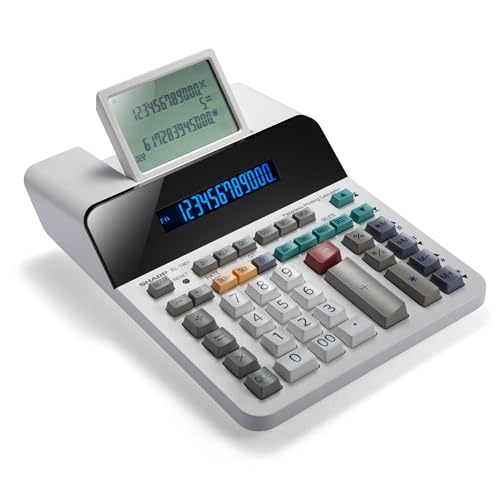
  2. A scrolling LCD that does the job of printed tape without any paper.

    92Outstanding
    Check price
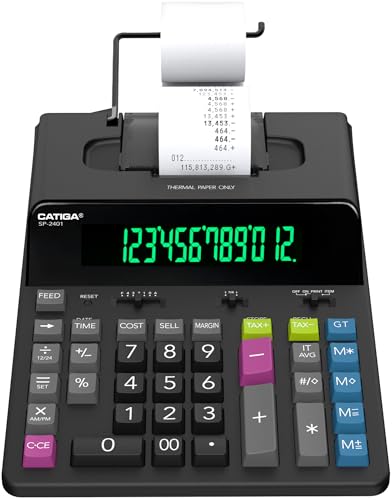
  3. A thermal tape printer at 8.0 lines per second with a large fluorescent display.

    90Excellent
    Check price
  4. A weighted two-color printer with a high-contrast display that stays put while you type.

    88Excellent
    Check price
  5. A plain 14 digit, 5-inch solar calculator for anyone who just needs big numbers.

    86Excellent
    Check price
  6. A compact ink-roller printer with cost, sell and margin keys for pricing work.

    84Very Good
    Check price

People shopping for a big-button calculator often check the key size and nothing else. Then the screen turns out to be tiny, or the keys are spongy, or the thing runs out of ink on a Friday afternoon. For anyone with low vision, arthritis or just a long day of bookkeeping, the display and the working method matter as much as the button.

This ranking looks at six desk calculators in the under $75 range. We reviewed the listings and published specs for display size and digits, power source, printing method and bookkeeping features such as tax keys and step checking. Anything the listing does not say, we leave unclaimed.

Before you buy

What Actually Matters

01

Display Size and Digits

A bigger display means less squinting and fewer misread numbers. Twelve digits is standard for office work, and fourteen suits larger sums. Check the listed screen size in inches and whether the display shows one line or two.

02

Printing vs Paperless

A printing calculator creates a tape you can file, while a paperless model scrolls its record on screen. Printers need paper or ink, and screens need nothing. Decide whether you need a physical record before choosing.

03

Power Source

Solar models never need a charge in a lit room, and battery backup covers dim spaces. Printers usually need mains or batteries. Check the listing for solar, battery or AC wording, because it affects where you can use the machine.

04

Bookkeeping Keys

Tax rate keys, cost, sell and margin keys and step checks save hours for small businesses. They matter if you price or tax items repeatedly. Look at the key list and the stated step-check length on the listing.

05

Stability and Desk Footprint

A light printer can slide as you type, while a weighted base holds firm. A big body takes desk space, which matters in a small office. Compare the listed dimensions with the area you have free.

In-depth reviews

Our Ranked Picks, Reviewed

1

Best Overall Value

DECKLIT 12 Digit 2 Line Extra Large Calculator

Our verdict: Big buttons, a 5.5 inch two-line display and a 120-step check for under $50.

The DECKLIT is a 12 digit, two-line calculator with extra large buttons and a 5.5 inch LCD, powered by both battery and solar, in the $25 to $50 bracket. It adds a 120-step calculation check and a configurable tax rate.

It takes first place because the two-line display is the feature that quietly saves you from mistakes. You can see the entry and the running result at once, and the 120-step check lets you scroll back through what you typed. Dual power means it keeps working in a dim room. The compromise is no paper tape, so you cannot hand a printed record to a client.

Buy it if you want a clear display and bookkeeping checks without paying for a printer. Skip it if you need a physical receipt of every entry.

Display
5.5 inch, 12 digit, 2 line
Power
Battery and solar
Check
120-step review
Tax
Configurable rate

What we like

  • +Two lines show entry and result
  • +120-step check catches typing errors
  • +Solar and battery power both work
  • +Configurable tax rate key

Watch out for

  • −No printed tape for records
  • −Large body takes up desk space

Buy it if: Home and small-office users who want a big, clear display.

Skip it if: You need a paper trail for every calculation.

2

Best Paperless Display

Sharp Paperless Printing Desk Calculator with Check and Correct

Our verdict: A scrolling LCD that does the job of printed tape without any paper.

The Sharp pairs a large 12 digit LCD with a scrolling display that replaces paper tape and a check-and-correct function, in the $50 to $100 bracket. It is built to behave like a printing adding machine without consuming paper or ink.

It ranks second because it keeps the adding-machine workflow that accountants like while removing the consumable. Scrolling back to correct an earlier entry is faster than reprinting a tape. It sits behind the DECKLIT because the display is one line, and the listing does not call out solar power, so check how it is powered.

It suits people who add long columns of figures and want to correct them on screen. Skip it if you need the real tape for filing.

Display
Large 12 digit LCD
Tape
Scrolling, no paper
Function
Check and correct
Price bracket
$50 to $100

What we like

  • +No paper or ink to replace
  • +Scrolling display reviews entries
  • +Check and correct fixes mistakes
  • +Large 12 digit screen

Watch out for

  • −No physical printout produced
  • −Power source not stated on listing

Buy it if: Bookkeepers who add long lists and want no consumables.

Skip it if: You need a printed record to attach to paperwork.

3

Best Ink-Free Printing

CATIGA 12 Digit Thermal Printing Calculator

Our verdict: A thermal tape printer at 8.0 lines per second with a large fluorescent display.

The CATIGA is a 12 digit thermal printing calculator that prints at 8.0 lines per second without ink, with an extra large fluorescent display, tax calculation, and a clock and calendar. Expect to pay somewhere from $50 to $100.

It ranks third because it brings a real paper tape to the group, and the thermal method means no ribbon or ink cartridge to dry out. A bright fluorescent display is easy to read at a glance. The tradeoff is thermal paper, which fades over time, so important records should be copied or scanned. Printing is fast, but you must keep paper rolls on hand.

It is the right pick for anyone who prints a tape for every calculation. Skip it if you want zero consumables.

Print speed
8.0 lines per second
Print method
Thermal, ink-free
Display
Extra large fluorescent
Extras
Tax, clock and calendar

What we like

  • +Ink-free thermal tape printing
  • +Fast 8.0 lines per second
  • +Bright fluorescent display
  • +Tax keys and a built-in clock

Watch out for

  • −Thermal paper fades with age
  • −Needs paper rolls on hand

Buy it if: People who want a printed tape without managing ink.

Skip it if: You never need paper records of calculations.

4

Best Stable Desk Printer

Sharp 12-Digit Two-Color Print Calculator

Our verdict: A weighted two-color printer with a high-contrast display that stays put while you type.

This Sharp is a 12 digit desktop adding machine with two-color printing, a high-contrast display and a weighted base for stable printing, measuring 12.88 by 8.75 inches, in the $50 to $100 bracket. The two colors separate positive and negative figures on the tape.

It ranks fourth because it is the sturdiest of the printers here. A weighted base stops the machine from skating across the desk when you press keys hard, which is a real problem for lighter printers. Red-and-black tape also makes negatives easy to spot. It loses ground to the CATIGA because it uses an ink ribbon, and its larger body needs real desk space.

Choose it for steady, high-volume adding. Skip it if desk space or ink upkeep is a concern.

Digits
12
Printing
Two-color
Base
Weighted for stability
Size
12.88 x 8.75 in

What we like

  • +Weighted base stays in place
  • +Two colors mark negative values
  • +High-contrast display reads clearly
  • +Classic adding machine layout

Watch out for

  • −Takes up a lot of desk
  • −Printing uses an ink ribbon

Buy it if: Heavy daily adders who want a stable machine.

Skip it if: Desk space is tight or you want ink-free upkeep.

5

Best Solar Budget Pick

Desktop 14 Digit Large Calculator with 5-Inch LCD and Solar Power

Our verdict: A plain 14 digit, 5-inch solar calculator for anyone who just needs big numbers.

This desktop model has 14 digits, a 5-inch LCD and solar power, in the $25 to $50 bracket. It offers no printer and no bookkeeping checks, which keeps it simple and light.

It ranks fifth because it covers the basic job at a low price: big digits, big keys and nothing to charge. Fourteen digits handles larger sums than a 12 digit model. Against the DECKLIT it gives up the two-line display, step check and tax rate, and the listing offers little else to separate it from other generic options.

It suits students, seniors and anyone who wants a low-effort calculator at a desk. Skip it if you need tax keys or a record of entries.

Digits
14
Display
5-inch LCD
Power
Solar
Price bracket
$25 to $50

What we like

  • +14 digits handle larger sums
  • +5-inch LCD is easy to read
  • +Solar power needs no charging
  • +Low price for a big display

Watch out for

  • −No printer or step check
  • −Generic listing with few extras

Buy it if: Everyday users wanting big numbers on a budget.

Skip it if: You need tax keys or any record of entries.

6

Best for Margin Math

Victor 12-Digit Compact Adding Machine Printing Calculator

Our verdict: A compact ink-roller printer with cost, sell and margin keys for pricing work.

The Victor is a compact 12 digit adding machine with an ink-roller printer running at 2.3 lines per second, plus cost, sell and margin keys and a 20 percent recycled plastic case. It is the most compact printer here.

It ranks last because compact usually means smaller buttons, which works against the point of this guide. Its strengths are practical: the cost, sell and margin keys speed up markups for small retailers, and the ink roller is a cheap consumable. The slower print speed shows next to the CATIGA.

It is a good pick for retailers who price goods all day. Skip it if oversized keys are your priority.

Digits
12
Print speed
2.3 lines per second
Special keys
Cost, sell, margin
Printer
Ink roller

What we like

  • +Cost, sell and margin keys
  • +Compact body saves desk space
  • +Ink roller is simple to replace
  • +Recycled plastic enclosure

Watch out for

  • −Compact keys are smaller
  • −Slower print than thermal rivals

Buy it if: Small retailers who calculate margins on a tape.

Skip it if: Large keys matter more than printer features.

Methodology

How We Ranked These

Display Readability

We compared display size, digit count and lines shown, since readability is the reason to buy a big-button model.

Key Size and Layout

Listing claims about large buttons were weighed against compact bodies and stable bases.

Printing Method

Thermal, ink-roller, scrolling and no-printer designs were compared on upkeep and usefulness of records.

Bookkeeping Features

Tax keys, step checks, margin keys and correction tools were credited where listed.

Value Under $75

Features were set against price brackets, with credit for clear listings and penalties for vague ones.

Every Primea Score uses the same weights: Performance 30% · Build & Materials 20% · Everyday Usability 20% · Value 20% · Owner Satisfaction 10%. Full scoring rules

Buyer's guide

How to Pick the Right One for You

By Printing Method

Decide whether you need a paper tape, because it splits the field into three camps.

MethodOur pick
No printing, two-line displayDECKLIT 12 Digit Extra Large Calculator
Scrolling record, no paperSharp Paperless Printing Calculator
Thermal, ink-free tapeCATIGA Thermal Printing Calculator
Ink ribbon, two-color tapeSharp 12-Digit Two-Color Calculator

By Budget

SpendOur pick
Under $50DECKLIT 12 Digit Extra Large Calculator
Under $50, plain solarDesktop 14 Digit Solar Calculator
$50 to $75, paperlessSharp Paperless Printing Calculator
$50 to $75, tape printerCATIGA Thermal Printing Calculator

Thermal vs Ink Printing

Thermal

Heat marks the paper, so there is no ink to dry out. The CATIGA works this way and prints fast, though thermal tape fades with age.

Ink roller or ribbon

A roller or ribbon makes lasting marks on plain paper. The Victor and the Sharp two-color machine use ink and cost little to run, but the ink needs replacing.

Thermal is the better default for daily convenience, while ink suits records you keep.

By Work Style

WorkOur pick
Pricing and markupsVictor 12-Digit Compact Printing Calculator
Adding long columnsSharp 12-Digit Two-Color Calculator
Tax calculationsDECKLIT 12 Digit Extra Large Calculator
Light everyday useDesktop 14 Digit Solar Calculator
Auditing entries on screenSharp Paperless Printing Calculator

For Low Vision Specifically

Look for

The largest stated display, high contrast, and large keys with clear spacing. A two-line screen helps you confirm what you typed.

In this ranking

The DECKLIT has a 5.5 inch two-line display, the 14 digit model has a 5-inch screen, and the CATIGA offers a bright fluorescent display.

When to Spend More

Spend more if

You add long columns daily or need a printed record. The Sharp two-color printer and the CATIGA justify the extra cost.

Save if

You calculate only occasionally. The DECKLIT and the 14 digit model are enough for most people.

Questions

Frequently Asked Questions

Does a large button calculator need batteries?+

Not always. Solar models like the 14 digit unit run on light, and the DECKLIT combines solar and battery. Printing models generally need a power source, so check the listing.

What is the most common buying mistake?+

Looking only at key size. A big button with a tiny screen still strains the eyes. Compare the display size and contrast, not just the keys.

Is a printing calculator worth it over a paperless one?+

It is worth it only if you need a paper record. Printing machines add paper and ink to manage, while the Sharp Paperless scrolls a record on screen. For most home users, paperless is the easier choice.

How do I set a tax rate?+

On models with tax keys, you enter the rate in the setup mode and then use the tax keys to add or remove it. The DECKLIT lists a configurable rate, so check its manual for the exact key sequence.

How do I look after a thermal printer?+

Use the right paper width, keep the machine away from heat and replace rolls before they run out. Copy important tapes, because thermal print fades with time.

Do these calculators work for kids or students?+

For basic arithmetic, yes, but none is a scientific model. If a student needs trig or graphing, buy a dedicated scientific calculator instead.

Final take

Buy the DECKLIT for a clear two-line display and bookkeeping checks at the lowest price here. The Sharp Paperless is the pick for adding without paper, and the CATIGA is the one to get when you want an ink-free tape. For steady, heavy use choose the Sharp two-color printer, and for the simplest option take the 14 digit solar model.

More Ranked & Reviewed Guides