

Primea ReviewsAll Reviews

Primea Reviews is reader-supported. When you buy through our Amazon links we may earn a commission, at no extra cost to you. Rankings are set by our editors and never sold. Learn more

Ranked & Reviewed by Primea Reviews

The 6 Best Wireless Printers for Home Offices of 2026, Ranked & Reviewed

By the Primea Editorial TeamUpdated November 1, 202610 min read6 products ranked
The 6 Best Wireless Printers for Home Offices of 2026, Ranked & Reviewed

The short answer

The HP OfficeJet Pro 8125e is the best wireless printer for a home office, with an automatic document feeder, duplex and multi-device WiFi under $100. The Epson EcoTank ET-2800 wins on running cost, and the Brother DCP-L2640DW suits offices that print only black text. The Canon TS6520 is for people tired of WiFi problems.

The Primea Scoreboard

Ranked & Reviewed

  1. ADF, duplex and multi-device WiFi in one home-office inkjet.

    94Outstanding
    Check price
  2. Cartridge-free ink tanks that mean fewer refill interruptions.

    91Excellent
    Check price
  3. A compact black-and-white laser with duplex, copy and scan.

    88Excellent
    Check price
  4. A small OLED shows WiFi status when connections drop.

    85Excellent
    Check price
  5. App-guided setup for routers without a WPS button.

    82Very Good
    Check price
  6. WiFi with an automatic document feeder and legacy fax on a budget.

    79Very Good
    Check price

Most people pick a home-office printer by the sticker price and regret it a year later. Across twelve months of invoices, contracts and school forms, the cost of ink or toner and the number of times you re-pair the machine with your router outweigh the difference between a $60 and a $150 purchase. The better question is what the printer costs to feed and how easily it stays on WiFi.

We reviewed eight listings, dropped a near-duplicate HP OfficeJet Pro and a basic Canon, and ranked six on connectivity, duplex and document feeding, consumables and price bucket. Everything rests on listing specs, not bench runs, so check the exact configuration, including whether an ink trial or toner plan is bundled, before you order.

Before you buy

What Actually Matters

01

WiFi setup

Some printers join WiFi through a router WPS button, and others use app-guided setup. App setup avoids a common failure when the router has no WPS option, and a stable connection saves hours of troubleshooting. Look for app setup or no WPS dependency in the specs, as on the EcoTank and DeskJet. Also confirm the printer supports 2.4 GHz networks, since many models cannot join 5 GHz bands.

02

ADF and duplex

An automatic document feeder scans a stack without lifting the lid, and duplex prints both sides to halve paper use. They are separate features, and a printer can have one without the other. The OfficeJet 8125e lists both. Check the listing names each one separately, not just a generic office label, and look for a sheet capacity on the feeder if you scan long contracts.

03

Ink or toner cost

Cartridge costs add up faster than the sticker price. Supertank printers use bottled ink, lasers use toner, and some inkjets lean on subscription plans like Instant Ink. This is the long-run cost of ownership. Read the ink system line before buying, and note whether a trial converts to a paid plan. Ask what a replacement set of cartridges or toner costs, and how many pages it covers.

04

Color vs monochrome

A monochrome laser is cheap and sharp for text, while a color inkjet handles charts, photos and presentations. Printing a color chart on a black-only printer is impossible, so the choice matters up front. Match the type to what you print most, and read the title for monochrome or color. If you only occasionally need color, a separate print shop run can beat paying for a color machine.

05

Multi-device support

Several people printing from phones and laptops need multi-device WiFi so the printer keeps accepting jobs from each. It affects shared households and small offices most. The OfficeJet 8125e lists multi-device support. Look for the phrase in the specs and check whether mobile printing apps are named. Confirm the printer shares one network name with every device that will send it jobs.

In-depth reviews

Our Ranked Picks, Reviewed

1

Best Overall

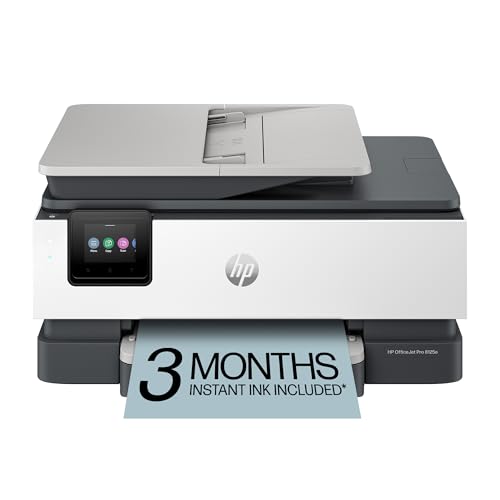
HP OfficeJet Pro 8125e Wireless All-in-One Color Inkjet Printer

Our verdict: ADF, duplex and multi-device WiFi in one home-office inkjet.

The OfficeJet Pro 8125e wins by doing what an office does daily. It joins multiple devices over WiFi, pulls stacks of paper through an automatic document feeder and prints both sides with duplex, and it includes a three-month Instant Ink trial. The feeder is the quiet hero: scanning a ten-page contract without lifting the lid saves real time.

It leads the Canon TS6520, which offers duplex but lists no feeder, and the Epson EcoTank, which lists neither feeder nor duplex. At $50 to $100 it also costs less than the EcoTank's $100 to $200 bucket. Its argument is features per dollar, not low running cost, and the EcoTank wins that fight.

Buy it for a household or office with several users and regular scanning. The caveat is ink: after the trial, Instant Ink is a subscription, and cartridges remain an ongoing cost. Skip it if you print rarely.

Connectivity
WiFi, multi-device
Feeding
ADF
Printing
Duplex
Trial
3-month Instant Ink

What we like

  • +ADF included
  • +Duplex printing
  • +Multi-device WiFi
  • +Instant Ink trial

Watch out for

  • −Ink is ongoing cost
  • −Subscription after trial

Buy it if: Home offices with several users.

Skip it if: You print rarely.

2

Best for Low Ink Cost

Epson EcoTank ET-2800 Wireless Color All-in-One Supertank Printer

Our verdict: Cartridge-free ink tanks that mean fewer refill interruptions.

The EcoTank ET-2800 is built for people who print steadily and hate cartridge runs. A cartridge-free supertank system holds a long-lasting ink supply, and setup does not depend on a WPS button on the router. Scan and copy are built into a compact all-in-one, in the $100 to $200 bucket.

Second place follows because the listing mentions neither a document feeder nor duplex, which the OfficeJet has. The trade is stark: HP wins on office features, Epson wins on cost per page and fewer refill interruptions. Over the long term the tanks can pay back the higher upfront price, especially for anyone who prints a few pages every day.

Buy it if you print regularly and want to stop thinking about cartridges. Skip it if you scan multi-page paperwork, since scanning is a flatbed job without an ADF. The upfront cost is the highest among the inkjets here.

Ink
Cartridge-free supertank
Functions
Print, scan, copy
Setup
No WPS button needed
Price
$100-200

What we like

  • +Cartridge-free tanks
  • +Long-lasting ink supply
  • +No WPS setup
  • +Compact design

Watch out for

  • −No ADF or duplex listed
  • −Higher upfront cost

Buy it if: Steady printing with low ink hassle.

Skip it if: You need an ADF.

3

Best for Text

Brother DCP-L2640DW Wireless Compact Monochrome Laser Printer

Our verdict: A compact black-and-white laser with duplex, copy and scan.

The Brother DCP-L2640DW is the text specialist. It is a compact monochrome laser with WiFi, duplex, copy and scan, a Refresh Subscription toner trial and Alexa support. Laser toner stays stable when the printer sits idle for weeks, so the first page after a long gap comes out clean, unlike an inkjet whose nozzles can dry.

Third place reflects the fact that black-only printing rules out charts, photos and colored forms, and the $200 to $500 bucket makes it the priciest option. Against the EcoTank, it wins on idle reliability and speed for text but loses on color. The OfficeJet beats it on features at roughly a quarter of the price.

Pick it for contracts, invoices and anything mostly black. Skip it if you print photos or slide decks. The toner trial is a subscription hook, so decide beforehand whether you want to continue it.

Type
Monochrome laser
Printing
Duplex
Functions
Copy and scan
Extras
Alexa support

What we like

  • +Laser text output
  • +Duplex printing
  • +Copy and scan
  • +Works with Alexa

Watch out for

  • −No color printing
  • −Highest price bucket

Buy it if: Text-heavy home offices.

Skip it if: You print photos or charts.

4

Best Troubleshooting Display

Canon PIXMA TS6520 Wireless Color Inkjet Printer

Our verdict: A small OLED shows WiFi status when connections drop.

The Canon PIXMA TS6520 is for anyone who has fought printer WiFi before. A 1.42 inch OLED display shows connection status, app-guided setup walks you through joining the router, and duplex printing is included in a compact body. That small screen tells you whether the problem is the printer or the network, which saves a surprising amount of time.

Fourth place comes down to the missing automatic document feeder, which undercuts the HP 8125e on features at a similar $50 to $100 bucket. It beats the DeskJet 4355 below by adding duplex and a status display, and neither is on that model.

Buy it if dropped connections are your recurring headache. Skip it if you scan stacks of pages, since scanning is manual. The display is small, so it reports status rather than offering rich menus.

Display
1.42 inch OLED status
Printing
Duplex
Setup
App-guided WiFi
Price
$50-100

What we like

  • +OLED status screen
  • +Duplex printing
  • +App-guided setup
  • +Compact design

Watch out for

  • −No ADF listed
  • −Small display

Buy it if: Anyone who has fought printer WiFi before.

Skip it if: You scan stacks of pages.

5

Best App Setup

HP DeskJet 4355 Wireless All-in-One Color Inkjet Printer

Our verdict: App-guided setup for routers without a WPS button.

The DeskJet 4355 is the setup-first pick. It joins WiFi through the HP Smart app, so no WPS button is needed, and the box adds a short Instant Ink trial plus the maker's AI printing tools, all in a compact body. For a router without a WPS button, an app-based join is the simplest path.

Fifth place follows from what it skips: the OfficeJet's automatic document feeder and duplex, and the Canon TS6520 above adds duplex and a status display for the same $50 to $100 bucket. The 4355's argument is simplicity: a light printer for a small desk.

Buy it for light home printing, such as occasional forms and shipping labels. Skip it for long documents or heavy scanning, because the office feature set is basic and you will flip pages by hand. Instant Ink becomes a subscription after the trial, so watch your usage.

Setup
HP Smart app, no WPS
Trial
3-month Instant Ink
Type
Color inkjet all-in-one
Price
$50-100

What we like

  • +No WPS button needed
  • +Instant Ink trial
  • +AI-capable features
  • +Compact design

Watch out for

  • −No ADF or duplex listed
  • −Basic office feature set

Buy it if: Light home printing.

Skip it if: You print long documents.

6

Best Budget Scanner

Canon PIXMA TR4720 All-in-One Wireless Printer

Our verdict: WiFi with an automatic document feeder and legacy fax on a budget.

The TR4720 is a budget scanner with a printer attached. It offers WiFi, an automatic document feeder, mobile printing and built-in fax, in the $50 to $100 bucket. A feeder at that price lets you scan a stack of receipts without babysitting the glass.

Last place follows because fax is a legacy feature few home offices touch, and duplex is not highlighted in the listing. The HP 8125e costs a similar amount and adds duplex, a multi-device WiFi line and an ink trial. The TR4720's only real argument is that the feeder is available cheaply.

Buy it for multi-page scanning on a budget. Skip it if you print many double-sided documents, since you would flip each sheet manually. Expect to pay attention to cartridge cost, as no ink plan is listed here.

Feeding
Automatic document feeder
Connectivity
WiFi, mobile printing
Extra
Built-in fax
Price
$50-100

What we like

  • +ADF included
  • +Mobile printing
  • +WiFi connectivity
  • +Built-in fax

Watch out for

  • −Duplex not highlighted
  • −Fax rarely used

Buy it if: Budget multi-page scanning.

Skip it if: You want duplex printing.

Methodology

How We Ranked These

Wireless setup

App-guided setup and status feedback ranked higher.

Document handling

ADF and duplex support counted for office tasks.

Running costs

Supertank, toner and subscription ink were compared.

Output type

Color inkjet versus monochrome laser was weighed against use.

Price bucket

Features were weighed against the listed price bucket.

Every Primea Score uses the same weights: Performance 30% · Build & Materials 20% · Everyday Usability 20% · Value 20% · Owner Satisfaction 10%. Full scoring rules

Buyer's guide

How to Pick the Right One for You

By Print Volume

Pages per month steer you to the right ink system.

VolumeOur pick
Light, a few pages weeklyHP DeskJet 4355
Moderate with scanningHP OfficeJet Pro 8125e
Heavy, steady printingEpson EcoTank ET-2800
Heavy text onlyBrother DCP-L2640DW

By Budget

SpendOur pick
$50 to $100 full-featuredHP OfficeJet Pro 8125e
$50 to $100 simpleHP DeskJet 4355
$100 to $200Epson EcoTank ET-2800
$200 to $500Brother DCP-L2640DW

Inkjet vs Laser

Inkjet

Color at lower upfront cost. The HP and Canon models plus the Epson EcoTank are inkjet.

Laser

Sharp black text and low idle risk. The Brother DCP-L2640DW is the laser option.

Most buyers should default to inkjet unless they print text almost exclusively.

By Router Situation

SituationOur pick
No WPS button on routerHP DeskJet 4355
Mesh routerEpson EcoTank ET-2800
Printer far from routerCanon PIXMA TS6520
Many devices printingHP OfficeJet Pro 8125e

For Remote Workers Scanning Contracts Specifically

Look for

An automatic document feeder, duplex and reliable WiFi.

In this ranking

The HP OfficeJet Pro 8125e lists an ADF and duplex, and the Canon TR4720 lists an ADF at a budget.

When to Spend More

Spend more if

You print daily and want low ink fuss, pointing to the Epson EcoTank or Brother laser.

Save if

Printing is occasional, in which case the HP DeskJet 4355 suffices.

Questions

Frequently Asked Questions

Do I need WPS on my router?+

Not for the HP DeskJet 4355 or the Epson EcoTank ET-2800, which both list setup that does not depend on a WPS button. The Canon TS6520 uses app-guided setup too, so a router without WPS is not a blocker for any of these.

Is a laser better than an inkjet for a home office?+

For text, yes. The Brother DCP-L2640DW stays ready after idle periods and prints black documents cleanly, with no dried nozzles. For charts and photos, an inkjet like the HP OfficeJet 8125e is more flexible.

Is the EcoTank worth it over a cheap inkjet?+

If you print regularly, yes. Cartridge-free tanks cut refill interruptions, which suits the EcoTank ET-2800. For occasional printing, a cheaper model like the HP DeskJet 4355 makes more sense because you will not recover the higher upfront cost.

What mistake do buyers make?+

Ignoring the ink cost. A low upfront price can hide an expensive consumable, so compare supertank, toner and cartridge systems, not just the price bucket. The EcoTank and Brother laser are the two that reward steady printing.

How do I set up wireless printing?+

Use the maker's app to join your WiFi, then add the printer on your phone or computer. HP models use the HP Smart app, and the Canon TS6520 has app-guided steps plus an OLED screen showing connection status.

What about Instant Ink?+

HP's trial lasts three months on the OfficeJet 8125e and DeskJet 4355. After that it is a subscription, so decide before the trial ends whether your print volume justifies it. Light users often do better buying ink as needed.

Final take

For most home offices, the HP OfficeJet Pro 8125e is the right wireless printer, with a feeder, duplex and multi-device WiFi at a modest price. Pick the Epson EcoTank ET-2800 if ink cost is your main worry, the Brother DCP-L2640DW for pure text, and the Canon TS6520 if WiFi keeps dropping.

More Ranked & Reviewed Guides