
Primea ReviewsAll Reviews

Primea Reviews is reader-supported. When you buy through our Amazon links we may earn a commission, at no extra cost to you. Rankings are set by our editors and never sold. Learn more

Ranked & Reviewed by Primea Reviews

The 7 Best WiFi Extenders Under $200 for Dead Zones and Far Rooms, Ranked & Reviewed

By the Primea Editorial TeamUpdated November 3, 202611 min read7 products ranked
The 7 Best WiFi Extenders Under $200 for Dead Zones and Far Rooms, Ranked & Reviewed

The short answer

The TP-Link AX3000 is the best extender here, a WiFi 6 unit with EasyMesh, an Ethernet port and a 64-device limit, priced in the $50 to $100 range. The TP-Link RE550 is the cheaper wired-port choice for older routers, the AC1200 is the budget EasyMesh pick, and the generic extenders at the bottom make large coverage claims you should treat with caution.

The Primea Scoreboard

Ranked & Reviewed

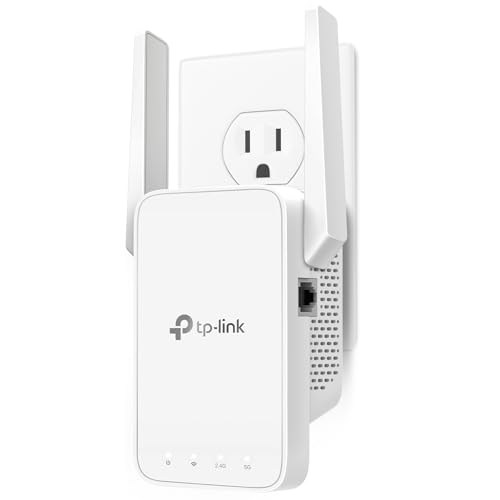
  1. A WiFi 6 dual-band extender with EasyMesh, an Ethernet port and room for 64 devices.

    95Outstanding
    Check price
  2. 02
    TP-Link AC1900 WiFi Range Extender RE550

    An AC1900 dual-band extender with a gigabit Ethernet port and 2200 square foot rating.

    92Outstanding
    Check price
  3. A 1.2Gbps dual-band extender with EasyMesh and one Ethernet port for small to mid homes.

    89Excellent
    Check price
  4. A dual-band extender with OneMesh support and 1200 square foot coverage for under $25.

    87Excellent
    Check price
  5. A dual-band 1200Mbps booster with a large coverage claim and few supporting details.

    84Very Good
    Check price
  6. A repeater promising one-tap setup, an Ethernet port and a 50-device allowance.

    82Very Good
    Check price
  7. An unbranded repeater with an Ethernet port and a headline claim of 9800 square feet.

    80Very Good
    Check price

Range extenders have a dirty secret that the box never mentions: a basic extender repeats your signal by receiving and retransmitting on the same radio, which can cut speeds roughly in half. Putting one in the worst corner of the house, where signal is already weak, makes things worse. The best placement is halfway between router and dead zone, and the best extender has a way around the speed penalty.

This ranking is organised around those facts. We reviewed seven extenders under $200 from their listings, comparing WiFi generation, dual-band design, EasyMesh or OneMesh support, Ethernet ports, device limits and the stated coverage. Where a listing gives only a marketing number with no detail, we call it a claim, not a measurement.

Before you buy

What Actually Matters

01

Dual-band design

A dual-band extender uses 2.4GHz and 5GHz. The 5GHz band is faster but shorter in range, and the 2.4GHz band reaches farther through walls. Single-band units have to share one radio, which slows speed. Look for dual-band on the listing.

02

WiFi generation

WiFi 6 handles many devices at once and uses less airtime per phone. AC extenders work fine with older routers. Match the extender to your router, since a fast extender cannot improve a slow router.

03

Mesh compatibility

EasyMesh and OneMesh let the extender share your network name and hand devices off between units. Without them you may see two networks. Check that your router supports the same standard.

04

Coverage claims

Square footage claims are best-case, in open space with no walls. Realistic results are a fraction of the figure. Place the extender halfway between the router and the dead zone, not inside the dead zone.

05

Ethernet port

A wired port lets you connect a TV, console or PC to the extender with a cable, which is more reliable than wireless. Check whether the port is gigabit, as with the RE550, since slower ports cap wired speed.

In-depth reviews

Our Ranked Picks, Reviewed

5

Best Unbranded Dual-Band

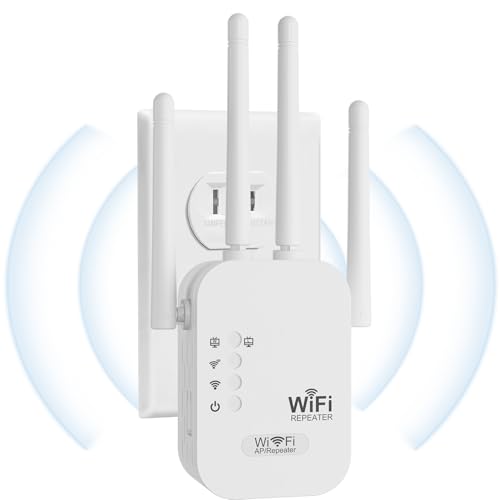
1200Mbps Dual Band WiFi Extender Signal Booster Covers Up to 3600 Sq.ft

Our verdict: A dual-band 1200Mbps booster with a large coverage claim and few supporting details.

This unbranded extender is listed as 1200Mbps dual-band with coverage up to 3600 square feet and costs under $25. The listing offers little beyond that.

It ranks fifth because dual-band is the one design choice that matters, and it has it. The 3600 square foot claim is a vendor figure and should be read as a ceiling, not a typical result, since walls, floors and interference cut real coverage hard. Support and firmware updates from small sellers are harder to count on.

Buy it as a cheap trial for a dead zone. Skip it if you want proven support.

Speed class
1200Mbps dual-band
Coverage
Up to 3600 sq ft claimed
Brand
Unbranded
Price bracket
Under $25

What we like

  • +Dual-band design
  • +Very low cost
  • +Large coverage claim
  • +Easy low-risk trial

Watch out for

  • −Few listed specifications
  • −Coverage claim is optimistic

Buy it if: Cheap trials of a single dead zone.

Skip it if: You want brand support and firmware.

6

Best One-Tap Setup

WiFi Extender Signal Booster for Home, 1-Tap Setup, Ethernet Port, 50 Devices

Our verdict: A repeater promising one-tap setup, an Ethernet port and a 50-device allowance.

The listing promises 1-tap setup, an Ethernet port, coverage up to 5000 square feet and 50 devices, at under $25. It is another unbranded repeater.

It ranks sixth because the claim of 5000 square feet from a plug-in extender is a very large number and unlikely in a real home. The easy setup button is real value for non-technical users. The extra Ethernet port helps a TV or console.

Buy it if setup simplicity is the priority. Skip it if you would rely on the coverage number.

Setup
1-tap button
Coverage
Up to 5000 sq ft claimed
Devices
Up to 50
Port
Ethernet

What we like

  • +One-tap setup is beginner friendly
  • +Ethernet port included
  • +Claims 50 device support
  • +Very low price

Watch out for

  • −5000 sq ft claim is unrealistic
  • −Unbranded with thin support

Buy it if: Non-technical buyers who want simple setup.

Skip it if: You trust the coverage figure.

7

Cheapest Experiment

WiFi Repeater Internet Booster with Ethernet Port, Long Range, Ivory White

Our verdict: An unbranded repeater with an Ethernet port and a headline claim of 9800 square feet.

The listing claims coverage of up to 9800 square feet, includes an Ethernet port and quick setup, and comes in ivory white. It costs under $25.

It ranks last because a 9800 square foot figure from a plug-in repeater is not credible, and no standard, band or device limit is listed. Ethernet is the practical feature, letting you wire one device. Treat it as a low-cost experiment.

Buy it only if you accept the risk. Skip it if you want documented WiFi standards.

Coverage
Up to 9800 sq ft claimed
Port
Ethernet
Finish
Ivory white
Price bracket
Under $25

What we like

  • +Ethernet port included
  • +Quick setup advertised
  • +Lowest-risk spend
  • +Neutral ivory finish

Watch out for

  • −No WiFi standard listed
  • −Coverage claim is not credible

Buy it if: Low-stakes experiments for a rarely used room.

Skip it if: You want documented specs.

Methodology

How We Ranked These

WiFi standard

We compared WiFi 6 and AC designs, dual-band layouts and listed speed classes, since the standard sets the ceiling on speed.

Mesh support

EasyMesh and OneMesh compatibility were weighed for how well an extender joins an existing network under one name.

Wired ports

Ethernet and gigabit port presence were scored for wiring TVs, consoles and desktops.

Claims versus detail

Large coverage numbers without supporting specs were treated as vendor claims and marked down accordingly.

Value under $200

Every unit costs far below $200, so extras such as WiFi 6 and device limits were compared against the $50 to $100 top pick.

Every Primea Score uses the same weights: Performance 30% · Build & Materials 20% · Everyday Usability 20% · Value 20% · Owner Satisfaction 10%. Full scoring rules

Buyer's guide

How to Pick the Right One for You

By Router Type

Your router sets what an extender can do for you.

Your routerOur pick
WiFi 6 with EasyMeshTP-Link AX3000 WiFi 6 Range Extender
Older AC router, wired deviceTP-Link AC1900 WiFi Range Extender RE550
Router with EasyMeshTP-Link AC1200 WiFi Extender with EasyMesh
TP-Link OneMesh routerTP-Link WiFi Extender with Ethernet Port, Dual Band, OneMesh

By Budget

SpendOur pick
$50 to $100TP-Link AX3000 WiFi 6 Range Extender
$25 to $50TP-Link AC1900 WiFi Range Extender RE550
Under $25, brandedTP-Link WiFi Extender with Ethernet Port, Dual Band, OneMesh
Under $25, unbranded1200Mbps Dual Band WiFi Extender Signal Booster Covers Up to 3600 Sq.ft

Extender vs Mesh System

Extender

Cheap and plugs into an outlet, but repeats the signal and can halve speed. Best for one dead zone. Picks: TP-Link AX3000, RE550, AC1200.

Mesh system

Several nodes replace the router and keep one fast network. Costs more but holds speed across larger homes. None of these picks is a full mesh.

Default to an EasyMesh extender if your router supports it, and consider a full mesh for very large homes.

By Home Size

SizeOur pick
Studio or flat, to 1200 sq ftTP-Link WiFi Extender with Ethernet Port, Dual Band, OneMesh
Small house, to 1600 sq ftTP-Link AC1200 WiFi Extender with EasyMesh
Mid-size, to about 2200 sq ftTP-Link AC1900 WiFi Range Extender RE550
Larger or many devicesTP-Link AX3000 WiFi 6 Range Extender

For Streaming and Gaming Specifically

Look for

A gigabit Ethernet port, a dual-band design and WiFi 6 if your router supports it, so a wired console avoids the wireless penalty.

In this ranking

TP-Link AX3000 for the best performance, and TP-Link RE550 if you want a gigabit port on a tighter budget.

When to Spend More

Spend more if

You have a large home, many devices or a WiFi 6 router. The AX3000 is the model here, and a full mesh kit beyond it.

Save if

You only have one weak room and an older router. The AC1200 or the OneMesh model does the job.

Questions

Frequently Asked Questions

Will an extender work with any router?+

Basic extender function works with nearly any router, but EasyMesh and OneMesh need a compatible router. Check your router's manual for the mesh standard it supports.

What is the biggest mistake with extenders?+

Putting them in the dead zone. An extender needs a decent signal to repeat. Place it halfway between router and dead zone where it still gets at least a moderate signal.

Is the AX3000 worth it over the RE550?+

If your router is WiFi 6 and you have many devices, yes. For an older router, the RE550 gives a gigabit port and bigger listed coverage for less.

How do I set one up?+

Plug it in near the router, use the app or WPS button to connect, then move it halfway to the dead zone. Check the signal light to confirm placement.

Why is my extended network slow?+

Single-radio repeaters halve throughput, and a weak input signal makes it worse. Move the extender closer to the router, or use the Ethernet port for important devices.

Should I believe a 9800 square foot claim?+

No. Plug-in extenders do not cover that much in a real home. Treat any figure above a few thousand square feet as marketing.

Final take

The TP-Link AX3000 is the best WiFi extender here for any modern home, with WiFi 6, EasyMesh, a wired port and a 64-device limit. The RE550 suits older routers that need a gigabit port, and the AC1200 is the budget mesh-ready choice. The unbranded units are low-cost experiments, not recommendations. Place the extender halfway to the dead zone.

More Ranked & Reviewed Guides