

Primea ReviewsAll Reviews

Primea Reviews is reader-supported. When you buy through our Amazon links we may earn a commission, at no extra cost to you. Rankings are set by our editors and never sold. Learn more

Ranked & Reviewed by Primea Reviews

The 6 Best Mesh WiFi Systems Under $200 for Whole-Home Coverage, Ranked & Reviewed

By the Primea Editorial TeamUpdated November 3, 202610 min read6 products ranked
The 6 Best Mesh WiFi Systems Under $200 for Whole-Home Coverage, Ranked & Reviewed

The short answer

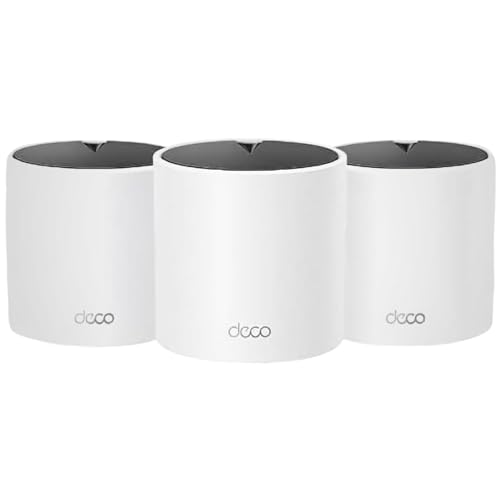
The TP-Link Deco X55 3-pack is the best mesh system under $200 for most homes, with WiFi 6 and an AX3000 speed class across three nodes. The Deco X15 is the pick if you can run Ethernet between nodes, the Deco S4 3-pack is the cheapest way to blanket a house, and the Deco X25 is a renewed compact WiFi 6 option.

The Primea Scoreboard

Ranked & Reviewed

  1. WiFi 6 at an AX3000 speed class with three nodes, and still inside the $100 to $200 bracket.

    94Outstanding
    Check price
  2. AX1500 WiFi 6 with two gigabit ports per unit and Ethernet backhaul for the most stable links.

    92Outstanding
    Check price
  3. Three AC1900 nodes in the $50 to $100 bracket, the least costly way to fill a house.

    89Excellent
    Check price
  4. AX1800 WiFi 6 in a compact three-node kit, sold renewed at a low price.

    87Excellent
    Check price
  5. A single X55 unit for small spaces or for adding a node to an existing Deco network.

    84Very Good
    Check price
  6. Two WiFi 5 nodes at the bottom of the price range, for a modest home.

    81Very Good
    Check price

The most common mesh mistake is buying by the coverage number on the box. A claim of thousands of square feet describes the best case, with open space, no brick and nodes placed in a perfect line. What actually decides whether your bedroom has a usable signal is the speed class of each node, whether nodes can talk to each other over a cable, and whether you buy enough of them in the first place.

This ranking sorts six TP-Link Deco systems that sit under the $200 mark by those practical points. We reviewed the product names, speed classes and listing details for each one, and we ranked them on WiFi generation, pack size, wired backhaul support and value. Where the listing does not give a figure, such as port counts on some models, we leave it out instead of guessing.

Before you buy

What Actually Matters

01

WiFi 5 vs WiFi 6

WiFi 6 handles many connected devices more efficiently, which matters when phones, TVs, speakers and cameras all share one network. WiFi 5 still works for light households. Check the listing for WiFi 6 or an AX prefix in the speed class, as the AC prefix means the older standard.

02

Speed class numbers

Labels like AX3000 or AC1900 add together the maximum speeds of each radio band, so no single device will reach the headline figure. They are useful for comparison only. Pick the class by how many devices you run and by your internet plan, not by the biggest number.

03

Wired backhaul

Backhaul is how nodes talk to each other. Over a wireless link they share radio capacity with your devices, but over Ethernet they do not. If you can run a cable, choose a system with a listed Ethernet backhaul option, like the Deco X15, and your far rooms will hold their speed.

04

Node count and placement

Coverage claims assume open space. Walls, floors and appliances cut the signal sharply, so place nodes about one room apart and avoid cupboards. If you live in a house with more than two floors, three nodes is a sensible starting point.

05

Renewed vs new stock

Renewed products are refurbished and often cost less, but warranty terms and return windows can differ from a new kit. Read the condition and guarantee text on the listing. Treat any renewed router as a lower-risk purchase only if the return policy is clear.

In-depth reviews

Our Ranked Picks, Reviewed

Methodology

How We Ranked These

WiFi generation

We compared WiFi 5 and WiFi 6 systems, since the newer standard handles crowded households far better.

Speed class

AC1900, AX1500, AX1800 and AX3000 ratings were weighed as headroom for the number of devices and the internet plan.

Backhaul and ports

We favoured systems that list Ethernet backhaul and gigabit ports, since wired links keep distant rooms fast.

Pack size and coverage

One, two and three-node kits were judged against typical home sizes, with stated coverage treated as a best case.

Value inside the bracket

Feature depth was set against the $50 to $100 and $100 to $200 price buckets that define this guide.

Every Primea Score uses the same weights: Performance 30% · Build & Materials 20% · Everyday Usability 20% · Value 20% · Owner Satisfaction 10%. Full scoring rules

Buyer's guide

How to Pick the Right One for You

By Home Size

Node count matters more than any other number on the box.

Home typeOur pick
Large two-storey houseTP-Link Deco X55 AX3000 WiFi 6 Mesh System, Deco X55(3-Pack)
Wired home or long layoutTP-Link Deco X15 Dual-Band AX1500 WiFi 6 Mesh Wi-Fi System
Small flat or studioTP-Link Deco X55 AX3000 WiFi 6 Mesh System, Deco X55(1-Pack)
Modest house, one dead spotTP-Link Deco S4 Whole Home Mesh WiFi System, Deco S4(2-Pack)

By Budget

SpendOur pick
$50 to $100, three nodesTP-Link Deco S4 Mesh AC1900 WiFi System, Deco S4(3-Pack)
$50 to $100, WiFi 6TP-Link Deco X25 AX1800 Dual-Band Whole Home Mesh Wi-Fi 6 System (3-Pack)
$100 to $200, most homesTP-Link Deco X55 AX3000 WiFi 6 Mesh System, Deco X55(3-Pack)
$100 to $200, wiredTP-Link Deco X15 Dual-Band AX1500 WiFi 6 Mesh Wi-Fi System

WiFi 6 vs WiFi 5

WiFi 6

Better with many devices at once, and better power efficiency for phones. Costs slightly more. Picks: Deco X55, Deco X15 and Deco X25.

WiFi 5

Fine for streaming and video calls in a light household, at the lowest price. Picks: Deco S4 3-pack and 2-pack.

Default to WiFi 6 unless the budget is under $100 and the household is small.

By Connection Type

SetupOur pick
Ethernet cables between nodesTP-Link Deco X15 Dual-Band AX1500 WiFi 6 Mesh Wi-Fi System
Wireless links only, high speedTP-Link Deco X55 AX3000 WiFi 6 Mesh System, Deco X55(3-Pack)
Wireless links, tight budgetTP-Link Deco S4 Mesh AC1900 WiFi System, Deco S4(3-Pack)
Extending an existing Deco networkTP-Link Deco X55 AX3000 WiFi 6 Mesh System, Deco X55(1-Pack)

For Working From Home Specifically

Look for

Stable links in the room where you work, WiFi 6 for video calls over a busy network, and ideally a wired backhaul to the node near your desk.

In this ranking

The Deco X15 with Ethernet backhaul is the steadiest option, while the Deco X55 3-pack is the better choice if you cannot run cable.

When to Spend More

Spend more if

You have a fast internet plan, more than fifteen devices, or a house with thick walls. The Deco X55 3-pack covers those needs inside the cap.

Save if

Your plan is modest and your household is light. The Deco S4 3-pack covers a big house for the least money.

Questions

Frequently Asked Questions

Can I mix different Deco models in one network?+

TP-Link allows some mixing, but compatibility varies by model and firmware, so check the compatibility list before combining a new unit with an older one. Buying a matched kit is the safest way to avoid problems.

What is the biggest mistake with mesh systems?+

Putting nodes too far apart. Each node needs a strong link back to the previous one, so place them roughly one room apart rather than at the far edge of coverage. A distant node just repeats a weak signal.

Is the Deco X55 worth it over the Deco S4?+

For most households, yes. WiFi 6 and the AX3000 class cope far better with many devices than the older AC1900 class. If you have only a few devices and a basic plan, the S4 3-pack saves money.

How hard is setup?+

It usually takes 10 to 20 minutes. You connect the first node to your modem, install the TP-Link Deco app, follow the prompts to name the network, and then add the other nodes one at a time.

How do I maintain the system?+

Keep the firmware updated through the app, which fixes bugs and security issues, and reboot a node if a room goes quiet. Dust the vents occasionally and keep nodes out of enclosed cabinets.

Should I buy the renewed Deco X25?+

It can be good value if the return policy is clear. Check the seller's warranty and the condition grade in the listing, since renewed products do not carry the same cover as new ones.

Final take

For most homes under $200, the TP-Link Deco X55 3-pack is the best mesh WiFi system here: WiFi 6, an AX3000 speed class and three nodes. The Deco X15 is the better choice if you can run Ethernet between nodes, and the Deco S4 3-pack is the cheapest way to blanket a large house. The renewed X25 adds WiFi 6 at a low price if you accept refurbished stock. Match node count to your floor plan before you worry about speed ratings.

More Ranked & Reviewed Guides