

Primea ReviewsAll Reviews

Primea Reviews is reader-supported. When you buy through our Amazon links we may earn a commission, at no extra cost to you. Rankings are set by our editors and never sold. Learn more

Ranked & Reviewed by Primea Reviews

The 7 Best Mesh WiFi Systems Under $300 for Whole-Home Coverage, Ranked & Reviewed

By the Primea Editorial TeamUpdated November 3, 202611 min read7 products ranked
The 7 Best Mesh WiFi Systems Under $300 for Whole-Home Coverage, Ranked & Reviewed

The short answer

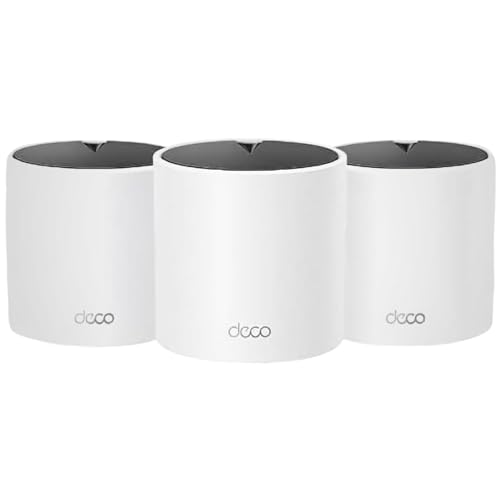
The three-node TP-Link Deco X55 AX3000 kit is the best balance of WiFi 6 speed, coverage and cost for most homes. The Deco 7 BE23 is the pick if you want WiFi 7 and a wired backhaul option, the Deco 7 BE5000 is the faster WiFi 7 step up, and the Deco S4 sets are the bare-minimum choice for a small budget and light use.

The Primea Scoreboard

Ranked & Reviewed

  1. Three WiFi 6 nodes at AX3000 class cover a typical multi-floor house without stretching the budget.

    94Outstanding
    Check price
  2. WiFi 7 with 160 MHz channels, 2.5G ports and wired backhaul for up to 6,500 sq ft.

    92Outstanding
    Check price
  3. A dual-band BE5000 WiFi 7 kit with 4 streams and 240 MHz on the product name.

    90Excellent
    Check price
  4. A compact AX1500 WiFi 6 mesh with two gigabit ports per unit and Ethernet backhaul.

    88Excellent
    Check price
  5. A single WiFi 6 Deco X55 for small spaces or for expanding an existing Deco setup.

    86Excellent
    Check price
  6. Three WiFi 5 nodes at the lowest spend, built for coverage rather than speed.

    84Very Good
    Check price
  7. A two-node WiFi 5 whole-home kit for apartments and small houses on a tight budget.

    82Very Good
    Check price

The biggest mistake in mesh shopping is trusting the big number on the box. AX3000, BE5000 and AC1900 are combined theoretical figures, added up across bands, and no single phone or laptop ever sees that total. What you actually feel is how many nodes you get, how they talk to each other and whether the speed class matches the gadgets you own.

This ranking therefore sorts by generation, node count and backhaul options rather than headline speed. We reviewed seven TP-Link Deco kits from their listings: WiFi standard, rated speed class, stated coverage, port counts and whether wired backhaul is supported. Where a listing is thin, we say so and avoid inventing numbers.

Before you buy

What Actually Matters

01

WiFi generation

WiFi 5, WiFi 6 and WiFi 7 differ in how efficiently they share airtime across many devices, and newer generations handle busy homes better. WiFi 6 is the sweet spot because most current devices support it, while WiFi 7 only pays off with WiFi 7 clients. Check the standard on the box and match it to your newest phone or laptop.

02

Speed class numbers

Labels like AX3000 or BE5000 add the theoretical speeds of every band together, so no single device ever reaches the total. Compare them only within the same generation, and treat them as a rough tier rather than a promise. Look for the band count and stream count on the listing for a clearer picture.

03

Node count and coverage

A mesh works because nodes overlap, so too few leaves gaps and too many wastes money. A three-node kit is the usual fit for a two-story house, while two nodes suit a compact home. Quoted square footage is a best-case open-space figure, so subtract for walls, floors and brick.

04

Ports and backhaul

Backhaul is how nodes talk to each other, and dual-band kits share the same radio for devices and node traffic, which cuts speed. Running Ethernet between nodes avoids that penalty. Look for the number and speed of ports, and note whether the listing says wired backhaul is supported.

05

Internet plan speed

Gigabit ports cap throughput near 1 Gbps, so a faster plan needs a 2.5G port to take advantage of it. Most households on plans under 500 Mbps will never notice the difference. Check your plan speed and the WAN port rating before paying for a premium kit.

In-depth reviews

Our Ranked Picks, Reviewed

Methodology

How We Ranked These

WiFi generation and speed class

We compared WiFi 5, 6 and 7 kits and treated the rated speed as a combined theoretical figure rather than what one device receives.

Node count and coverage

Kits were scored on how many nodes ship in the box and the square footage the listing quotes.

Ports and backhaul

Gigabit versus 2.5G ports and the option of Ethernet backhaul weighed heavily, since they decide whether a fast internet plan survives the mesh.

Setup and app experience

Each kit uses the Deco app, so we credited listings that describe straightforward setup and router replacement.

Value under $300

We judged what each kit delivers against its price range and how much of the budget it leaves for other gear.

Every Primea Score uses the same weights: Performance 30% · Build & Materials 20% · Everyday Usability 20% · Value 20% · Owner Satisfaction 10%. Full scoring rules

Buyer's guide

How to Pick the Right One for You

By WiFi Generation

The generation decides how well the system handles busy homes and which devices benefit.

GenerationOur pick
WiFi 7, wired backhaulTP-Link Deco 7 BE23 BE3600 Mesh System
WiFi 7, faster classTP-Link Deco 7 BE5000 Mesh System
WiFi 6, best valueTP-Link Deco X55 AX3000 Mesh System, 3-Pack
WiFi 5, lowest spendTP-Link Deco S4 AC1900 Mesh System, 3-Pack

By Budget

SpendOur pick
$50 to $100TP-Link Deco S4 AC1900 Mesh System, 3-Pack
$50 to $100 (expansion)TP-Link Deco X55 AX3000 Mesh System, 1-Pack
$100 to $200TP-Link Deco X55 AX3000 Mesh System, 3-Pack
$200 to $300TP-Link Deco 7 BE23 BE3600 Mesh System

Wireless Backhaul vs Wired Backhaul

Wireless backhaul

Nodes talk to each other over the same radios your devices use, so speed drops at each hop. Fine for light use. Picks: Deco S4 sets and Deco X55 3-Pack.

Wired backhaul

Ethernet cable between nodes keeps the radios free for devices and keeps speed high. Picks: Deco 7 BE23 and Deco X15.

Default to wired backhaul if you can run cable, since it matters more than the speed class.

By Home Size

HomeOur pick
Large home, 3+ floorsTP-Link Deco 7 BE23 BE3600 Mesh System
Two-story houseTP-Link Deco X55 AX3000 Mesh System, 3-Pack
Mid-size, wiredTP-Link Deco X15 AX1500 Mesh System
Small apartmentTP-Link Deco S4 AC1900 Mesh System, 2-Pack

For Gigabit Internet Specifically

Look for

A 2.5G port, wired backhaul and a modern WiFi generation. Gigabit ports on every node can bottleneck a plan above 1 Gbps.

In this ranking

Deco 7 BE23 is the only kit with documented 2.5G ports. The Deco 7 BE5000 is the faster class if you confirm its ports on the listing.

When to Spend More

Spend more if

You have a fast internet plan, a crowded smart home or plan to wire the house. The Deco 7 BE23 and Deco 7 BE5000 earn the premium.

Save if

You live in a small space with few devices. The Deco S4 sets or the Deco X55 single node will do the job.

Questions

Frequently Asked Questions

Will these Deco kits work with my existing modem?+

Yes, they connect by Ethernet to any modem or ISP gateway. If your gateway is also a router, set it to bridge or IP passthrough mode so the two do not conflict.

What is the most common mesh setup mistake?+

Placing nodes too far apart, so the satellite only receives a weak signal. Put each node roughly halfway between the previous one and the dead zone, and use the app's signal indicator to confirm.

Is WiFi 7 worth it over WiFi 6 here?+

Only if you own WiFi 7 devices or have a plan faster than 1 Gbps. For most households the X55 three-pack gives better coverage per dollar, and you can upgrade later.

How do I set up a Deco system?+

Connect the first unit to the modem, install the Deco app and follow the prompts, then place the other nodes and let the app pair them. Most owners finish in well under half an hour.

Can I mix different Deco models?+

Many Deco models can join the same network, but a mixed kit runs at the capability of the weakest link in many cases. Check TP-Link's compatibility list before combining WiFi 5, 6 and 7 units.

How do I keep the system secure and fast?+

Keep the firmware updated through the app, use WPA3 where your devices support it and reboot nodes if speeds drop. Moving a node away from microwaves and thick walls often fixes odd slowdowns.

Final take

Buy the Deco X55 three-pack if you want dependable WiFi 6 across a multi-floor home without overspending. Step up to the Deco 7 BE23 if you have a fast internet plan and can use wired backhaul. Leave the Deco S4 sets for small homes and tight budgets, and skip any single-node kit when you need whole-house coverage.

More Ranked & Reviewed Guides