

Primea ReviewsAll Reviews

Primea Reviews is reader-supported. When you buy through our Amazon links we may earn a commission, at no extra cost to you. Rankings are set by our editors and never sold. Learn more

Ranked & Reviewed by Primea Reviews

The 6 Best TP-Link Deco Mesh WiFi Systems for Whole-Home Coverage, Ranked & Reviewed

By the Primea Editorial TeamUpdated November 3, 202610 min read6 products ranked
The 6 Best TP-Link Deco Mesh WiFi Systems for Whole-Home Coverage, Ranked & Reviewed

The short answer

The TP-Link Deco 7 BE5000 is the mesh system to buy if you want WiFi 7 with a 5 Gbps rating and 240 MHz channels, and the Deco 7 BE23 is the pick for wired backhaul with two 2.5G ports and 6,500 square feet of listed coverage. The Deco X55 3-pack is the WiFi 6 sweet spot, and the S4 packs are the cheapest route to whole-home coverage.

The Primea Scoreboard

Ranked & Reviewed

  1. A dual-band WiFi 7 mesh with a 5 Gbps rating, four streams and 240 MHz channels.

    94Outstanding
    Check price
  2. A BE3600 WiFi 7 mesh covering up to 6,500 sq ft, with 2.5G ports and wired backhaul.

    92Outstanding
    Check price
  3. A three-pack WiFi 6 mesh rated AX3000, the sensible middle of the range.

    89Excellent
    Check price
  4. An AX1500 WiFi 6 mesh with 5,600 sq ft listed coverage, two Gigabit ports per unit and Ethernet backhaul.

    86Excellent
    Check price
  5. A three-pack AC1900 WiFi 5 mesh at $50 to $100, the cheapest route to whole-home coverage.

    83Very Good
    Check price
  6. A two-pack of the same AC1900 mesh, for smaller homes, at $50 to $100.

    80Very Good
    Check price

A mesh system is judged by the walls it has to get through, not by its top speed. The big number on the box, 5 Gbps or 3.6 Gbps, is the sum of radio rates between the router and a perfect client at arm's length. In a real house it describes almost nothing. What matters is how many nodes you get, how they talk to each other, and whether a cable can link them, because a wired link between nodes avoids the biggest loss in a mesh.

We reviewed eight listings, set aside a range extender that is not a mesh and a single-node pack, and ranked six TP-Link Deco systems. The comparison uses Wi-Fi generation, stated coverage, port speed and backhaul support from the listings, with gaps noted. Price buckets replace exact prices, and no performance figure comes from our own measurement.

Before you buy

What Actually Matters

01

Wi-Fi generation

WiFi 7 and 6 handle many devices well. WiFi 5 copes less well with crowds and has lower speeds. The dual-band WiFi 7 systems here lack 6 GHz, so the gain over WiFi 6 is real but modest.

02

Number of nodes

More nodes mean better coverage but cost more. Two suit small homes and three suit multi-floor ones. Place nodes about halfway between the router and the dead spot, not in it.

03

Wired backhaul

Linking nodes by Ethernet avoids the speed loss of a wireless hop between them. If your house has cable runs, choose a system that supports wired backhaul, like the BE23 and the X15.

04

Port speeds

Gigabit ports cap wired devices at 1 Gbps. 2.5G ports, as on the BE23, suit faster internet plans. Check the port speed in the title or specs.

05

Rating numbers

AX3000 or BE5000 labels add up the speeds of all radios. No single device reaches that. Compare them within a generation, and focus on coverage and ports for real-life use.

In-depth reviews

Our Ranked Picks, Reviewed

Methodology

How We Ranked These

Wi-Fi generation

We compared WiFi 7, WiFi 6 and WiFi 5, noting that the dual-band WiFi 7 units lack a 6 GHz band.

Coverage and nodes

Pack sizes of two and three nodes and listed coverage of 5,600 and 6,500 square feet were checked.

Ports and backhaul

Gigabit and 2.5G ports and Ethernet backhaul support were weighed for wired homes.

Radio ratings

AX1500, AX3000, AC1900, BE3600 and BE5000 ratings were treated as combined figures, not real speeds.

Value

Feature depth was set against the $50 to $100, $100 to $200 and $200 to $500 brackets.

Every Primea Score uses the same weights: Performance 30% · Build & Materials 20% · Everyday Usability 20% · Value 20% · Owner Satisfaction 10%. Full scoring rules

Buyer's guide

How to Pick the Right One for You

By Home Size

Home size sets the number of nodes you need.

HomeOur pick
Apartment or small houseTP-Link Deco S4 Whole Home Mesh WiFi System, Deco S4(2-Pack)
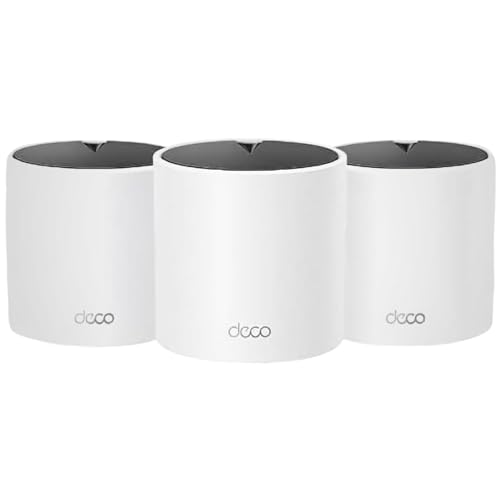
Average houseTP-Link Deco X55 AX3000 WiFi 6 Mesh System, Deco X55(3-Pack)
Large or multi-floor homeTP-Link Deco 7 BE23 Dual-Band BE3600 WiFi 7 Mesh Wi-Fi System
Fast internet and new devicesDeco 7 Dual-Band BE5000 WiFi 7 Mesh Wi-Fi System 4-Stream 5 Gbps, 240 Mhz

By Budget

SpendOur pick
$50 to $100 (three nodes)TP-Link Deco S4 Mesh AC1900 WiFi System, Deco S4(3-Pack)
$50 to $100 (two nodes)TP-Link Deco S4 Whole Home Mesh WiFi System, Deco S4(2-Pack)
$100 to $200TP-Link Deco X55 AX3000 WiFi 6 Mesh System, Deco X55(3-Pack)
$200 to $500Deco 7 Dual-Band BE5000 WiFi 7 Mesh Wi-Fi System 4-Stream 5 Gbps, 240 Mhz

Wired vs Wireless Backhaul

Wired backhaul

Nodes linked by Ethernet, with full speed between them. Picks: Deco 7 BE23, Deco X15.

Wireless backhaul

Nodes link by radio, simple but with some loss. Picks: Deco 7 BE5000, Deco X55, Deco S4 packs.

Default to wired backhaul if your home has Ethernet runs.

By Internet Plan

PlanOur pick
Up to 300 MbpsTP-Link Deco X15 Dual-Band AX1500 WiFi 6 Mesh Wi-Fi System | Replaces Routers and Extenders
Around 500 MbpsTP-Link Deco X55 AX3000 WiFi 6 Mesh System, Deco X55(3-Pack)
GigabitDeco 7 Dual-Band BE5000 WiFi 7 Mesh Wi-Fi System 4-Stream 5 Gbps, 240 Mhz
Multi-gigTP-Link Deco 7 BE23 Dual-Band BE3600 WiFi 7 Mesh Wi-Fi System

For Work-From-Home Setups Specifically

Look for

Wired backhaul, a node near your desk with an Ethernet port, and VPN support. Stable video calls need low latency more than raw speed.

In this ranking

The Deco 7 BE23 for wired links and VPN, and the Deco X15 for a wired, moderate-cost setup.

When to Spend More

Spend more if

You have gigabit or multi-gig internet, many devices or a large home. The Deco 7 systems give more headroom and better ports.

Save if

Your plan is modest and your problem is dead spots. The Deco S4 or X55 packs fix it for $50 to $200.

Questions

Frequently Asked Questions

Do I need WiFi 7?+

Not for most homes. The dual-band WiFi 7 systems here help with newer devices, but WiFi 6 handles typical plans well. Choose WiFi 7 if you have fast internet and WiFi 7 gear.

What is the biggest mistake with mesh systems?+

Placing nodes too far apart. Each node needs a decent signal from its neighbor, so put it about halfway to the dead spot. A node in a dead zone just repeats a weak signal.

Is the BE5000 worth it over the X55?+

If you have gigabit internet and newer devices, yes. If your plan is a few hundred megabits and your gear is WiFi 6 or older, the X55 three-pack is plenty.

How hard is setup?+

Plug the first unit into your modem, install the Deco app, and follow the steps to add nodes. Most people finish in 15 to 30 minutes.

Can I use my existing router?+

Yes, in access point mode, though you lose some features. Many people replace the old router with the Deco system for simpler management.

Does mesh slow my internet?+

A wireless hop between nodes costs some speed. A wired backhaul avoids the loss. Place nodes well and your speeds should stay close to the plan.

Final take

For most households that want the best, the Deco 7 BE5000 is the top mesh system here, with WiFi 7, four streams and wide channels. The Deco 7 BE23 is the best choice for wired homes and multi-gig plans, the Deco X55 three-pack is the WiFi 6 sweet spot, and the S4 packs fix dead spots on a budget. Node placement matters more than the speed rating.

More Ranked & Reviewed Guides