

Primea ReviewsAll Reviews

Primea Reviews is reader-supported. When you buy through our Amazon links we may earn a commission, at no extra cost to you. Rankings are set by our editors and never sold. Learn more

Ranked & Reviewed by Primea Reviews

The 5 Best Mesh WiFi Systems Under $100, Ranked & Reviewed

By the Primea Editorial TeamUpdated November 3, 202610 min read5 products ranked
The 5 Best Mesh WiFi Systems Under $100, Ranked & Reviewed

The short answer

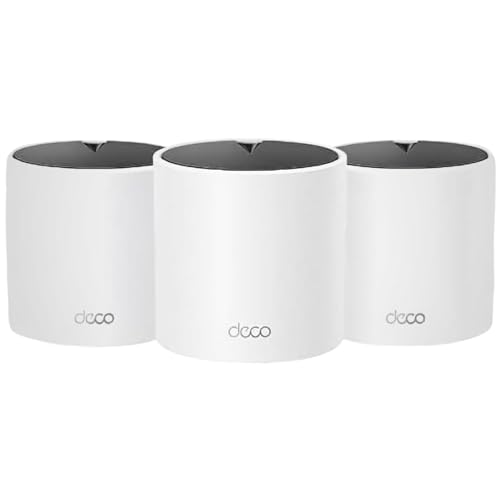
The TP-Link Deco X25 3-pack is the mesh WiFi system to buy under $100 if you want three nodes and WiFi 6, though it is sold renewed. The Deco X55 offers faster AX3000 hardware as a single unit, the Deco S4 3-pack is the older AC1900 value route, and the Deco X15 is the stretch pick with Ethernet backhaul.

The Primea Scoreboard

Ranked & Reviewed

  1. Three WiFi 6 nodes under $100, with the catch that this unit is sold renewed.

    94Outstanding
    Check price
  2. A faster AX3000 WiFi 6 unit that works alone and grows into a mesh later.

    91Excellent
    Check price
  3. An older AC1900 WiFi 5 set with three nodes for the budget-minded.

    88Excellent
    Check price
  4. Two Deco S4 nodes for medium homes, with no speed detail in the listing.

    85Excellent
    Check price
  5. A WiFi 6 AX1500 mesh with two gigabit ports per node and Ethernet backhaul support.

    81Very Good
    Check price

The cheapest way to ruin a mesh network is to buy the biggest pack you can afford and ignore where the nodes will sit. Mesh nodes pass traffic to each other over the air, so every hop between them costs speed. A three-pack placed badly can feel slower than a single good router in the middle of the house.

This ranking is about getting the best coverage for a $100 budget, and the honest answer is that at this price you are buying either older WiFi 5 hardware or discounted and renewed WiFi 6. We reviewed five TP-Link Deco systems from their listings, focusing on WiFi generation, pack size, ports and backhaul options. We left out standalone range extenders, which are a different kind of product and do not create a true mesh.

Before you buy

What Actually Matters

01

WiFi 6 vs WiFi 5

WiFi 6 is the newer standard and handles many simultaneous devices more efficiently, which matters in homes with phones, TVs, cameras and speakers all connected at once. WiFi 5, marked by the AC label, still works but ages faster. Look at the model name: AX means WiFi 6, AC means WiFi 5.

02

Number of nodes

A node is one mesh unit. A single node suits a small apartment, two cover a medium home, and three handle larger or multi-story layouts. More nodes mean shorter hops between devices and the router. Count your floors and the far corners before you choose a pack.

03

Backhaul

Backhaul is the link between mesh nodes. Wireless backhaul shares airtime with your devices, so each hop reduces speed. Ethernet backhaul uses a cable, as the Deco X15 supports, and keeps full speed between nodes. Check the listing for the words Ethernet backhaul.

04

Speed rating

Labels like AX1800 and AX3000 add up the theoretical speed of both bands and are not what you will see on one device. They are useful only for comparing tiers. Match the tier to your internet plan, and do not pay for speed your plan cannot deliver.

05

Renewed vs new

A renewed unit is refurbished and resold, often with a shorter warranty and a return window set by the seller. It can be a bargain for networking gear that rarely wears out, but read the policy. If you want a full manufacturer warranty, look for a new listing.

In-depth reviews

Our Ranked Picks, Reviewed

Methodology

How We Ranked These

WiFi generation

We compared WiFi 6 and WiFi 5 hardware, since the generation decides how well a system copes with many devices at once.

Pack size and coverage

Node count and stated square footage were weighed against typical one and two-story homes.

Backhaul and ports

Ethernet ports and wired backhaul support were scored, because a cabled link between nodes protects speed.

Condition and warranty

Renewed versus new condition was factored in, along with how much the listing says about support.

Value under $100

Each system was placed in its price bucket and rewarded for delivering more nodes or a newer standard per dollar.

Every Primea Score uses the same weights: Performance 30% · Build & Materials 20% · Everyday Usability 20% · Value 20% · Owner Satisfaction 10%. Full scoring rules

Buyer's guide

How to Pick the Right One for You

By Home Size

Home size sets how many nodes you need before anything else.

HomeOur pick
Multi-story, three nodesTP-Link - Deco X25 AX1800 Dual-Band Whole Home Mesh Wi-Fi 6 System (3-Pack) - White (Renewed)
Large home, WiFi 5TP-Link Deco S4 Mesh AC1900 WiFi System, Deco S4(3-Pack)
Medium single storyTP-Link Deco S4 Whole Home Mesh WiFi System, Deco S4(2-Pack)
Apartment or small homeTP-Link Deco X55 AX3000 WiFi 6 Mesh System, Deco X55(1-Pack)

By Budget

SpendOur pick
$50 to $100 (three nodes)TP-Link - Deco X25 AX1800 Dual-Band Whole Home Mesh Wi-Fi 6 System (3-Pack) - White (Renewed)
$50 to $100 (fast single)TP-Link Deco X55 AX3000 WiFi 6 Mesh System, Deco X55(1-Pack)
$50 to $100 (WiFi 5)TP-Link Deco S4 Mesh AC1900 WiFi System, Deco S4(3-Pack)
$100 to $200 (stretch)TP-Link Deco X15 Dual-Band AX1500 WiFi 6 Mesh Wi-Fi System | Replaces Routers and Extenders | Covers up to 5,600 sq.ft. | 2 Gigabit Ports...

WiFi 6 vs WiFi 5

WiFi 6

Handles more devices with less congestion and stays useful longer. Picks: Deco X25, Deco X55 and Deco X15.

WiFi 5

Cheaper and fine for older devices and moderate use, but it dates sooner. Picks: Deco S4 3-pack and 2-pack.

Default to WiFi 6 unless a new-condition WiFi 5 pack saves you real money.

By Backhaul

BackhaulOur pick
Ethernet cabled between nodesTP-Link Deco X15 Dual-Band AX1500 WiFi 6 Mesh Wi-Fi System | Replaces Routers and Extenders | Covers up to 5,600 sq.ft. | 2 Gigabit Ports...
Wireless, three nodesTP-Link - Deco X25 AX1800 Dual-Band Whole Home Mesh Wi-Fi 6 System (3-Pack) - White (Renewed)
Wireless, two nodesTP-Link Deco S4 Whole Home Mesh WiFi System, Deco S4(2-Pack)
Single node, no backhaulTP-Link Deco X55 AX3000 WiFi 6 Mesh System, Deco X55(1-Pack)

For Streaming and Video Calls Specifically

Look for

WiFi 6 radios, a node near the room you stream in, and wired backhaul if you can run a cable. Stable latency matters more than peak speed.

In this ranking

The Deco X25 3-pack for full coverage, the Deco X55 for a small home that wants more speed, and the Deco X15 if your house has Ethernet runs.

When to Spend More

Spend more if

You have a gigabit internet plan or a large home with thick walls. A faster tier and Ethernet backhaul will matter far more than node count.

Save if

Your internet plan is modest and your devices are few. The Deco S4 packs and the renewed X25 cover that well under $100.

Questions

Frequently Asked Questions

Can I mix different Deco models in one mesh?+

Often you can, but compatibility depends on the model families. Check the TP-Link compatibility list before mixing generations, since WiFi 5 and WiFi 6 nodes may not share every feature.

What is the biggest mistake with budget mesh systems?+

Placing nodes too far apart. Each node needs a decent signal from the one before it. Put them roughly halfway between the router and the dead zone, not in the dead zone itself.

Is the X25 renewed pack worth it over a new S4?+

For most people, yes. You get WiFi 6 and three nodes for a similar budget. If you want a new unit with a full warranty, the S4 3-pack is the safer route, but it uses older WiFi 5 hardware.

How hard is the setup?+

It is straightforward. You connect the first unit to your modem, install the Deco app, and follow the prompts to add the other nodes. Most people finish in 15 to 20 minutes.

Do I still need my old router?+

Usually not. A Deco unit replaces the router, though you may need to put your ISP's gateway in bridge mode so the two devices do not conflict. Your provider can explain how.

Can a WiFi extender be a substitute for mesh?+

An extender repeats a signal and often halves the speed on the extended network. A mesh system manages one network across all nodes, which is smoother for roaming between rooms.

Final take

For most budgets under $100, the renewed TP-Link Deco X25 3-pack is the best mesh WiFi system here, with WiFi 6 and three nodes. The Deco X55 is a better single node if your home is small and your internet is fast, and the Deco S4 3-pack is a sensible new-condition value option. The Deco X15 is worth a look only if it is on sale and your house has Ethernet. Node placement will matter more than the model you pick.

More Ranked & Reviewed Guides