
Primea ReviewsAll Reviews

Primea Reviews is reader-supported. When you buy through our Amazon links we may earn a commission, at no extra cost to you. Rankings are set by our editors and never sold. Learn more

Ranked & Reviewed by Primea Reviews

The 6 Best VESA Mini PC Mounts of 2026, Ranked & Reviewed

By the Primea Editorial TeamUpdated November 1, 202610 min read6 products ranked
The 6 Best VESA Mini PC Mounts of 2026, Ranked & Reviewed

The short answer

The HumanCentric bracket is the best VESA mini PC mount, with 75x75 and 100x100 mm support, a 0.65 to 2.55 inch depth range, and an 11 lb device rating or 18 lb combined with the monitor. The VIVO is the steel budget pick with a 3-year warranty, and the 12 lb open-frame mount has the widest fit. Three model-specific mounts cover Dell OptiPlex Micro and Lenovo ThinkCentre Tiny machines.

The Primea Scoreboard

Ranked & Reviewed

  1. The clearest spec sheet and the most hardware in the box.

    94Outstanding
    Check price
  2. Powder-coated steel and a 3-year warranty for under $25.

    91Excellent
    Check price
  3. A 12 lb open-frame metal mount with the widest fit range.

    88Excellent
    Check price
  4. Purpose-built for the OptiPlex Micro with a ventilated frame.

    85Excellent
    Check price
  5. Another OptiPlex Micro fit, with Velcro adapter straps.

    82Very Good
    Check price
  6. Built around named ThinkCentre Tiny models.

    79Very Good
    Check price

A VESA mini PC mount works only if two numbers agree: the 75x75 or 100x100 mm hole pattern on the back of your monitor, and the thickness of your computer. Plenty of buyers verify the pattern and forget the thickness, then find the box is too chunky for the jaws or too slim to stay put. Both facts sit on a spec sheet, and both are easy to check.

Six mounts landed in this ranking after we checked pattern support, device range, weight rating, airflow and extras, then folded the results into the Primea score. Prices are buckets only. Three are universal brackets and three are model-specific, so the first question is whether you own a named Dell or Lenovo.

Before you buy

What Actually Matters

01

VESA hole pattern

VESA is the standard square of four screw holes on the back of a monitor, usually 75x75 or 100x100 mm. If your monitor does not have one of these, the mount cannot attach. Look at the back of your monitor or its manual, and measure the hole spacing if neither names the pattern. A mismatched pattern is the most common return.

02

Device thickness

A thin-client bracket grips the PC between two jaws, so the box must fall inside the stated width or depth range. Too thick and it will not fit. Measure your PC and compare to the range in the listing, such as the HumanCentric's 0.65 to 2.55 inches. Include the case lip and rubber feet in your measurement.

03

Weight rating

The rating is the maximum the bracket is built to carry, often 11 or 12 lb. A micro PC and its cables can add up. Look for a combined rating when mounting behind a monitor, because the arm must carry both, and the HumanCentric is the one that lists it. A mount without a combined figure leaves the arm's limit unknown.

04

Airflow

A ventilated open frame lets heat escape, which matters for a PC running all day. A fully boxed mount can trap warmth. Look for words like open-frame or ventilated, and keep clearance around the vents, as the VIVO OptiPlex mount's open structure suggests. A hot PC throttles and wears out sooner.

05

Mounting options

Some brackets support only behind-monitor use, while others also do wall, under-desk and pole. Extra options help if you rearrange. Check the hardware list in the bullet points, and note which listings include hardware for studs or concrete before you drill. Wood studs and concrete need different fixings.

In-depth reviews

Our Ranked Picks, Reviewed

1

Best Overall

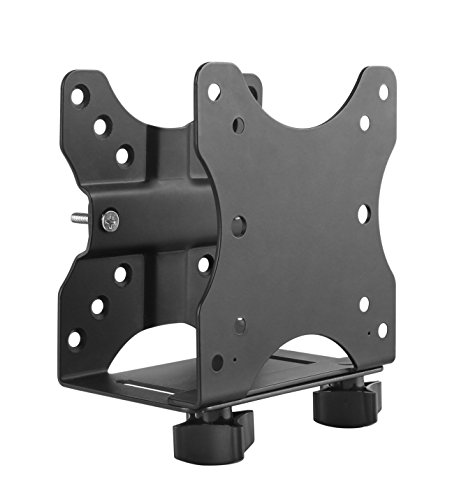
HumanCentric Thin Client Mount Bracket Mini PC VESA Monitor Arm

Our verdict: The clearest spec sheet and the most hardware in the box.

The HumanCentric fits VESA 75x75 and 100x100 mm patterns and accepts devices 0.65 to 2.55 inches deep. It carries an 11 lb device rating, or 18 lb combined with the monitor, and ships with silicone scratch strips plus hardware for wall, under-desk and pole mounting, in the $25 to $50 bucket. A combined rating tells you what the monitor arm can carry once the PC is attached.

It ranks first because the spec sheet is the clearest and the hardware kit is the fullest. The VIVO matches the 11 lb figure for less but gives no combined rating.

Buy it for hanging a mini PC behind a monitor arm. The caveats are a price above rivals and a 2.55 inch depth cap. Skip it if your PC is thicker than that.

VESA
75x75 and 100x100 mm
Depth range
0.65-2.55 in.
Rating
11 lb device, 18 lb combined
Price
$25-50

What we like

  • +Device and combined ratings
  • +Scratch strips included
  • +Wall, desk, pole hardware
  • +Fits both VESA patterns

Watch out for

  • −Costs more than rivals
  • −2.55 in. depth cap

Buy it if: Buyers hanging a mini PC behind a monitor arm.

Skip it if: Your PC is thicker than 2.55 inches.

2

Best Budget Steel

VIVO Adjustable Thin Client Mini PC Mount Bracket, CPU VESA

Our verdict: Powder-coated steel and a 3-year warranty for under $25.

The VIVO bracket is solid steel with a powder-coated finish, adjusts from 1.8 to 7.1 cm in width, handles 5 kg (about 11 lb), and fits VESA 75x75 and 100x100 mm. The maker backs it with a 3-year warranty, under $25. Powder coating resists chips and rust on a part that never gets maintained.

It ranks second because it gives you steel and a long warranty at a lower price, but the listing offers fewer extras and no combined rating. Against the HumanCentric, you lose scratch strips and a fuller hardware set.

Buy it for budget shoppers who want steel and a warranty. The caveats are the limited width range and few extras. Skip it if you want cable management accessories included.

Material
Powder-coated steel
Width
1.8-7.1 cm
Capacity
5 kg (11 lb)
Warranty
3 years

What we like

  • +Solid steel build
  • +3-year warranty
  • +Under $25
  • +Both VESA patterns

Watch out for

  • −Limited width range
  • −Fewer extras listed

Buy it if: Budget shoppers who want steel and a warranty.

Skip it if: You want cable management accessories included.

3

Best Flexible Mount

Adjustable Thin Client Mini PC VESA Mount to Wall, Under Desk, Monitor Arm

Our verdict: A 12 lb open-frame metal mount with the widest fit range.

This open-frame metal mount adjusts from 0.63 to 2.8 inches wide, holds 12 lb, and supports wall, under-desk, behind-monitor and pole mounting. A cable management clip and pen holder come included, under $25. An open frame leaves the PC exposed to air, which helps a machine that runs all day.

It ranks third because the fit range and capacity are the best here, but the brand is unknown and no warranty is listed. Against the VIVO, it fits a thicker device and holds a pound more.

Buy it for people who might switch between desk and wall. The caveats are little brand reputation and no stated warranty. Skip it if you want a named warranty.

Width range
0.63-2.8 in.
Capacity
12 lb
Frame
Open metal
Extras
Cable management, pen holder

What we like

  • +Widest fit range here
  • +12 lb capacity
  • +Four mounting styles
  • +Cable management included

Watch out for

  • −Little brand reputation
  • −No warranty listed

Buy it if: People who might switch between desk and wall.

Skip it if: You want a named warranty.

4

Best for Dell OptiPlex Micro

VIVO Behind Monitor Mini PC VESA Mount for Dell OptiPlex Micro

Our verdict: Purpose-built for the OptiPlex Micro with a ventilated frame.

The VIVO OptiPlex mount is built for Dell OptiPlex Micro machines, with VESA 75x75 and 100x100 mm support, a ventilated open structure, and hardware for wood studs and concrete, under $25. A model-specific cradle holds the PC exactly, so there is no rattle or guesswork about width.

It ranks fourth because it is model-specific, and a universal bracket covers more machines. For an OptiPlex Micro, though, it fits better than a generic clamp and ships with masonry hardware.

Buy it for Dell OptiPlex Micro owners wanting a snug fit. The caveats are the single-model design and limited use for other PCs. Skip it if your mini PC is a different brand.

Target
Dell OptiPlex Micro
VESA
75x75 and 100x100 mm
Mounting
Behind monitor, desk, wall
Price
Under $25

What we like

  • +Built for OptiPlex Micro
  • +Ventilated open frame
  • +Stud and concrete hardware
  • +Under $25

Watch out for

  • −Model-specific
  • −Limited use for other PCs

Buy it if: Dell OptiPlex Micro owners wanting a snug fit.

Skip it if: Your mini PC is a different brand.

5

Best Dell Micro Alternate

Mini PC Mount for Dell Micro Mount, Wall VESA and Under Desk Mount

Our verdict: Another OptiPlex Micro fit, with Velcro adapter straps.

This mount is for named Dell OptiPlex Micro models and fits a device size of 1.4 by 7 by 7.2 inches. It supports VESA 75x75 and 100x100 mm, wall or under-desk mounting, and includes Velcro straps for the power adapter, under $25. Strapping down the power brick keeps the cable weight off the bracket.

It ranks fifth because it lists no ventilation note, and its audience is the same as the VIVO OptiPlex mount. What it adds is an exact device size and adapter straps.

Buy it for Dell Micro owners who also want to hide the power brick. The caveats are the model-specific design and no airflow note. Skip it if you need a universal bracket.

Target
Dell OptiPlex Micro
Device size
1.4 x 7 x 7.2 in.
VESA
75x75 and 100x100 mm
Extras
Velcro adapter straps

What we like

  • +Exact device size stated
  • +Adapter Velcro straps
  • +Wall or under desk
  • +Under $25

Watch out for

  • −Model-specific
  • −No ventilation note

Buy it if: Dell Micro owners who also want to hide the power brick.

Skip it if: You need a universal bracket.

6

Best for Lenovo ThinkCentre

Mini PC Mount for Lenovo ThinkCentre Wall VESA and Under Desk Mount

Our verdict: Built around named ThinkCentre Tiny models.

This mount is purpose-built for named Lenovo ThinkCentre Tiny models, supports VESA 75x75 and 100x100 mm, and can also be used on a wall or under a desk. It comes with an anti-scratch rubber mat and Velcro adapter straps, under $25. A rubber mat protects the PC's finish from the steel.

It ranks last because the audience is narrow and you must verify your exact model against the list. It has the same ideas as the Dell mounts, aimed at a different brand.

Buy it for ThinkCentre Tiny owners. The caveats are the narrow audience and the model list to check. Skip it if your PC is not on the listed models.

Target
Lenovo ThinkCentre Tiny
VESA
75x75 and 100x100 mm
Extras
Rubber mat, Velcro straps
Price
Under $25

What we like

  • +Built for ThinkCentre Tiny
  • +Anti-scratch rubber mat
  • +Adapter Velcro straps
  • +Under $25

Watch out for

  • −Narrow audience
  • −Must verify model list

Buy it if: ThinkCentre Tiny owners.

Skip it if: Your PC is not on the listed models.

Methodology

How We Ranked These

VESA patterns

We checked that each mount lists 75x75 and 100x100 mm support.

Device fit

We compared stated width, depth and device size limits.

Weight rating

We looked at stated capacity, from about 11 lb to 12 lb.

Included hardware

We favored kits with wall, desk or pole hardware and cable aids.

Specificity

Model-specific mounts were scored for fit but marked down for narrow use.

Every Primea Score uses the same weights: Performance 30% · Build & Materials 20% · Everyday Usability 20% · Value 20% · Owner Satisfaction 10%. Full scoring rules

Buyer's guide

How to Pick the Right One for You

By Where You Mount It

Pick by location first.

LocationOur pick
Behind monitorHumanCentric Thin Client Mount Bracket
Under a deskAdjustable Thin Client Mini PC VESA Mount
On a wallVIVO Adjustable Thin Client Mini PC Mount Bracket
Dell OptiPlex MicroVIVO Behind Monitor Mini PC VESA Mount for Dell OptiPlex Micro

By Budget

SpendOur pick
Under $25VIVO Adjustable Thin Client Mini PC Mount Bracket
Under $25Adjustable Thin Client Mini PC VESA Mount
$25 to $50HumanCentric Thin Client Mount Bracket
Under $25, DellMini PC Mount for Dell Micro Mount

Universal vs Model-Specific

Universal

Adjustable jaws fit many PCs. The HumanCentric, VIVO Adjustable and Adjustable Thin Client mounts are in this group.

Model-specific

Built for named models. The two Dell mounts and the Lenovo ThinkCentre mount fit here.

Most buyers should choose a universal mount unless they own a listed Dell or Lenovo.

By Device Size

Your PCOur pick
Thin, under 2.55 in.HumanCentric Thin Client Mount Bracket
Up to 2.8 in. wideAdjustable Thin Client Mini PC VESA Mount
Small, about 1.8 cm to 7.1 cmVIVO Adjustable Thin Client Mini PC Mount Bracket
1.4 x 7 x 7.2 in.Mini PC Mount for Dell Micro Mount

For Behind-Monitor Setups Specifically

Look for

A combined weight rating that includes the monitor, plus both 75x75 and 100x100 mm support.

In this ranking

The HumanCentric lists 18 lb combined with a monitor and fits both patterns.

When to Spend More

Spend more if

You want the HumanCentric's combined rating, scratch strips and fuller hardware kit.

Save if

Your PC is light, so the VIVO steel bracket under $25 is enough.

Questions

Frequently Asked Questions

Will these fit any monitor?+

They fit monitors with a 75x75 or 100x100 mm VESA pattern. Check the back of your monitor before ordering, because a monitor without holes needs an adapter. Some slim monitors hide the pattern under a cover.

What is the biggest mistake?+

Ignoring PC thickness. If the box is wider than the stated range, the bracket will not grip it, however well the VESA holes match. Measure width, depth and height of the PC with a ruler before you buy.

Is the HumanCentric worth more than the VIVO?+

It adds a combined rating, scratch strips and fuller hardware. The VIVO adds a 3-year warranty at a lower price. If the monitor arm is light, the combined rating is the deciding factor.

How do I install one?+

Attach the bracket to the PC, then screw it to the monitor's VESA holes or to the wall or desk using the supplied hardware. Route cables before you tighten it, and test the grip by gently tugging the PC before you hang the monitor.

Do mounted mini PCs overheat?+

An open frame helps airflow. Leave space around the vents, and avoid pushing the PC into a tight gap behind the monitor. A hot, boxed-in PC slows down under load, so airflow is not optional.

Can I use a Dell mount on a Lenovo?+

No. Those mounts are built for named models, so use the universal ones instead, or the Lenovo mount for a ThinkCentre Tiny. Check the model list on each listing first.

Final take

Buy the HumanCentric for a behind-monitor setup with a mainstream mini PC, and the VIVO if a warranty matters at under $25. The open-frame mount suits people who may rearrange, while the Dell and Lenovo mounts are for named models only. Measure your PC thickness and check your monitor's VESA pattern before ordering.

More Ranked & Reviewed Guides