
Primea ReviewsAll Reviews

Primea Reviews is reader-supported. When you buy through our Amazon links we may earn a commission, at no extra cost to you. Rankings are set by our editors and never sold. Learn more

Ranked & Reviewed by Primea Reviews

The 6 Best Mini PC Mounts of 2026, Ranked & Reviewed

By the Primea Editorial TeamUpdated November 1, 20269 min read6 products ranked
The 6 Best Mini PC Mounts of 2026, Ranked & Reviewed

The short answer

The HumanCentric bracket is the best mini PC mount, with VESA 75x75 and 100x100 support, wall, under-desk and pole mounting, and an 18 lb combined rating. The Adjustable Thin Client mount is the flexible budget pick, and the VIVO offers a three-year warranty. PUTORSEN is the pick for heavy devices and NAS boxes.

The Primea Scoreboard

Ranked & Reviewed

  1. VESA, wall, under-desk and pole mounting in one bracket.

    94Outstanding
    Check price
  2. Four mounting spots and cable management.

    90Excellent
    Check price
  3. Powder-coated steel with a 3-year warranty.

    87Excellent
    Check price
  4. An open frame that keeps air moving.

    84Very Good
    Check price
  5. Five height levels from 1.8 to 3.3 inches.

    81Very Good
    Check price
  6. The highest weight rating, at 22 lbs.

    78Very Good
    Check price

A mini PC looks tiny until you try to hang one. The usual failure is thickness: a bracket that grips 2.5 inches will not hold a 3 inch box, and a VESA mount is no help when the monitor has no matching holes. Weight matters too, because a mount rated for a thin client can sag under a NAS or a mini workstation with a big power brick attached.

We ranked six mounts using the spec sheets for adjustable width, weight rating and mounting spots. The order favors fit range and versatility, then special-purpose designs. Check your device's thickness and the hole pattern on your monitor's back before every purchase, with a ruler in hand, because those two measurements decide which mounts are even possible.

Before you buy

What Actually Matters

01

Device thickness

Thickness decides if a mount fits at all. Many thin-client brackets grip 0.6 to 2.8 inches. Measure your PC with a ruler, including feet and ports, and compare it to the range in the listing. Boxes thicker than 3.3 inches need the PUTORSEN or similar, and anything between 2.8 and 3.3 inches suits the 5-Level bracket. A tight fit strains the clamps over time.

02

VESA support

VESA is the standard hole pattern on the back of monitors. 75x75 and 100x100 are the common sizes, and the HumanCentric, VIVO and suptek support both. Check your monitor's manual before buying a VESA mount, and use an under-desk bracket if there are no holes. VESA also keeps cables behind the screen, which tidies a workstation.

03

Weight limit

Most mounts here hold about 11 lbs. A heavier NAS needs a mount rated to 22 lbs. Find the weight limit in the bullets, and add the weight of the power brick and cables. Leave a margin, because a bracket loaded to its limit may sag or loosen. The HumanCentric lists an 18 lb combined rating with a monitor.

04

Mounting spot

Under the desk frees the surface, while behind a monitor hides the box entirely. Pick the spot first, then the mount. Wall and pole mounting add options for open-plan setups. Check the listing for which spots a bracket supports, because many cover only one, and a change of desk may force a new purchase.

05

Protection

Scratch strips and padding protect the casing. They matter on a nicely finished mini PC. The HumanCentric includes silicone strips. Look for padding in the listing, and avoid bare metal against aluminum bodies, which can mar the finish and leave marks you cannot buff out.

In-depth reviews

Our Ranked Picks, Reviewed

1

Best Overall

HumanCentric Thin Client Mount Bracket Mini PC VESA Monitor Arm, Under Desk

Our verdict: VESA, wall, under-desk and pole mounting in one bracket.

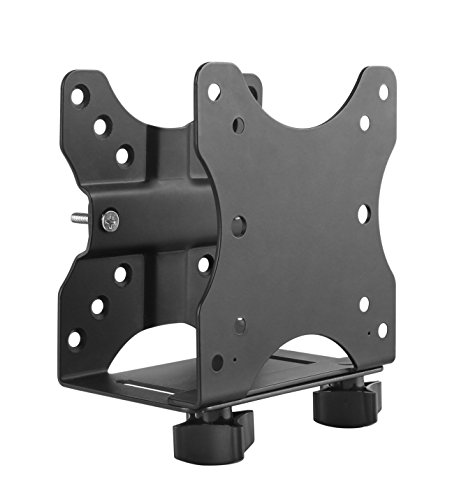
The HumanCentric fits devices 0.65 to 2.55 inches deep and mounts on VESA 75x75 and 100x100, under a desk, on a wall or on a pole, in the $25 to $50 range. It is rated for an 11 lb device, or 18 lb combined with a monitor, and includes silicone scratch strips. The combined rating is useful: when the bracket sits behind a monitor on an arm, the total load matters, not just the device.

It ranks first because it covers the most mounting options and publishes both ratings. The Adjustable Thin Client below is cheaper but states less.

Buy it for a standard mini PC on a VESA monitor. The caveat is the 2.55 inch depth limit, which excludes thicker boxes. Measure yours with a ruler before ordering, and skip it if the PC exceeds that.

Device depth
0.65 to 2.55 in
VESA
75x75, 100x100
Load
11 lbs (18 lbs with monitor)
Mounting
Wall, under desk, pole

What we like

  • +VESA 75x75 and 100x100
  • +Wall, desk and pole mounting
  • +Silicone scratch strips
  • +18 lb combined rating

Watch out for

  • −2.55 in depth limit
  • −$25-50 price

Buy it if: Standard mini PCs on VESA monitors.

Skip it if: Your PC is over 2.55 inches thick.

2

Best Flexible Mount

Adjustable Thin Client Mini PC Mount Bracket (Wall, Under Desk, Monitor Arm)

Our verdict: Four mounting spots and cable management.

This metal bracket fits devices 0.63 to 2.8 inches wide and mounts on a wall, under a desk, behind a monitor or on a monitor arm, under $25. It is rated for 12 lbs and has built-in cable management and a pen holder. Cable management matters more than it sounds: a mini PC that hangs under a desk still trails power, HDMI and USB leads that look untidy without a guide.

It ranks second because its width range is wider than the HumanCentric's, and the rating is one pound higher. The listing lacks a stated combined load, and no VESA sizes appear.

Choose it for tidy cables on a budget. The caveat is lower detail, and the width range is the limit for a thicker device. Skip it if you need a stated VESA pattern, because the listing never confirms one.

Device width
0.63 to 2.8 in
Load
12 lbs
Mounting
Wall, desk, monitor, arm
Extras
Cable management, pen holder

What we like

  • +Wide 2.8 in range
  • +Cable management
  • +Pen holder
  • +Under $25

Watch out for

  • −No VESA sizes listed
  • −Lower detail

Buy it if: Tidy desks with several mounting options.

Skip it if: You need VESA-only mounting.

3

Best Warranty

VIVO Adjustable Thin Client Mini PC Mount Bracket

Our verdict: Powder-coated steel with a 3-year warranty.

The VIVO is solid powder-coated steel with an adjustable width of 1.8 to 7.1 cm, VESA 75x75 and 100x100 support, a 5 kg (about 11 lb) weight limit and a 3-year warranty, under $25. Powder coating resists scratches and rust better than bare paint, and a three-year warranty is rare at this price.

It ranks third because the width range is narrower than the first two, topping out near 2.8 inches. The warranty is the longest listed here, which shifts the value case for anyone who plans to keep the PC mounted for years.

Pick it for a slim thin client. Check that your device is thinner than 2.8 inches. Skip it if your PC is thicker, or if you need cable guides, since the listing names none.

Width
1.8 to 7.1 cm
VESA
75x75, 100x100
Load
5 kg (about 11 lb)
Warranty
3 years

What we like

  • +3-year warranty
  • +VESA 75x75 and 100x100
  • +Powder-coated steel
  • +Under $25

Watch out for

  • −Narrow width range
  • −11 lb limit

Buy it if: Slim thin clients.

Skip it if: Your PC is thicker than 2.8 inches.

4

Best Cooling Design

suptek Thin Client Mount Bracket Adjustable Mini PC Mount

Our verdict: An open frame that keeps air moving.

The suptek is solid steel with an adjustable width of 0.6 to 2.7 inches, VESA 75x75 and 100x100 support, an 11 lb weight limit and an open-frame cooling design, under $25. An open frame lets air reach the sides of the PC, which matters for small boxes that run warm under load.

It ranks fourth because it lacks the extras of the first two: no cable management and a lower weight rating than the Adjustable Thin Client. The open frame helps a warm PC, and the price keeps it competitive.

Choose it for a PC that runs warm. The caveat is no cable management. Skip it if you want guides or a pen holder, and note that its 11 lb limit matches the HumanCentric's device rating but not its combined one.

Width
0.6 to 2.7 in
VESA
75x75, 100x100
Load
11 lbs
Frame
Open, cooling design

What we like

  • +Open cooling frame
  • +VESA 75x75 and 100x100
  • +Solid steel
  • +Under $25

Watch out for

  • −No cable management
  • −11 lb limit

Buy it if: Warm-running PCs.

Skip it if: You want cable features.

5

Best for Thicker PCs

Under Desk Mini PC Mount Bracket, 5-Level Height Adjustable

Our verdict: Five height levels from 1.8 to 3.3 inches.

This reinforced steel bracket has 5 height levels from 1.8 to 3.3 inches and width-adjustable side brackets, under $25. It mounts under a desk only, and comes with screws and a positioning template. Height levels let it fit boxes thicker than the thin-client mounts above can hold, up to 3.3 inches.

It ranks fifth because it mounts in one place only, and offers no VESA option. It fits thicker boxes than any thin-client mount, which is its reason to exist, but you give up wall and monitor mounting.

Buy it for a chunkier mini PC under a desk. The template helps you drill straight. Skip it if you want VESA mounting or a wall bracket, and check the underside of your desk for thickness before you drive screws in.

Height range
1.8 to 3.3 in
Levels
5
Mounting
Under desk only
Kit
Screws and template

What we like

  • +Fits up to 3.3 in
  • +5 height levels
  • +Positioning template
  • +Under $25

Watch out for

  • −Under-desk only
  • −No VESA mounting

Buy it if: Thicker mini PCs under a desk.

Skip it if: You want VESA mounting.

6

Best for Heavy Devices

PUTORSEN Under Desk Mini PC Mount NAS Mount Bracket Holder

Our verdict: The highest weight rating, at 22 lbs.

The PUTORSEN is sturdy steel rated for 22 lbs (10 kg), with 9 height levels from 4.2 to 8.0 inches, under-desk mounting only and a full installation kit, in the $25 to $50 range. Its range is built for NAS boxes and larger devices, not thin clients.

It ranks last because it suits larger devices and not thin mini PCs. A 4.2 inch minimum height means a slim PC would rattle inside it. It carries the most weight here, at twice the rating of the standard brackets.

Pick it for a NAS or a bigger box. Skip it if your PC is a thin client. Make sure the underside of your desk can hold 22 lbs, because screws into thin particleboard can pull out.

Load
22 lbs (10 kg)
Height range
4.2 to 8.0 in
Levels
9
Mounting
Under desk only

What we like

  • +22 lb capacity
  • +9 height levels
  • +Full install kit
  • +Fits NAS boxes

Watch out for

  • −Too big for thin PCs
  • −Under-desk only

Buy it if: NAS boxes and big mini PCs.

Skip it if: Your PC is a thin client.

Methodology

How We Ranked These

Fit range

We compared stated device width, depth and height ranges.

Weight rating

We used stated load limits from 11 to 22 lbs.

Mounting options

We counted wall, under-desk, VESA and pole options.

Hardware

We noted scratch protection, templates and install kits.

Price

We compared price brackets from under $25 to $50.

Every Primea Score uses the same weights: Performance 30% · Build & Materials 20% · Everyday Usability 20% · Value 20% · Owner Satisfaction 10%. Full scoring rules

Buyer's guide

How to Pick the Right One for You

By Mounting Location

Decide where the PC will hang.

LocationOur pick
Behind a VESA monitorHumanCentric Thin Client Mount Bracket
Wall, desk or armAdjustable Thin Client Mini PC Mount Bracket
Under a desk, thick PCUnder Desk Mini PC Mount Bracket, 5-Level
Under a desk, NASPUTORSEN Under Desk Mini PC Mount

By Budget

SpendOur pick
Under $25, flexibleAdjustable Thin Client Mini PC Mount Bracket
Under $25, warrantyVIVO Adjustable Thin Client Mount
$25-50, VESAHumanCentric Thin Client Mount Bracket
$25-50, heavyPUTORSEN Under Desk Mini PC Mount

VESA vs Under-Desk

VESA

Hides the PC behind a monitor. Picks: HumanCentric, VIVO and suptek.

Under-desk

Clears the desktop with no monitor holes needed. Picks: Under Desk 5-Level and PUTORSEN.

Most buyers should default to VESA if the monitor supports it, as it hides the cables too.

By Device Weight

WeightOur pick
Light thin clientVIVO Adjustable Thin Client Mini PC Mount
About 11 lbssuptek Thin Client Mount Bracket
About 12 lbsAdjustable Thin Client Mini PC Mount Bracket
Up to 22 lbsPUTORSEN Under Desk Mini PC Mount

For Cluttered Desks Specifically

Look for

Cable management and under-desk or behind-monitor mounting.

In this ranking

The Adjustable Thin Client mount has built-in cable management, and the HumanCentric hangs behind a monitor.

When to Spend More

Spend more if

You need VESA plus a combined load rating. The HumanCentric is $25-50.

Save if

You have a light PC. The Adjustable Thin Client mount is under $25.

Questions

Frequently Asked Questions

Will a mount fit my mini PC?+

Measure its thickness and compare it to the mount's range. The HumanCentric covers 0.65 to 2.55 inches, the Adjustable Thin Client up to 2.8, and the 5-Level bracket up to 3.3. Always include feet and ports in your measurement.

What if my monitor has no VESA holes?+

Use an under-desk or wall mount instead, such as the Under Desk 5-Level bracket. VESA mounts need matching holes, so check your monitor's manual first, and count the screw holes on the back panel.

Is the HumanCentric worth it over the Adjustable Thin Client?+

If you need VESA and a combined rating, yes. For flexible mounting at lower cost, the Adjustable is enough, and it adds cable management and a pen holder. The HumanCentric is still the safer choice for a heavier setup.

How do I install under a desk?+

Hold the template to the underside, mark the holes and screw in. Check the desk thickness for the screws, and avoid thin boards that cannot hold the weight, such as particleboard shelves under a tabletop.

Does the PC need airflow?+

Yes. An open frame like the suptek helps a warm PC, and you should never block the vents with the bracket or a wall, because a hot PC throttles and shortens its life.

Can I mount a NAS?+

Use the PUTORSEN, rated to 22 lbs. It fits boxes from 4.2 to 8.0 inches in height, and the other brackets here top out near 11 to 12 lbs, so a NAS with drives may overload them.

Final take

Buy the HumanCentric for a standard mini PC on a VESA monitor, or the Adjustable Thin Client mount for tidy cables on a budget. Thicker boxes need the 5-level bracket, and heavy NAS units need the PUTORSEN. Measure thickness and weight before you order, and check your monitor's VESA pattern.

More Ranked & Reviewed Guides