
Primea ReviewsAll Reviews

Primea Reviews is reader-supported. When you buy through our Amazon links we may earn a commission, at no extra cost to you. Rankings are set by our editors and never sold. Learn more

Ranked & Reviewed by Primea Reviews

The 5 Best Mini PC Wall Mounts of 2026, Ranked & Reviewed

By the Primea Editorial TeamUpdated November 1, 20269 min read5 products ranked
The 5 Best Mini PC Wall Mounts of 2026, Ranked & Reviewed

The short answer

The HumanCentric bracket is the best mini PC wall mount, with an 11 lb rating, a 0.65 to 2.55 inch depth range and wall, VESA and pole options. The VIVO matches the 11 lb rating for under $25 with a 3-year warranty, and the suptek adds an open-frame design for heat. The universal strap mount handles odd shapes, and the NOTMBESTM shelf suits renters with light devices.

The Primea Scoreboard

Ranked & Reviewed

  1. The highest rated capacity here, with wall, VESA and pole options.

    93Outstanding
    Check price
  2. Powder-coated steel with a 3-year warranty at under $25.

    90Excellent
    Check price
  3. An open-frame steel bracket that keeps air moving around the PC.

    87Excellent
    Check price
  4. A strap-based mount that fits a range of named Dell, Lenovo and HP models.

    84Very Good
    Check price
  5. A light shelf you can screw in or stick on.

    81Very Good
    Check price

A mini PC mount is a bracket, and brackets fail on a number nobody checks: the thickness of the device. Slide a 2.6 inch machine toward a clip built for 2.55 inches and it will not seat, no matter how sturdy the steel. Most returns in this category trace back to a width mismatch, not to a weak mount.

We reviewed mounts on listed weight capacity, adjustable range, mounting options and cooling design, and scored them on the Primea framework. Five made the cut. They are ranked by how many mini PCs each is likely to hold safely, with hardware and warranty as tiebreakers. Measure your device before you read further, because every verdict below depends on it, and a bracket that is almost the right size is simply the wrong one.

Before you buy

What Actually Matters

01

Device depth

Device depth is how thick your PC is, and the bracket must fit it. Too tight and it will not slide in, and too loose and the PC rattles. The HumanCentric lists 0.65 to 2.55 inches and the VIVO 1.8 to 7.1 cm. Measure your device and compare it with the stated range before ordering. Add a few millimeters for the case lip.

02

Weight rating

Weight rating is the safe load for the PC plus any dock, hub or cables hanging from it. Steel brackets here list around 11 lb, while the light shelf caps near 3 kg. Check the number in the listing, and add the weight of anything you plan to mount alongside the PC. Leave margin; brackets are rated for a static load, not a pulled cable.

03

Mounting method

Mounting method is how the bracket attaches: wall, VESA, pole or under-desk. Each suits a different layout, and a bracket that lacks your method is useless in your setup. Look for the supported list in the bullets. The suptek lists pole and under-desk but not VESA, while the HumanCentric and VIVO list all three of wall, VESA and pole.

04

Ventilation

Ventilation is how freely air reaches the PC. Mini PCs run warm and trap heat inside enclosed brackets, which can throttle performance. Open-frame designs such as the suptek let air flow around the sides. Check for open frame or vent details in the listing, and leave a gap around the device on every mount.

05

Wall type

Wall type decides the hardware. Drywall needs anchors unless you hit a stud, while adhesive suits smooth, clean surfaces only. Check which hardware is included, since the HumanCentric ships with a full kit and the NOTMBESTM includes both screws and adhesive. Textured or painted walls often defeat adhesive, so test a small patch first.

In-depth reviews

Our Ranked Picks, Reviewed

1

Best Overall

HumanCentric Thin Client Mount Bracket, Wall Mount Option

Our verdict: The highest rated capacity here, with wall, VESA and pole options.

The HumanCentric bracket holds 11 lb and fits devices from 0.65 to 2.55 inches thick. It mounts to a wall, a VESA pattern or a pole, and ships with silicone scratch strips and a full hardware kit, in the $25 to $50 bracket. Scratch strips matter because bare steel rubs lacquered mini PC shells and can mark them within days.

Top spot comes from capacity and range together. Against the VIVO, it matches the 11 lb rating and adds the scratch protection, though it costs more and has no multi-year warranty listed.

It suits a mini PC paired with a dock, a heavier thin client, or any setup where a few ounces matter. The caveat is the 2.55 inch depth limit: a thicker device will not seat, so measure first and skip it if yours is over that.

Capacity
11 lb
Depth range
0.65 to 2.55 inch
Mounting
Wall, VESA, pole
Price bracket
$25-50

What we like

  • +11 lb rating
  • +Wall, VESA, pole
  • +Scratch strips included
  • +Full hardware kit

Watch out for

  • −Costs $25-50
  • −2.55 inch depth limit

Buy it if: Heavier mini PCs or PC and dock pairs.

Skip it if: Your device is over 2.55 inches thick.

2

Best Warranty

VIVO Adjustable Thin Client Mini PC Wall Mount Bracket

Our verdict: Powder-coated steel with a 3-year warranty at under $25.

The VIVO bracket is solid powder-coated steel that adjusts from 1.8 to 7.1 cm wide, mounts to a wall, VESA pattern or pole and holds 5 kg, about 11 lb. A 3-year manufacturer warranty comes with it, at under $25. Powder coating resists chipping and rust better than bare paint, which matters on a bracket that never gets cleaned.

It ranks just below the HumanCentric because the listing mentions no scratch strips. In exchange it costs less and carries the longest warranty in this guide, so the price-to-backing ratio is excellent.

Buy it for a budget setup that still needs real support behind it. The caveat is the narrower width range, up to 7.1 cm, so check your device depth, and add your own felt or tape to protect the finish.

Capacity
5 kg (about 11 lb)
Width range
1.8 to 7.1 cm
Warranty
3 years
Price bracket
Under $25

What we like

  • +3-year warranty
  • +Powder-coated steel
  • +Wall, VESA, pole
  • +Under $25

Watch out for

  • −Narrower width range
  • −No scratch strips listed

Buy it if: Budget buyers who want backing.

Skip it if: Your mini PC is thicker than 7.1 cm.

3

Best for Heat

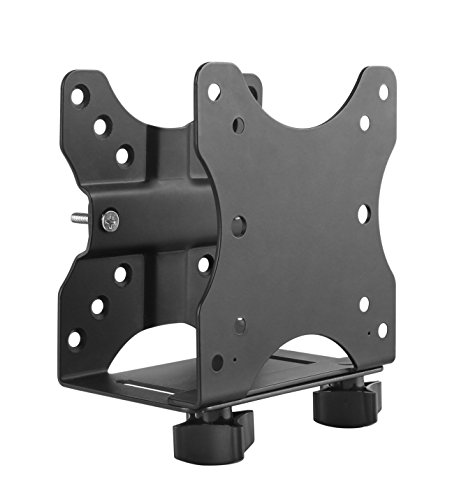
suptek Thin Client Mount Bracket, Wall Mount with Open-Frame Cooling

Our verdict: An open-frame steel bracket that keeps air moving around the PC.

The suptek is a solid steel, open-frame bracket that adjusts from 0.6 to 2.7 inches wide, holds 11 lb and mounts to a wall, a pole or under a desk, at under $25. An open frame leaves the sides and top of the PC exposed to moving air instead of boxing it in, and mini PCs run warm.

It ranks third because airflow is its main advantage, not accessories. Against the VIVO, it accepts slightly thicker devices than the HumanCentric's 2.55 inches, and it lists the same 11 lb rating, but it offers no warranty detail.

It suits tight corners and enclosed shelves where heat could build. The caveat is that VESA mounting is not listed, so skip it if you need to hang a PC behind a monitor, and expect few extras.

Capacity
11 lb
Width range
0.6 to 2.7 inch
Design
Open frame
Price bracket
Under $25

What we like

  • +Open-frame airflow
  • +Wider 2.7 inch range
  • +11 lb capacity
  • +Under $25

Watch out for

  • −VESA not listed
  • −Short on extras

Buy it if: Enclosed or tight spots.

Skip it if: You need VESA mounting.

4

Best Universal Fit

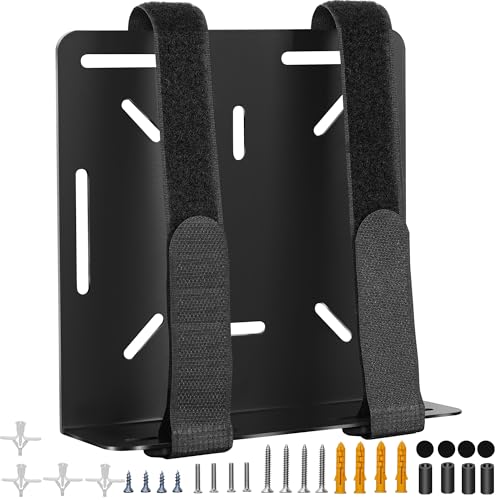
Universal Wall and VESA Mount for Micro PC, UPS Units, WiFi Router

Our verdict: A strap-based mount that fits a range of named Dell, Lenovo and HP models.

The universal wall and VESA mount uses an adjustable strap for devices up to 17 inches in perimeter and lists compatibility with named Dell, Lenovo and HP mini PCs. It mounts on a wall or behind a monitor and costs under $25. A strap adapts to shapes a rigid bracket cannot grip, including routers and small UPS units.

It ranks fourth because straps hold less rigidly than steel, and there is no weight rating on the listing. A heavy PC on a strap is a guess. Against the steel brackets above, though, it handles odd shapes better.

It works well for routers, micro PCs and mixed gear that does not fit a clip. The caveat is the missing weight rating, so skip it for a heavy PC or dock, and check the strap for fraying over time.

Style
Adjustable strap
Fit
Up to 17 inch perimeter
Mounting
Wall or behind monitor
Price bracket
Under $25

What we like

  • +Fits odd shapes
  • +Named Dell, Lenovo, HP fit
  • +Behind-monitor option
  • +Under $25

Watch out for

  • −No weight rating listed
  • −Strap less rigid

Buy it if: Odd-shaped devices and mixed gear.

Skip it if: You want a rated steel bracket.

5

Best for Renters

NOTMBESTM Adjustable Wall Mount Shelf for Mini PC, WiFi Router

Our verdict: A light shelf you can screw in or stick on.

The NOTMBESTM is a shelf with an adjustable push plate from 0 to 65 mm, a limit under 3 kg (about 6.6 lbs) and a choice of screw or adhesive installation. It mounts to a wall, under a desk or behind a TV, at under $25. Having both screws and adhesive in the box lets you pick based on how far you can modify the wall.

It ranks last because of its lower weight limit, which is well under the 11 lb of the steel brackets. Adhesive is also less secure than a screwed anchor, particularly on textured paint.

It suits renters with a light mini PC who cannot drill. Use screws if you can. Skip it if your PC or dock is heavy, because cables pulling on a stick-on shelf can peel it off the wall over time.

Limit
Under 3 kg (about 6.6 lbs)
Width
0 to 65 mm
Install
Screw or adhesive
Price bracket
Under $25

What we like

  • +Adhesive option
  • +Screws included too
  • +Behind-TV mounting
  • +Under $25

Watch out for

  • −Low weight limit
  • −Adhesive less secure

Buy it if: Renters with light devices.

Skip it if: Your PC or dock is heavy.

Methodology

How We Ranked These

Capacity

We compared listed weight ratings.

Fit range

We checked the adjustable width or depth range.

Mounting options

We noted wall, VESA, pole and under-desk support.

Cooling

We looked for open-frame designs.

Support

We considered warranty and hardware.

Every Primea Score uses the same weights: Performance 30% · Build & Materials 20% · Everyday Usability 20% · Value 20% · Owner Satisfaction 10%. Full scoring rules

Buyer's guide

How to Pick the Right One for You

By Device Size

Device dimensions decide fit.

DeviceOur pick
Up to 2.55 inch thickHumanCentric Thin Client Mount Bracket, Wall Mount Option
Up to 2.7 inch thicksuptek Thin Client Mount Bracket, Wall Mount with Open-Frame Cooling
Narrow, up to 7.1 cmVIVO Adjustable Thin Client Mini PC Wall Mount Bracket
Odd shape or routerUniversal Wall and VESA Mount for Micro PC, UPS Units, WiFi Router

By Budget

SpendOur pick
Under $25 backedVIVO Adjustable Thin Client Mini PC Wall Mount Bracket
Under $25 airflowsuptek Thin Client Mount Bracket, Wall Mount with Open-Frame Cooling
Under $25 lightNOTMBESTM Adjustable Wall Mount Shelf for Mini PC, WiFi Router
$25-50HumanCentric Thin Client Mount Bracket, Wall Mount Option

Bracket vs Strap

Bracket

Steel holds rigidly and carries a rated load. HumanCentric, VIVO and suptek are brackets.

Strap or shelf

Flexible for odd shapes or hole-free installs. The universal strap and NOTMBESTM shelf are in this group.

Most buyers should default to a steel bracket unless the device is oddly shaped.

By Install Style

InstallOur pick
Behind monitorUniversal Wall and VESA Mount for Micro PC, UPS Units, WiFi Router
VESA patternHumanCentric Thin Client Mount Bracket, Wall Mount Option
No holesNOTMBESTM Adjustable Wall Mount Shelf for Mini PC, WiFi Router
PoleVIVO Adjustable Thin Client Mini PC Wall Mount Bracket

For Cramped Corners Specifically

Look for

Open frame so heat does not build up.

In this ranking

The suptek bracket has an open-frame cooling design.

When to Spend More

Spend more if

You mount a heavy PC or dock, which the $25-50 HumanCentric supports at 11 lb.

Save if

Your device is light, where the under $25 VIVO still gives a 3-year warranty.

Questions

Frequently Asked Questions

Will these fit my model?+

Compare your device depth and width with each listed range before buying. The HumanCentric tops out at 2.55 inches and the suptek at 2.7 inches, so a thicker device may need the VIVO or a strap mount. Never force a PC into a clip.

Can I mount behind a monitor?+

The universal mount lists behind-monitor mounting, and the HumanCentric and VIVO use VESA patterns on the monitor. The suptek does not list VESA, so check the listing before assuming it hangs behind a screen. Confirm your monitor's VESA pattern too.

Is the HumanCentric worth it over VIVO?+

Only if you need depth up to 2.55 inches or the scratch strips. The VIVO matches the 11 lb rating for under $25 and adds a 3-year warranty, so it is the better deal for most.

Do I need drywall anchors?+

Use anchors into drywall unless you hit a stud, and check what hardware is included before you start drilling. The HumanCentric ships a full hardware kit, while the NOTMBESTM offers adhesive as a no-drill alternative.

Does heat matter?+

Yes, in enclosed spots. Mini PCs run warm, so use the open-frame suptek in tight corners and leave a gap around the device on any bracket.

Will adhesive hold?+

Only for devices under the listed 3 kg and on clean, smooth walls. The NOTMBESTM includes screws too, which are the safer choice if the wall allows drilling. Adhesive alone is a last resort.

Final take

Buy the HumanCentric for most mini PCs, especially a PC paired with a dock. The VIVO is the better deal if you want a long warranty under $25, and the suptek suits hot, tight spots. Use the strap mount only for oddly shaped gear and the NOTMBESTM only for light devices on walls you cannot drill. Check device thickness before anything else.

More Ranked & Reviewed Guides