
Primea ReviewsAll Reviews

Primea Reviews is reader-supported. When you buy through our Amazon links we may earn a commission, at no extra cost to you. Rankings are set by our editors and never sold. Learn more

Ranked & Reviewed by Primea Reviews

The 6 Best Universal Mini PC Mounts for VESA, Wall and Under-Desk Use in 2026, Ranked & Reviewed

By the Primea Editorial TeamUpdated November 3, 20269 min read6 products ranked
The 6 Best Universal Mini PC Mounts for VESA, Wall and Under-Desk Use in 2026, Ranked & Reviewed

The short answer

The adjustable thin client bracket for NUC, Dell, HP and Mac mini is the mount to buy for most people, with a 12 lb rating, four mounting methods and a wide 0.63 to 2.8 inch range. The HumanCentric is the flexible three-position alternative, the VIVO has the longest warranty, and the strap-based universal mount rescues odd-sized devices.

The Primea Scoreboard

Ranked & Reviewed

  1. The widest adjustment, the highest load rating and four ways to mount, all under $25.

    94Outstanding
    Check price
  2. Three mounting options and 0.65 to 2.55 inch depth, from a brand with a strong monitor-arm following.

    92Outstanding
    Check price
  3. A 3-year warranty and documented brand compatibility for the cost of a sandwich.

    90Excellent
    Check price
  4. An open-frame ventilated design that keeps the PC breathing, with an 11 lb rating.

    87Excellent
    Check price
  5. Steel with EVA anti-scratch pads, two-screw installation and room for up to 2.8 inch thick devices.

    84Very Good
    Check price
  6. A strap-based mount for odd shapes, with named support for Dell OptiPlex Micro, Lenovo ThinkCentre and HP Desktop Mini.

    81Very Good
    Check price

The word universal on a mini PC mount is doing a lot of work. In practice it means universal within a width range, usually between about half an inch and three inches, and it says nothing about your machine's weight, vent positions or the shape of its sides. The common mistake is to measure the PC's footprint and forget its thickness, then discover the clamp arms will not close.

This ranking sorts six mounts by adjustable width, stated weight capacity, number of mounting positions and airflow. We reviewed the listings and published specs, not physical units, and the price here is a bracket, never an exact figure. Check your PC's thickness in inches against the range before you order.

Before you buy

What Actually Matters

01

Thickness range

Measure your PC's thickness, not just its footprint, then check it against the bracket's adjustable range. A PC at the edge of the range may not clamp securely. Leave a little margin on both sides.

02

Weight rating

Most mini PCs weigh a few pounds, but add the adapter, dongles and cables before you compare. A stated 11 or 12 lb rating gives plenty of headroom for typical machines. Check the rating on the listing rather than assuming.

03

VESA pattern

VESA 75x75 and 100x100 mm are the two common hole patterns on monitors and TVs. A bracket that supports both fits most displays. Check your display's rear for the pattern, and use the screws included.

04

Ventilation

Mini PCs draw air through small vents, and a closed bracket against a wall can block them. Open-frame designs leave the sides exposed. Check where your PC's intake and exhaust sit before mounting it face-in.

05

Mounting location

Behind a monitor keeps the desk clear, under a desk hides it, and a wall mount suits a media shelf. Some brackets offer all three. Decide where the PC will live and check cable reach to the ports.

In-depth reviews

Our Ranked Picks, Reviewed

1

Best Overall

Adjustable Thin Client Mini PC Mount Bracket for NUC, Dell, HP, Mac mini

Our verdict: The widest adjustment, the highest load rating and four ways to mount, all under $25.

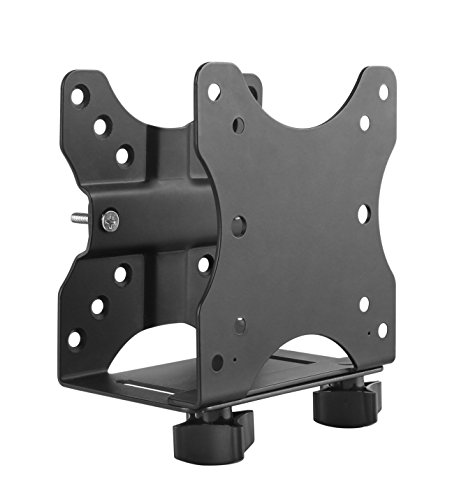
This bracket adjusts from 0.63 to 2.8 inches wide, carries a stated 12 lb, and offers four mounting methods. It also includes a built-in pen holder and cable management, and it names NUC, Dell, HP and Mac mini machines as compatible.

It wins because the specs are the strongest on paper: the 12 lb rating gives you headroom over the 11 lb of its competitors, and the 2.8 inch range accepts a thicker PC than most. Four mounting methods mean the same bracket can sit behind a monitor, under a desk or on a wall, depending on how you rearrange later. The pen holder is a gimmick, but the cable clips are useful.

Buy it if you want one bracket that fits the widest range of PCs and positions. Skip it if your machine is thicker than 2.8 inches.

Adjustable width
0.63 to 2.8 in
Rated load
12 lb
Mounting methods
4
Extras
Pen holder, cable management

What we like

  • +Highest stated 12 lb capacity
  • +Four mounting methods
  • +Widest adjustment range on paper
  • +Built-in cable management

Watch out for

  • −Pen holder adds little value
  • −Open frame offers little protection

Buy it if: Anyone with a NUC, Dell, HP or Mac mini style PC.

Skip it if: Your PC is thicker than 2.8 inches.

2

Best Mounting Flexibility

HumanCentric Thin Client Mount Bracket Mini PC VESA Monitor Arm, Under Desk

Our verdict: Three mounting options and 0.65 to 2.55 inch depth, from a brand with a strong monitor-arm following.

The HumanCentric bracket adjusts from 0.65 to 2.55 inches, supports up to 11 lb, fits VESA 75x75 and 100x100 patterns, and offers three mounting options: behind a monitor, under a desk or on a wall. It belongs to the $25 to $50 tier, a step above the cheapest units.

It ranks second because it does everything the top pick does at a slightly smaller range and lower load rating, with no cable-management extras. The maker is well known for monitor arms, which gives some confidence in its steel and finish. If your mini PC fits within 2.55 inches, this is a polished option.

Buy it if you want a reputable mount for a typical mini PC. Skip it if you need to hold a heavier or thicker machine.

Adjustable depth
0.65 to 2.55 in
Rated load
11 lb
VESA
75x75 and 100x100 mm
Mounting options
3

What we like

  • +Three flexible mounting positions
  • +VESA 75 and 100 compatible
  • +Known monitor-arm brand
  • +Handles 11 lb devices

Watch out for

  • −Narrower range than the leader
  • −Costs more than the cheapest

Buy it if: Buyers who want a polished mount for a standard mini PC.

Skip it if: Your mini PC is heavier than 11 lb.

3

Best Warranty

VIVO Adjustable Thin Client Mini PC Mount Bracket

Our verdict: A 3-year warranty and documented brand compatibility for the cost of a sandwich.

The VIVO bracket adjusts from 1.8 to 7.1 cm wide, supports 5 kg (11 lb), fits VESA 75x75 and 100x100 mm patterns, and comes with a 3-year manufacturer warranty. The listing documents compatibility with specific named brands, instead of a vague universal claim.

It ranks third because the warranty is the longest we saw, and clear compatibility lists reduce the odds of a wrong purchase. The width range tops out at roughly 2.8 inches, matching the leader, but the capacity and mounting options are lower. It is also the plainest of the group, so you pay for dependability, not extras.

Buy it if you value a warranty and a clear compatibility list. Skip it if you want multiple mounting positions and cable tools.

Adjustable width
1.8 to 7.1 cm
Rated load
5 kg (11 lb)
VESA
75x75 and 100x100 mm
Warranty
3 years

What we like

  • +Three-year manufacturer warranty
  • +Documented brand compatibility
  • +VESA 75 and 100 support
  • +Lowest price bracket

Watch out for

  • −Fewer extras
  • −Fewer mounting positions listed

Buy it if: Buyers who want a documented fit and a long warranty.

Skip it if: You want cable management built in.

4

Best Ventilated Frame

suptek Thin Client Mount Bracket Adjustable Mini PC Mount Bracket

Our verdict: An open-frame ventilated design that keeps the PC breathing, with an 11 lb rating.

The suptek bracket has an open-frame ventilated design, an adjustable width from 0.6 to 2.7 inches, an 11 lb rated support, and VESA 75x75 and 100x100 mounting. It is described as aimed at reducing thermal throttling risk while mounted.

Ventilation matters because mini PCs run small fans and shrink their airflow when mounted tight to a monitor or under a drawer. The open frame leaves the sides exposed. It ranks fourth because other options in the group offer more mounting methods or wider range, but for a hot-running PC the airflow edge is a real argument.

Buy it if your mini PC runs warm and you want airflow around it. Skip it if you need extra mounting positions.

Adjustable width
0.6 to 2.7 in
Rated load
11 lb
Design
Open-frame ventilated
VESA
75x75 and 100x100 mm

What we like

  • +Open frame helps airflow
  • +Reduces throttling risk
  • +VESA 75 and 100 compatible
  • +Wide 2.7 inch range

Watch out for

  • −No cable management extras
  • −Plain design

Buy it if: Hot-running mini PCs mounted in tight spaces.

Skip it if: You want more mounting methods.

5

Best for Thick Devices

Monzlteck Adjustable Small Device Wall Mount or VESA Mount

Our verdict: Steel with EVA anti-scratch pads, two-screw installation and room for up to 2.8 inch thick devices.

The Monzlteck mount supports devices up to 2.8 inches thick, uses steel construction with EVA anti-scratch pads, and installs with only two screws. It can be mounted on a wall or under a desk.

It ranks fifth because the listing gives fewer numbers on weight capacity than the top options, and it lists fewer mounting choices. The scratch pads, though, protect the case, which matters if your mini PC is a Mac mini with a polished aluminium shell. For thick devices that other brackets reject, it is a quick, clean fix.

Buy it if your device is thicker than most brackets accept. Skip it if you need a published weight rating.

Max thickness
2.8 in
Build
Steel with EVA anti-scratch pads
Install
Two screws
Mounting
Wall or under desk

What we like

  • +Handles up to 2.8 inch devices
  • +EVA pads protect the case
  • +Steel construction
  • +Fast two-screw install

Watch out for

  • −No weight rating listed
  • −Fewer mounting options

Buy it if: Thick mini PCs and small networking devices.

Skip it if: You need a published load rating.

6

Best Strap-Based Fit

Universal Wall and VESA Mount for Micro PC, UPS Units, WiFi Router and More

Our verdict: A strap-based mount for odd shapes, with named support for Dell OptiPlex Micro, Lenovo ThinkCentre and HP Desktop Mini.

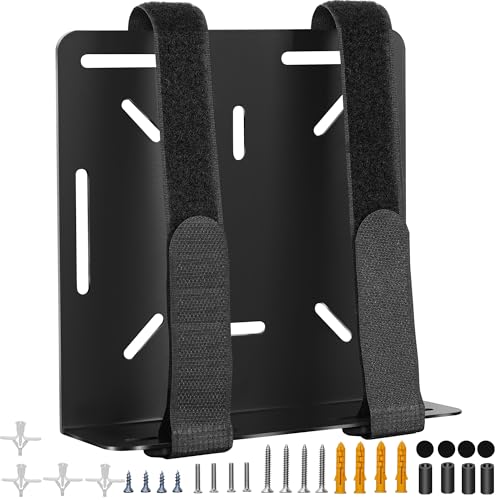
This mount holds a device with straps instead of a rigid clamp, supporting up to a 17 inch perimeter. The listing names Dell OptiPlex Micro, Lenovo ThinkCentre and HP Desktop Mini as compatible, and it can mount on a wall or behind a monitor.

It ranks last because straps trade rigidity for fit. A strap suits devices whose dimensions fall outside a standard bracket, such as routers or UPS units, and for those the flexibility is worth it. For a standard mini PC, a rigid bracket holds the machine more firmly and presents a cleaner look.

Buy it if your device is an odd size. Skip it if a rigid bracket fits your PC.

Fit method
Straps, not rigid bracket
Perimeter
Up to 17 in
Named support
Dell OptiPlex Micro, Lenovo ThinkCentre, HP Desktop Mini
Mounting
Wall or behind monitor

What we like

  • +Fits odd device shapes
  • +Named compatibility list
  • +Works for routers and UPS units
  • +Lowest price bracket

Watch out for

  • −Straps are less rigid
  • −Less tidy look

Buy it if: Unusually shaped devices outside standard ranges.

Skip it if: A rigid bracket fits your PC.

Methodology

How We Ranked These

Adjustable range

We compared stated width and depth ranges, from 0.6 to 2.8 inches, against typical mini PC thicknesses.

Load rating

Published weight ratings of 11 lb and 12 lb were weighed against the heaviest mini PCs and UPS devices.

Mounting flexibility

VESA patterns, wall, desk and behind-monitor options decided how many places one bracket can serve.

Airflow and protection

Open frames, scratch pads and cable management were scored for keeping the PC cool and unmarked.

Warranty and value

Warranty length and the under $25 and $25 to $50 brackets were used to judge value.

Every Primea Score uses the same weights: Performance 30% · Build & Materials 20% · Everyday Usability 20% · Value 20% · Owner Satisfaction 10%. Full scoring rules

Buyer's guide

How to Pick the Right One for You

By Device Thickness

Thickness is the first filter, and it is the one most buyers skip.

Device thicknessOur pick
Up to 2.55 inchesHumanCentric Thin Client Mount Bracket Mini PC VESA Monitor Arm, Under Desk
Up to 2.7 inchessuptek Thin Client Mount Bracket Adjustable Mini PC Mount Bracket
Up to 2.8 inchesAdjustable Thin Client Mini PC Mount Bracket for NUC, Dell, HP, Mac mini
Odd shapes and perimetersUniversal Wall and VESA Mount for Micro PC, UPS Units, WiFi Router and More

By Budget

SpendOur pick
Under $25 (best specs)Adjustable Thin Client Mini PC Mount Bracket for NUC, Dell, HP, Mac mini
Under $25 (warranty)VIVO Adjustable Thin Client Mini PC Mount Bracket
Under $25 (airflow)suptek Thin Client Mount Bracket Adjustable Mini PC Mount Bracket
$25 to $50HumanCentric Thin Client Mount Bracket Mini PC VESA Monitor Arm, Under Desk

Rigid Bracket vs Strap Mount

Rigid bracket

Clamps the sides for a firm, tidy hold, but only within its stated range. Picks: the adjustable thin client bracket, HumanCentric, VIVO, suptek and Monzlteck.

Strap mount

Wraps devices of unusual size, at the cost of a looser feel. Pick: the Universal Wall and VESA Mount.

Default to a rigid bracket whenever your device fits.

By Mounting Location

LocationOur pick
Behind a monitorHumanCentric Thin Client Mount Bracket Mini PC VESA Monitor Arm, Under Desk
Under a deskAdjustable Thin Client Mini PC Mount Bracket for NUC, Dell, HP, Mac mini
On a wallMonzlteck Adjustable Small Device Wall Mount or VESA Mount
Tight, warm spotsuptek Thin Client Mount Bracket Adjustable Mini PC Mount Bracket

For a Mac mini or NUC Specifically

Look for

A range that covers the PC's thickness, scratch protection for aluminium cases, and clearance for the vents and ports.

In this ranking

The adjustable thin client bracket names Mac mini and NUC directly, the VIVO documents brand support, and the Monzlteck adds scratch pads.

When to Spend More

Spend more if

You want a polished, reputable mount and flexible placement. The HumanCentric costs more and adds assurance.

Save if

Your PC is standard size and the desk is private. The top-ranked bracket costs less than $25.

Questions

Frequently Asked Questions

Will a universal mount fit any mini PC?+

Only within its stated width range and weight rating. Measure your PC's thickness, compare it to the range, and check ventilation and port access.

What is the common mistake with these mounts?+

Mounting the PC with vents blocked. Make sure the intake and exhaust have clearance, especially if the PC runs a small fan.

Is the VIVO worth it over the top pick?+

If you value the 3-year warranty and documented compatibility, yes. The top pick has a higher weight rating and more mounting methods for a similar price.

How hard is installation?+

Easy. Fix the bracket to the monitor, desk or wall with the screws provided, then slide the PC into the adjustable arms and tighten. Plan about ten minutes.

Can I mount it behind a monitor?+

Yes, if the monitor has a VESA pattern of 75x75 or 100x100 mm and the PC clears any stand. Check that the monitor's own arm can carry the extra weight.

Do I need to use the straps?+

Only if the PC does not fit a rigid bracket. Straps suit routers, UPS units and odd shapes, but rigid brackets hold a standard mini PC more firmly.

Final take

For most mini PCs, the adjustable thin client bracket for NUC, Dell, HP and Mac mini is the best universal mount here: widest range, highest rating and four mounting methods for under $25. The HumanCentric is the polished alternative, and the VIVO wins on warranty. Use the strap-based mount only when a rigid bracket will not fit, and always check your PC's thickness before you click buy.

More Ranked & Reviewed Guides