
Primea ReviewsAll Reviews

Primea Reviews is reader-supported. When you buy through our Amazon links we may earn a commission, at no extra cost to you. Rankings are set by our editors and never sold. Learn more

Ranked & Reviewed by Primea Reviews

The 6 Best Mini PC Monitor Mounts of 2026, Ranked & Reviewed

By the Primea Editorial TeamUpdated November 1, 20269 min read6 products ranked
The 6 Best Mini PC Monitor Mounts of 2026, Ranked & Reviewed

The short answer

The Adjustable Thin Client bracket attached to a monitor arm is the best mini PC monitor mount, carrying 12 lb across a wide 0.63 to 2.8 inch fit range for under $25. HumanCentric is the choice for heavier monitors, VIVO leads on warranty, and a Dell-specific VIVO model suits OptiPlex Micro owners.

The Primea Scoreboard

Ranked & Reviewed

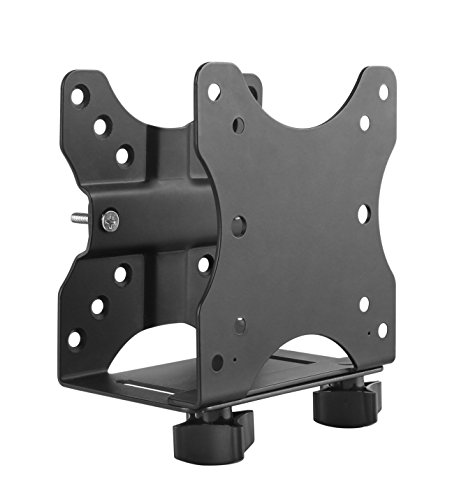
  1. A metal bracket that fits 0.63 to 2.8 inch devices and carries 12 lb.

    93Outstanding
    Check price
  2. The only bracket here with a stated combined rating alongside the monitor.

    90Excellent
    Check price
  3. Powder-coated steel with a 3-year warranty.

    87Excellent
    Check price
  4. A ventilated mount that conceals a Dell OptiPlex Micro behind the screen.

    84Very Good
    Check price
  5. An open-frame metal mount that also attaches to a stand pole.

    81Very Good
    Check price
  6. A simple steel mount with a 2-screw install.

    78Very Good
    Check price

Hanging a mini PC off the back of a monitor clears desk space, but it changes the load your arm carries. The VESA pattern on a display is rated for the display, and a thin arm may sit close to its limit before a computer is added. That is the number most shoppers forget to check.

Six mounts were ranked using the listed VESA patterns, device width range, weight capacity and ventilation. We weighed how safely and how widely each one fits, using the listings alone. Always add your monitor and PC weights together and compare them with the arm's own rating.

Before you buy

What Actually Matters

01

Combined load

The combined load is the monitor plus the PC, and your arm and VESA plate have limits. Exceeding them risks sagging. Add both weights and compare with the arm's rating. The HumanCentric lists 18 lb combined, so use its figure with the monitor in mind.

02

VESA pattern

VESA is the hole pattern on the monitor's back, and 75x75 and 100x100mm are the common sizes. Your monitor must match the mount. Look at the back of the display or its manual, and check that the listing names the same pattern, as HumanCentric and VIVO do.

03

Device width

The bracket must fit your PC's thickness or depth. Listings give a range, such as 0.63 to 2.8 inches or 1.8 to 7.1 cm. Measure your case before ordering, because a PC outside the range will not seat, and the wider range of the first pick helps.

04

Airflow

A PC behind a screen can run warm, and a closed bracket traps heat. Open frames, like the 12 lb stand-pole mount, let air move around the case. Look for open-frame in the title and leave room around the vents once it is mounted.

05

Install

Simple installs save time and reduce mistakes. Check what hardware comes in the box, since some kits add wall and under-desk screws and others do not. The Monzlteck advertises a 2-screw install, while HumanCentric adds scratch strips. Read the bullets before ordering.

In-depth reviews

Our Ranked Picks, Reviewed

1

Best Overall

Adjustable Thin Client Mini PC Mount Bracket, Attached to Monitor Arm

Our verdict: A metal bracket that fits 0.63 to 2.8 inch devices and carries 12 lb.

This metal bracket accepts devices 0.63 to 2.8 inches wide and carries 12 lb. It mounts to a monitor arm, a wall or under a desk, and comes with cable management and a pen holder. It costs under $25.

The combination of width range, capacity and price carries it to first place. Against HumanCentric, it holds more on its own, at 12 lb to 11 lb, although it publishes no combined rating with the monitor, so you must do that math yourself. Metal construction adds a little weight.

Buy it for a typical mini PC on a monitor arm. The caveat is load: check how much weight your arm has left after the display, because the listing gives you no combined figure to lean on.

Width range
0.63 to 2.8 inch
Capacity
12 lb
Mounting
Monitor arm, wall, under-desk
Price bracket
Under $25

What we like

  • +12 lb capacity
  • +Wide fit range
  • +Cable management included
  • +Under $25

Watch out for

  • −No combined rating
  • −Metal adds weight

Buy it if: Most mini PCs on monitor arms.

Skip it if: Your arm is near its limit.

2

Best for Heavy Monitors

HumanCentric Thin Client Mount Bracket, Mini PC to Monitor Arm

Our verdict: The only bracket here with a stated combined rating alongside the monitor.

HumanCentric's bracket fits VESA 75x75 and 100x100mm, accepts devices 0.65 to 2.55 inches deep, and lists an 11 lb device rating with 18 lb combined alongside the monitor. Silicone scratch strips and wall and under-desk hardware are included. It sits in the $25 to $50 bucket.

A stated combined rating is rare, and it is the reason this model ranks second. It reassures anyone with a heavier monitor who worries about total load. The tradeoffs are a narrower depth range than the leader and a higher price bucket.

Choose it for heavier displays near their arm limit. Skip it if your PC is thicker than 2.55 inches, since the cheaper first-place bracket accepts more. Check your arm's own rating even then, because the combined figure applies to the bracket.

Device rating
11 lb, 18 lb combined
Depth
0.65 to 2.55 inch
VESA
75x75 and 100x100mm
Price bracket
$25-50

What we like

  • +Combined 18 lb rating
  • +Scratch strips included
  • +VESA 75 and 100
  • +Extra hardware

Watch out for

  • −Costs $25-50
  • −Narrower range

Buy it if: Heavier monitors near their limit.

Skip it if: You need wider device fit.

3

Best Warranty

VIVO Adjustable Thin Client Mini PC Mount, Attached to Monitor

Our verdict: Powder-coated steel with a 3-year warranty.

VIVO's thin client mount is powder-coated solid steel with VESA 75x75 and 100x100mm support, a 1.8 to 7.1 cm width range and a 5 kg (about 11 lb) rating. It carries a 3-year warranty and falls in the under $25 bucket.

It takes third place because the 12 lb pick holds slightly more and fits a wider range. Against HumanCentric, it undercuts on price and adds a longer warranty, though it gives you no combined rating or scratch strips. It also lacks cable extras.

Buy it if backing matters and your PC fits within 7.1 cm. Skip it if you need the full 12 lb capacity. The warranty is the strongest reason to pick it, especially for a device you plan to leave mounted for years.

Capacity
5 kg (about 11 lb)
Width
1.8 to 7.1 cm
VESA
75x75, 100x100mm
Warranty
3 years

What we like

  • +3-year warranty
  • +Powder-coated steel
  • +VESA compatible
  • +Under $25

Watch out for

  • −Slightly lower capacity
  • −No cable extras

Buy it if: Buyers wanting warranty backing.

Skip it if: You need 12 lb capacity.

4

Best for Dell Micro

VIVO Behind Monitor Mini PC Mount for Dell OptiPlex Micro

Our verdict: A ventilated mount that conceals a Dell OptiPlex Micro behind the screen.

This VIVO model is built for the Dell OptiPlex Micro. It fits VESA 75x75 and 100x100mm, attaches behind the screen out of sight, and uses a ventilated open structure. Desk and wall hardware are included, and it costs under $25.

For that one device family, a dedicated mount holds the machine more rigidly than a universal clamp and keeps it hidden. It ranks fourth because it fits nothing else, and the listing states no weight rating. Compared with the universal brackets above, flexibility is the cost.

Buy it if you own an OptiPlex Micro and want a clean behind-monitor look. Skip it for any other brand. The ventilated frame helps with heat, but leave breathing room around the vents all the same.

Device
Dell OptiPlex Micro
VESA
75x75, 100x100mm
Design
Ventilated open mount
Price bracket
Under $25

What we like

  • +Dell-specific fit
  • +Concealed mounting
  • +Ventilated structure
  • +Under $25

Watch out for

  • −Dell Micro only
  • −No rating listed

Buy it if: OptiPlex Micro owners.

Skip it if: You own another brand.

5

Best Open Frame

Adjustable Thin Client Mini PC Mount, Attach to Monitor Arm and Stand

Our verdict: An open-frame metal mount that also attaches to a stand pole.

This open-frame metal mount fits 0.63 to 2.8 inch widths and holds 12 lb. It attaches to a monitor arm, stand pole, wall or underside of a desk, and includes cable management and a pen holder. It costs under $25.

The specs nearly mirror the first-place bracket, which is why it ranks fifth. Its distinguishing points are the open frame, which lets air move around the case, and the option to clamp onto a stand pole instead of an arm. Like the leader, it lists no combined rating with the monitor.

Choose it if your monitor sits on a stand with a pole, or your PC runs warm. If the first pick already fits your setup, there is little reason to switch. Work out total load before you install anything.

Width
0.63 to 2.8 inch
Capacity
12 lb
Design
Open frame
Mounting
Arm, pole, wall, under-desk

What we like

  • +Stand pole option
  • +Open-frame airflow
  • +12 lb capacity
  • +Under $25

Watch out for

  • −Near-identical to top pick
  • −No combined rating

Buy it if: Monitor stand users.

Skip it if: The top pick suits you.

6

Best Simple

Monzlteck Adjustable Small Device VESA Mount Behind the Monitor

Our verdict: A simple steel mount with a 2-screw install.

The Monzlteck is a steel mount for devices under 2.8 inches thick, with behind-monitor, wall and under-desk options. It adds anti-scratch EVA pads, uses a 2-screw install and costs under $25.

Quick installation is the appeal, and the steel build suits a small PC. It ranks last because the listing states no weight rating, so you cannot judge how much it will carry the way you can with the 12 lb brackets. The feature set is also plain compared with the others.

Pick it for a light mini PC when you want the fastest setup. Skip it if you need a published capacity or a heavier machine. Treat it as a lightweight option and keep the PC's weight modest.

Thickness
Under 2.8 inch
Material
Steel
Pads
Anti-scratch EVA
Install
2 screws

What we like

  • +Quick 2-screw install
  • +Steel build
  • +EVA pads
  • +Under $25

Watch out for

  • −No weight rating
  • −Plain feature set

Buy it if: Light mini PCs.

Skip it if: You need a stated capacity.

Methodology

How We Ranked These

Capacity

We compared listed weight ratings.

VESA fit

We checked 75x75 and 100x100mm support.

Device range

We compared width or depth ranges.

Airflow

We looked at open-frame designs.

Extras

We noted cable management and warranty.

Every Primea Score uses the same weights: Performance 30% · Build & Materials 20% · Everyday Usability 20% · Value 20% · Owner Satisfaction 10%. Full scoring rules

Buyer's guide

How to Pick the Right One for You

By Monitor Weight

Load limits first.

SituationOur pick
Monitor near its limitHumanCentric Thin Client Mount Bracket, Mini PC to Monitor Arm
Typical armAdjustable Thin Client Mini PC Mount Bracket, Attached to Monitor Arm
Stand poleAdjustable Thin Client Mini PC Mount, Attach to Monitor Arm and Stand
Light PCMonzlteck Adjustable Small Device VESA Mount Behind the Monitor

By Budget

SpendOur pick
Under $25 bestAdjustable Thin Client Mini PC Mount Bracket, Attached to Monitor Arm
Under $25 warrantyVIVO Adjustable Thin Client Mini PC Mount, Attached to Monitor
Under $25 DellVIVO Behind Monitor Mini PC Mount for Dell OptiPlex Micro
$25-50HumanCentric Thin Client Mount Bracket, Mini PC to Monitor Arm

Universal vs Device-Specific

Universal

Adjusts to many PCs. The 12 lb brackets, HumanCentric, VIVO adjustable and Monzlteck are universal.

Device-specific

A rigid fit for one family. The VIVO Dell OptiPlex mount is the example.

Most buyers should default to a universal bracket.

By Mount Location

LocationOur pick
Monitor armAdjustable Thin Client Mini PC Mount Bracket, Attached to Monitor Arm
Stand poleAdjustable Thin Client Mini PC Mount, Attach to Monitor Arm and Stand
Behind screen, DellVIVO Behind Monitor Mini PC Mount for Dell OptiPlex Micro
Behind screen, anyMonzlteck Adjustable Small Device VESA Mount Behind the Monitor

For Dell OptiPlex Micro Users Specifically

Look for

VESA 75x75 or 100x100mm and a ventilated design.

In this ranking

The VIVO Dell OptiPlex mount is built for it.

When to Spend More

Spend more if

Your monitor is near its limit, which HumanCentric's 18 lb combined rating addresses.

Save if

Your PC is light, where the under $25 12 lb bracket is enough.

Questions

Frequently Asked Questions

Will it block monitor ports?+

It can, depending on the port layout. Check the clearance around your monitor's ports, and use a mount that leaves them accessible, before you attach the bracket.

Does heat matter?+

Yes. A PC behind the screen can run warm, so favor an open frame like the stand-pole mount or the ventilated VIVO Dell model, and leave space around the vents.

Will my arm hold it?+

Add the PC and monitor weights and compare with the arm. The HumanCentric lists an 18 lb combined rating, while the Adjustable Thin Client mount lists 12 lb for the device alone.

Do I need tools?+

Only a screwdriver in most cases. The Monzlteck advertises a 2-screw install, and the other kits include their own hardware, so check the box contents on the listing.

Is HumanCentric worth it?+

If your arm is near its limit, yes, because it lists 18 lb combined with the monitor. If not, the cheaper Adjustable Thin Client bracket carries 12 lb for less.

Do Intel NUCs fit?+

Check the width range. A NUC-style box has to fall within the bracket's range, such as 0.63 to 2.8 inches on the top pick. Measure it first, since the Dell-specific VIVO will not fit other brands.

Final take

Start with the combined weight of your monitor and PC, then pick the mount. The Adjustable Thin Client bracket suits most setups, HumanCentric makes sense when the arm is close to its limit, and VIVO gives you a 3-year warranty. Leave space around the vents, because a PC behind a screen can run warm.

More Ranked & Reviewed Guides